1. Introduction
This manual provides essential information for the safe and efficient use of your Flash Furniture X40 Gaming Chair. Please read these instructions carefully before assembly and operation. Keep this manual for future reference.
The Flash Furniture X40 Gaming Chair is designed for comfort during extended periods of use, featuring a reclining back, adjustable seat height, a slide-out footrest, and a massaging lumbar pillow.
2. Safety Information
- Ensure all components are securely fastened before use.
- Do not stand on the chair.
- Do not exceed the maximum weight recommendation of 280 pounds.
- Keep hands and fingers clear of moving parts during adjustment.
- Use caution when reclining to prevent tipping.
- For cleaning, use a solvent-based cleaner as directed in the maintenance section. Avoid contact with skin and eyes.
3. Package Contents
Verify that all parts are present before beginning assembly. Refer to the included assembly diagram for a complete list of components.

Image 1: Flash Furniture X40 Gaming Chair. This image displays the fully assembled gaming chair, highlighting its red and black design and ergonomic shape.
4. Assembly Instructions
Assembly is required. Please follow the detailed instructions provided in the separate assembly guide included with your product. Ensure all screws and bolts are tightened securely. If you encounter any issues, refer to the troubleshooting section or contact customer support.

Image 2: Key Features Diagram. This diagram illustrates the full back recline (95°-175°), removable lumbar pillow, pneumatic seat height and tilt lever, and slide-out footrest.
5. Operating Instructions
5.1 Seat Height Adjustment
To adjust the seat height, locate the pneumatic lever under the seat. While seated, pull the lever up to lower the seat. To raise the seat, stand up slightly and pull the lever up. Release the lever at the desired height.
5.2 Backrest Recline
The backrest can recline from 95° to 175°. To recline, pull the lever on the side of the chair (typically the right side) and lean back to your desired angle. Release the lever to lock the backrest in position. The armrests are designed to move with the reclining back for continuous support.
5.3 Footrest Operation
To extend the footrest, pull the loop located under the front of the seat. The footrest will slide out. Flip it up to elevate your feet. To retract, push the footrest back under the seat until it locks into place.
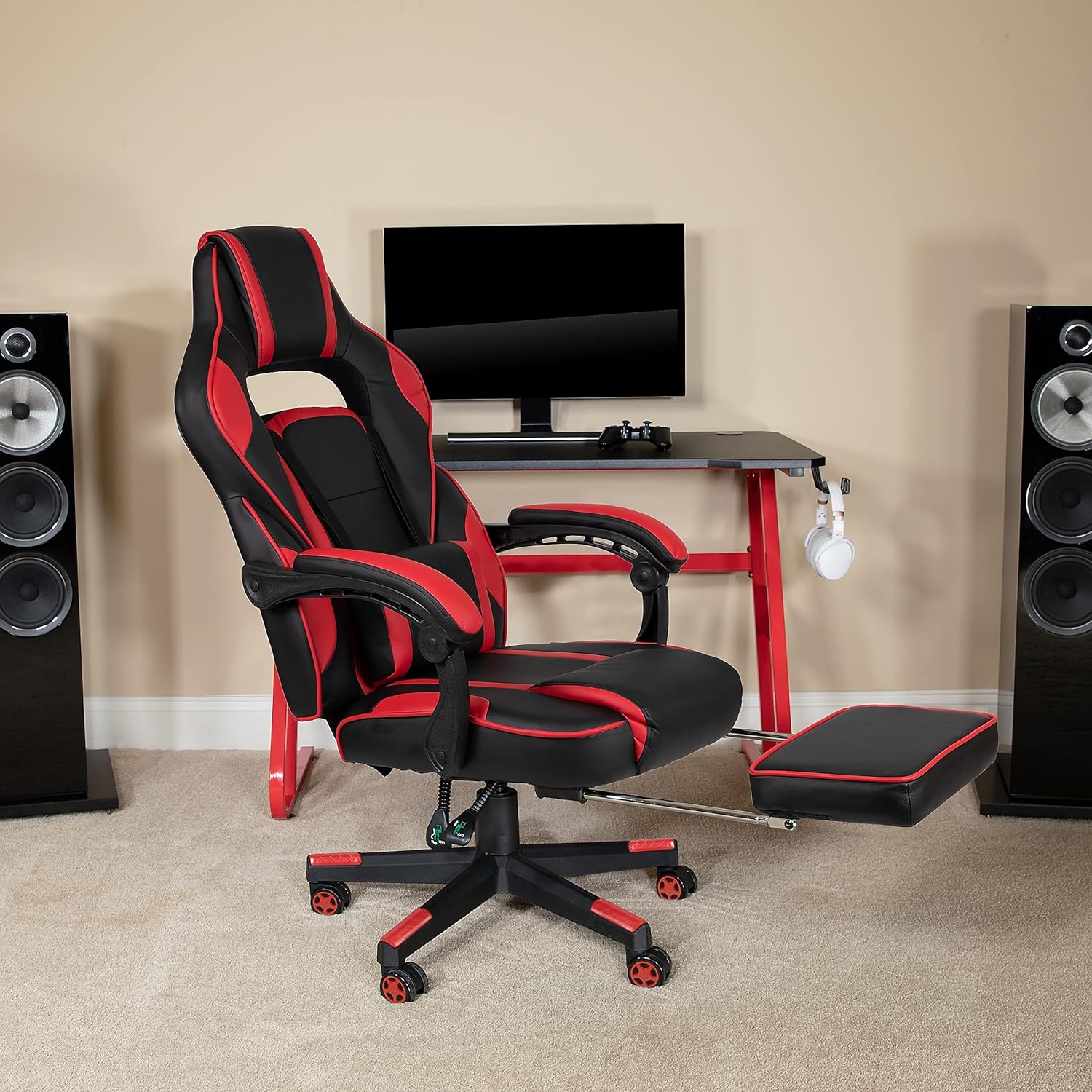
Image 3: Chair with Extended Footrest. This image shows the gaming chair with its footrest fully extended, positioned in front of a computer desk, demonstrating its use for relaxation.
5.4 Massaging Lumbar Pillow
The lumbar pillow provides support and features a vibrating massage function. Connect the attached 3-foot USB cord to a compatible USB power source (e.g., computer, USB wall adapter) to activate the massage. The lumbar pillow is removable and can be adjusted for optimal comfort.

Image 4: Massaging Lumbar Pillow. A close-up view of the lumbar pillow, showing its design and the integrated USB cable for the massage function.
5.5 Swivel Function
The chair features a full 360-degree swivel for ease of movement and access to your workspace.
5.6 Official Product Video
Video 1: Flash Furniture X40 Gaming Chair Features. This video demonstrates the various features and adjustments of the Flash Furniture X40 Gaming Chair, including the recline, footrest, and overall design.
6. Maintenance and Care
To maintain the appearance and longevity of your chair, follow these care instructions:
- Cleaning: For spills and general cleaning, use a solvent and water-based cleaner, such as foam. Apply the cleaner to a soft cloth and gently wipe the affected area. Do not apply cleaner directly to the chair.
- Regular Inspection: Periodically check all bolts and screws to ensure they remain tight. Re-tighten as necessary to prevent loosening and ensure stability.
- Avoid Harsh Chemicals: Do not use abrasive cleaners, strong solvents, or harsh chemicals, as these can damage the upholstery.
- Sunlight Exposure: Avoid prolonged exposure to direct sunlight to prevent fading and material degradation.
7. Troubleshooting
If you experience any issues with your Flash Furniture X40 Gaming Chair, consider the following:
- Instability or Wobbling: Check all assembly bolts and screws. Ensure they are fully tightened. Uneven flooring can also cause wobbling; try moving the chair to a level surface.
- Difficulty Adjusting Height: Ensure the pneumatic lever is fully engaged. If the chair does not raise or lower smoothly, the gas lift cylinder may require replacement.
- Footrest Not Extending/Retracting: Check for any obstructions under the seat or along the footrest mechanism. Ensure the pull loop is functioning correctly.
- Massaging Lumbar Pillow Not Working: Verify the USB cable is securely connected to both the pillow and a powered USB port. Check if the power source is active.
For persistent issues not resolved by these steps, please contact Flash Furniture customer support.
8. Specifications
| Feature | Detail |
|---|---|
| Brand | Flash Furniture |
| Model Name | Flash Furniture X40 |
| Product Dimensions | 29.25"D x 28"W x 51.25"H |
| Seat Dimensions | 21.25"W x 21"D x 18.5-22.5"H |
| Back Dimensions | 22"W x 31"H |
| Arm Height (from floor) | 27.25-30.25"H |
| Arm Height (from seat) | 6-9.25"H |
| Lumbar Pillow Dimensions | 12"W x 3"D x 8"H |
| Color | Red (with Black accents) |
| Material | Faux Leather (80% Polyurethane/40% PVC/30% Twill), Foam Fill |
| Maximum Weight Recommendation | 280 Pounds |
| Back Style | Reclining (95° - 175°) |
| Special Features | Adjustable, Massaging Lumbar Pillow, Slide-Out Footrest, 360° Swivel |
| Item Weight | 44 pounds |
| UPC | 889142923770 |

Image 5: Chair Dimensions. This image provides a visual representation of the chair's overall height, width, and depth, including the range for the extended footrest.
9. Warranty and Support
For warranty information or customer support, please refer to the documentation included with your purchase or visit the official Flash Furniture website. You can also contact their customer service department for assistance with product inquiries, parts, or troubleshooting.
Flash Furniture is committed to providing quality products and support.


