
Product Overview
The 1010music Bluebox is a compact digital mixer and recorder designed to be the centerpiece of your electronic music setup. It seamlessly integrates your synthesizers, drum machines, and Eurorack modules into a cohesive ecosystem, enabling direct recording and performance without the need for a computer.
Key features include:
- Six stereo line inputs for connecting various audio sources.
- Three stereo line outputs for flexible routing to monitors, effects, or other devices.
- Built-in effects such as reverb and delay to enhance your sound.
- 4-band EQ and global compression for precise audio shaping.
- MIDI I/O to keep all your gear synchronized.
- Ability to record up to 12 mono tracks or six stereo tracks directly to a microSD card.

Figure 1: Front view of the Bluebox, highlighting its intuitive touchscreen and physical controls.
Setup
1. Power Connection
Connect the provided power adapter to the "POWER" port on the rear of the Bluebox. Ensure the power source is stable and provides the correct voltage as specified in the product's technical specifications. It is recommended to use the dedicated power adapter to avoid potential noise issues.
2. Audio Input Connections
The Bluebox features six stereo line inputs (3.5mm / 1/8" jacks). Connect your synthesizers, drum machines, and other audio sources to these inputs. Use appropriate adapter cables if your gear uses 1/4" or XLR outputs. The inputs are labeled 1 through 6.
3. Audio Output Connections
Connect your monitoring system (speakers, headphones) to the "OUT" ports (1 and 2) or the "PHONES" output. The Bluebox provides three stereo line outputs. Adjust output levels as needed.
4. MIDI Connections
For synchronization with other MIDI devices, connect your MIDI controller or other MIDI gear to the "MIDI IN" and "MIDI OUT" ports using 3.5mm TRS MIDI cables (Type A). This allows the Bluebox to send and receive clock and control messages.
5. MicroSD Card Insertion
Insert a formatted microSD card into the "MICRO SD" slot on the side of the unit. This card is essential for recording and storing your projects and audio files. Ensure the card is properly seated.

Figure 2: Rear panel connections, including power, USB, and audio inputs/outputs.
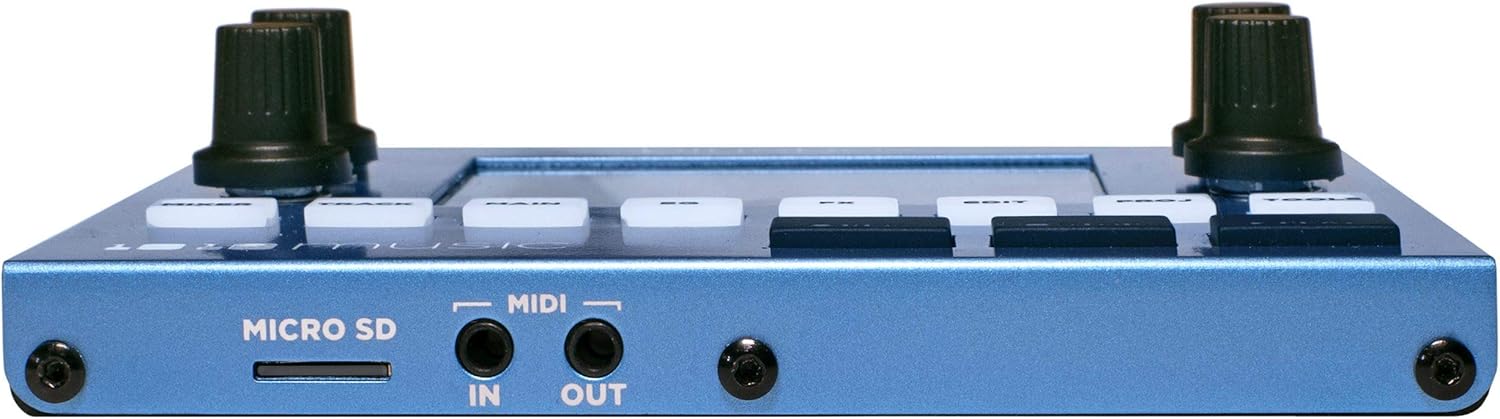
Figure 3: Side panel connections for microSD and MIDI.
Operating Instructions
1. Navigating the Interface
The Bluebox features a responsive touchscreen and several physical buttons and knobs for navigation and control. Use the touchscreen to select tracks, adjust parameters, and access menus. The knobs provide fine-tuned control over selected parameters.
- MIXER: Access the main mixer view to adjust input levels, panning, and routing.
- TRACK: View and manage individual track settings, including recording status and playback options.
- MAIN: Control master output levels and global settings.
- EQ: Access the 4-band equalizer for each track and master output.
- FX: Configure and apply built-in reverb and delay effects.
- EDIT: Access advanced editing features for tracks and projects.
- PROJ: Manage projects, including saving, loading, and creating new ones.
- TOOLS: Access system settings, firmware updates, and utility functions.
2. Recording Audio
To record, ensure a formatted microSD card is inserted. Select the desired input track(s) on the mixer screen. Press the REC button to arm recording. Press PLAY to start recording. Press STOP to end recording. Recorded files are saved to the microSD card.
3. Applying Effects
Navigate to the FX section to enable and adjust the built-in reverb and delay. You can apply these effects globally or to individual tracks, depending on your routing configuration.
4. MIDI Synchronization
The Bluebox can act as a MIDI master or slave. Configure MIDI clock settings in the TOOLS menu to synchronize with external sequencers or drum machines, ensuring all your devices play in time.
Maintenance
To ensure the longevity and optimal performance of your 1010music Bluebox, follow these maintenance guidelines:
- Cleaning: Use a soft, dry, lint-free cloth to clean the exterior of the unit, including the touchscreen. Avoid abrasive cleaners, solvents, or sprays directly on the device.
- Storage: When not in use, store the Bluebox in a cool, dry place away from direct sunlight, extreme temperatures, and high humidity.
- Handling: Handle the unit with care. Avoid dropping it or subjecting it to strong impacts.
- Firmware Updates: Regularly check the 1010music website for firmware updates. Updates can provide new features, performance improvements, and bug fixes. Follow the instructions provided by the manufacturer for safe updating.
Troubleshooting
This section addresses common issues you might encounter with your Bluebox.
No Audio Output
- Check all audio cable connections to ensure they are securely plugged into the correct input and output jacks.
- Verify that the volume levels on the Bluebox (individual tracks and master output) are not muted or set too low.
- Ensure your monitoring system (speakers, headphones) is powered on and functioning correctly.
Unwanted Noise or Hum
- Ensure the Bluebox is powered by its dedicated power adapter and not sharing a USB hub with other devices, especially if those devices are also USB-powered. Ground loops can introduce noise.
- Check audio cables for damage or poor shielding.
- Ensure all connections are tight.
Recording Issues
- Verify that a compatible microSD card is inserted and properly formatted (FAT32 recommended).
- Check available space on the microSD card.
- Ensure the desired tracks are armed for recording before pressing PLAY.
- If files are not saving to the correct project folder, manually organize them via the Bluebox's file management or by transferring the SD card to a computer.
MIDI Synchronization Problems
- Confirm that MIDI cables are correctly connected (IN to OUT, OUT to IN).
- Check MIDI clock settings on both the Bluebox and your external devices to ensure they are configured as master/slave appropriately.
Specifications
| Feature | Detail |
|---|---|
| Brand | 1010music |
| Model Number | 202 |
| Item Weight | 1.96 pounds |
| Product Dimensions | 10.45 x 6.75 x 3.05 inches |
| Power Source | Corded Electric |
| Number of Channels | 24 (internal processing, 6 stereo inputs) |
| Audio Input Type | 3.5mm (1/8") Stereo Line Inputs (6) |
| Audio Output Type | 3.5mm (1/8") Stereo Line Outputs (3) |
| Recording Capability | Up to 12 mono or 6 stereo tracks to microSD |
| MIDI I/O | 3.5mm TRS MIDI (Type A) |
| Built-in Effects | Reverb, Delay, 4-band EQ, Global Compression |
Warranty and Support
For detailed warranty information, product registration, and technical support, please visit the official 1010music website. You can find comprehensive FAQs, user forums, and contact information for customer service there.
Official Website: www.1010music.com
Keep your purchase receipt and product serial number handy when contacting support.


