
1. Introduction
The Medisana F4 Non-Contact Infrared Thermometer is designed for fast, accurate, and hygienic temperature measurement. It allows for remote temperature readings without physical contact, making it suitable for all ages, including infants. This manual provides detailed instructions for safe and effective use of your device.
Key features include a large LCD display with backlight, a high-temperature alarm, and a memory function to store previous readings.
2. Safety Information
- Read all instructions carefully before using the thermometer.
- Do not immerse the thermometer in water or other liquids.
- Keep the device away from direct sunlight, dust, and extreme temperatures.
- Do not drop or subject the thermometer to strong impacts.
- This device is intended for household use. Consult a medical professional for any health concerns.
- Keep batteries out of reach of children.
3. Product Components
Familiarize yourself with the parts of your Medisana F4 thermometer:
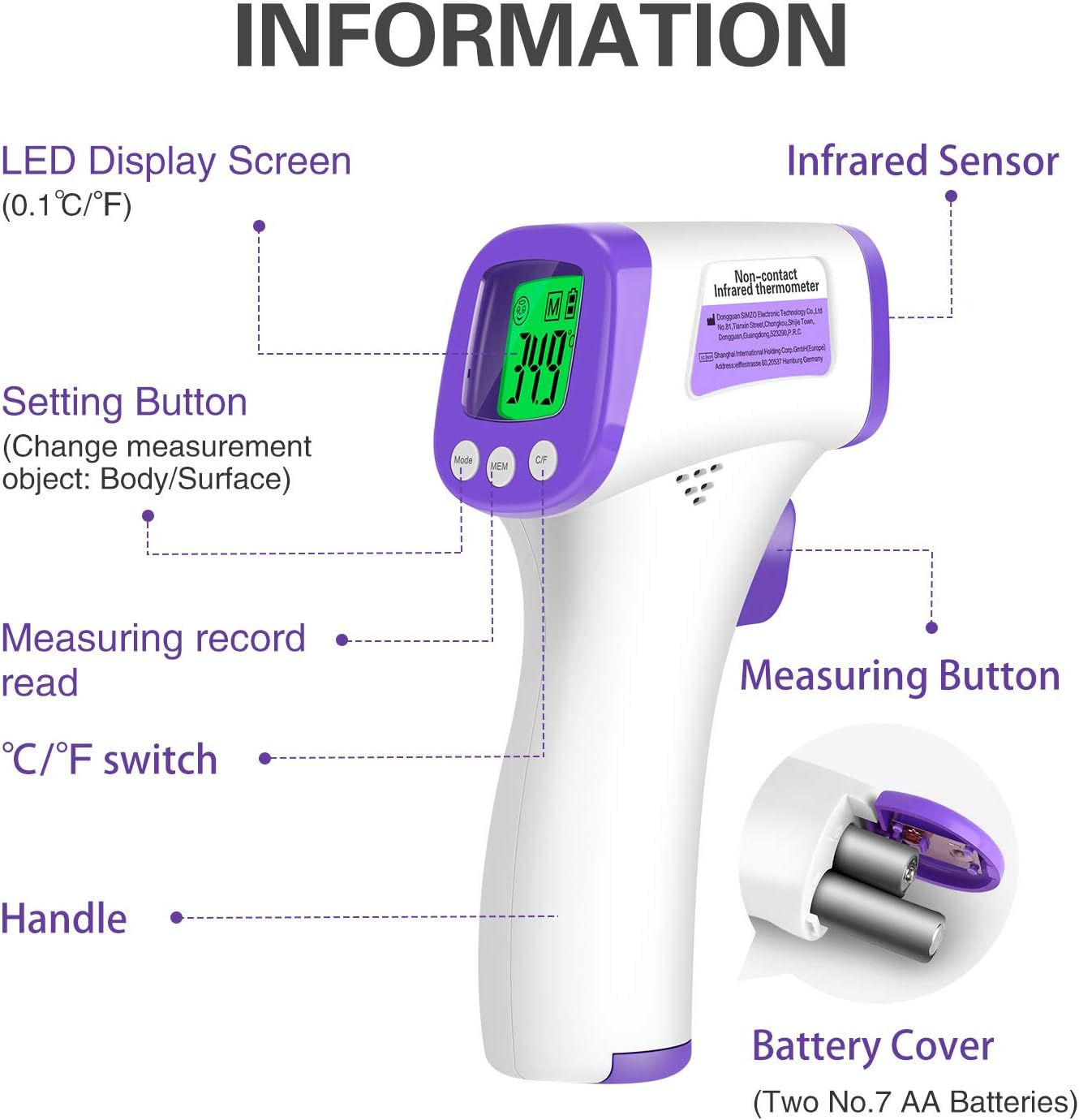
This image displays the Medisana F4 thermometer with labels pointing to its key components: LED Display Screen, Infrared Sensor, Setting Button (Mode), Measuring Record Read (MEM), Celsius/Fahrenheit Switch (C/F), Handle, Measuring Button, and Battery Cover.
- Infrared Sensor: Detects infrared energy emitted by the body or object.
- LED Display Screen: Shows temperature readings, mode, and other indicators.
- Measuring Button: Press to take a temperature reading.
- Mode Button: Used to switch between body and surface measurement modes.
- MEM Button: Accesses stored memory readings.
- C/F Button: Switches between Celsius and Fahrenheit temperature units.
- Battery Cover: Located at the bottom of the handle, for battery installation.
4. Setup
4.1 Battery Installation
- Open the battery cover located at the bottom of the handle.
- Insert two AAA batteries, ensuring correct polarity (+ and -).
- Close the battery cover securely.
The thermometer requires 2 AAA batteries, which are included with the product.
5. Operating Instructions
5.1 Power On/Off
- To power on, press the Measuring Button. The device will perform a self-test and display the last reading.
- The thermometer automatically turns off after 30 seconds of inactivity to conserve power.
5.2 Measurement Mode Selection
Press the 'Mode' button to switch between Body Temperature mode and Surface Temperature mode. The display will indicate the selected mode.
5.3 Taking a Measurement
- Ensure the thermometer is in the desired measurement mode (Body or Surface).
- For body temperature, hold the thermometer 1-5 cm away from the center of the forehead.
- Press the Measuring Button once. The measurement will be displayed in less than 1 second.

This image highlights the 1-second temperature test feature of the Medisana F4 thermometer, along with icons representing Quick Measurement, LED Display, Memory Function, Non-contact Measurement, High-quality Infrared Sensor, and Fever Alarm.
5.4 Switching Temperature Units (°C/°F)
To switch between Celsius (°C) and Fahrenheit (°F), press and hold the 'Set' button for 3 seconds, then press the 'MEM' or 'Mode' button to toggle the unit.
5.5 Memory Function
The thermometer can store up to 50 previous measurements, allowing you to track temperature changes over time.
- Press the 'MEM' button to view the stored readings.
- Each press of the 'MEM' button will cycle through the stored measurements.

This image illustrates the Data Memory Function, showing the memory function icon on the display, the stored memory data, and indicating the 'MEM' button used to track the last 10 readings.
5.6 High Temperature Warning (Fever Alarm)
The device features a high-temperature alarm with visual (backlight color) and audible prompts to quickly indicate abnormal body temperatures. The large LCD screen has 3 different backlight indicators:

This image shows the thermometer's display indicating different temperature ranges: Normal Temperature (green backlight), Slight Temperature (yellow backlight), and High Temperature (red backlight) with corresponding temperature values.
- Normal Temperature: Green backlight (e.g., 35.1°C - 37.3°C / 88.7°F - 99.14°F)
- Slight Temperature: Yellow backlight (e.g., 37.4°C - 38°C / 99.32°F - 100.4°F)
- High Temperature: Red backlight with an audible alarm (e.g., 38.1°C - 42.9°C / 100.58°F - 109.2°F)
5.7 Multipurpose Uses
Beyond body temperature, the Medisana F4 can measure the temperature of various objects and environments:

This image illustrates the versatile applications of the Medisana F4 thermometer, including measuring water temperature (baby bath), milk temperature, indoor room temperature, and food temperature (cooked chicken).
- Water Temperature Measurement: Ideal for checking bath water for infants.
- Milk Temperature Measurement: Ensures baby formula or milk is at a safe temperature.
- Indoor Temperature Measurement: For monitoring room temperature.
- Food Temperature Measurement: Useful for checking the temperature of food.
6. Maintenance and Care
- Clean the thermometer body with a soft, dry cloth.
- Use an alcohol swab to gently clean the infrared sensor. Do not scratch the lens.
- Store the thermometer in a cool, dry place, away from direct sunlight and extreme temperatures.
- Remove batteries if the device will not be used for an extended period.
7. Troubleshooting
| Problem | Possible Cause | Solution |
|---|---|---|
| No display/Device won't turn on | Batteries are dead or incorrectly inserted. | Replace batteries or check polarity. |
| Inaccurate readings | Sensor is dirty; measurement distance is incorrect; environmental factors. | Clean sensor; ensure 1-5 cm distance; avoid drafts or direct heat sources. |
| Display shows 'Lo' or 'Hi' | Temperature is outside the measurable range. | Ensure measurement is within the specified range (e.g., 32°C-42.9°C for body). |
If problems persist, contact customer support.
8. Specifications
- Brand: Medisana
- Model Number: F4
- Part Number: F4
- Connectivity Technology: Infrared
- Response Time: 1 second
- Measurement Distance: 1-5 cm (Non-contact)
- Measurement Accuracy: ± 0.1°C (± 0.18°F)
- Temperature Units: Celsius (°C) / Fahrenheit (°F)
- Memory Storage: 50 measurements
- Power Source: 2 x AAA batteries (included)
- Auto-off: After 30 seconds of inactivity
- Outer Material: Plastic
- Age Range Description: Adult (suitable for all ages)
- Included Components: Thermometer
9. Warranty and Support
For warranty information or technical support, please refer to the documentation provided with your purchase or visit the official Medisana website. Keep your proof of purchase for any warranty claims.


