
1. Product Overview
The iLIVING ILG918 Infrared Heater is designed to provide efficient and comfortable warmth for your home. It utilizes an advanced dual heating system, combining infrared quartz and PTC elements, to deliver consistent heat without drying out the air. This unit is equipped with multiple safety features and user-friendly controls for optimal performance.

Figure 1.1: Front view of the iLIVING ILG918 Infrared Heater, highlighting the digital display and control buttons.
Key Features:
- Dual Heating System: Combines infrared quartz tube and PTC heating for effective warmth.
- Energy Saving Auto Mode: Automatically adjusts between high and low settings to maintain desired temperature.
- Safety Features: Includes tip-over protection and auto shut-off overheat protection.
- Quiet Operation: High pressure, low noise blower with a noise level of 39 dB.
- Electronic Thermostat: Adjustable temperature range from 50°F to 85°F.
- Portability: Equipped with caster wheels for easy movement.
- Remote Control: For convenient operation from a distance.
2. Safety Information
Please read all instructions carefully before using this heater. Failure to follow these instructions may result in fire, electric shock, or injury.
Important Safeguards:
- Always plug heaters directly into a wall outlet/receptacle. Never use with an extension cord or relocatable power tap (outlet/power strip).
- This heater is hot when in use. To avoid burns, do not let bare skin touch hot surfaces.
- Keep combustible materials, such as furniture, pillows, bedding, papers, clothes, and curtains at least 3 feet (0.9 m) from the front of the heater and keep them away from the sides and rear.
- Extreme caution is necessary when any heater is used by or near children or invalids and whenever the heater is left operating and unattended.
- Do not operate any heater with a damaged cord or plug or after the heater malfunctions, has been dropped or damaged in any manner.
- Do not use outdoors.
- To disconnect heater, turn controls to off, then remove plug from outlet.
- Do not insert or allow foreign objects to enter any ventilation or exhaust opening as this may cause an electric shock or fire, or damage the heater.
- To prevent a possible fire, do not block air intakes or exhaust in any manner. Do not use on soft surfaces, like a bed, where openings may become blocked.
- This heater is intended for use in residential homes only.
- The heater is equipped with a tip-over switch and overheat protection for enhanced safety. If the heater tips over or overheats, it will automatically shut off.

Figure 1.2: Rear view of the heater, displaying safety warnings and product specifications.
3. Package Contents
Verify that all components are present before setup:
- iLIVING ILG918 Infrared Heater (1 unit)
- Remote Control (1 unit)
4. Setup
The iLIVING ILG918 Infrared Heater requires no assembly. Simply follow these steps for initial setup:
- Placement: Place the heater on a firm, level surface. Ensure there is at least 3 feet (0.9 m) of clear space around the front, sides, and rear of the heater to allow for proper airflow and to prevent fire hazards.
- Electrical Connection: Plug the heater's power cord directly into a 120V, 15 Amp (or higher) grounded wall outlet. Avoid using extension cords, power strips, or connecting to outlets that are shared with other high-wattage appliances, as this may trip circuit breakers.
5. Operating Instructions
Your iLIVING ILG918 Infrared Heater can be operated using the control panel on the unit or the included remote control.
Control Panel Overview:

Figure 1.3: Control panel and digital display on the heater.
- Power Button: Turns the unit on or off.
- Standby Button: Puts the unit into standby mode.
- Temp Down (-): Decreases the desired temperature.
- Temp Up (+): Increases the desired temperature.
- Mode Button: Cycles through operating modes (Auto, High, Low).
- Digital Display: Shows current room temperature or set temperature.
- Indicator Lights: ECO, High, Low indicators.
Remote Control Overview:
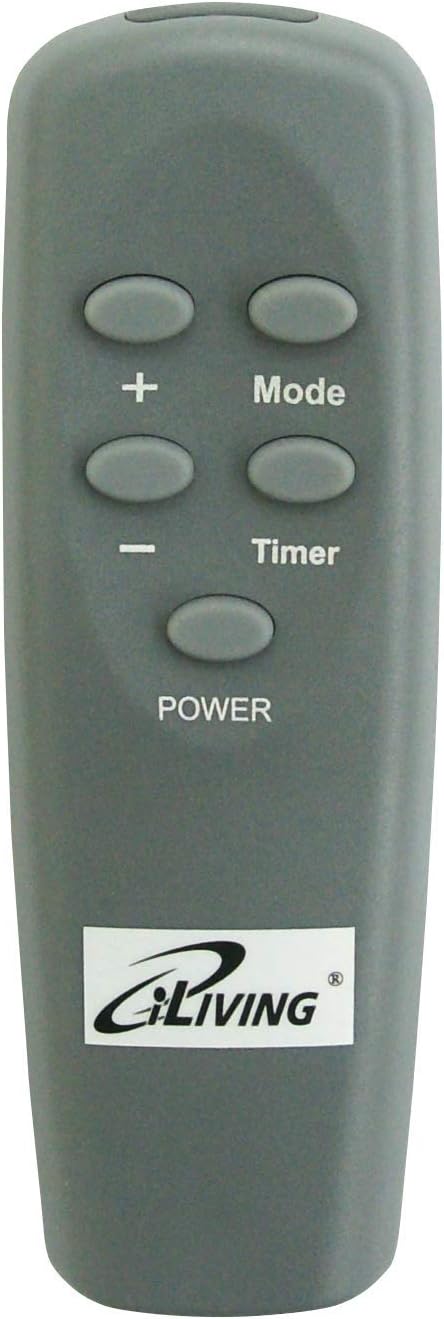
Figure 1.4: Remote control for the heater.
- The remote control duplicates most functions of the control panel.
- Important: To use the remote control, the heater must first be turned on to STANDBY mode by pressing the POWER button on the unit itself. Then, press the POWER button on the remote to fully turn the heater on.
Operating Modes:
- Auto Mode: Set your desired temperature (50-85°F). The unit will automatically cycle between High and Low settings, or turn on/off, to maintain the set temperature.
- High Setting (1500W): Operates at maximum heat output.
- Low Setting (1000W): Operates at reduced heat output.
Timer Function:
The heater features a 12-hour automatic shut-off timer. Consult the full manual for detailed instructions on setting the timer.
6. Maintenance
Regular maintenance ensures optimal performance and longevity of your heater.
Cleaning:
- Always unplug the heater from the power outlet and allow it to cool completely before cleaning.
- Use a soft, damp cloth to clean the exterior surfaces of the heater. Do not use abrasive cleaners or solvents.
- The heater is equipped with a lifetime filter. Periodically clean the filter by removing it and gently vacuuming or rinsing with water. Ensure the filter is completely dry before reinserting.
Storage:
When not in use, store the heater in a cool, dry place, away from direct sunlight and extreme temperatures. It is recommended to store it in its original packaging to protect it from dust and damage.
7. Troubleshooting
If you experience issues with your iLIVING ILG918 Infrared Heater, refer to the following common problems and solutions:
| Problem | Possible Cause | Solution |
|---|---|---|
| Heater does not turn on. | No power to the unit; Tip-over switch activated; Overheat protection activated; Unit not in STANDBY mode for remote use. | Check power cord connection and wall outlet. Ensure heater is upright on a flat surface. Allow unit to cool down if overheated. Press the POWER button on the unit first to enter STANDBY mode before using the remote. |
| Heater trips circuit breaker. | Overloaded circuit; Heater connected to an extension cord or power strip. | Ensure the heater is plugged directly into a dedicated wall outlet. Disconnect other appliances from the same circuit. Reduce other electrical load on the circuit. |
| Heater is not heating effectively. | Temperature setting too low; Air intake/exhaust blocked; Room size too large for heater capacity. | Increase the set temperature. Ensure no obstructions are blocking the air vents. For very large rooms, supplementary heating may be required. |
| Remote control not working. | Batteries are dead or incorrectly inserted; Heater not in STANDBY mode. | Replace remote control batteries (requires 2 AAA batteries, not included). Ensure the heater's main power button has been pressed to put it in STANDBY mode. |
8. Specifications
| Model Number | ILG-918W |
| Brand | iLiving |
| Heat Output | 1500 Watts (High), 1000 Watts (Low) |
| Voltage | 120 Volts |
| Amperage | 12.5 Amps |
| Temperature Range | 50°F to 85°F |
| Product Dimensions (L x W x H) | 13 x 12 x 15 inches |
| Item Weight | 22.3 pounds |
| Heating Coverage | Large room |
| Included Components | Heater, Remote Control |
| UPC | 850005348931 |
9. Warranty and Support
This iLIVING ILG918 Infrared Heater comes with a 3-year limited manufacturer warranty. This warranty covers defects in materials and workmanship under normal use.
For warranty claims, technical support, or any questions regarding your product, please contact iLIVING USA customer service. Refer to the contact information provided with your product packaging or visit the official iLIVING USA website for assistance.


