
OLYMPIA Neo 2287
Contents
Olympia Neo Seniors Smartphone User Manual
Model: Neo 2287
1. Product Overview
The Olympia Neo is a smartphone specifically designed for seniors, featuring a user-friendly interface, large display, and essential functions for easy communication. It is hearing aid compatible and includes a dedicated emergency call button for enhanced safety.
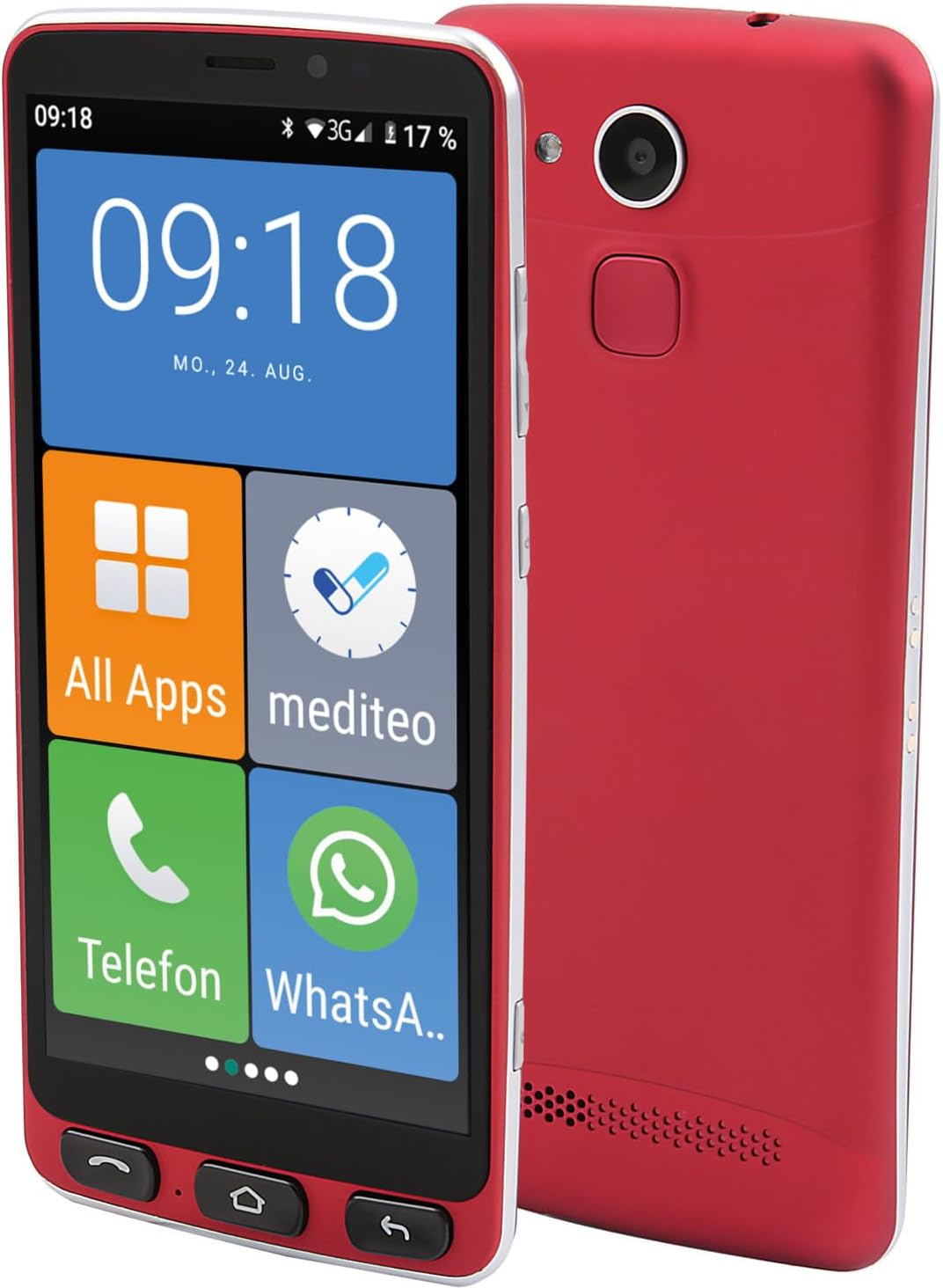
Figure 1.1: Front and rear view of the Olympia Neo Seniors Smartphone in red. The front features a large display with a simplified interface, while the rear shows the main camera and an emergency button.

Figure 1.2: Overview of the Olympia Neo Seniors Smartphone, highlighting its dimensions (156 x 70 x 93 mm), weight (171g), 5.5-inch multi-task display, and the prominent emergency call button.
2. Safety Information
Please read this safety information carefully before using your Olympia Neo Smartphone to ensure safe and proper operation.
- Do not expose the device to extreme temperatures, direct sunlight, or high humidity.
- Avoid dropping or subjecting the device to strong impacts.
- Use only original or certified accessories (charger, battery) to prevent damage and ensure safety.
- Keep the device away from medical devices such as pacemakers, as it may cause interference.
- Do not attempt to disassemble or repair the device yourself. Refer to qualified service personnel.
- Dispose of the device and its battery responsibly according to local regulations.
3. Setup
3.1. Inserting the SIM Card and Battery
- Carefully remove the back cover of the smartphone.
- Insert the SIM card(s) into the designated slot(s). Ensure the card is oriented correctly. This device supports Dual SIM.
- If using an external memory card, insert the Micro SD card into its slot.
- Insert the 2400 mAh Lithium-ion battery into its compartment, aligning the contacts.
- Replace the back cover until it clicks into place.
3.2. Initial Charging
Before first use, fully charge the smartphone. Use the provided charging cable and adapter, or place the phone in the charging dock.

Figure 3.1: The Olympia Neo Smartphone placed in its user-friendly charging dock. A full charge provides up to 120 hours of standby time.
3.3. Powering On/Off
- To power on: Press and hold the Power button located on the side of the device until the screen lights up.
- To power off: Press and hold the Power button, then select "Power off" from the options on the screen.
4. Operating Instructions
4.1. User Interface and Navigation
The Olympia Neo features an extra-large visual interface with a simplified menu structure, making it easy to navigate. It runs on Android 10.0.

Figure 4.1: The Olympia Neo's intuitive interface with large, clear icons and comfortable quick dial options featuring contact photos for up to 6 favorites. The display is high-contrast for better readability.
4.2. Making and Receiving Calls
- To make a call: Tap the "Telefon" (Phone) icon. You can dial a number directly or select a contact from your address book.
- To receive a call: When the phone rings, tap the green phone icon to answer.
- The device is hearing aid compatible (HAC).
4.3. Emergency Call Button
The dedicated emergency call button provides quick access to pre-set emergency contacts.
- To activate: Press and hold the emergency button on the back of the phone.
- The phone will automatically dial pre-configured emergency numbers and can send an SMS with your location.
4.4. Using the Camera
The Olympia Neo is equipped with two cameras: an 8 Megapixel rear camera and a 5 Megapixel front camera.

Figure 4.2: The Olympia Neo features both a front and rear camera, allowing users to capture photos and videos easily.
- To open the camera: Tap the "Fotos" (Photos) icon or the camera app.
- Tap the shutter button to take a picture.
- Switch between front and rear cameras using the camera toggle icon.
4.5. Pre-installed Applications
The smartphone comes with useful applications pre-installed, including WhatsApp and Mediteo.

Figure 4.3: The Mediteo app, pre-installed on the Olympia Neo, serves as a helpful medication reminder for daily use.
- WhatsApp: For messaging and calls over the internet.
- Mediteo: A medication reminder application to help users take their medication on time.
5. Maintenance
5.1. Cleaning the Device
- Use a soft, dry cloth to clean the screen and body of the smartphone.
- Avoid using harsh chemicals or abrasive materials.
5.2. Battery Care
- To prolong battery life, avoid fully discharging the battery frequently.
- Store the device in a cool, dry place when not in use for extended periods.
- The 2400 mAh Li-ion battery is replaceable.
5.3. Software Updates
Regularly check for software updates to ensure optimal performance and security. Updates can typically be found in the device's settings menu under "System" or "About phone."
6. Troubleshooting
6.1. Common Issues and Solutions
| Problem | Possible Cause | Solution |
|---|---|---|
| Device does not turn on | Low battery, faulty battery, software issue | Charge the device for at least 30 minutes. Check battery connection. Perform a forced restart (refer to manual for specific key combination). |
| Cannot make/receive calls | No SIM card, poor network signal, incorrect network settings | Ensure SIM card is properly inserted. Move to an area with better signal. Check network settings in "Settings" > "Network & Internet" > "Mobile network". |
| Screen is unresponsive | Temporary software glitch, screen damage | Restart the device. If issue persists, contact customer support. |
| Battery drains quickly | Too many apps running in background, high screen brightness, old battery | Close unused apps. Reduce screen brightness. Consider replacing the battery if it's old. |
If the problem persists after trying these solutions, please contact Olympia customer support.
7. Specifications
Detailed technical specifications for the Olympia Neo Seniors Smartphone.

Figure 7.1: A summary of the Olympia Neo's technical specifications, including network, display, memory, and camera details.
| Feature | Detail |
|---|---|
| Model Name | Neo |
| Model Number | 2287 |
| Operating System | Android 10.0 |
| Display Size | 5.5 Inches |
| Display Resolution | 1080 x 1920 Pixels |
| RAM | 2 GB |
| Internal Storage | 16 GB |
| Expandable Storage | Micro SD Card Slot |
| Rear Camera | 8 Megapixels |
| Front Camera | 5 Megapixels |
| Battery Capacity | 2400 mAh Lithium-ion (included) |
| Talk Time | 12 hours |
| Standby Time | 120 hours |
| Connectivity | 4G (LTE), Quad Band, Bluetooth, WLAN, GPS |
| SIM Type | Dual SIM |
| Special Features | Hearing Aid Compatible, Emergency Call Button, Separate Haptic Keys |
| Dimensions | 156 x 70 x 93 mm |
| Weight | 171g |
8. Warranty and Support
For warranty information and technical support, please refer to the documentation included with your purchase or visit the official Olympia website.
- Manufacturer: Olympia Group
- Contact: Refer to the official Olympia website for contact details.
Documents and downloads
Ask a question about this manual
Ask about setup, troubleshooting, compatibility, parts, safety, or missing instructions. Manuals+ will review the question and use this page’s manual context to help answer it.