
1. Introduction
The V BESTLIFE KN321 is a versatile 2-in-1 Wireless Bluetooth 5.0 Audio Transmitter and Receiver. This device allows you to add Bluetooth functionality to non-Bluetooth audio equipment, enabling wireless audio streaming in various scenarios. In Transmitter (TX) mode, it sends audio from devices like TVs or CD players to Bluetooth headphones or speakers. In Receiver (RX) mode, it receives audio from Bluetooth-enabled smartphones or tablets and plays it through wired speakers or car audio systems.
Its compact design and dual functionality make it an ideal solution for enhancing your audio experience at home or on the go.
2. Safety Information
WARNING:
- To avoid damage, do not expose the device to extreme temperatures or humidity.
- Keep the device away from heat sources and direct sunlight.
- To prevent potential interference with other wireless devices, maintain a safe distance from them while using this device.
- Always follow proper connection and disconnection procedures when using this device with other audio and computing devices.
- Charge the device using the provided USB cable only. Do not attempt to charge the device using any other method.
- Always supervise the charging process and do not leave the device unattended while charging.
- In case of any damage or malfunction, stop using the device immediately and contact the manufacturer for assistance.
3. Package Contents
Please check the package for the following items:
- 1x V BESTLIFE KN321 Bluetooth 5.0 Audio Transmitter Receiver
- 1x Micro USB Power Cable
- 1x 3.5mm Aux Cable
- 1x RCA Audio Cable (often included, derived from image PT08)
- 1x User Manual (this document)

Image: The KN321 device shown with its accompanying Micro USB charging cable, 3.5mm auxiliary cable, and RCA audio cable.
4. Product Overview
The KN321 is a compact, square-shaped device with a textured top surface. It features a power button, a mode switch (RX/TX), a 3.5mm audio jack, and a Micro USB charging port.
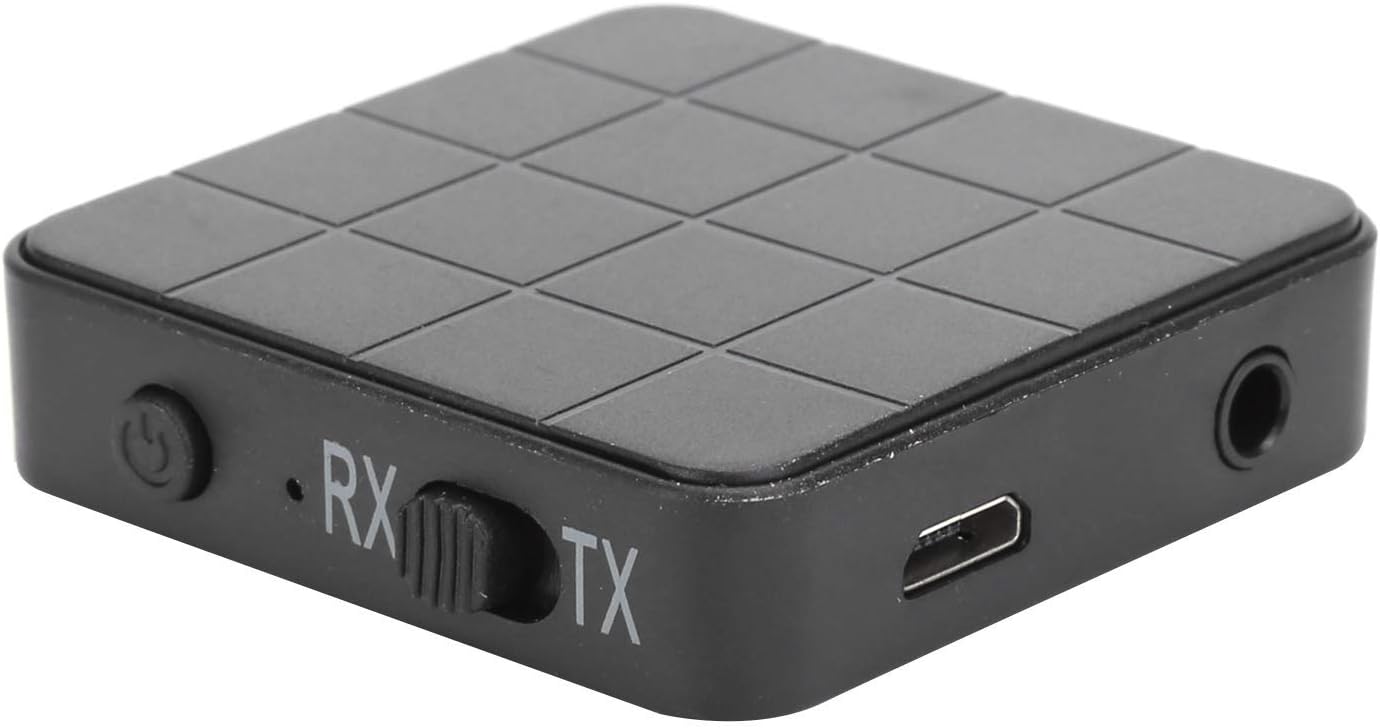
Image: A close-up view of the KN321 Bluetooth adapter, highlighting the power button, RX/TX mode switch, 3.5mm audio output, and Micro USB charging port.
5. Specifications
| Feature | Detail |
|---|---|
| Model | KN321 |
| Bluetooth Version | BT5.0 |
| Supported Profiles | A2DP, AVRCP (Receiver Mode Only) |
| Operating Range | Up to 10 meters / 33 feet (without blocking objects) |
| Pairing Name | KN321 |
| Battery Type | Li Polymer (200mAh) |
| Charging Time | Approximately 2 Hours |
| Dimensions (L x W x H) | Approx. 44mm x 44mm x 12mm (1.7in x 1.7in x 0.5in) |
| Weight | Approx. 78.0g / 2.8oz |
| Material | Plastic |

Image: Diagram illustrating the dimensions of the KN321 device: 44mm (1.7in) length, 44mm (1.7in) width, and 12mm (0.5in) height.

Image: Illustration showing the KN321 device in a living room setting, indicating an operating range of up to 10m (33ft).
6. Setup
6.1 Charging the Device
- Connect the provided Micro USB power cable to the charging port on the KN321.
- Plug the other end of the USB cable into a USB power adapter (not included) or a computer's USB port.
- The indicator light will illuminate during charging and turn off once fully charged. A full charge takes approximately 2 hours.
6.2 Powering On/Off
- Power On: Press and hold the power button for approximately 3 seconds until the indicator light flashes.
- Power Off: Press and hold the power button for approximately 3 seconds until the indicator light turns off.
6.3 Selecting Operating Mode (TX/RX)
The KN321 features a physical switch to toggle between Transmitter (TX) and Receiver (RX) modes.
- Slide the switch to the TX position for Transmitter mode.
- Slide the switch to the RX position for Receiver mode.
Ensure the device is powered off before changing modes for optimal performance.
7. Operating Instructions
7.1 Transmitter Mode (TX)
Use TX mode to wirelessly stream audio from a non-Bluetooth device (e.g., TV, CD player, computer) to Bluetooth headphones or speakers.
- Set the KN321 to TX mode using the switch.
- Connect the KN321 to your non-Bluetooth audio source (e.g., TV, computer, stereo) using the 3.5mm Aux cable or RCA audio cable. Plug one end into the KN321's 3.5mm audio jack and the other end into the audio output port of your source device.
- Power on the KN321. The indicator light will flash, indicating it's searching for Bluetooth devices.
- Put your Bluetooth headphones or speakers into pairing mode.
- The KN321 will automatically search for and connect to nearby Bluetooth audio devices. Once connected, the indicator light will remain solid.
- Adjust the volume on your connected Bluetooth headphones/speakers or the source device.

Image: Diagram illustrating the KN321 in Transmitter (TX) mode, connecting a TV to Bluetooth headphones or speakers via the 3.5mm or RCA audio cable.
7.2 Receiver Mode (RX)
Use RX mode to wirelessly stream audio from a Bluetooth-enabled device (e.g., smartphone, tablet, laptop) to wired speakers, headphones, or a car audio system.
- Set the KN321 to RX mode using the switch.
- Connect the KN321 to your wired audio output device (e.g., wired speakers, headphones, car AUX input) using the 3.5mm Aux cable. Plug one end into the KN321's 3.5mm audio jack and the other end into the audio input port of your receiving device.
- Power on the KN321. The indicator light will flash, indicating it's in pairing mode.
- On your Bluetooth-enabled device (smartphone, tablet), go to Bluetooth settings and search for new devices. Select "KN321" from the list to pair.
- Once successfully paired, the indicator light on the KN321 will remain solid.
- Play audio on your Bluetooth-enabled device. The sound will now be streamed to your wired speakers/headphones.

Image: Diagram illustrating the KN321 in Receiver (RX) mode, connecting a smartphone or tablet to wired speakers or car audio system via the 3.5mm audio cable.

Image: A visual representation of the KN321 in Receiver mode, connected to a speaker system with the 3.5mm audio cable, ready to receive audio from a Bluetooth source.
8. Troubleshooting
- No Power: Ensure the device is fully charged. Connect it to a power source using the Micro USB cable.
- Cannot Pair:
- Make sure the KN321 is in the correct mode (TX for transmitting, RX for receiving).
- Ensure the other Bluetooth device is in pairing mode and within the 10-meter (33ft) operating range.
- Turn off and on both devices, then try pairing again.
- Clear previous Bluetooth connections on your source/receiving device if necessary.
- No Sound:
- Verify that the audio cables are securely connected to both the KN321 and the audio source/receiving device.
- Check the volume levels on all connected devices (KN321, source device, receiving device).
- Ensure the KN321 is successfully paired and the indicator light is solid.
- Confirm the correct audio input/output is selected on your source/receiving device.
- Humming/Static Noise: If you experience humming or static, especially when charging, try using a different USB power adapter or connecting the device to a different power source. Some power sources can introduce ground loop noise.
- Intermittent Connection: Reduce the distance between the KN321 and the paired device. Ensure there are no significant obstacles (walls, large metal objects) between them.
9. Maintenance
- Clean the device with a soft, dry cloth. Do not use liquid cleaners or aerosols.
- Store the device in a cool, dry place away from direct sunlight and extreme temperatures.
- Avoid dropping or subjecting the device to strong impacts.
- Do not attempt to disassemble or repair the device yourself, as this will void the warranty and may cause damage.
10. Warranty and Support
This product comes with a standard manufacturer's warranty. For specific warranty terms and conditions, please refer to the documentation provided at the time of purchase or contact your retailer.
For technical support, troubleshooting assistance, or inquiries about replacement parts, please contact V BESTLIFE customer service through your purchase platform or the official V BESTLIFE website.
Please have your model number (KN321) and purchase information ready when contacting support.