
1. Introduction
The RealMe 7i is a dual-SIM (Nano) smartphone featuring an octa-core Qualcomm Snapdragon 662 SoC processor, 4GB of RAM, and 64GB of internal storage expandable via microSD. It operates on Android 10 with Realme UI. The device is powered by a 5000mAh non-removable battery with 18W fast charging support. It includes a quad-camera system on the rear (64 MP main, 8 MP ultrawide, 2 MP monochrome, 2 MP depth) and a 16 MP front camera.
2. Product Overview
Familiarize yourself with the physical components of your RealMe 7i smartphone.
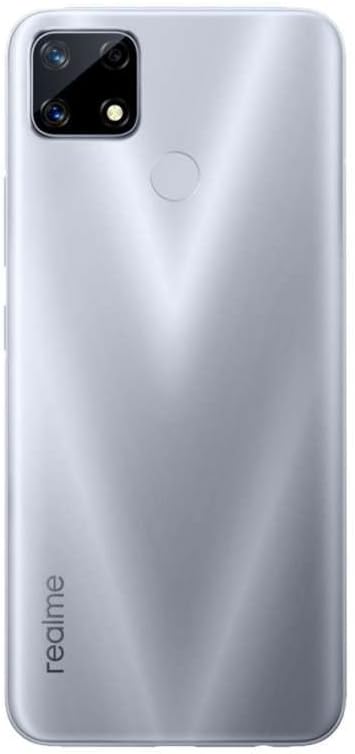
Figure 2.1: Front View. This image displays the front of the RealMe 7i smartphone, highlighting its 6.5-inch display and the front-facing camera located in a notch at the top center.

Figure 2.2: Rear View. This image shows the back of the RealMe 7i, featuring the quad-camera module in the upper left corner and a circular fingerprint sensor centrally located on the upper half of the device.

Figure 2.3: Right Side View. This image illustrates the right side of the RealMe 7i, where the power button and volume rocker are positioned for easy access.

Figure 2.4: Left Side View. This image shows the left side of the RealMe 7i, indicating the location of the SIM card tray.
3. Setup
3.1. Inserting SIM and MicroSD Cards
- Locate the SIM card tray on the left side of the device (refer to Figure 2.4).
- Insert the SIM ejector tool into the small hole on the tray to open it.
- Place your Nano-SIM card(s) and/or microSD card into the designated slots on the tray. Ensure the gold contacts are facing down.
- Carefully push the tray back into the phone until it clicks into place.
3.2. Charging the Device
- Connect the USB Type-C cable to the charging port at the bottom of the phone.
- Connect the other end of the cable to a compatible 18W fast charger.
- Allow the phone to charge fully before initial use. The battery indicator on the screen will show charging status.
3.3. Powering On/Off
- To power on, press and hold the Power button (located on the right side) until the RealMe logo appears.
- To power off, press and hold the Power button until the power options menu appears, then select "Power off".
4. Operating Instructions
4.1. Basic Navigation
- The RealMe 7i runs on Android 10 with Realme UI. Navigate the interface using touch gestures.
- Swipe up: Access the app drawer.
- Swipe down: Access the notification panel and quick settings.
- Tap: Select an item.
- Long press: Access contextual menus or move icons.
4.2. Camera Usage
The device features a versatile quad-camera system on the rear and a high-resolution front camera.
- Open the Camera application from the home screen or app drawer.
- Rear Camera: Utilize the 64 MP main sensor for high-resolution photos, the 8 MP ultrawide for broader scenes, and the 2 MP macro/depth sensors for specialized shots.
- Front Camera: The 16 MP front camera is ideal for selfies and video calls.
- Explore various modes such as Portrait, Night, Pro, and Panorama within the camera app.
4.3. Connectivity
- Wi-Fi: Access Wi-Fi settings from the Quick Settings panel or Settings app to connect to wireless networks.
- Mobile Data: Ensure your SIM card is active and mobile data is enabled in settings for internet access via 4G networks.
- Bluetooth: Pair with Bluetooth devices like headphones or speakers through the Bluetooth settings.
5. Maintenance
5.1. Software Updates
Regularly check for and install software updates to ensure optimal performance, security, and access to new features. Navigate to Settings > Software Update to check for available updates.
5.2. Cleaning Your Device
- Use a soft, lint-free cloth to gently wipe the screen and back of the phone.
- Avoid using harsh chemicals or abrasive materials, as these can damage the device's finish.
- For stubborn smudges, slightly dampen the cloth with water or a screen cleaner specifically designed for electronics.
6. Troubleshooting
This section addresses common issues you might encounter with your RealMe 7i.
- Device not turning on: Ensure the battery is charged. Connect the charger and wait a few minutes before attempting to power on again.
- Apps freezing or crashing: Close the problematic app and reopen it. If the issue persists, restart the phone. Clear the app's cache and data from Settings if necessary.
- Poor battery life: Reduce screen brightness, disable unnecessary background apps, turn off Wi-Fi/Bluetooth when not in use, and check for apps consuming excessive power in battery settings.
- Network connectivity issues: Check if airplane mode is off. Restart the phone. Verify SIM card insertion. Contact your carrier if the issue persists.
- Fingerprint sensor not working: Ensure your finger is clean and dry. Re-register your fingerprints in the security settings.
7. Specifications
| Feature | Detail |
|---|---|
| Model Number | RMX2103SIL |
| Operating System | Android 10, Realme UI |
| Processor | Qualcomm SM6115 Snapdragon 662 (11 nm), Octa-core (4x2.0 GHz Kryo 260 Gold & 4x1.8 GHz Kryo 260 Silver), Adreno 610 GPU |
| Display | 6.5 inches, 720 x 1600 pixels, 20:9 ratio (~270 ppi density), Corning Gorilla Glass |
| RAM | 4GB |
| Internal Storage | 64GB (expandable via microSD) |
| Rear Camera | Quad: 64 MP (wide, f/1.8), 8 MP (ultrawide, f/2.3), 2 MP (macro, f/2.4), 2 MP (depth, f/2.4) |
| Front Camera | 16 MP (f/2.1) |
| Battery | Li-Po 5000 mAh, non-removable, Fast charging 18W |
| Connectivity | 4G LTE (Bands 1, 3, 5, 8, 38, 40, 41), Wi-Fi, Bluetooth, USB Type-C |
| Dimensions | 6.48 x 2.99 x 0.39 inches (164.5 x 75.9 x 9.8 mm) |
| Weight | 7.3 ounces (208 grams) |
8. Warranty and Support
This RealMe 7i is an International Model. Please note that there is no warranty in the US for this specific model. For warranty information and support in other regions, please refer to the documentation provided with your purchase or visit the official realme website for your specific region.
For technical assistance, you may also refer to the official realme support channels available in your country of purchase.