
1. Introduction
Thank you for choosing the UTRAI JS-Mini Portable Jump Starter. This device is designed to provide emergency jump-starting for 12V vehicles and serve as a versatile power bank for your electronic devices. Its compact design and robust safety features make it an essential tool for any driver.
Please read this manual thoroughly before use to ensure safe and optimal operation. Keep this manual for future reference.
2. Product Overview
2.1 Package Contents
- UTRAI JS-Mini Jump Starter Unit
- Smart Clamp Cables
- USB Charging Cable
- User Manual

Figure 1: Package Contents
2.2 Key Features
- Powerful Jump Starting: 2500A peak current for 12V vehicles, compatible with up to 7.5L gasoline and 5.5L diesel engines.
- Mobile Power Bank: 13800mAh capacity with dual USB outputs (5V/2.1A and 5V/1A) for charging smartphones, tablets, and other devices.
- LED Emergency Light: Features three modes: steady illumination, SOS signal, and warning strobe.
- Smart Clamp Cable: Equipped with multiple safety protections and a display to confirm battery status.
- Compact and Portable: Designed for easy storage and transport.

Figure 2: Compact Design
3. Safety Information
The UTRAI JS-Mini is equipped with a smart clamp cable that provides comprehensive protection for both the jump starter and your vehicle's battery. The smart clamp display will indicate any operational errors or battery status issues.
3.1 Protection Systems
- Short Circuit Protection: Prevents damage from accidental short circuits.
- Reverse Connection Protection: Alerts and protects against incorrect battery terminal connections.
- Low Voltage Protection: Prevents over-discharge of the jump starter.
- High Voltage Protection: Safeguards against excessive voltage input.
- Overcharge Protection: Protects the internal battery from overcharging.
- Overheat Protection: Shuts down the device if it becomes too hot.
- Reverse Charge Protection: Prevents current flow back from the car battery to the jump starter.

Figure 3: Multi-Protection Features
4. Setup
4.1 Initial Charging
Before first use, fully charge the UTRAI JS-Mini jump starter. Connect the provided USB charging cable to the Type-C input port on the jump starter and to a suitable USB power adapter (not included). The LED indicators will show the charging progress. Ensure all four LEDs are solid when fully charged.
5. Operating Instructions
5.1 Jump Starting a Vehicle
This jump starter is suitable for 12V vehicles with up to 7.5L gasoline engines or 5.5L diesel engines.
- Connect Smart Clamp Cable: Insert the blue plug of the smart clamp cable into the jump start port on the UTRAI JS-Mini unit. Ensure a secure connection.
- Connect to Car Battery: Attach the red clamp to the positive (+) terminal of your car battery and the black clamp to the negative (-) terminal. The smart clamp display will show the battery voltage and indicate readiness.
- Start Engine: Once the smart clamp indicates a safe connection (e.g., a steady green light or appropriate voltage reading), start your vehicle's engine.
- Remove Jump Cable: After the engine starts, immediately remove the smart clamp cable from the car battery, then disconnect it from the jump starter unit.

Figure 4: Jump Starting Connection
5.2 Using as a Power Bank
The UTRAI JS-Mini can charge two devices simultaneously using its dual USB output ports.
- Connect Device: Plug your device's USB charging cable into one of the USB output ports (USB1: 5V/2.1A, USB2: 5V/1A) on the jump starter.
- Begin Charging: The jump starter will automatically begin charging your device. The LED indicators will show the remaining power.

Figure 5: Mobile Device Charging
5.3 LED Emergency Light
The built-in LED light offers three modes for various situations:
- Illumination: Press the power button once to turn on the steady light for general lighting.
- SOS Mode: Press the power button twice to activate the SOS flashing signal for emergencies.
- Warning Strobe: Press the power button three times for a rapid strobe light, useful for attracting attention.
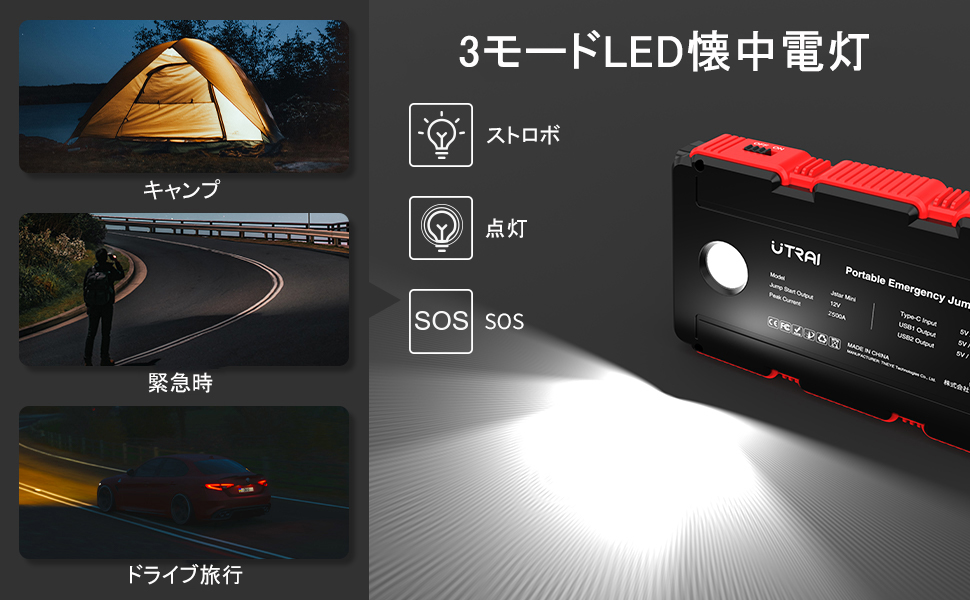
Figure 6: LED Light Modes
5.4 Product Demonstration Video
Watch this video for a visual guide on how to use your UTRAI JS-Mini Jump Starter, including unboxing, jump-starting a car, and utilizing its power bank and LED light features.
Video 1: UTRAI JS-Mini Product Demonstration
6. Maintenance
- Recharge Regularly: To maintain optimal battery health, recharge the jump starter at least once every three months, even if not in use.
- Storage: Store the device in a cool, dry place away from direct sunlight and extreme temperatures.
- Cleaning: Use a soft, dry cloth to clean the unit. Do not use harsh chemicals or abrasive materials.
7. Troubleshooting
The smart clamp cable provides diagnostic information on its display. Refer to the following common indicators:
- Low Voltage: Indicates the car battery voltage is too low.
- Overheat: The smart clamp or jump starter is too hot. Allow it to cool down.
- Connection Error: Check if the clamps are properly connected to the battery terminals.
- Reverse Polarity: Clamps are connected to the wrong terminals. Reconnect correctly.
- Short Circuit: Indicates a short circuit. Disconnect immediately and check connections.
- Overcharge: The jump starter's internal battery is overcharged.
- Reverse Charge: Current is flowing back from the car battery. Disconnect the clamps.
If you encounter issues not listed here or if troubleshooting steps do not resolve the problem, please contact customer support.
8. Specifications
| Feature | Specification |
|---|---|
| Brand | UTRAI |
| Model Name | JS-Mini |
| Peak Current | 2500 Amps |
| Voltage | 12 Volts |
| Battery Capacity | 13800mAh (Lithium Ion) |
| Compatible Engine Types | Up to 7.5L Gasoline / 5.5L Diesel |
| Product Dimensions | 15.05 x 8.45 x 2.8 cm |
| Product Weight | 780 g |
| USB Output 1 | 5V/2.1A |
| USB Output 2 | 5V/1A |
| Type-C Input | 5V/2A |
9. Warranty and Support
9.1 Warranty Information
This UTRAI product comes with a 12-month seller warranty from the date of purchase. Please retain your proof of purchase for warranty claims.
9.2 Customer Support
For any questions, technical assistance, or warranty inquiries, please contact UTRAI customer support through the retailer's platform or visit the official UTRAI website for contact details.


