
Introduction
This manual provides detailed instructions for the safe and efficient operation of your RUIZHI Lipo 80W 6A Professional Balance Charger. This high-performance microprocessor-controlled charger is designed to charge and discharge a wide variety of batteries, including LiPo/Li-Ion/Life (1-6S), NiMH/NiCd (1-15S), and Pb (2-20V) batteries. Please read this manual thoroughly before use to ensure proper functionality and safety.

Figure 1: RUIZHI Lipo 80W 6A Professional Balance Charger (Blue model)
Safety Information
Always prioritize safety when operating this charger. Failure to follow these guidelines can result in property damage, injury, or fire.
- Never leave the charger unattended while it is connected to a power source or charging/discharging a battery.
- Ensure the charger is placed on a heat-resistant, non-flammable, and non-conductive surface.
- Do not charge batteries near flammable materials or in direct sunlight.
- Verify battery type and cell count settings match the battery being charged. Incorrect settings can cause severe damage or fire.
- Avoid reverse polarity connections. Always double-check the positive and negative terminals before connecting.
- Do not attempt to charge damaged or swollen batteries.
- Keep the charger away from moisture, dust, and extreme temperatures.
- Use only the provided power adapter and cables.
- This device is not a toy. Keep out of reach of children.

Figure 2: Always ensure correct battery connections and avoid charging damaged batteries.
Product Overview
The RUIZHI B6 charger features a robust design with an intuitive interface for managing various battery types. Below is an overview of its components and ports.
Package Contents
- RUIZHI Lipo 80W 6A Professional Balance Charger
- AC/DC Power Adapter
- AC Power Cable
- Set of various battery connection cables

Figure 3: Included components: charger, power adapter, AC cable, and various battery cables.
Device Layout and Ports
Familiarize yourself with the charger's display, buttons, and connection ports.

Figure 4: Front panel with LCD display and control buttons.
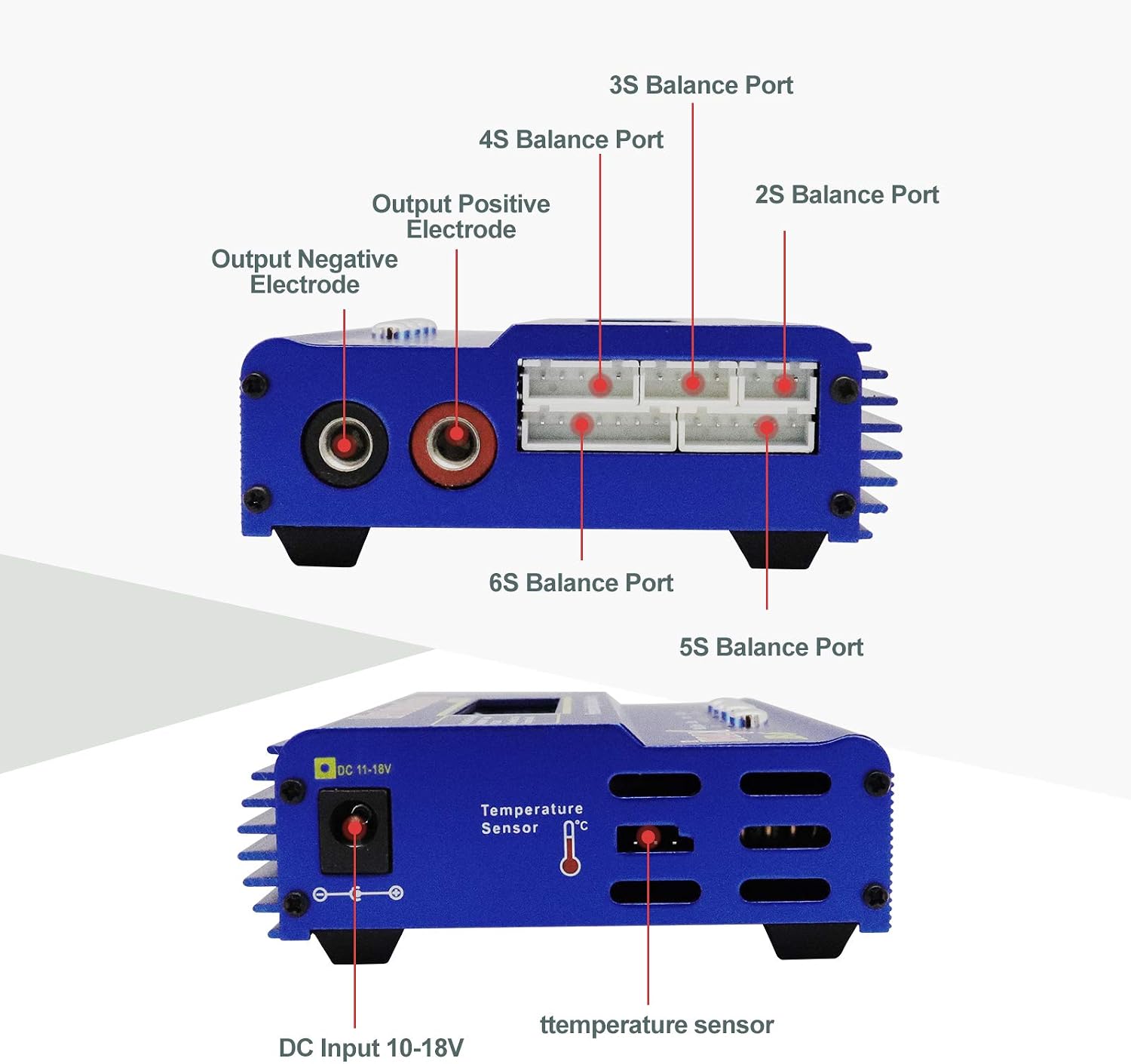
Figure 5: Side view displaying output terminals, balance ports (2S-6S), and DC input (10-18V).
- LCD Display: Shows charging status, battery type, voltage, current, and other parameters.
- Control Buttons: "Batt.Type/Stop", "Dec.", "Inc.", "Start/Enter" for navigation and setting adjustments.
- Output Terminals: Red (+) and Black (-) connectors for main battery connection.
- Balance Ports: Dedicated ports for 2S, 3S, 4S, 5S, and 6S LiPo/Li-Ion/Life batteries for balanced charging.
- DC Input (10-18V): Power input for the charger.
- Temperature Sensor Port: For connecting an optional temperature sensor.
Setup
Follow these steps to set up your RUIZHI B6 charger for the first time.
- Connect Power: Connect the AC power cable to the AC/DC power adapter, then plug the adapter into a wall outlet. Connect the DC output plug of the adapter to the DC Input port (10-18V) on the side of the RUIZHI B6 charger.
- Power On: The charger's LCD display should light up, indicating it is powered on and ready for operation.
- Prepare Battery: Ensure your battery is in good condition and free from any physical damage.
- Connect Battery:
- For LiPo/Li-Ion/Life batteries, connect the main battery lead to the charger's output terminals (red to red, black to black). Then, connect the battery's balance lead to the appropriate balance port on the side of the charger (e.g., 3S port for a 3-cell battery).
- For NiMH/NiCd or Pb batteries, only connect the main battery lead to the charger's output terminals.

Figure 6: Charger connected to different battery types (LiPo, LiFe, NiMH/NiCd, Li-ion, PB).
Operating Instructions
This section details how to operate your RUIZHI B6 charger for various functions.
Basic Operation Steps
- Select Battery Type: Press the "Batt.Type/Stop" button to cycle through the main menu options. Select the desired battery type (e.g., LiPo, NiMH, Pb).
- Access User Settings: Once the battery type is selected, press the "Start/Enter" button twice to enter the parameter settings for that battery type.
- Adjust Parameters: Use the "Dec." and "Inc." buttons to adjust parameters such as charge current (Amps) and cell count (for Lithium batteries).
- Confirm and Start: After setting the parameters, hold the "Start/Enter" button for approximately 2 seconds. The charger will perform a battery check. Once confirmed, press "Start/Enter" again to begin the charging or discharging process.
- Stop Operation: To stop any ongoing process, press the "Batt.Type/Stop" button.
Charging Specific Battery Types
- LiPo/Li-Ion/Life Batteries:
- Select "LiPo BATT", "Li-Ion BATT", or "LiFe BATT".
- Choose between "Balance Charge", "Fast Charge", "Storage", or "Discharge". "Balance Charge" is recommended for optimal battery life and safety.
- Set the charge current (A) and cell count (S) to match your battery's specifications.
- Confirm and start.
- NiMH/NiCd Batteries:
- Select "NiMH BATT" or "NiCd BATT".
- Choose between "Charge", "Auto Charge", "Discharge", "Re-Peak", or "Cycle".
- Set the charge current (A) and confirm.
- Pb (Lead Acid) Batteries:
- Select "PB BATT".
- Choose between "Charge" or "Discharge".
- Set the charge current (A) and voltage (V) to match your battery.
Instructional Videos
For visual guidance on operating the charger, please refer to the following official instructional videos:
RUIZHI B6 Charger: Instructions for Use (English)
This video provides a comprehensive guide on how to use the RUIZHI B6 Balance Charger, covering menu navigation and basic charging procedures in English.
Haisito HB6 Lipo Charger 80W 6A Operation Guide
A detailed video demonstrating the operation of a similar 80W 6A Lipo charger, including setting charge parameters and starting the process.
B6V2 LiPo Balance Charger Overview
This video provides an overview of the B6V2 LiPo Balance Charger, showcasing its features and basic usage for battery balancing and charging.
Maintenance
Proper maintenance ensures the longevity and reliable performance of your charger.
- Cleaning: Regularly wipe the charger with a soft, dry cloth. Do not use abrasive cleaners or solvents.
- Storage: Store the charger in a cool, dry place away from direct sunlight and extreme temperatures when not in use.
- Cable Inspection: Periodically inspect all cables and connectors for signs of wear, damage, or corrosion. Replace any damaged components immediately.
- Ventilation: Ensure the charger's ventilation openings are clear and unobstructed during operation to prevent overheating.
Troubleshooting
If you encounter issues with your RUIZHI B6 charger, refer to the following common problems and solutions.
| Problem | Possible Cause | Solution |
|---|---|---|
| Charger does not power on. | No power from outlet; faulty power adapter/cable; incorrect DC input voltage. | Check wall outlet and power connections. Ensure the power adapter is functioning. Verify DC input voltage is within 10-18V. |
| Charging process does not start. | Incorrect battery type/cell count settings; poor battery connection; battery too low/damaged. | Double-check all settings match the battery. Ensure main and balance leads are securely connected. Inspect battery for damage. |
| Error message on display. | Battery voltage error; connection error; internal fault. | Refer to the specific error code (if displayed) in the full manual (if available). Reconnect the battery. If the issue persists, contact support. |
| Charger gets excessively hot. | Poor ventilation; high ambient temperature; internal fault. | Ensure adequate airflow around the charger. Operate in a cooler environment. If overheating continues, discontinue use and contact support. |
| Inaccurate voltage readings. | Faulty balance cable; internal calibration issue. | Try a different balance cable. If the problem persists, the unit may require service. |
Note: The charger does not have protection against reverse polarity. Always ensure correct positive and negative connections to avoid damage.
Specifications
Detailed technical specifications for the RUIZHI B6 Balance Charger.
| Feature | Specification |
|---|---|
| Brand | RUIZHI |
| Model Number | B6 (Z0263) |
| Color | Blue |
| Product Dimensions (L x W x H) | 26.6 x 15.9 x 4.9 cm (10.47 x 6.26 x 1.93 inches) |
| Input Voltage | 10-18V DC |
| Output Voltage | 18V DC |
| Charge Current Range | 0.1-6.0A |
| Discharge Current Range | 0.1-2.0A |
| Max Charge Power | 80W |
| Max Discharge Power | 5W |
| LiPo/Li-Ion/LiFe Cell Count | 1-6S |
| NiMH/NiCd Cell Count | 1-15S |
| Pb Battery Voltage | 2-20V |
| Compatible Devices | RC cars, drones, airsoft guns |
| Number of Ports | 1 (main output) + balance ports |
| UPC | 782903702464 |
Warranty and Support
RUIZHI products are designed for reliability and performance. For warranty information or technical support, please refer to the documentation included with your purchase or contact your retailer. Keep your proof of purchase for warranty claims.