1. Introduction
Thank you for choosing the Cecotec BreezeCare 4000 Connected Humidifier. This device is designed to improve the air quality in your home by maintaining optimal humidity levels, which can help alleviate dry skin, irritated airways, and other discomforts. This manual provides essential information for the safe and efficient use of your humidifier. Please read it thoroughly before first use and keep it for future reference.

Image 1.1: The Cecotec BreezeCare 4000 Connected Humidifier, a sleek black unit with a digital display and touch controls.
2. Safety Instructions
To ensure safe operation, always follow these basic safety precautions:
- Do not immerse the unit, power cord, or plug in water or other liquids.
- Always place the humidifier on a firm, flat, and stable surface, away from direct sunlight and heat sources.
- Keep the humidifier out of reach of children and pets.
- Unplug the device before filling, cleaning, or moving it.
- Do not block the air inlets or outlets.
- Use only clean, cool tap water. Distilled or demineralized water is recommended to prevent mineral buildup.
- Do not add essential oils directly into the water tank; use the designated aroma tray if available.
- If the power cord is damaged, it must be replaced by the manufacturer, its service agent, or similarly qualified persons to avoid a hazard.
3. Product Components
Familiarize yourself with the main parts of your humidifier:
- Water Tank (6L capacity)
- Base Unit with Ultrasonic Transducer
- Mist Nozzle
- Control Panel (Touch-sensitive display)
- Remote Control
- Water Filter
- Aroma Tray (for essential oils)
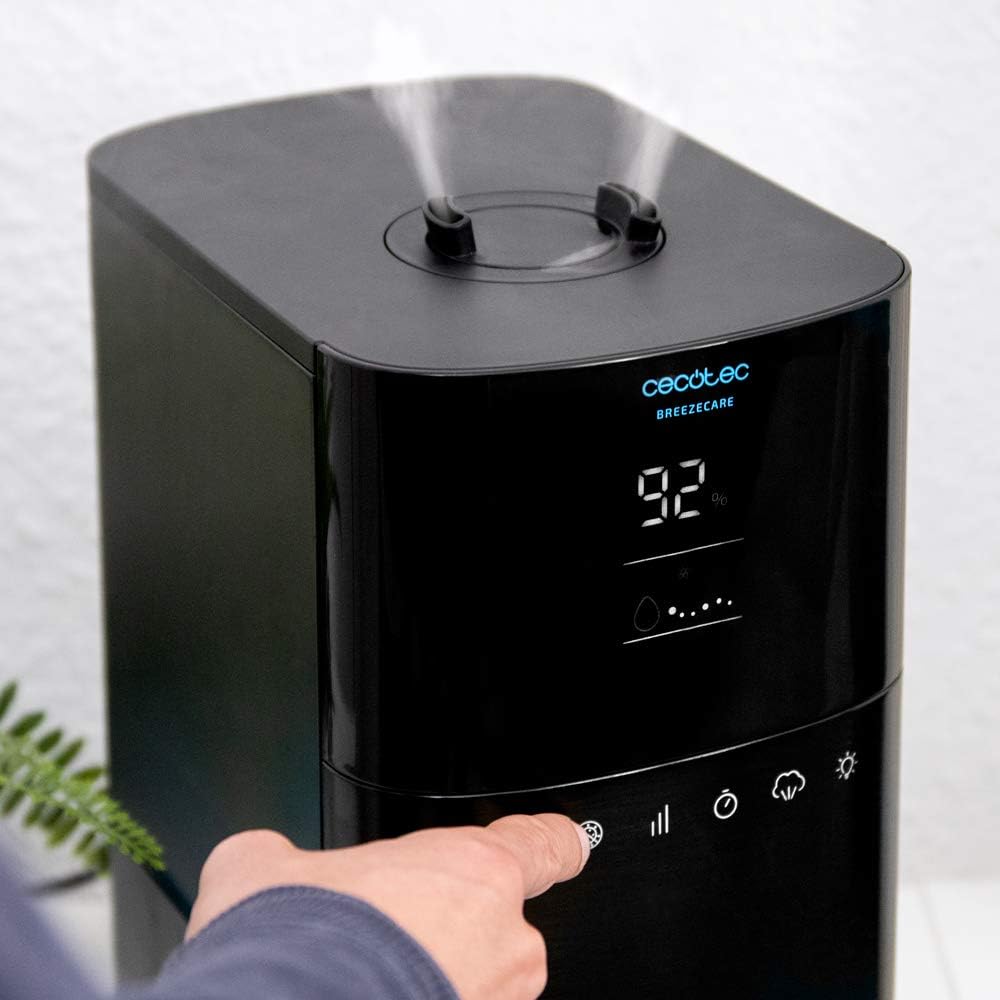
Image 3.1: A close-up view of the humidifier's touch control panel, showing the digital display and various function icons.

Image 3.2: The aroma tray, designed for adding essential oils to diffuse fragrance into the air.
4. Setup
4.1 Unpacking and Placement
- Carefully remove the humidifier from its packaging.
- Place the unit on a flat, stable, and water-resistant surface at least 15 cm away from walls and furniture. Ensure it is not placed on carpet or near heat sources.
- Avoid placing the humidifier directly under electrical outlets or near sensitive electronic devices.

Image 4.1: The humidifier positioned in a living room, demonstrating appropriate placement near a sofa.
4.2 Filling the Water Tank
- Remove the water tank from the base unit.
- Unscrew the tank cap and fill the tank with clean, cool tap water. Do not exceed the maximum fill line.
- Screw the tank cap back on tightly.
- Place the filled water tank back onto the base unit, ensuring it is seated correctly.

Image 4.2: A hand utilizing the integrated handle on the humidifier for easy transport, useful when refilling the tank.
4.3 Power Connection
Plug the power cord into a suitable electrical outlet. The unit will enter standby mode.
4.4 Wi-Fi Setup
The BreezeCare 4000 Connected features Wi-Fi control. To connect:
- Download the official Cecotec app from your smartphone's app store.
- Follow the in-app instructions to pair your humidifier with your home Wi-Fi network.
- Once connected, you can control all functions via your smartphone.

Image 4.3: A hand holding a smartphone, illustrating the use of the mobile application for controlling the humidifier.
5. Operating Instructions
5.1 Power On/Off
Press the power button on the control panel or remote control to turn the humidifier on or off.
5.2 Adjusting Humidity Level
Use the humidity setting button to select your desired humidity level, ranging from 30% to 90%. The integrated hygrostat will automatically maintain this level.
5.3 Mist Output Control
The humidifier offers 3 mist output speeds. Press the mist button to cycle through low, medium, and high settings.
5.4 Cold/Hot Mist Selection
Choose between cold mist (up to 350 ml/h) and hot mist (up to 400 ml/h) depending on your preference and environmental conditions. Hot mist can help warm the air slightly and may be preferred in colder climates.
5.5 Timer Function
Set the operating timer for up to 12 hours. The humidifier will automatically turn off once the set time has elapsed.
5.6 Plasma Function
Activate the plasma function to help purify the air by attacking germs and eliminating unpleasant odors in the environment.
5.7 Sleep Mode / Display Light
Press the light button to turn off the display lights for undisturbed sleep. The humidifier will continue to operate according to its settings.
6. Maintenance
Regular cleaning and maintenance are crucial for optimal performance and longevity of your humidifier.
6.1 Daily Maintenance
- Empty and rinse the water tank daily.
- Wipe the base unit with a clean, damp cloth.
6.2 Weekly Cleaning
- Unplug the humidifier and remove the water tank.
- Pour 1 cup of white vinegar into the water tank and base unit, letting it sit for 20-30 minutes to loosen mineral buildup.
- Use a soft brush or cloth to clean the inside of the tank and the ultrasonic transducer.
- Rinse all components thoroughly with clean water until the vinegar smell is gone.
- Clean the water filter as per its specific instructions (if applicable).
- Dry all parts completely before reassembling.
6.3 Storage
If storing the humidifier for an extended period, ensure it is clean and completely dry. Store it in a cool, dry place, preferably in its original packaging.
7. Troubleshooting
If you encounter issues with your humidifier, refer to the following table for common problems and solutions:
| Problem | Possible Cause | Solution |
|---|---|---|
| No mist output | Low water level; Mineral buildup on transducer; Unit not properly assembled. | Refill water tank; Clean transducer with vinegar solution; Reassemble tank correctly. |
| Unpleasant odor from mist | Stagnant water; Dirty tank/base. | Empty and clean tank daily; Perform weekly deep cleaning. |
| Excessive noise (gurgling) | Normal operation as water flows; Unit not on a flat surface. | Ensure unit is on a stable, flat surface. Some gurgling is normal. |
| Control panel unresponsive | Temporary electronic glitch; Power issue. | Unplug the unit for 5 minutes, then plug it back in. |
| Light blinks continuously | Indication of a specific error or low water. | Check water level; Refer to the full product manual for specific error codes if available. |
If the problem persists after trying these solutions, please contact Cecotec customer support.
8. Specifications
| Feature | Detail |
|---|---|
| Model Name | BreezeCare 4000 Connected |
| Model Number | 5613 |
| Dimensions (L x W x H) | 38 x 23 x 31.5 cm |
| Weight | 3.27 Kilograms |
| Water Tank Capacity | 6 Liters |
| Max. Humidification Rate | 400 ml/h (Hot Mist) / 350 ml/h (Cold Mist) |
| Coverage Area | Up to 40 m² |
| Operating Modes | Vaporizer (Cold/Hot Mist) |
| Special Features | Timer, Remote Control, Wi-Fi Control, Hygrostat, Plasma Function |
| Color | Black |
| Spare Parts Availability | 10 Years |
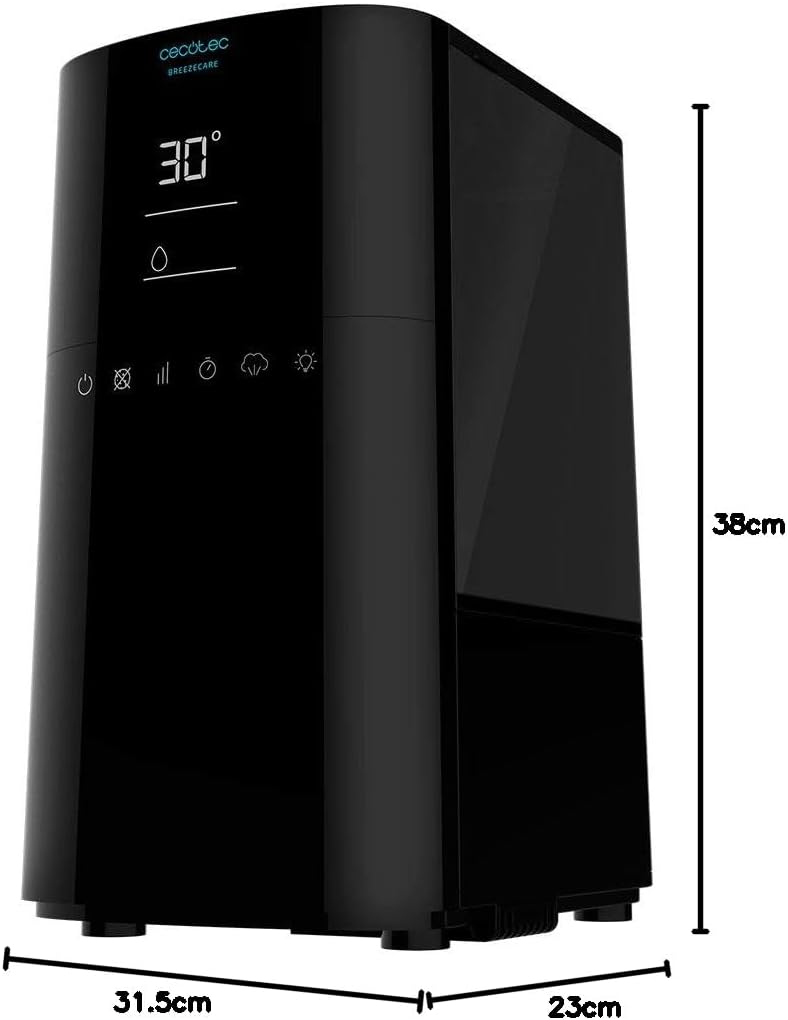
Image 8.1: A diagram illustrating the physical dimensions of the humidifier (38cm height, 31.5cm depth, 23cm width).
9. Warranty and Support
Cecotec products are manufactured to high-quality standards. For specific warranty terms and conditions, please refer to the warranty card included with your purchase or visit the official Cecotec website. Spare parts for this model are indicated to be available for up to 10 years.
For technical support, troubleshooting assistance beyond this manual, or to inquire about spare parts, please contact Cecotec customer service through their official channels. You can often find contact information on the product packaging, the official website, or by visiting the Cecotec Brand Store on Amazon.


