1. Introduction
This manual provides detailed instructions for the installation, operation, and maintenance of your TONGVEO TV-V3U 3X Optical Zoom PTZ Camera. This camera is designed for high-quality video conferencing, live streaming, and online learning applications, offering 1080P 60fps video output, 3X optical zoom, and flexible connectivity options.

Image 1.1: TONGVEO TV-V3U 3X Optical Zoom PTZ Camera and its remote control.
2. Package Contents
Please verify that all items are present in your package:
- 1 x TONGVEO TV-V3U PTZ Camera
- 1 x IR Remote Control
- 1 x 9.8ft USB 3.0 Cable
- 1 x DC 12V/2A Power Adaptor
- 1 x Wall Bracket with Screws
- 1 x User Manual (this document)
3. Product Overview
3.1 Key Features
- High-Definition Video: 1080P resolution at 60 frames per second (fps) for clear and smooth video.
- Optical Zoom: 3X optical zoom lens with a 1/2.8 inch HD Color CMOS sensor.
- Wide-Angle View: 113.91° (Wide) to 47.55° (Tele) Field of View (FOV) without distortion.
- Pan/Tilt Movement: Horizontal rotation of 350° (±175°) and vertical rotation of 180° (-90° to +90°).
- Simultaneous Outputs: HDMI and USB 3.0 video outputs for flexible connectivity.
- Control Options: IR remote control with 10 presets, and support for RS485/RS232 interfaces for joystick control (255 presets via PELCO, 64 via VISCA).
- Wide Compatibility: Works with popular video conferencing software such as Zoom, OBS, Facebook Live, WebEx, Polycom, BlueJeans, and more. Supports Windows (7, 8.1, 10, 11) and Mac OS (10.10 and higher).
3.2 Camera Ports and Connections

Image 3.1: Rear panel of the TONGVEO TV-V3U camera with connection ports.
- DC 12V: Power input port.
- RS485: Control interface for daisy-chaining multiple cameras or external control.
- RS232: Control interface for external PTZ controllers or joysticks.
- USB: USB 3.0 port for connecting to a computer for video and control.
- HDMI: HDMI output port for connecting to a display or video switcher.
4. Setup
4.1 Physical Connection
- Power Connection: Connect the DC 12V power adaptor to the camera's DC 12V port and plug it into a power outlet.
- Video Output:
- For computer connection: Connect the supplied USB 3.0 cable from the camera's USB port to an available USB 3.0 port on your computer.
- For display/switcher connection: Connect an HDMI cable from the camera's HDMI port to your TV, monitor, or video switcher.
- Control Connection (Optional): If using an external PTZ controller, connect it to the RS232 or RS485 port as required.
4.2 Software Setup
The TONGVEO TV-V3U camera is generally plug-and-play. For most operating systems (Windows 7/8.1/10/11, Mac OS 10.10 and higher), no specific driver installation is required for USB connectivity. The camera will be recognized as a standard webcam.
- Open your preferred video conferencing or streaming software (e.g., Zoom, OBS, Microsoft Teams).
- Navigate to the video/camera settings within the software.
- Select "TONGVEO Camera" or a similar entry as your video input device.
- Adjust video resolution and frame rate settings if necessary (1080P, 60fps recommended).

Image 4.1: Connectivity diagram illustrating various setup configurations.
5. Operating Instructions
5.1 Powering On/Off
Press the POWER button on the remote control or the camera unit to turn the camera on or off. The indicator light will show the camera's status.
5.2 Pan, Tilt, and Zoom (PTZ) Control
Use the directional arrows (UP, DOWN, LEFT, RIGHT) on the remote control to adjust the camera's pan and tilt. Use the ZOOM + and ZOOM - buttons to adjust the optical zoom level. The camera features smooth and quiet movement.
5.3 Using Presets
The camera supports 10 preset positions via the IR remote control. To set a preset:
- Adjust the camera to the desired position (pan, tilt, zoom).
- Press the PRESET button on the remote.
- Press a number button (0-9) to save the current position to that preset number.
To recall a preset:
- Press the desired number button (0-9) on the remote. The camera will move to the saved position.
5.4 Image Settings
The remote control allows adjustment of various image parameters:
- Brightness: Use the L-BRIGHT+ and L-BRIGHT- buttons.
- Mirror/Flip: Use the MIRROR button to flip the image horizontally or vertically, useful for ceiling installations.
- Freeze: Use the FREEZE button to pause the video feed.
- Backlight Compensation: Press and hold the BACKLIGHT ON/OFF button to toggle backlight compensation.
- Focus: Use AUTO, FAR, NEAR, MANUAL focus buttons.
For advanced image settings, press the MENU button on the remote to access the On-Screen Display (OSD) menu.
6. Remote Control Functions
The IR remote control provides comprehensive control over the camera's functions. Familiarize yourself with the button layout and their corresponding actions.

Image 6.1: Detailed functions of the IR remote control.
- POWER: Turns the camera on or off.
- CAMERA SELECT (1-4): Allows one remote to control up to four cameras by selecting the camera address.
- PRESET (0-9): Saves and recalls camera positions.
- RESET: Clears a saved preset.
- L-BRIGHT +/-: Adjusts image brightness.
- MIRROR: Flips the image horizontally/vertically.
- FREEZE: Pauses the video output.
- Directional Arrows (UP/DOWN/LEFT/RIGHT): Controls pan and tilt movement.
- MENU: Accesses the On-Screen Display (OSD) menu for advanced settings.
- ZOOM SLOW/FAST (+/-): Adjusts zoom speed.
- FOCUS (AUTO/FAR/NEAR/MANUAL): Controls focus mode and adjustment.
- BACKLIGHT ON/OFF: Toggles backlight compensation.
- PTZ RESET: Resets PTZ settings.
7. Installation Options
The TONGVEO TV-V3U camera offers multiple installation methods to suit various environments:
- Desk Mount: Place the camera on a flat surface.
- Wall Mount: Use the included wall bracket and screws to secure the camera to a wall.
- Ceiling Mount: The camera can be inverted and mounted to the ceiling using a compatible bracket (sold separately or included if specified). Remember to use the MIRROR function on the remote to correct the image orientation.
- Tripod Mount: Attach the camera to a standard tripod using the threaded hole on its base.

Image 7.1: Illustration of different installation options for the camera.
8. Maintenance
- Cleaning: Use a soft, dry cloth to clean the camera body. For the lens, use a specialized lens cleaning cloth and solution. Avoid harsh chemicals or abrasive materials.
- Storage: When not in use for extended periods, store the camera in a cool, dry place, away from direct sunlight and extreme temperatures.
- Cable Management: Ensure cables are not kinked or strained to prevent damage.
9. Troubleshooting
If you encounter issues with your TONGVEO TV-V3U camera, please refer to the following common problems and solutions:
| Problem | Possible Cause | Solution |
|---|---|---|
| No video output | Loose cable connection, incorrect input selection on display, camera not powered on, software not detecting camera. | Check all cable connections (USB, HDMI, power). Ensure the camera is powered on. Select the correct input source on your display. Verify camera selection in your software settings. Try a different USB port or cable. |
| Image is blurry or out of focus | Incorrect focus setting, dirty lens. | Use the remote control to adjust focus (AUTO, FAR, NEAR, MANUAL). Clean the camera lens with a soft, dry cloth. |
| Remote control not working | Dead batteries, IR sensor blocked, incorrect camera address selected. | Replace batteries in the remote. Ensure no obstructions between the remote and the camera's IR sensor. Verify the correct camera address (1-4) is selected on the remote if controlling multiple cameras. |
| PTZ movement is unresponsive | Control signal issue, camera malfunction. | Check remote control functionality. If using RS232/RS485, verify cable connections and controller settings. Power cycle the camera. |
| Green screen or garbled video on Mac OS | Compatibility issue with specific Mac OS versions or USB-C adapters. | Ensure your Mac OS is updated. Try different USB-C adapters or direct USB 3.0 connection if available. Test with different video conferencing software. Contact TONGVEO support if the issue persists. |
10. Specifications
The following table outlines the technical specifications for the TONGVEO TV-V3U PTZ Camera:
| Feature | Specification |
|---|---|
| Model Number | TV-V3U |
| Brand | TONGVEO |
| Optical Zoom | 3X |
| Video Capture Resolution | 1080p (Full HD) |
| Frame Rate | 60fps |
| Photo Sensor Technology | CMOS (1/2.8 inch HD Color CMOS with 2.38 megapixel) |
| Field of View (FOV) | 113.91° (W) - 47.55° (T) |
| Pan Rotation | 350° (±175°) |
| Tilt Rotation | 180° (-90° to +90°) |
| Video Outputs | HDMI, USB 3.0 |
| Control Interfaces | IR Remote, RS232, RS485 |
| Video Compression Format | YUY2, MJPG, H.264, H.265 |
| Operating Systems | Windows 7/8.1/10/11, Mac OS 10.10+, Android, Linux (requires UVC support) |
| Power Supply | DC 12V/2A |
| Item Weight | 5.85 pounds |
| Package Dimensions | 11.18 x 8.74 x 7.95 inches |
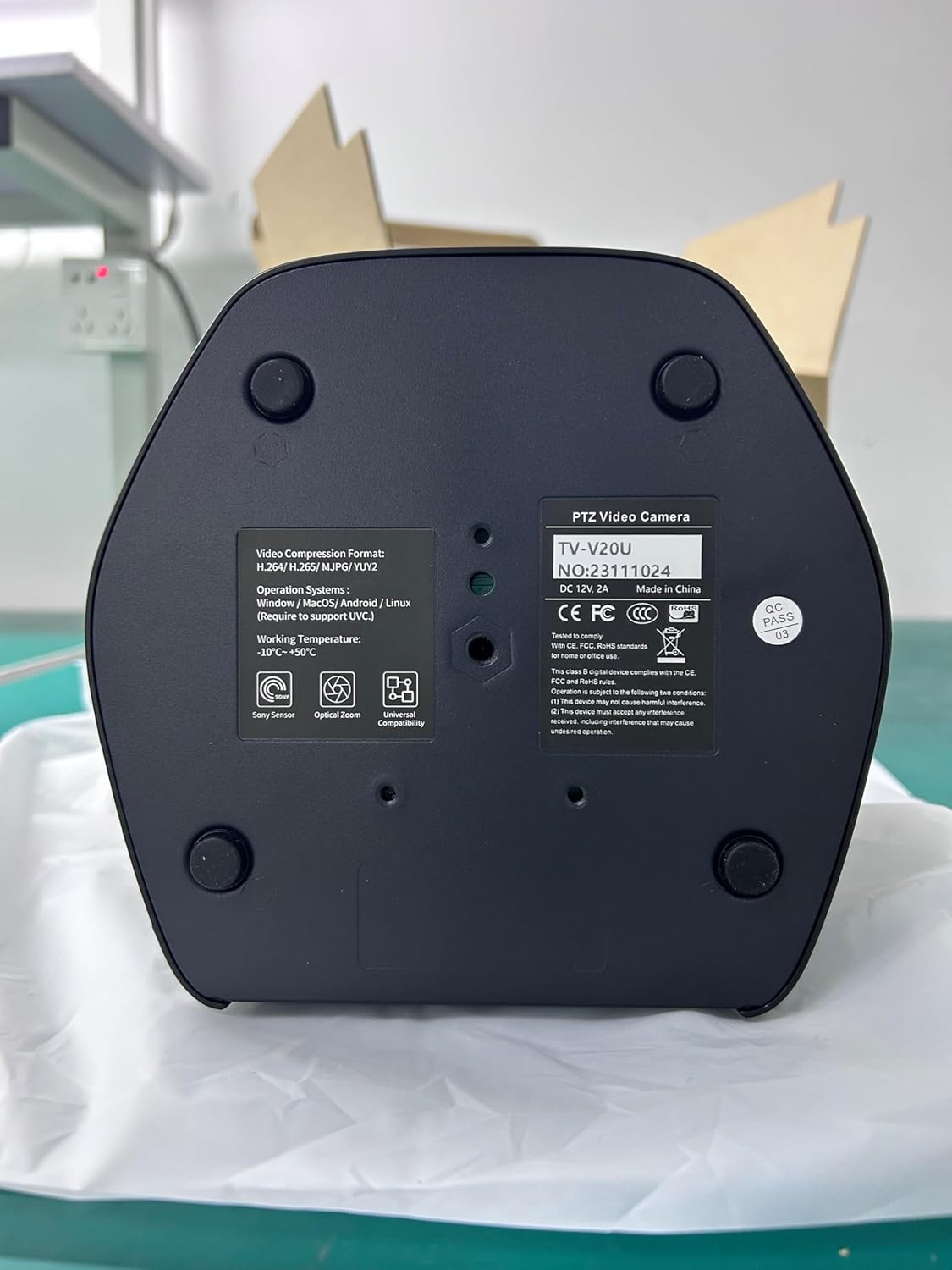
Image 10.1: Bottom label of the camera showing model information (TV-V3U-PRO variant shown).
11. Warranty and Support
TONGVEO products are designed for reliability and performance. For specific warranty details, please refer to the warranty card included with your product or visit the official TONGVEO website. If you require technical assistance or have questions not covered in this manual, please contact TONGVEO customer support through their official channels.


