
AUVON AS8012C242
Contents
AUVON Professional Muscle Stimulator User Manual
Model: AS8012C242
Introduction
The AUVON Professional Muscle Stimulator is a versatile 3-in-1 device combining TENS (Transcutaneous Electrical Nerve Stimulation) for pain relief and EMS (Electrical Muscle Stimulation) for muscle conditioning and strengthening. This manual provides essential information for the safe and effective use of your device, including setup, operation, maintenance, and troubleshooting.

Image: AUVON Professional Muscle Stimulator with its accessories, including electrodes and a carrying case.
Important Safety Warnings
This product is not suitable for individuals with certain medical conditions or circumstances. Please read the following points carefully before using this product.
- Do not use this product if you have an implanted defibrillator, cardiac pacemaker, or any other implanted metal or electronic device.
- Do not use this product if you have heart rhythm problems, seizures, brain diseases, or neurological disorders.
- Do not use this product if you have undiagnosed chronic pain.
- Do not use this product if you are pregnant or in labor.
- Do not use this product if you have cancer.
- Do not use this product if you are sensitive to electrotherapy.
- Do not use this product excessively.
- Do not use this product above the neck, especially on the head or neck.
- Do not use this product if you are under 22 years old.
Individual symptoms, situations, circumstances, and results may vary. The information provided is not intended for medical diagnosis or treatment, nor as a substitute for professional medical advice. Please consult your doctor or a qualified healthcare professional regarding your condition and appropriate medical treatment.
Package Contents
Upon opening your AUVON Professional Muscle Stimulator package, you should find the following items:
- 1 x AUVON Dual Channel Muscle Stimulator Unit
- 12 x 2"x2" Premium Electrode Pads
- 2 x Electrode Cables (1/2 cable)
- 1 x USB Charging Cable
- 1 x Storage Bag
- 1 x Multi-language User Manual

Image: All components included in the AUVON Muscle Stimulator package.
Product Features
TENS + EMS Combination
The AUVON TENS and PMS/EMS device combines two distinct therapies. TENS (Transcutaneous Electrical Nerve Stimulation) provides safe, non-invasive, and drug-free pain relief methods widely used by medical professionals and physical therapists. PMS/EMS (Powered Muscle Stimulator / Electrical Muscle Stimulation) utilizes electrical impulses to elicit muscle contraction, aiding in increased strength and endurance, serving as a valuable tool for rehabilitation and strength training.

Image: The device display illustrating the three main therapy categories: TENS for pain relief, PMS/EMS for muscle conditioning, and Massage for body relaxation, with 24 pre-programmed modes.
Independent Dual Channel
The device features independent dual channels (A and B), allowing you to apply different modes and intensity levels simultaneously to two separate body areas. For instance, you can use a specific mode and intensity for shoulder pain on Channel A, while applying a different mode and stronger intensity for back stimulation on Channel B.
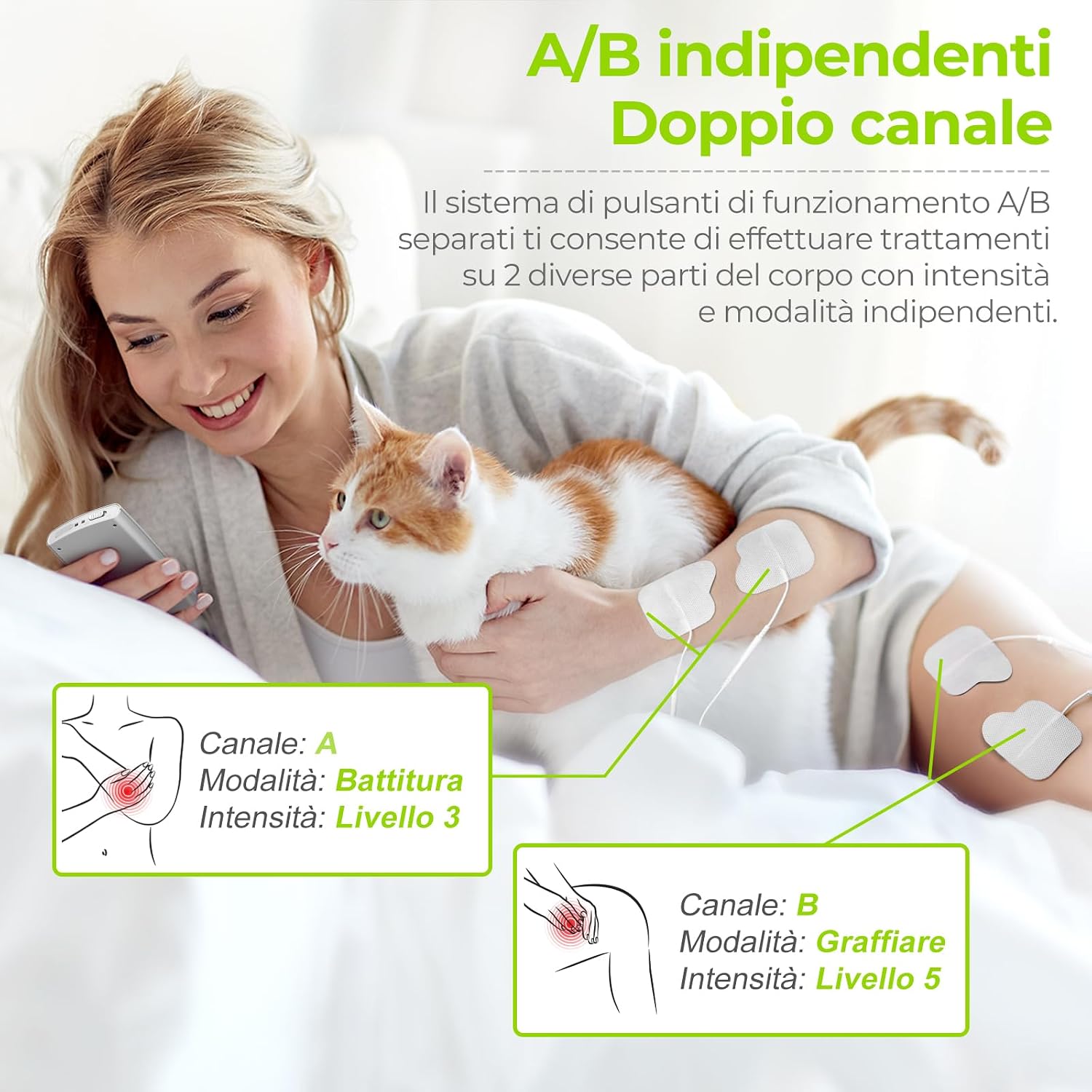
Image: A user demonstrating the independent dual channel functionality, applying electrodes to different body parts with distinct settings.
Professional Stimulator with 24 Modes and 20 Intensity Levels
The AUVON stimulator offers 20 intensity levels and 24 pre-programmed massage modes. The treatment time is adjustable, with a maximum duration of 90 minutes. Equipped with a powerful built-in rechargeable lithium battery, the unit provides up to 10 hours of continuous use on a single charge.
Upgraded Electrodes
The included electrodes feature a low-impedance Solid Gel, upgraded with an industry-leading American adhesive. This provides superior self-adhesive performance and allows for easy cleaning, extending their lifespan up to 45 uses. The 2mm standard connector cables and electrodes are widely used in medical settings, ensuring compatibility and ease of finding replacements.

Image: A detailed view of the medical-grade electrode pad, highlighting its layered construction and the 2mm pin connector for stable current delivery and corrosion resistance.
Setup Guide
Follow these steps to set up and begin using your AUVON Professional Muscle Stimulator:
- Connect Electrodes: Connect the electrode wire to the AUVON TENS electrodes.
- Apply Electrodes: Peel off the transparent protective film from the electrodes and firmly stick them onto the desired body area. Ensure the skin is clean and dry for optimal adhesion.
- Connect to Unit & Power On: Connect the electrode cables to the AUVON TENS unit. Turn on the device.
- Select Channel A: Press the left "∧" or "∨" button to select Channel A.
- Choose Main Mode: Press the 'M' button to cycle through and choose one of the 6 main modes.
- Choose Secondary Mode: Press the "<" or ">" buttons to select a secondary mode within the chosen main mode.
- Adjust Channel A Intensity: Press the left "∧" or "∨" button to increase or decrease the intensity level for Channel A.
- Select Channel B: Press the right "∧" or "∨" button to select Channel B. Repeat steps 5 and 6 for Channel B.
- Adjust Channel B Intensity: Press the right "∧" or "∨" button to increase or decrease the intensity level for Channel B.
- Set Timer: Press the 'T' button to select the desired treatment time, ranging from 10 to 90 minutes.
- Lock/Unlock: To lock or unlock the unit's controls, press and hold the central button for 3 seconds.
- Power Off & Remove: After your session, turn off the TENS unit, then carefully remove the electrodes from your skin.

Image: Visual instructions detailing each step of setting up and operating the device.
Operating Instructions
Once the device is set up as described in the 'Setup Guide' section, you can begin your therapy session. The device allows for precise control over your treatment:
- Mode Selection: Use the 'M' button to select the main therapy type (TENS, PMS/EMS, or Massage). Further refine your selection using the '<' and '>' buttons to choose from the 24 pre-programmed modes.
- Intensity Adjustment: Independently adjust the intensity for Channel A and Channel B using their respective "∧" (increase) and "∨" (decrease) buttons. Start with a low intensity and gradually increase it until you feel a comfortable, yet effective, sensation.
- Timer Setting: Press the 'T' button to set the duration of your session. The timer can be set from 10 to 90 minutes. The device will automatically shut off once the time expires.
- Screen Lock: To prevent accidental changes during a session, press and hold the central button for 3 seconds to lock the screen. Repeat to unlock.
Always ensure the electrodes are securely attached to your skin before increasing intensity. If the sensation is uncomfortable, reduce the intensity immediately.
Maintenance and Care
Proper maintenance will ensure the longevity and optimal performance of your AUVON TENS/EMS device:
- Storage: When not in use, turn off the device and remove the electrodes. Store the device in a cool, dry place, preferably in the provided storage bag.
- Electrode Care: After each use, cover the electrodes with their supplied electrode holders or protective films. Store them in the provided bag. Applying a few drops of water to the adhesive side of the pads before and after use can help maintain their stickiness and extend their lifespan.
- Charging: Charge the device at least every 3 months, even if not used regularly, to maintain battery health. You can charge the device using the supplied USB cable via a computer or a compatible USB wall adapter.
- Cleaning: Wipe the device with a soft, damp cloth. Do not use abrasive cleaners or immerse the device in water.
Troubleshooting
If you encounter any issues with your AUVON Professional Muscle Stimulator, please refer to the following common troubleshooting tips:
| Problem | Possible Cause | Solution |
|---|---|---|
| Device does not turn on | Low or no battery charge | Charge the device using the USB cable. |
| Weak or no sensation | Intensity too low; Electrodes not properly attached; Electrodes worn out; Cable connection loose | Increase intensity gradually; Ensure electrodes are firmly pressed onto clean, dry skin; Replace old electrodes; Check that cables are securely plugged into both the device and electrodes. |
| Electrodes not sticking | Skin is oily or dirty; Electrodes are old or dry | Clean and dry skin thoroughly before application; Apply a few drops of water to the adhesive side of the pads; Replace electrodes if they no longer adhere. |
| Uneven sensation between channels | Different intensity settings for Channel A and B; Electrode placement or condition difference | Adjust intensity levels for each channel independently to match desired sensation; Ensure electrodes are placed symmetrically and are in good condition. |
Specifications
| Specification | Detail |
|---|---|
| Model Number | AS8012C242 |
| Dimensions | 14.7 x 9.1 x 7.4 cm |
| Weight | 330 grams |
| Number of Channels | 2 (Independent Dual Channel) |
| Modes | 24 Pre-programmed Modes (TENS, PMS/EMS, Massage) |
| Intensity Levels | 20 Levels |
| Timer | Adjustable (10-90 minutes) |
| Battery Type | Rechargeable Lithium Ion (1 included) |
| Continuous Use Time | Up to 10 hours |
| Electrode Connector | 2mm Standard Pin Connector |
| Country of Origin | China |
| First Available Date | January 13, 2021 |
Warranty and Support
AUVON stands behind the quality of its products. Your AUVON Professional Muscle Stimulator comes with a 24-month warranty from the date of purchase. For any questions, technical assistance, or warranty claims, please do not hesitate to contact our friendly customer service team. We are committed to providing lifetime technical support to ensure your satisfaction and optimal use of the device.
Please refer to the contact information provided in your product packaging or on the official AUVON website for direct support.
Documents and downloads
Ask a question about this manual
Ask about setup, troubleshooting, compatibility, parts, safety, or missing instructions. Manuals+ will review the question and use this page’s manual context to help answer it.