1. Important Safety Information
WARNING: Use only in unoccupied spaces. Ozone is harmful to humans and pets when present in high concentrations.
- Always ensure no people, pets, or plants are in the room during operation.
- Ventilate the treated area thoroughly for at least 30-60 minutes after ozone generation is complete before re-entering.
- Do not operate the device if it is damaged or malfunctioning.
- Keep out of reach of children.
- Do not block the air intake or outlet vents.
- Unplug the unit before any maintenance or cleaning.
2. Product Overview
The Airthereal MA5000 is a commercial ozone generator designed to effectively eliminate odors, bacteria, and viruses from various environments. It produces 5000 mg/h of ozone, making it suitable for treating homes, offices, vehicles, and other spaces.

Figure 2.1: Front view of the Airthereal MA5000 Ozone Generator, showing the control dial and air vents.
2.1 Key Features
- High Ozone Output: 5000 mg/h for powerful odor and pathogen elimination.
- Versatile Application: Ideal for homes, offices, cars, basements, smoking areas, kitchens, and areas affected by water or fire damage.
- Timer Function: Features a 120-minute timer and a HOLD mode for flexible operation.
- Portable Design: Equipped with an insulating rubber handle for easy transport.
- Energy Efficient: Designed for low power consumption.
- Durable Construction: Made from metal (aluminum alloy).

Figure 2.2: The Airthereal MA5000 effectively eliminates odors such as musty smells, smoke, pet odors, cooking odors, formaldehyde, and those from fire-damaged areas.
3. Setup
3.1 Unpacking and Inspection
Carefully remove the ozone generator from its packaging. Inspect the unit for any signs of damage. Ensure all components listed below are present:
- 1 x Airthereal MA5000 Ozone Generator
- 1 x Ozone Plate (pre-installed)
- 1 x Power Cable
- 1 x User Manual

Figure 3.1: Contents of the Airthereal MA5000 package, including the unit, power cable, and user manual.
3.2 Placement
Place the ozone generator in the center of the room or area to be treated, ensuring it is on a stable, flat surface. Do not place it directly against walls or furniture, as this may obstruct airflow. Ensure there is adequate space around the unit for proper ventilation.
4. Operating Instructions
4.1 Pre-Operation Checklist
- Ensure the area to be treated is completely empty of people, pets, and plants.
- Close all windows and doors in the treatment area.
- Remove any valuable artwork, delicate fabrics, or rubber materials that might be sensitive to ozone.
4.2 Setting the Timer
The MA5000 features a 120-minute timer and a HOLD function.
- Timer Mode: Turn the dial clockwise to set the desired operating time (up to 120 minutes). The unit will automatically shut off when the timer expires.
- HOLD Mode: Turn the dial counter-clockwise to the "HOLD" position for continuous operation. Use this mode with extreme caution and only when you can ensure the area remains unoccupied for the entire duration.
Recommended Operating Time based on Area:
| Area (m²) | Time (minutes) |
|---|---|
| 9.29 m² | 7 min |
| 18.58 m² | 15 min |
| 27.87 m² | 30 min |
| 37.16 m² | 45 min |
| 46.45 m² | 60 min |
| 92.9 m² | HOLD |
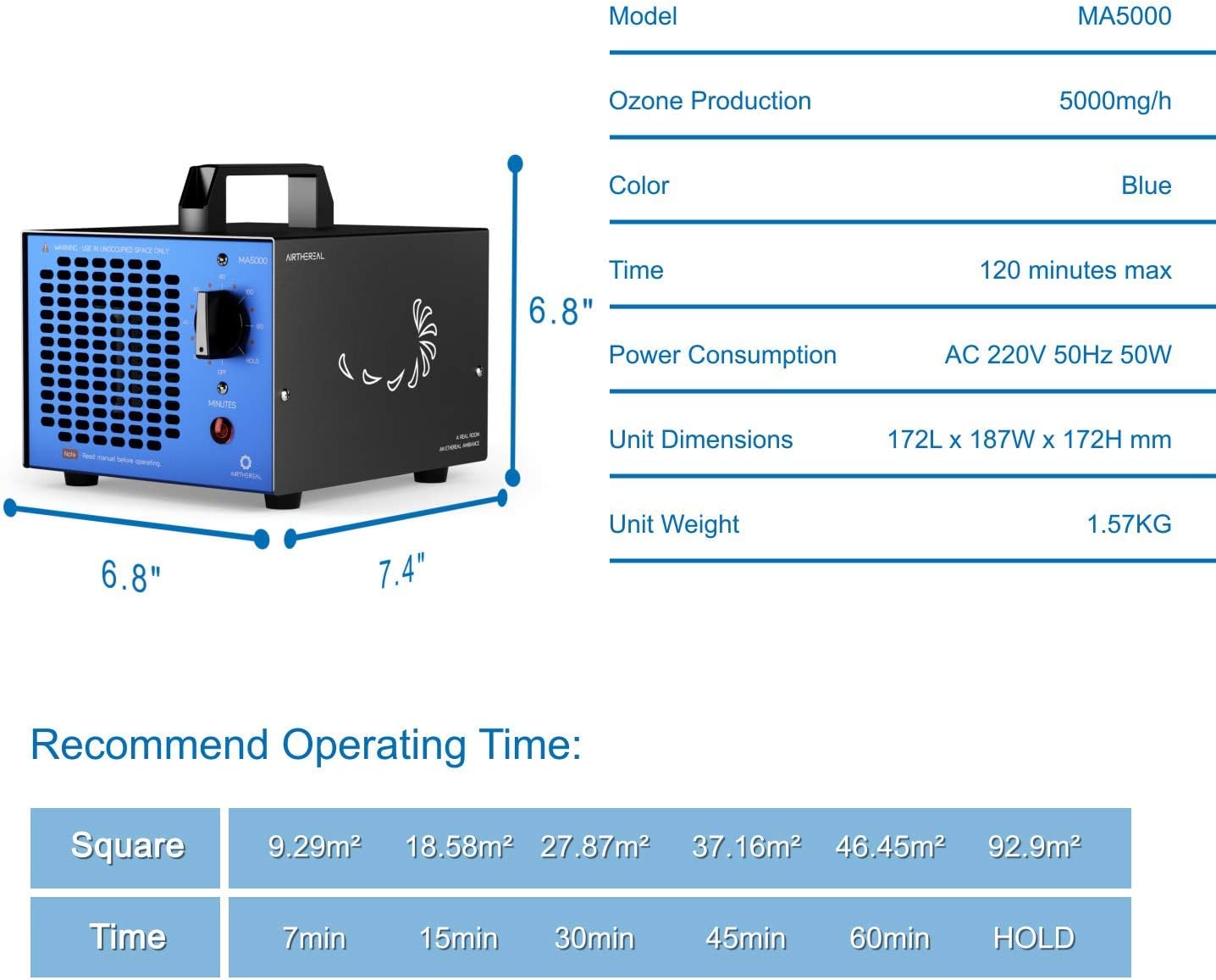
Figure 4.1: Product dimensions and a table showing recommended operating times based on room size.
4.3 Post-Operation Ventilation
After the ozone generation cycle is complete, open all windows and doors to ventilate the treated area. Allow at least 30-60 minutes for the ozone to dissipate before re-entering. The treated area should smell fresh and clean, similar to the scent after a thunderstorm.
5. Maintenance
Regular maintenance ensures optimal performance and longevity of your Airthereal MA5000 ozone generator.
5.1 Cleaning the Ozone Plate and Filter
The ozone plate and air filter should be cleaned regularly, depending on usage and air quality. A dirty plate or filter can reduce ozone output and efficiency.
- Unplug the unit from the power outlet.
- Locate the filter cover on the side of the unit.
- Remove the filter cover and carefully slide out the ozone plate and filter.
- Clean the ozone plate with a cotton swab dipped in rubbing alcohol. Ensure it is completely dry before reinstallation.
- The air filter is removable and washable. Rinse it under warm water and allow it to air dry completely.
- Reinstall the dry filter and ozone plate, then replace the filter cover.
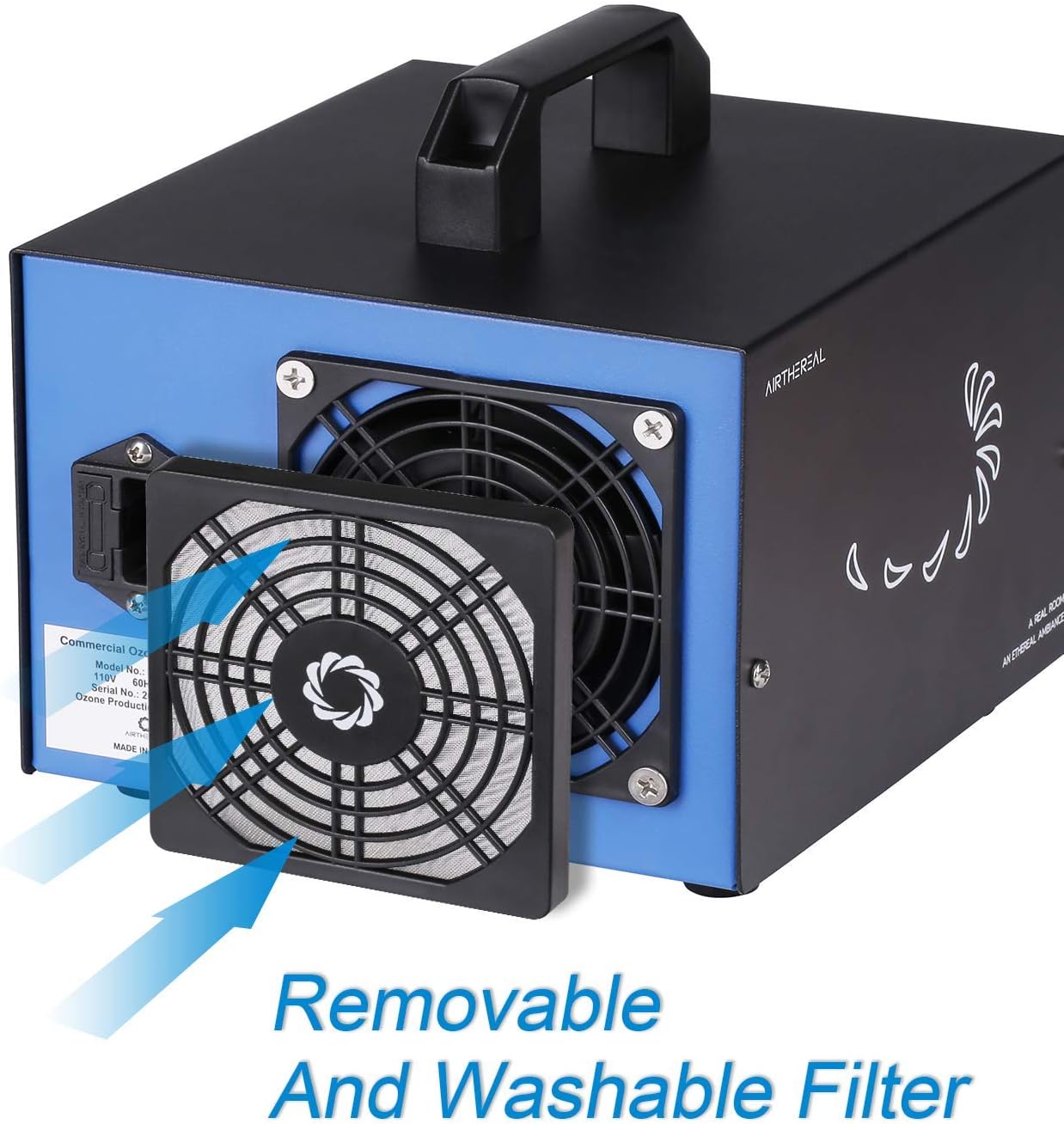
Figure 5.1: Illustration of how to remove and clean the washable filter and ozone plate.
5.2 Exterior Cleaning
Wipe the exterior of the unit with a soft, damp cloth. Do not use abrasive cleaners or solvents.
6. Troubleshooting
| Problem | Possible Cause | Solution |
|---|---|---|
| Unit does not turn on. | No power supply; Timer not set. | Check power connection; Ensure timer is set or in HOLD mode. |
| Low ozone output. | Dirty ozone plate or filter; Obstructed vents. | Clean ozone plate and filter (refer to Section 5.1); Ensure vents are clear. |
| Unusual noise. | Fan obstruction; Loose components. | Unplug and check for obstructions in the fan; Contact customer support if noise persists. |
7. Specifications
| Specification | Detail |
|---|---|
| Brand | AIRTHEREAL |
| Model Number | MA5000 Blau |
| Ozone Production | 5000 mg/h |
| Material | Metal (Aluminum Alloy) |
| Color | Blue |
| Unit Dimensions (L x W x H) | 172 x 187 x 172 mm (6.8 x 7.4 x 6.8 inches) |
| Unit Weight | 1.57 kg (3.46 lbs) |
| Power | AC 220-240 V 50 Hz 50 W |
| Noise Level | 35 dB |
| Control Method | Tactile (Dial) |
| Filter Type | Replaceable Ozone Plate |
| Max Floor Area | 100 square meters |

Figure 7.1: Detailed dimensions of the Airthereal MA5000 unit.
8. Warranty and Support
The Airthereal MA5000 comes with a 2-year warranty and lifetime support.
If you have any questions, concerns, or require assistance with your product, please do not hesitate to contact Airthereal customer support. They are committed to resolving any issues as quickly as possible.
For support, please refer to the contact information provided in the original packaging or on the official Airthereal website.


