Product Overview
The Membrane Solutions MSA3 Air Purifier is designed to provide clean and fresh air for your home. Featuring a 3-stage filtration system, including an H13 True HEPA filter, it effectively removes 99.97% of airborne particles as small as 0.01 microns, such as pet dander, dust, pollen, smoke, and odors. This unit is 100% ozone-free and operates with a low noise level, making it suitable for various living spaces, including bedrooms, living rooms, and offices.
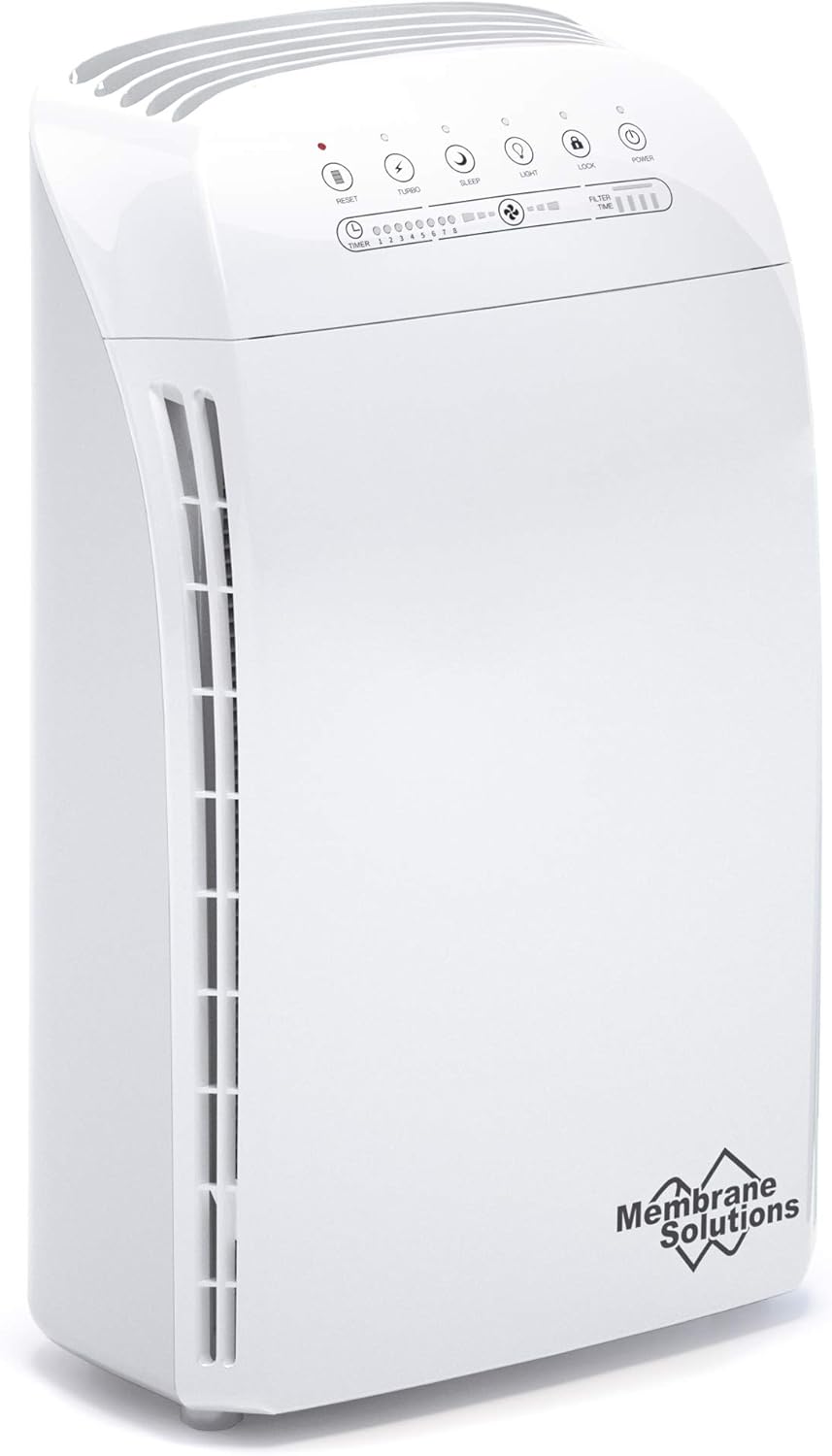
Image: Front view of the Membrane Solutions MSA3 Air Purifier, white in color, showing the control panel on top and air vents on the side.
Setup Guide
1. Unpacking and Placement
Carefully remove the air purifier from its packaging. Place the unit on a flat, stable surface in the desired room. Ensure there is adequate space around the unit for proper airflow, ideally at least 6 inches (15 cm) from walls or furniture.
2. Filter Installation
The MSA3 Air Purifier comes with its filter pre-installed, but it is typically sealed in plastic for protection during shipping. You must remove this plastic packaging before first use.
- Locate the back cover of the air purifier. Gently pull the cover to remove it, revealing the filter compartment.
- Remove the sealed filter from the unit. Carefully cut and remove all plastic packaging from the filter.
- Re-insert the filter into the air purifier. Ensure the filter is inserted from the top, aligning the recessed area on the filter with the protruding section on the unit. Incorrect insertion from the bottom may prevent the cover from closing securely and the unit from operating.
- Replace the back cover, ensuring it clicks securely into place. The unit will not power on if the cover is not properly closed.

Image: A visual guide demonstrating the correct way to insert the filter from the top and the incorrect way from the bottom. It also shows how to ensure the back cover is securely closed for proper operation.
Video: A demonstration on how to properly install the MSA3 filter. This video guides users through the steps of removing the old filter, unwrapping the new one, and correctly inserting it into the air purifier.
3. Power Connection
Plug the power cord into a standard electrical outlet. The unit is now ready for operation.
Operating Instructions
Control Panel Overview
Image: Close-up of the MSA3 Air Purifier's control panel, showing buttons for Power, Turbo, Sleep, Light, Lock, Reset, and indicators for Timer and Filter Time.
- Power Button: Turns the unit on or off.
- Turbo Button: Activates the highest fan speed for rapid air purification.
- Sleep Button: Sets the unit to its lowest fan speed (22dB) and dims/turns off indicator lights for quiet operation.
- Light Button: Toggles the control panel lights on or off.
- Lock Button: Activates/deactivates the child lock function, preventing accidental changes to settings.
- Timer Button: Sets the operating time for 1 to 8 hours.
- Filter Time Indicator: Displays the remaining filter life.
Air Purification Performance
The MSA3 Air Purifier is designed for large rooms, with a maximum coverage of up to 1590 sq ft. Users may notice an improvement in air quality within 10 minutes of operation. Its H13 True HEPA filter effectively captures particles as small as 0.01 microns, including PM 2.5, significantly reducing allergens and pollutants.

Image: The MSA3 Air Purifier in a bedroom setting, illustrating its capacity to purify air in large rooms, covering 398 sq ft in 15 minutes and 1590 sq ft in 60 minutes.
Video: A smoke test demonstrating the effectiveness of the MSA3 H13 HEPA Air Purifier in clearing smoke from an enclosed space, showcasing its rapid purification capabilities.

Image: A detailed diagram illustrating the 4 stages of filtration: Nonwoven Pre-filter, H13 True HEPA filter, Activated Carbon filter with OdallerPure™ Technology, and a plastic support mesh.
Maintenance
Filter Replacement
To maintain optimal performance, replace the filter regularly. The Filter Time Indicator on the control panel will alert you when a replacement is needed. Only use genuine Membrane Solutions MSA3 Air Filters to ensure proper function and to avoid damaging the unit. Non-official filters may not be compatible or meet HEPA standards.

Image: Various filter types available for the MSA3 Air Purifier, including Original, Toxin Absorber, Smoke Remover, and Pet Allergy filters, highlighting the specialized options for different needs.

Image: The MSA3 Air Purifier alongside a genuine Membrane Solutions filter, emphasizing the importance of using authentic filters for best fit and filtration performance.
Cleaning the Unit
Wipe the exterior of the air purifier with a soft, dry cloth. Do not use abrasive cleaners or solvents. Ensure the unit is unplugged before cleaning.
Troubleshooting
Unit Not Turning On
- Ensure the power cord is securely plugged into a working electrical outlet.
- Verify that the back cover of the air purifier is fully closed and latched. The unit has a safety protection design that prevents operation if the cover is not secure.
- Check if the filter is installed correctly from the top. An improperly installed filter can prevent the unit from powering on.
- If the unit emits 3 beeps and no LED lights illuminate, it may indicate that a new filter is required, even if the filter time indicator does not show it as expired. Replace the filter and try again.
Reduced Airflow or Odor
- Check the filter for excessive dust or debris. It may be time for a filter replacement.
- Ensure the air inlets and outlets are not blocked.
Specifications
| Feature | Detail |
|---|---|
| Brand | Membrane Solutions |
| Model Number | HERAP008_M1 |
| Color | White |
| Product Dimensions | 19.3 x 33.27 x 54.36 cm |
| Item Weight | 6 kg |
| Power/Wattage | 44 watts |
| Noise Level | 22 dB (Sleep Mode) |
| Max Coverage Area | Up to 1590 sq ft |
| Filter Type | H13 True HEPA PP electrostatic electret melt-blown filter |
| Particle Retention Size | 0.01 Micrometer |
| Control Method | Touch |
| Certifications | ETL, FCC, CE, RoHS |
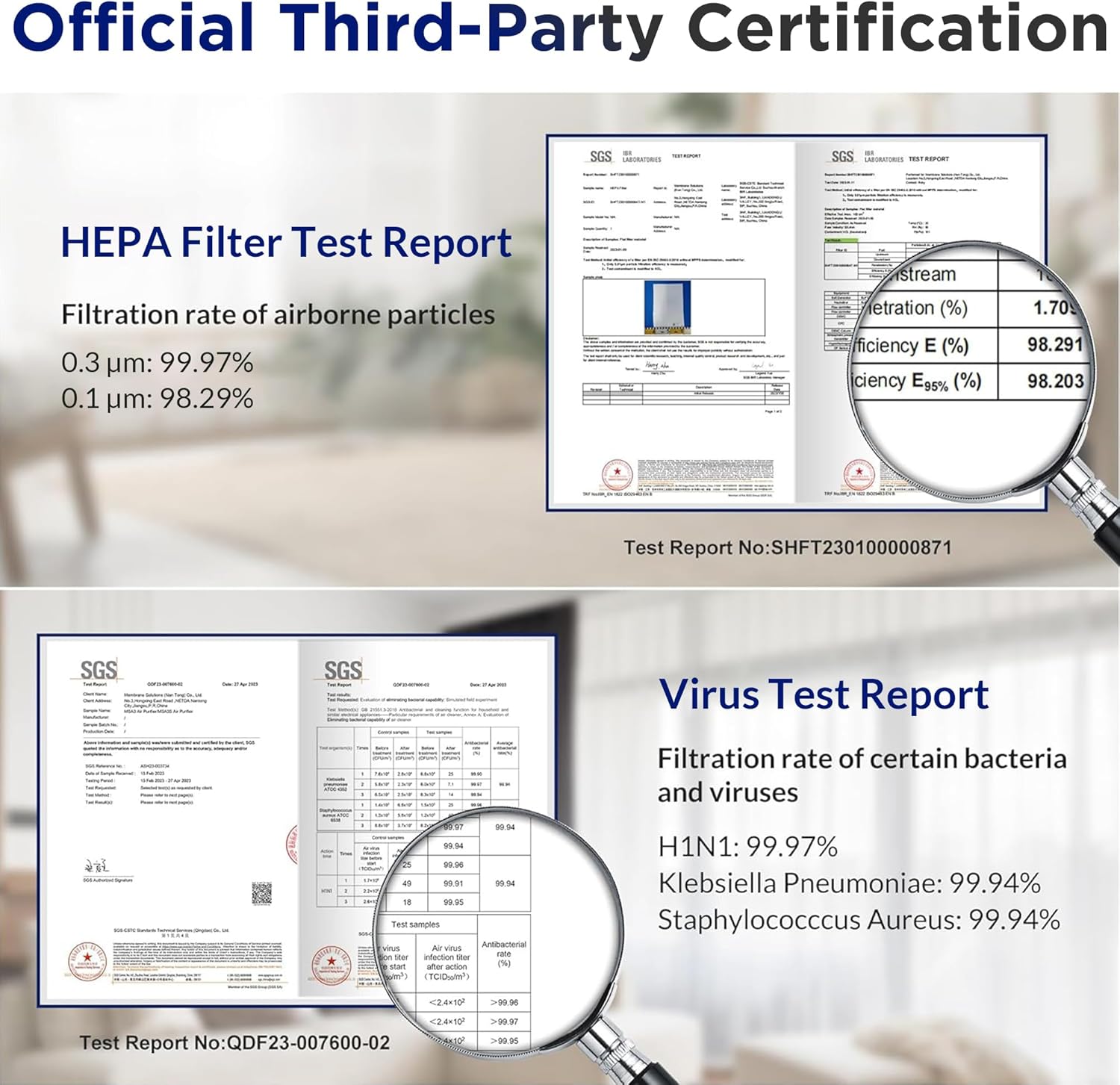
Image: Documents showing official third-party certifications and test reports for the MSA3 Air Purifier, including HEPA filter test results and virus test reports.
Warranty and Support
Membrane Solutions provides a warranty for this product. For detailed warranty information, product support, or to purchase genuine replacement parts, please visit the official Membrane Solutions website or contact their customer service. Keep your purchase receipt for warranty claims.
For further assistance, you can visit the Membrane Solutions Store on Amazon.


