
Introduction
Thank you for choosing the Prominence Home Atlas 51470-01 44-inch Ceiling Fan. This manual provides comprehensive instructions for the safe installation, operation, and maintenance of your new ceiling fan. Please read all instructions carefully before beginning installation and retain this manual for future reference.
The Atlas ceiling fan features a modern design with a champagne finish, integrated dimmable LED lighting, and reversible blades to complement various room aesthetics. It is designed for medium to large rooms, offering both cooling and air circulation benefits.

Image: The Prominence Home Atlas 44-inch ceiling fan installed in a modern bedroom setting.
Safety Information
To reduce the risk of electrical shock, fire, or personal injury, always follow these basic safety precautions:
- Read all instructions and safety information before installing your fan and save these instructions.
- All wiring must be in accordance with national and local electrical codes.
- The fan must be mounted to a ceiling joist or support structure capable of supporting a minimum of 35 lbs (15.9 kg).
- Ensure the installation site allows for a minimum of 7 feet (2.1 meters) clearance from the floor to the blade trailing edge.
- Do not operate the fan with damaged wiring or if the fan is not functioning properly.
- Always disconnect power at the main circuit breaker before installation or servicing.
Package Contents
Verify that all components listed below are included in your package:
- Ceiling Fan Motor Assembly
- 4 Fan Blades
- Light Kit with Frosted Integrated Globe
- Remote Control with Wall Dock
- Hardware Pack (screws, washers, wire nuts, etc.)
- Downrod (4-inch standard)
- Instruction Manual
Specifications
| Feature | Specification |
|---|---|
| Model Number | 51470-01 |
| Blade Span | 44 inches (111.76 cm) |
| Dimensions (L x W x H) | 44 x 44 x 14.9 inches (111.76 x 111.76 x 37.8 cm) |
| Weight | 14.83 lbs (6.73 kg) |
| Number of Blades | 4 |
| Number of Speeds | 3 |
| Power Consumption | 53.55 Watts |
| Voltage | 120 Volts (AC) |
| Light Kit | Integrated LED, 1400 Lumens, 18 Watts, 2700K Color Temperature, Dimmable (10%-100%) |
| Mounting Type | Downrod Mount (standard 4-inch included), Sloped Ceiling Compatible (angle mount sold separately for angles > 17 degrees) |
| Material | Metal, Laminated Wood, Glass |

Image: Product dimensions indicating a 44-inch blade span and 14.9-inch height from ceiling to the bottom of the light kit.
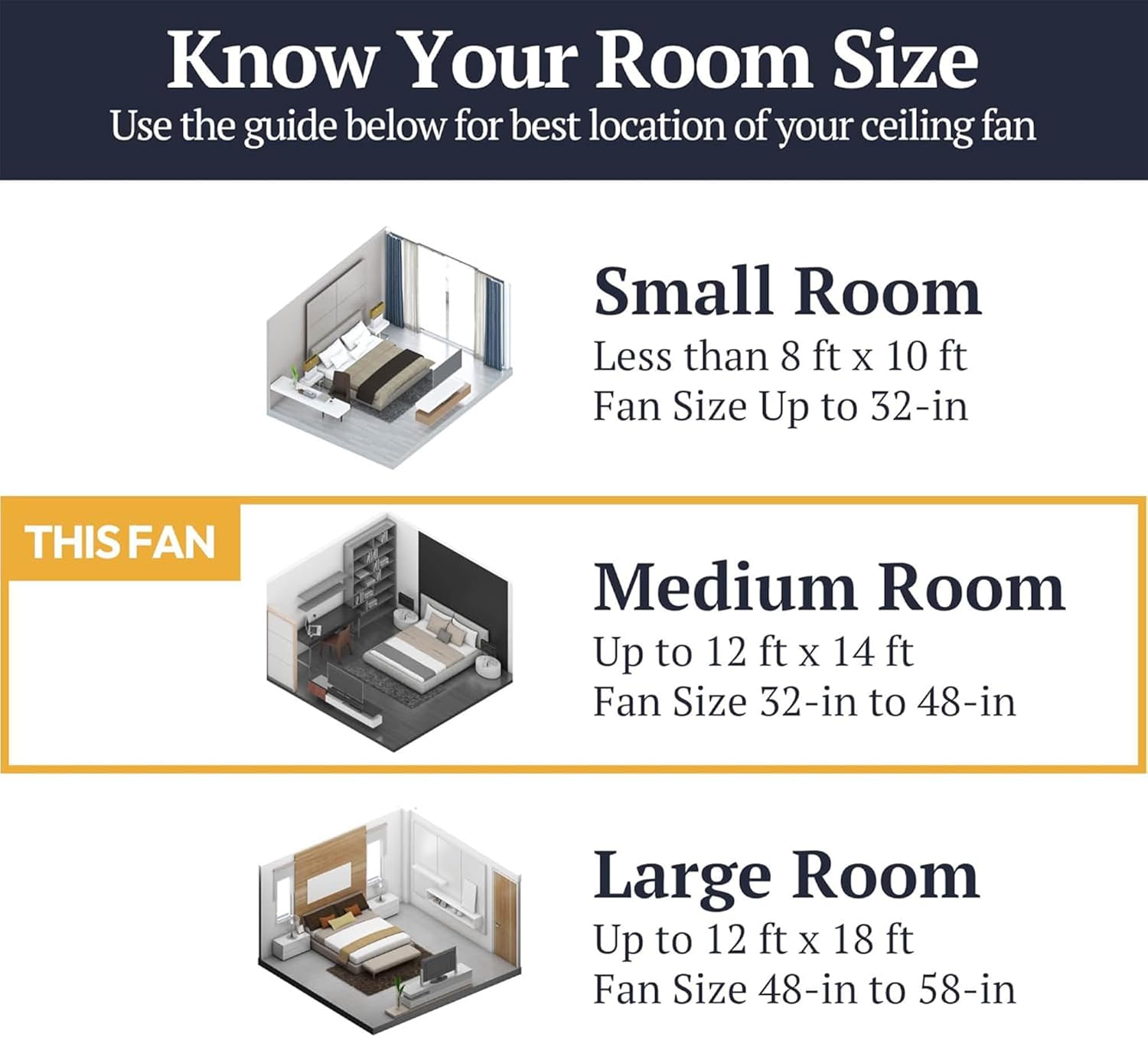
Image: Room size guide recommending the 44-inch fan for medium rooms up to 12 ft x 14 ft.
Setup and Installation
Professional installation is recommended for safety and optimal performance. Ensure power is disconnected at the circuit breaker before proceeding.
Mounting Options
The Atlas fan supports two mounting types:
- Standard Downrod Mount: Utilizes the included 4-inch downrod for standard flat ceilings.
- Sloped Ceiling Mount: Compatible with sloped ceilings. An angle mount kit (sold separately) is required for ceilings with angles greater than 17 degrees.
General Installation Steps (Summary)
- Secure the mounting bracket to the ceiling junction box and support structure.
- Assemble the downrod with the motor housing.
- Hang the fan assembly onto the mounting bracket.
- Complete electrical wiring connections according to the wiring diagram in the full manual.
- Attach the fan blades to the motor housing.
- Install the light kit and frosted globe.
- Restore power and test the fan and light functions.

Image: Overview of the Atlas fan highlighting its 4-blade design, reversible dual-finish blades, standard and angled mounting options, and 2700K light temperature.
Operating Instructions
Remote Control
Your Atlas ceiling fan comes with a convenient remote control and a wall dock for easy access. The remote allows you to control fan speed, light on/off, dimming, and other special features.

Image: Detailed view of the remote control and its wall dock, showing buttons for power, fan speed (high, medium, low), light on/off/dim, walk away light delay, variable breeze, and HomeShield™.
- Power Fan On/Off: Turns the fan on or off.
- High/Medium/Low Speed: Adjusts the fan's rotation speed.
- Light On/Off/Dim: Press to turn the light on or off. Press and hold to dim the light from 10% to 100%.
- Walk Away Light Delay: Delays the light turning off for one minute.
- Variable Breeze: Simulates a natural breeze by varying fan speed.
- HomeShield™: Simulates occupancy when you are away from home.
Reversible Motor
The fan features a reversible motor for year-round comfort. A switch on the fan housing allows you to change the direction of blade rotation:
- Summer Mode (Counter-clockwise): Creates a downward airflow, producing a cooling effect.
- Winter Mode (Clockwise): Creates an upward airflow, circulating warm air trapped near the ceiling and reducing heating costs.

Image: Illustration of the reversible motor's function, showing downward airflow for cooling in summer and upward airflow for circulating warm air in winter.
Reversible Blades
The fan blades have a dual-finish design, allowing you to choose the aesthetic that best suits your room:
- One side features a clean white finish.
- The other side features a warm honey oak finish.
To change the blade finish, simply remove the blades, flip them to the desired side, and reattach them securely.

Image: Comparison of the reversible blades, displaying the white finish (Side A) and the honey oak finish (Side B).
Integrated Dimmable LED Light
The fan includes an integrated LED light kit with a frosted globe. The light is dimmable from 10% to 100% using the remote control, providing adjustable illumination for your space.

Image: Detail of the frosted integrated globe light kit, highlighting its 2700K color temperature and 10%-100% dimmable functionality.
Maintenance
Regular maintenance ensures the longevity and optimal performance of your ceiling fan.
- Cleaning: Periodically clean the fan blades and motor housing with a soft, damp cloth. Do not use abrasive cleaners or solvents.
- Tighten Fasteners: Check all screws and fasteners annually to ensure they are secure. Loose connections can cause wobbling or noise.
- Light Kit: The integrated LED light kit does not require bulb replacement. If the light malfunctions, refer to the troubleshooting section or contact customer support.
Troubleshooting
If you experience issues with your fan, consult the following common problems and solutions:
| Problem | Possible Cause | Solution |
|---|---|---|
| Fan does not start | No power to the fan; Loose wire connections; Remote control battery low or not paired. | Check circuit breaker; Verify all wire connections are secure; Replace remote battery or re-pair remote. |
| Light does not turn on or dim | No power to the light; Loose wire connections; Integrated LED malfunction. | Check circuit breaker; Verify light kit wiring; Contact customer support if LED is faulty. |
| Fan wobbles excessively | Loose blade screws; Improperly balanced blades; Loose mounting bracket. | Ensure all blade screws are tight; Use a balancing kit (not included) if necessary; Tighten mounting bracket screws. |
| Noisy operation | Loose screws; Fan not properly secured; Blades rubbing. | Check and tighten all screws; Ensure fan is securely mounted; Check for any obstructions. |
Warranty and Support
Limited Lifetime Warranty
The Prominence Home Atlas 51470-01 ceiling fan is backed by a limited lifetime warranty provided by the manufacturer. Please refer to the warranty card included with your product for specific terms, conditions, and coverage details.
Customer Support
For technical assistance, missing parts, or warranty claims, please contact Prominence Home customer support. Contact information can typically be found on the manufacturer's website or on the product packaging.
When contacting support, please have your model number (51470-01) and proof of purchase readily available.