
1. Introduction
This manual provides essential information for the safe and effective operation of your Showlite DS-3 LED Derby Light Effect. Please read it thoroughly before use and retain it for future reference.

Image 1.1: Front view of the Showlite DS-3 LED Derby Light Effect, showcasing its design with vibrant light panels.
2. Safety Information
- Electrical Safety: Ensure the device is connected to a grounded power outlet with the correct voltage (220-240V, 50/60Hz). Disconnect power before cleaning or servicing.
- Placement: Position the unit on a stable surface or securely mount it using appropriate hardware. Ensure adequate ventilation and do not block the fan output.
- Temperature: Avoid operating in extreme temperatures or high humidity.
- Eye Safety: Do not look directly into the light source.
- Maintenance: Refer all servicing to qualified personnel. Do not attempt to open or repair the unit yourself.
3. Product Features
The Showlite DS-3 is a hybrid beam effect light designed for various event settings. Key features include:
- Light Source: 4 RGBW LEDs (3 watts each) for beam effects and 16 SMD LEDs (0.5 watts each) for strobe effects.
- Operating Modes: Automatic, Sound-activated, DMX control, Master/Slave.
- Control: Integrated control panel with 4 buttons and a 4-digit display, plus an infrared remote control.
- DMX Channels: 1 or 4 channel modes available.
- Construction: Sturdy metal casing with integrated fan for cooling.
- Connectivity: DMX In/Out, IEC power input/output.

Image 3.1: The DS-3 showcasing its versatile light effects in red, blue, green, and a combination of RGBW colors.
4. Setup
- Unpacking: Carefully remove the unit from its packaging. Inspect for any damage.
- Mounting: The unit can be placed on a flat surface or mounted using the included bracket. Ensure the mounting surface is secure and can support the weight of the fixture. A safety rope grommet is provided for additional security.
- Power Connection: Connect the provided power cord to the IEC power input on the rear of the unit, then plug it into a suitable power outlet (220-240V, 50/60Hz).
- DMX Connection (Optional): If using DMX control, connect a DMX cable from your DMX controller to the DMX IN port on the DS-3. For multiple units, connect from DMX OUT of the first unit to DMX IN of the next, and so on.

Image 4.1: Rear control panel of the DS-3, showing power input, DMX In/Out ports, and the display with control buttons.
5. Operation
5.1 Control Panel
The control panel on the rear of the unit features a 4-digit LED display and four buttons (MENU, UP, DOWN, ENTER) for navigating settings. Dedicated LEDs indicate the active mode (DMX, Auto, Slave, Sound).
- MENU: Cycles through the main menu options.
- UP: Increases values or moves up through menu options.
- DOWN: Decreases values or moves down through menu options.
- ENTER: Confirms selection or saves settings.
5.2 Operating Modes
The DS-3 offers several operating modes:
- Automatic Mode: The unit cycles through pre-programmed light shows.
- Sound-Activated Mode: The light effects react to music via the built-in microphone. The sensitivity of the microphone can be adjusted.
- DMX Control Mode: Allows external control via a DMX controller using either 1 or 4 channel mode.
- Master/Slave Mode: Connect multiple DS-3 units. One unit acts as the master, controlling all connected slave units, ensuring synchronized light shows.
5.3 Remote Control
The included infrared remote control provides convenient access to various functions, even when the unit is mounted in an inaccessible location.
- Power On/Off: Turn the unit on or off.
- Mode Selection: Switch between Auto, Music (Sound), and DMX modes.
- Color Combinations: Select specific color patterns.
- Speed Control: Adjust the speed of light effects.
- Strobe On/Off: Activate or deactivate the strobe effect.
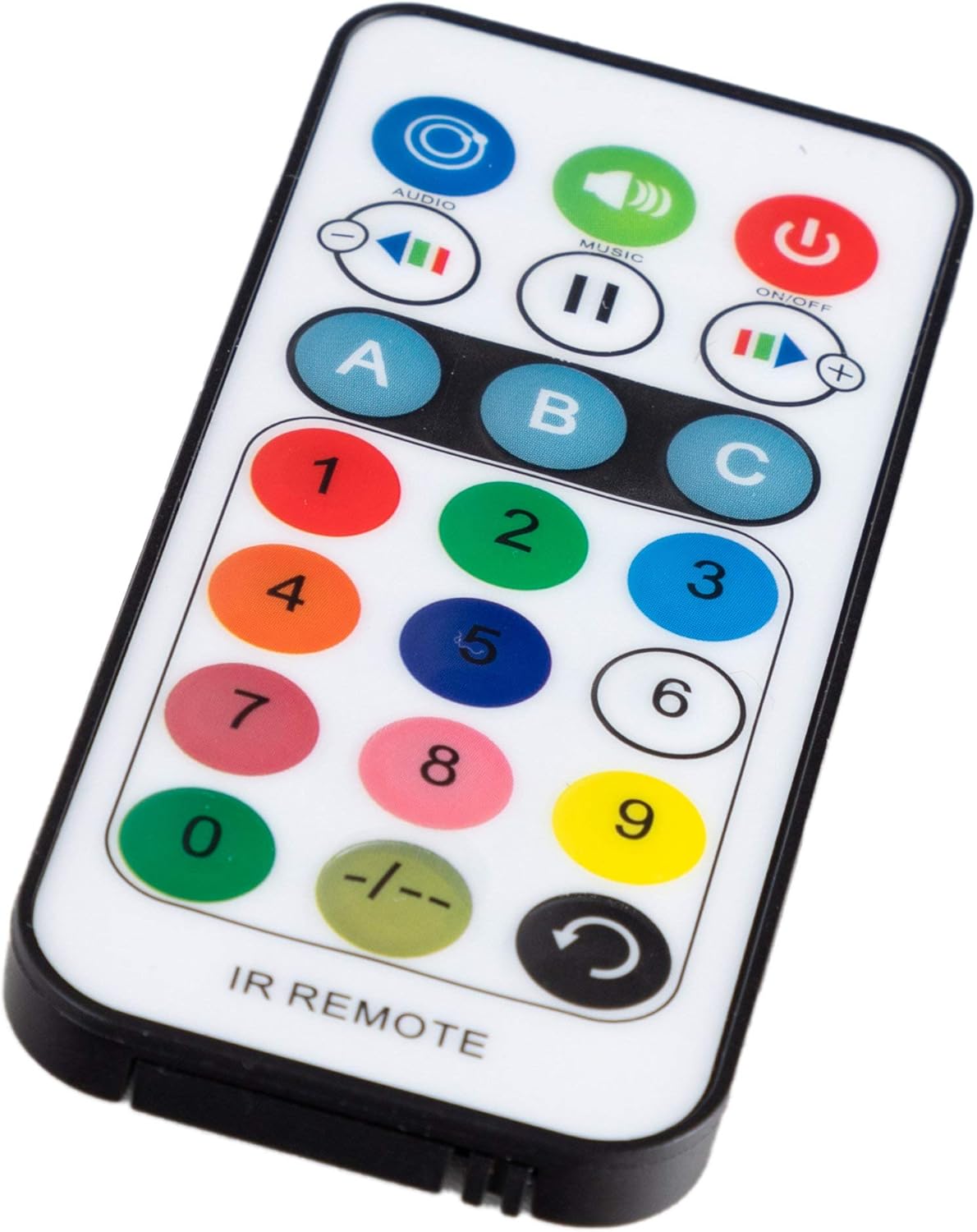
Image 5.1: The infrared remote control for the DS-3, showing various buttons for mode, color, speed, and strobe control.
Video 5.1: Demonstration of a similar party light's features, including remote control and voice-activated mode. Note: This video is for illustrative purposes and may not show the exact Showlite DS-3 model.
6. Maintenance
- Cleaning: Use a soft, dry cloth to clean the exterior of the unit. Do not use abrasive cleaners or solvents.
- Lens Cleaning: Gently wipe the lenses with a soft, lint-free cloth to maintain optimal light output.
- Ventilation: Periodically check that the fan and ventilation openings are free from dust and debris.
- Storage: When not in use for extended periods, store the unit in its original packaging in a dry, dust-free environment.
7. Troubleshooting
| Problem | Possible Cause | Solution |
|---|---|---|
| No power | Power cable disconnected, faulty outlet, blown fuse. | Check power cable connection. Test outlet with another device. Check and replace fuse if necessary. |
| No light output | Unit is off, mode not selected, DMX signal issue. | Ensure unit is powered on. Select an operating mode (Auto, Sound). Verify DMX connections and settings if in DMX mode. |
| Lights not reacting to music | Sound-activated mode not active, microphone sensitivity too low. | Activate Sound-activated mode. Increase microphone sensitivity via the control panel or remote. |
| DMX control not working | Incorrect DMX address, faulty cable, DMX mode not selected. | Verify DMX address setting. Check DMX cable connections. Ensure DMX mode is selected on the unit. |
8. Specifications
| Feature | Detail |
|---|---|
| Brand | Showlite |
| Model | DS-3 |
| Part Number | 00069702 |
| Light Source | 4x 3W RGBW LEDs (Beam), 16x 0.5W SMD LEDs (Strobe) |
| Operating Voltage | 220-240V, 50/60Hz |
| Power Consumption | Approx. 16.5 - 20 Watts |
| DMX Channels | 1 or 4 channels |
| Dimensions (W x H x D) | 20.2 x 14.2 x 16.8 cm (without bracket) |
| Weight | 1.65 kg |
| Material | Metal |
| Color | Black |

Image 8.1: Diagram showing the dimensions of the Showlite DS-3 LED Derby Light Effect.
9. Warranty and Support
For warranty information and technical support, please refer to the documentation provided with your purchase or contact your retailer. Specific warranty terms may vary by region and retailer.