
1. Introduction
Thank you for choosing the UTRAI Jstar 4 Jump Starter. This device is a powerful and versatile portable jump starter designed to provide emergency power for your vehicle, as well as serve as a power bank and emergency light source. Please read this manual carefully before use to ensure safe and optimal operation.
2. Package Contents
Verify that all items are present in your package:
- 1 x UTRAI Jstar 4 Jump Starter
- 1 x Smart Clip (Jump Cables)
- 1 x USB-C Charging Cable
- 1 x Practical Carrying Case
- 1 x User Manual

Image: Contents of the UTRAI Jstar 4 Jump Starter package.
3. Product Overview
The UTRAI Jstar 4 is a compact and powerful device designed for emergency vehicle starting and portable power needs. It features a robust design with integrated safety measures.
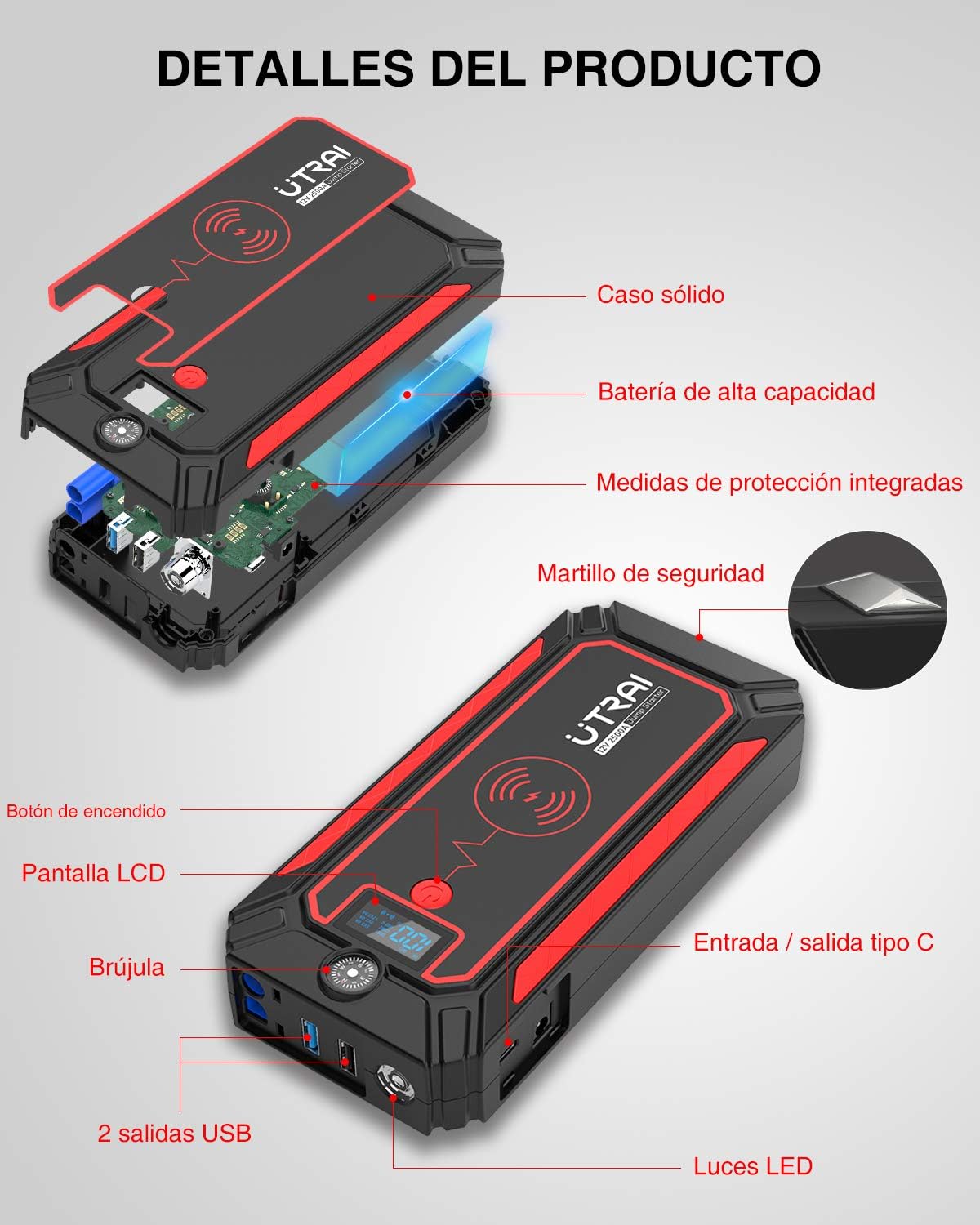
Image: Detailed view of the UTRAI Jstar 4 Jump Starter components.
Key Features:
- High Capacity Battery: 24000 mAh for multiple jump starts and device charging.
- Powerful Jump Starting: 2500A peak current, suitable for up to 8.0L gasoline and 7.0L diesel engines.
- 10W Wireless Charging: Conveniently charge compatible smartphones.
- Multiple USB Outputs: Includes QC3.0 (5V 3A / 9V 2A / 12V 1.5A) and standard 5V 2.1A USB ports.
- Bidirectional USB-C Port: For charging the unit and other devices (5V 3A).
- Integrated LCD Display: Shows remaining power and vehicle battery voltage.
- Multi-mode LED Flashlight: Normal, Strobe, and SOS modes for emergencies.
- Emergency Tools: Built-in compass and safety hammer.
4. Specifications
| Brand | UTRAI |
| Model | Jstar 4 |
| Battery Capacity | 24000 mAh |
| Peak Current | 2500 A |
| Start Voltage | 12 V |
| Wireless Charging Output | 10 W |
| USB-C Input/Output | 5 V / 3 A |
| USB Output 1 (QC3.0) | 5 V / 3 A, 9 V / 2 A, 12 V / 1.5 A |
| USB Output 2 | 5 V / 2.1 A |
| Dimensions (L x W x H) | 20.83 x 2.79 x 8.23 cm |
| Weight | 1.29 kg |
| Battery Type | Lithium-polymer |
| Engine Compatibility | Up to 8.0L Gas, 7.0L Diesel |
| Vehicle Service Type | SUV, Snowmobile, Van, Motorcycle |
5. Safety Information and Precautions
The UTRAI Jstar 4 is equipped with intelligent microcomputer control technology and multiple protection circuits to ensure safe operation. However, always observe the following safety guidelines:
- Do not short-circuit the jump starter terminals.
- Do not expose the device to extreme temperatures or direct sunlight for prolonged periods.
- Do not immerse the device in water.
- Keep out of reach of children.
- Do not attempt to disassemble or modify the device.
- Ensure proper connection of the smart clip to the vehicle battery terminals (red to positive, black to negative).
- If an error occurs during jump starting, disconnect the smart clip from the jump starter and reconnect it.

Image: Smart Clip with integrated safety protections.
6. Setup and Charging the Jump Starter
Before first use, fully charge the UTRAI Jstar 4. It is recommended to keep the device charged above 50% for optimal performance.
Charging the Unit:
- Connect the provided USB-C charging cable to the USB-C input/output port on the jump starter.
- Connect the other end of the USB-C cable to a suitable USB wall adapter (not included) or car charger.
- The LCD display will show the charging status and battery percentage. Charge until the display shows 100%.

Image: The UTRAI Jstar 4 can charge multiple devices simultaneously.
7. Operating Instructions: Jump Starting a Vehicle
Ensure the jump starter is sufficiently charged (above 50%) before attempting to jump start a vehicle.
- Connect the Smart Clip: Insert the blue plug of the smart clip into the jump starter's dedicated port.
- Attach to Battery: Connect the red clamp of the smart clip to the positive (+) terminal of the vehicle battery. Connect the black clamp to the negative (-) terminal of the vehicle battery. The smart clip's display will show the vehicle's battery voltage.
- Start Vehicle: Turn on the jump starter by pressing its power button. Then, start your vehicle's engine.
- Remove Clamps: Once the vehicle starts, immediately remove the smart clip from the vehicle battery, then disconnect the smart clip from the jump starter.

Image: Step-by-step guide for jump starting a vehicle.
8. Other Functions
8.1. Charging Mobile Devices (Power Bank Function)
- Wired Charging: Connect your device to one of the USB output ports (USB1 QC3.0 or USB2 5V/2.1A) or the USB-C port using an appropriate charging cable. The jump starter will automatically begin charging your device.
- Wireless Charging: Place your Qi-compatible smartphone on the designated wireless charging pad on the jump starter. Ensure the phone is centered for optimal charging. The wireless charging indicator will illuminate.
8.2. LED Flashlight
The built-in LED flashlight has three modes:
- Normal Light: Press the flashlight button once to turn on the steady light.
- Strobe Light: Press the flashlight button a second time for the strobe effect.
- SOS Signal: Press the flashlight button a third time for the SOS flashing pattern.
- Press the flashlight button a fourth time to turn off the light.

Image: Three modes of the integrated LED flashlight.
8.3. Integrated Compass
The jump starter includes a small compass for navigation assistance in outdoor or emergency situations.
8.4. Safety Hammer
A safety hammer is integrated into the design for emergency glass breaking, if necessary.
9. Display Information
The LCD display on the UTRAI Jstar 4 provides essential information about the device's status and connected devices.
- Battery Percentage: Shows the remaining power of the jump starter.
- Input/Output Status: Indicates when the device is charging (IN) or discharging (OUT) and the voltage/current for connected devices.
- Vehicle Battery Voltage: When the smart clip is connected to a vehicle battery, the display on the smart clip shows the vehicle's battery voltage.

Image: Integrated smart display showing device status and charging information.
10. Maintenance
- Regular Charging: To maintain battery health, it is recommended to charge the jump starter every three months, even if not in use.
- Storage: Store the device in a cool, dry place away from direct sunlight and extreme temperatures.
- Cleaning: Wipe the device with a soft, dry cloth. Do not use harsh chemicals or abrasive cleaners.
11. Troubleshooting
Device Not Turning On:
- Ensure the device is charged. Connect it to a charger and check the battery percentage on the LCD.
Vehicle Not Starting:
- Check the battery level of the jump starter; it should be above 50%.
- Ensure the smart clip clamps are securely connected to the correct battery terminals (red to positive, black to negative).
- If the smart clip display shows an error, disconnect the smart clip from the jump starter and then reconnect it. Attempt to start the vehicle again.
- The vehicle battery might be severely discharged or damaged. Consult a professional if the issue persists.
Wireless Charging Not Working:
- Ensure your device is Qi-compatible.
- Make sure your device is centered on the wireless charging pad.
- Remove any thick phone cases that might interfere with wireless charging.
12. Warranty and Support
The UTRAI Jstar 4 Jump Starter comes with a 12-month warranty. Additionally, UTRAI offers 24-hour customer service and a 30-day money-back guarantee.
For technical support or warranty claims, please contact UTRAI customer service through the retailer where you purchased the product or visit the official UTRAI website for contact information.


