
1. Introduction
Thank you for choosing the JIGA 30000mAh 22.5W PD USB-C Portable Charger, Model GW1. This high-capacity power bank is designed to provide reliable and fast charging for a wide range of electronic devices, including smartphones, tablets, and more. It features multiple input and output ports, wireless charging capability, and an integrated flashlight for convenience. Please read this manual carefully to ensure proper use and optimal performance of your device.
2. Product Overview
2.1 Key Features
- High Capacity: 30000mAh battery for extended power.
- Fast Charging: 22.5W Power Delivery (PD) and Quick Charge (QC 3.0) support for rapid device charging.
- Multiple Ports: 3 input ports (Micro USB, USB-C, Lightning) and 5 output ports (3 USB-A, 1 USB-C, 1 Wireless) for broad compatibility.
- Wireless Charging: Integrated 5W/10W wireless charging pad.
- Built-in Flashlight: Convenient LED flashlight for emergency use.
- LED Indicator: Displays remaining battery level.
2.2 Package Contents
- JIGA 30000mAh Portable Charger (Model GW1)
- USB-A to USB-C Charging Cable
- User Manual
2.3 Device Layout
Familiarize yourself with the various ports and features of your JIGA power bank:

Image: Overview of the JIGA Power Bank highlighting its 5 output ports (3 USB-A, 1 USB-C, 1 Wireless) and 3 input ports (Micro USB, USB-C, Lightning), along with Power Delivery (PD) and Quick Charge (QC) capabilities.
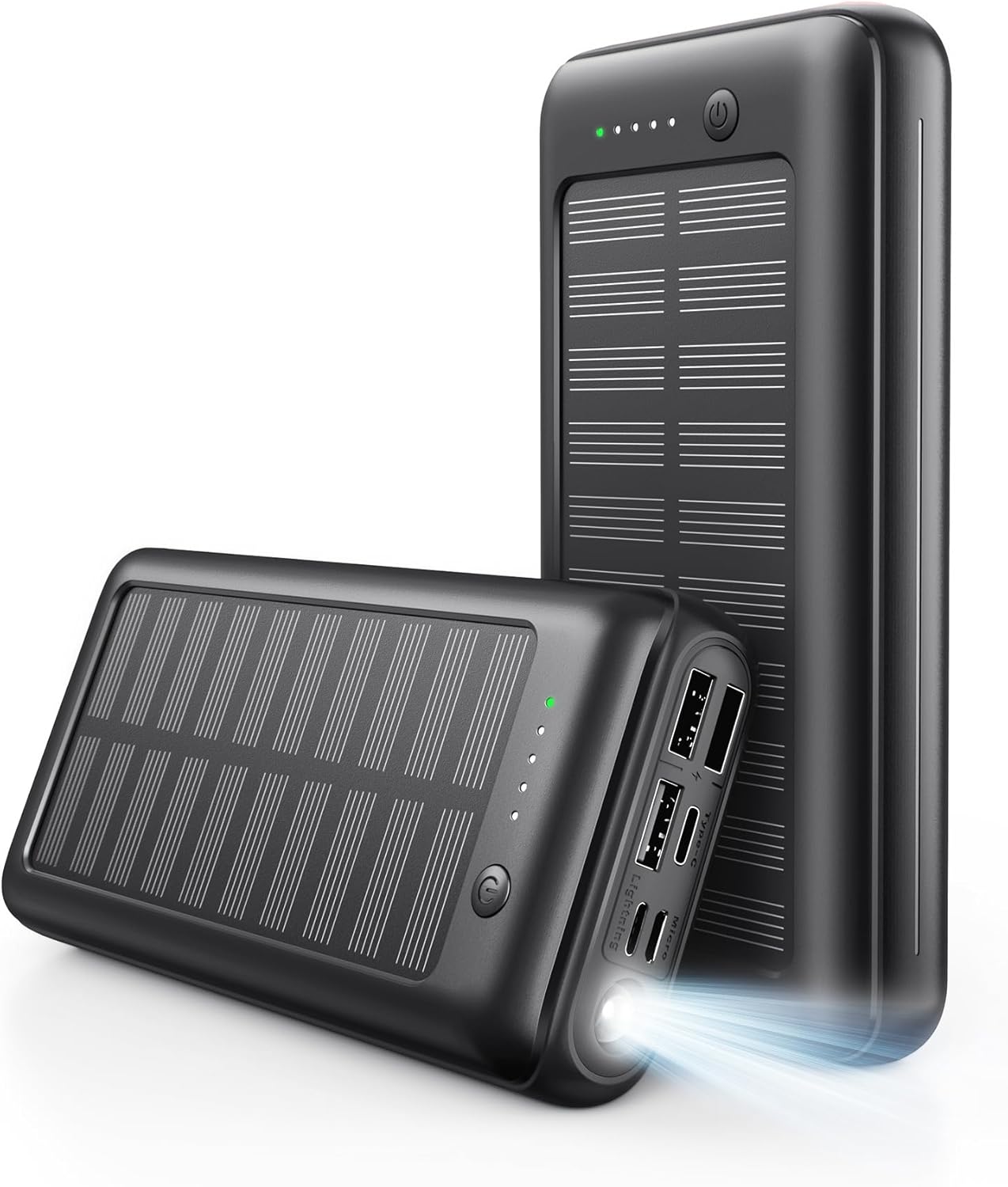
Image: Two JIGA Power Banks, one displaying its LED indicator lights and the other with its integrated flashlight illuminated, showcasing the device's compact design.
- Power Button: Activates the power bank and flashlight.
- LED Indicators: Displays remaining battery capacity.
- USB-A Output Ports (x3): For charging various USB-powered devices.
- USB-C Port (Input/Output): Supports both charging the power bank and fast charging compatible devices.
- Micro USB Input Port: For charging the power bank.
- Lightning Input Port: For charging the power bank.
- Wireless Charging Pad: For wirelessly charging compatible devices.
- Flashlight: Integrated LED light.
3. Setup
3.1 Initial Charging
Before first use, it is recommended to fully charge your JIGA power bank. This ensures optimal battery performance and accuracy of the LED indicators.
- Connect the provided USB-A to USB-C cable (or your own Micro USB or Lightning cable) to one of the power bank's input ports (Micro USB, USB-C, or Lightning).
- Connect the other end of the cable to a suitable USB wall adapter (not included).
- The LED indicators will illuminate and flash to show the charging progress. All four LEDs will be solid when fully charged.
4. Operating Instructions
4.1 Checking Battery Level
Press the power button once to check the remaining battery capacity. The LED indicators will light up, with each light representing approximately 25% of the battery charge.
4.2 Charging External Devices
The JIGA power bank offers multiple ways to charge your devices:
4.2.1 Wired Charging
- Connect your device's charging cable to one of the power bank's USB-A output ports or the USB-C output port.
- Connect the other end of the cable to your device.
- The power bank will automatically begin charging your device. If not, press the power button once.

Image: The JIGA Power Bank simultaneously charging a tablet, a smartphone via USB-C, and another smartphone via USB-A, demonstrating its multi-device charging capability.

Image: A JIGA Power Bank connected to a tablet, illustrating its 22.5W fast charging capability, with a comparison showing 33% charge in 30 minutes versus 30% with a standard 2.4A charger.

Image: A JIGA Power Bank with a USB-C cable connected, highlighting its 20W USB-C output for fast charging, showing 80% charge compared to 40% with a 10W charger.
4.2.2 Wireless Charging
For devices that support wireless charging:
- Place your wireless charging compatible device directly onto the wireless charging pad on the power bank.
- Ensure the device is centered on the pad for optimal charging.
- The power bank will automatically detect and begin wirelessly charging your device. If not, press the power button once.
4.3 Flashlight Operation
To use the integrated flashlight:
- Turn On: Double-press the power button quickly.
- Turn Off: Double-press the power button quickly again.
5. Maintenance
- Keep the power bank away from extreme temperatures, direct sunlight, and liquids.
- Clean the device with a soft, dry cloth. Do not use harsh chemicals or abrasive materials.
- Store the power bank in a cool, dry place when not in use.
- To prolong battery life, fully charge and discharge the power bank at least once every three months.
6. Troubleshooting
| Problem | Possible Cause | Solution |
|---|---|---|
| Device not charging from power bank. | Power bank is off or low on battery; cable is faulty; device is incompatible. | Press the power button to activate. Check power bank battery level. Try a different cable. Ensure your device is compatible. |
| Power bank not charging. | Charging cable or adapter is faulty; input port is damaged. | Try a different charging cable and wall adapter. Ensure the cable is fully inserted into the input port. |
| Wireless charging not working. | Device not aligned correctly; device case is too thick; device is not wireless charging compatible. | Reposition your device on the charging pad. Remove thick cases. Ensure your device supports wireless charging. |
| Flashlight not turning on/off. | Incorrect button press. | Double-press the power button quickly to toggle the flashlight. |
7. Specifications
| Feature | Detail |
|---|---|
| Model Number | GW1 |
| Battery Capacity | 30000 Milliamp Hours (3.7V) |
| Product Dimensions | 6.1 x 1.38 x 2.99 inches |
| Item Weight | 14.1 ounces |
| Input (PD) | 5V=3A, 9V=2A, 12V=1.5A (18W Max) |
| Input (Micro USB) | 5V=2A, 9V=2A |
| Input (Lightning) | 5V=2A |
| Output 1 (USB) | 5V=2.1A |
| Output 2/3 (QC 3.0) | 5V=3A, 9V=2A, 12V=1.5A (18W Max) |
| Output (PD) | 5V=3A, 9V=2A, 12V=1.5A (18W Max) |
| Output (Wireless) | 5W/10W |
| Manufacturer | Shen Zhen JI JIA Technology Co., Ltd. |
8. Warranty and Support
JIGA products are designed for reliability and performance. This product typically comes with a standard warranty. For specific warranty details and to potentially extend your warranty by an additional year, please refer to any included warranty cards or contact JIGA customer support directly.
Customer Support:
- Email: Support@jigapro.com
- Website: www.jigapro.com
Please have your order ID ready when contacting support for warranty claims or technical assistance.
