
SoundPEATS
Soundpeats Sonic Wireless Earbuds Instruction Manual
Model: Sonic
1. Product Overview
The Soundpeats Sonic wireless earbuds are designed to provide a superior audio experience with advanced features such as Bluetooth 5.2, Qualcomm QCC3040 chipset, aptX-Adaptive audio decoding, and IPX5 water resistance. They offer extended battery life and a comfortable fit for various activities including music listening, calls, and gaming.

Image: Soundpeats Sonic earbuds shown with their charging case. The earbuds are gray with rose gold accents, and the case is a matching gray.
2. Package Contents
Ensure all items are present in the package:
- 1 Pair of Soundpeats Sonic Wireless Earbuds
- 1 Charging Case
- 3 Pairs of Eartips (Small, Medium, Large - Medium pre-fitted)
- 1 USB-C Charging Cable
- 1 User Manual
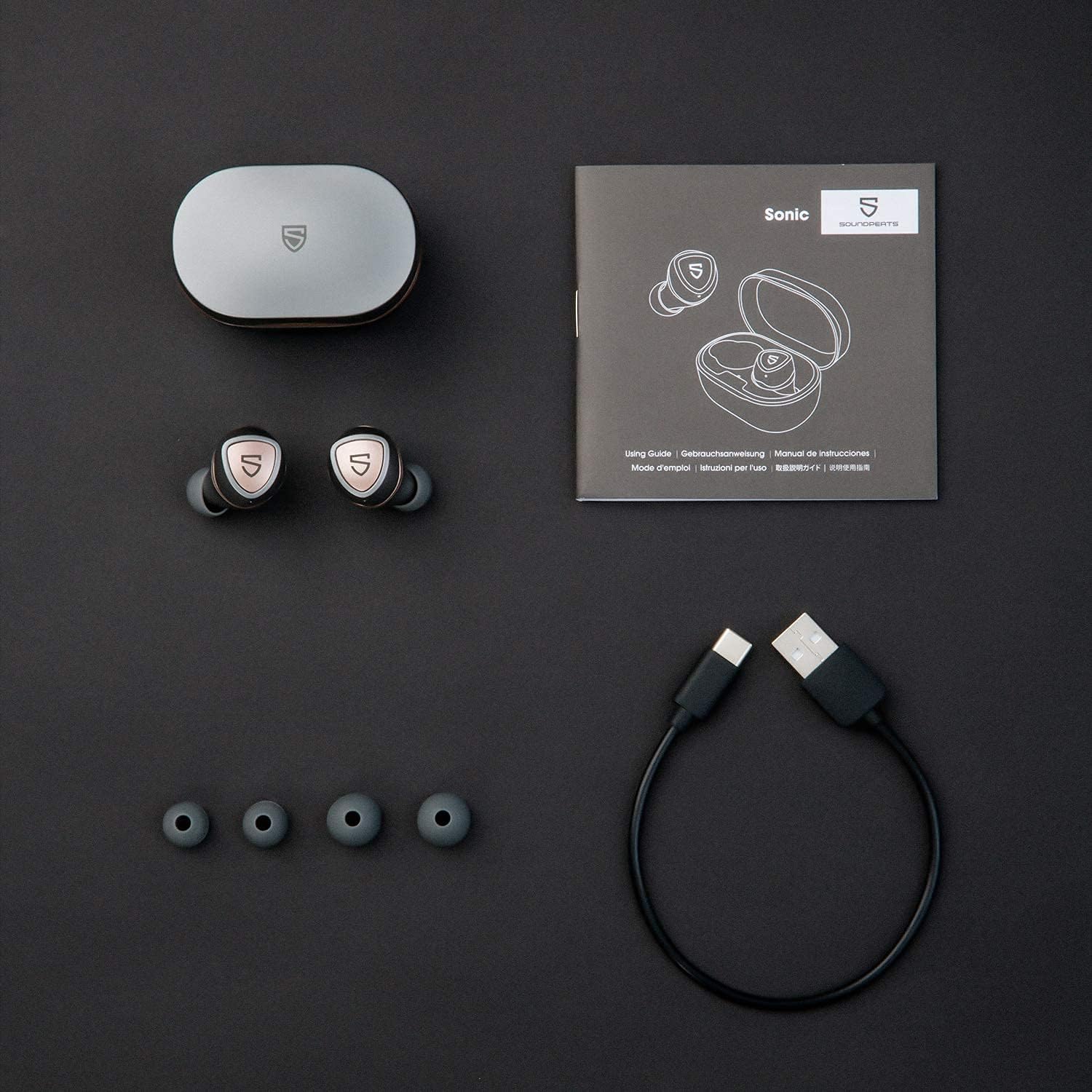
Image: All components of the Soundpeats Sonic package laid out: the charging case, two earbuds, three pairs of silicone eartips, a USB-C charging cable, and the user manual.
3. Setup Guide
3.1 Initial Charge
Before first use, fully charge the earbuds and the charging case.
- Place the earbuds into the charging case, ensuring the charging contacts align. The "S" logo on the earbuds will glow red while charging.
- Connect the USB-C charging cable to the charging port on the case and the other end to a USB power source (e.g., wall adapter, computer USB port).
- The indicator light inside the case will show the charging status of the case. A full charge for the case takes approximately 1.5 hours.

Image: The Soundpeats Sonic charging case with a USB-C cable plugged into its charging port, indicating the charging method.

Image: An illustration showing the Soundpeats Sonic earbuds inside the charging case, with indicators for battery levels: green for 100%-50%, orange for 49%-10%, and red for 0-10%.
3.2 Pairing with a Device
The earbuds will automatically enter pairing mode when taken out of the case for the first time.
- Open the charging case and remove both earbuds. They will automatically power on and attempt to pair with each other.
- Enable Bluetooth on your device (smartphone, tablet, computer).
- Search for "SOUNDPEATS Sonic" in the Bluetooth device list and select it to connect.
- Once connected, you will hear a voice prompt confirming the successful pairing.
Note: The advanced TrueWireless Mirroring technology ensures stable connection and reduced audio interruption.
3.3 Comfortable Fit
For optimal sound quality and comfort, choose the correct size eartips and ensure a proper fit.
- Try the different eartip sizes (Small, Medium, Large) to find the best seal for your ear canal.
- Insert the earbuds into your ears and gently twist them forward until the "S" logo is upright and they feel secure.

Image: A person wearing the Soundpeats Sonic earbuds, demonstrating their ergonomic design and comfortable fit in the ear.
4. Operating Instructions
4.1 Power On/Off
- Power On: The earbuds automatically power on when removed from the charging case.
- Power Off: The earbuds automatically power off when placed back into the charging case.
4.2 Button Controls
The Soundpeats Sonic earbuds feature sensitive button controls for precise operation.
| Function | Action |
|---|---|
| Play/Pause | Press the Multi-Function Button (MFB) once. |
| Volume + | Double press the Right MFB. |
| Volume - | Double press the Left MFB. |
| Next Track | Press and hold the Right MFB for 1.5 seconds. |
| Previous Track | Press and hold the Left MFB for 1.5 seconds. |
| Answer/End Call | Press the MFB once. |
| Reject Call | Press and hold the MFB for 1.5 seconds. |
| Activate Voice Assistant (Siri, Google Assistant) | Triple press the Right MFB. |
| Game Mode On/Off | Triple press the Left MFB. |

Image: A visual representation of the Soundpeats Sonic earbuds and charging case, detailing the button controls for various functions like power, play/pause, volume, track control, call management, voice assistant, and game mode.
5. Maintenance and Care
5.1 Cleaning
- Regularly clean the earbuds, especially the eartips and charging contacts, with a soft, dry, lint-free cloth.
- Remove eartips and clean them with mild soap and water if necessary, ensuring they are completely dry before reattaching.
- Do not use harsh chemicals or abrasive materials for cleaning.
5.2 Storage
- Always store the earbuds in their charging case when not in use to protect them and keep them charged.
- Store the case and earbuds in a cool, dry place, away from extreme temperatures and direct sunlight.
5.3 Battery Care
- To prolong battery life, avoid fully discharging the earbuds and charging case frequently.
- Charge the device regularly, even if not used for extended periods.
6. Troubleshooting
If you encounter issues with your Soundpeats Sonic earbuds, refer to the following common solutions:
| Problem | Possible Solution |
|---|---|
| Earbuds not pairing with device. |
|
| Only one earbud is working. |
|
| Low volume or poor sound quality. |
|
| Charging case not charging. |
|
7. Specifications
Key technical specifications for the Soundpeats Sonic Wireless Earbuds:
- Model Number: Sonic
- Brand: SoundPEATS
- Connectivity Technology: Wireless (Bluetooth)
- Bluetooth Version: 5.2
- Chipset: Qualcomm QCC3040
- Audio Codec: aptX-Adaptive
- Battery Life (Earbuds): Up to 15 hours per single charge
- Total Playtime (with Charging Case): Up to 35 hours
- Charging Port: USB Type-C
- Water Resistance: IPX5 (Sweat and splash resistant)
- Control Type: Button Control
- Special Features: cVc 8.0 Noise Reduction (for calls), Game Mode (low latency)
- Weight: Approximately 102 Grams (total item weight)
- Compatible Devices: iOS, Android, Microsoft, and other Bluetooth-enabled systems (e.g., iPhone, Samsung Galaxy, Huawei, iPad, MacBook)

Image: An exploded view diagram highlighting the internal components of the Soundpeats Sonic earbud, specifically pointing out the QCC3040 high-tech chipset responsible for seamless connection and lower power consumption.
Image: A graphic illustrating the 35-hour long-lasting enjoyment provided by the Soundpeats Sonic earbuds, indicating 15 hours per charge and 2 additional charges from the Type-C quick charge case.
8. Warranty and Support
SoundPEATS products are designed and manufactured to the highest quality standards. For warranty information and technical support, please refer to the official SoundPEATS website or contact their customer service directly.
- Official Website: Visit the SoundPEATS official website for the most up-to-date warranty policy and support resources.
- Customer Service: For any issues or inquiries, contact SoundPEATS customer support through the contact information provided on their website or product packaging.
Please retain your proof of purchase for warranty claims.
Related Documents -
 |
SoundPEATS Sonic Bluetooth Earbuds FAQ Frequently asked questions and troubleshooting guide for SoundPEATS Sonic Bluetooth earbuds, covering topics like Bluetooth connectivity, sound issues, charging, and touch controls. |
 |
SoundPEATS Truengine 3 SE Wireless Earbuds User Guide Comprehensive user guide for the SoundPEATS Truengine 3 SE wireless earbuds, covering pairing, reset, wearing instructions, product diagram, button controls, game mode, FAQs, and FCC statement. |
 |
SOUNDPEATS Air3 User Guide: Pairing, Features, and Specifications Comprehensive user guide for the SOUNDPEATS Air3 wireless earbuds, covering pairing instructions, touch controls, product diagram, Q&A, FCC statement, and detailed specifications. |
 |
SoundPEATS Air3 Pro Earbuds: FAQ, Troubleshooting, and User Guide Comprehensive Frequently Asked Questions (FAQ) and troubleshooting guide for SoundPEATS Air3 Pro wireless earbuds, covering Bluetooth connectivity, sound issues, charging, touch controls, and customer support. |
 |
SoundPEATS Mini Pro Earbuds: FAQ & Troubleshooting Guide Get answers to common questions and solutions for issues with your SoundPEATS Mini Pro wireless earbuds, covering Bluetooth connectivity, sound problems, charging, touch controls, and customer support. |
 |
SOUNDPEATS Mini Pro User Manual: Setup, Controls, and Q&A Comprehensive user manual for SOUNDPEATS Mini Pro wireless earbuds, covering first start, pairing, ANC modes, touch controls, wearing instructions, and frequently asked questions. |