1. Introduction
This manual provides detailed instructions for the assembly and operation of the UCTRONICS U6232 bundle. This product includes a 400W AC to DC switching power supply (Model S-400) and a CNC housing (Model S06A), designed to integrate with Riden RD6006 or RD6006W DC-DC buck-converter modules (RD6006/W module not included). The bundle provides a stable and regulated power source for various applications, including powering stepper motors.
2. Safety Information
WARNING: This product involves high voltage wiring. Assembly and wiring require a high level of expertise. Non-professionals must not operate or assemble this device. Failure to follow these instructions may result in electric shock, fire, explosion, or severe injury.
- Always ensure the device is disconnected from the main power source before performing any assembly, wiring, or maintenance.
- Before powering on, verify the input voltage switch (110V/220V) on the AC to DC power source is set correctly for your region to prevent damage to the unit.
- The power supply incorporates multiple protection mechanisms: Anti-reverse protection, Overvoltage Protection (OVP), Overcurrent Protection (OCP), Overload Protection (OPP), and Over-temperature Protection (OTP). However, these are not substitutes for safe handling practices.
- Ensure all connections are secure and properly insulated to prevent short circuits.
- Do not operate the device in wet or damp conditions.
- Keep the device away from flammable materials.
3. Package Contents
Carefully unpack the box and verify that all components listed below are present and undamaged. If any parts are missing or damaged, please contact customer support.
- 1 × 400W AC to DC Power Source (Model S-400)
- 1 × Upper Cover Plate
- 1 × Lower Cover Plate
- 4 × Wires (for internal connections)
- 1 × Power Supply Board for Fan
- 1 × Cooling Fan
- 1 × Power Socket AC-03
- 1 × Power Switch KCD3
- 1 set of Assembly Accessories (screws, nuts, and pads)
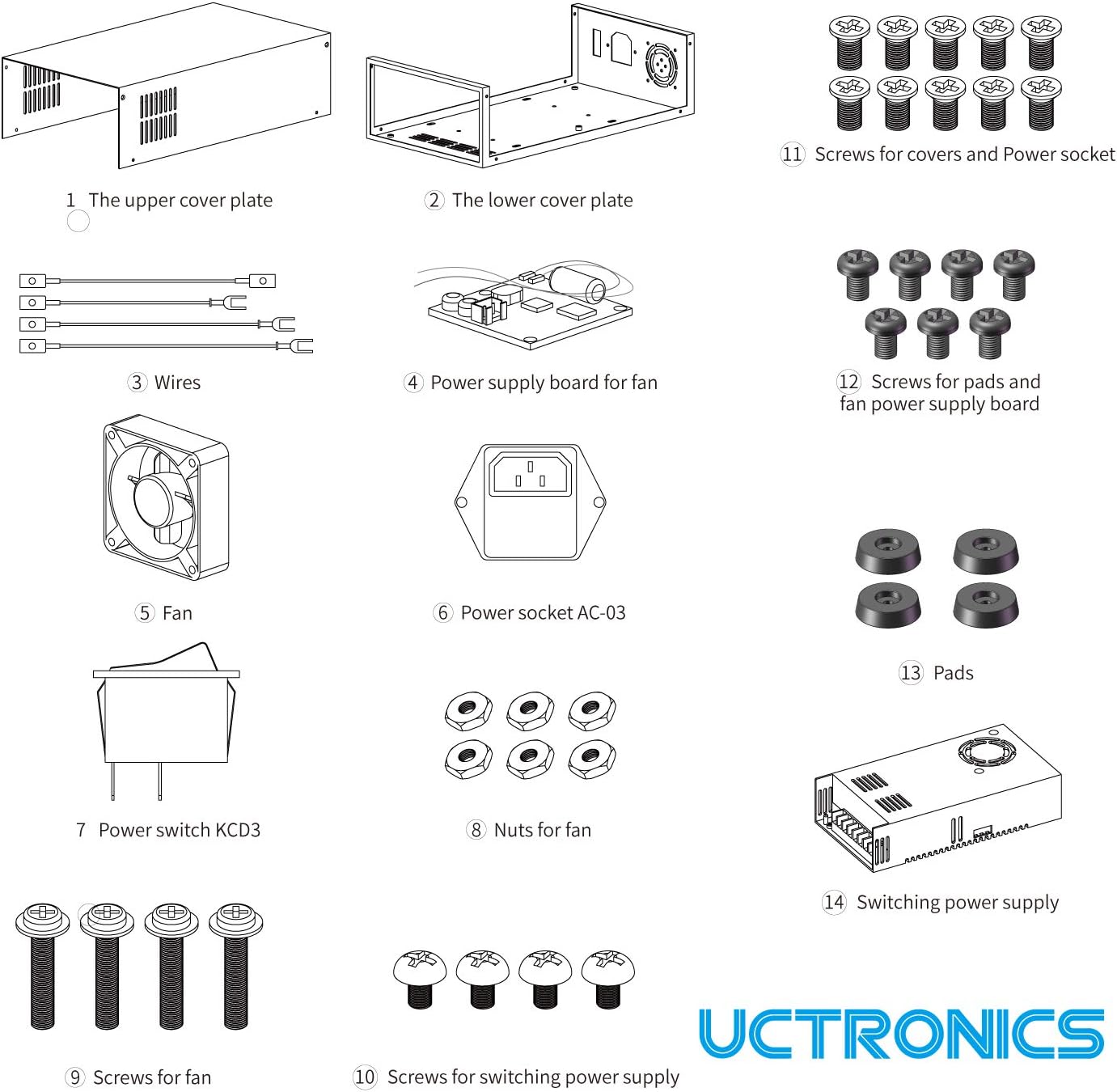
Figure 3.1: Detailed view of all components included in the UCTRONICS U6232 bundle, numbered for identification.
4. Setup and Assembly
This section outlines the steps to assemble the UCTRONICS U6232 power supply and case. Refer to the diagrams for visual guidance.
4.1 Component Overview

Figure 4.1: Exploded view diagram showing the assembly order of the UCTRONICS U6232 power supply, case, and fan. The Riden RD6006/W module is shown separately for context.
4.2 Assembly Steps
- Prepare the Lower Cover Plate: Place the lower cover plate on a stable surface.
- Install the Power Supply: Carefully place the 400W AC to DC power source (S-400) into the lower cover plate. Secure it using the appropriate screws (refer to Figure 3.1, item 10).
- Install the Power Socket and Switch: Mount the AC-03 power socket and KCD3 power switch into their designated cutouts on the rear panel of the lower cover plate. Secure them with screws and nuts as provided (refer to Figure 3.1, items 6 and 7).
- Install the Cooling Fan: Attach the cooling fan to its designated position, typically on the rear panel, ensuring proper airflow direction. Secure it with screws and nuts (refer to Figure 3.1, item 5 and 8).
- Install the Fan Power Supply Board: Mount the small power supply board for the fan (refer to Figure 3.1, item 4) inside the case, connecting it to the fan.
- Wiring Connections:
- Connect the AC input wires from the power socket and switch to the AC input terminals of the 400W power supply. Ensure correct Live (L), Neutral (N), and Ground (GND) connections.
- Connect the DC output wires from the 400W power supply to the input terminals of your Riden RD6006/RD6006W module. Pay close attention to polarity (+ and -).
- Connect the fan to its power supply board, and the fan power supply board to the main 400W power supply's DC output or a dedicated auxiliary output if available.
Crucial Step: Before making any AC connections, locate the voltage selector switch on the 400W AC to DC power source. Set it to either 110V or 220V according to your local mains voltage. Incorrect setting will damage the unit upon power-up.

Figure 4.2: Wiring diagram illustrating the connections for the AC input, power switch, power socket, and the 400W power supply.

Figure 4.3: Internal wiring detail showing the connections for the cooling fan, power socket, and power switch within the case.
- Install the Riden RD6006/W Module: If you have the RD6006/W module, install it into the front panel cutout of the case. Connect its input terminals to the DC output of the 400W power supply.
- Attach the Upper Cover Plate: Once all internal components are securely installed and wired, place the upper cover plate over the assembly and secure it with the remaining screws.
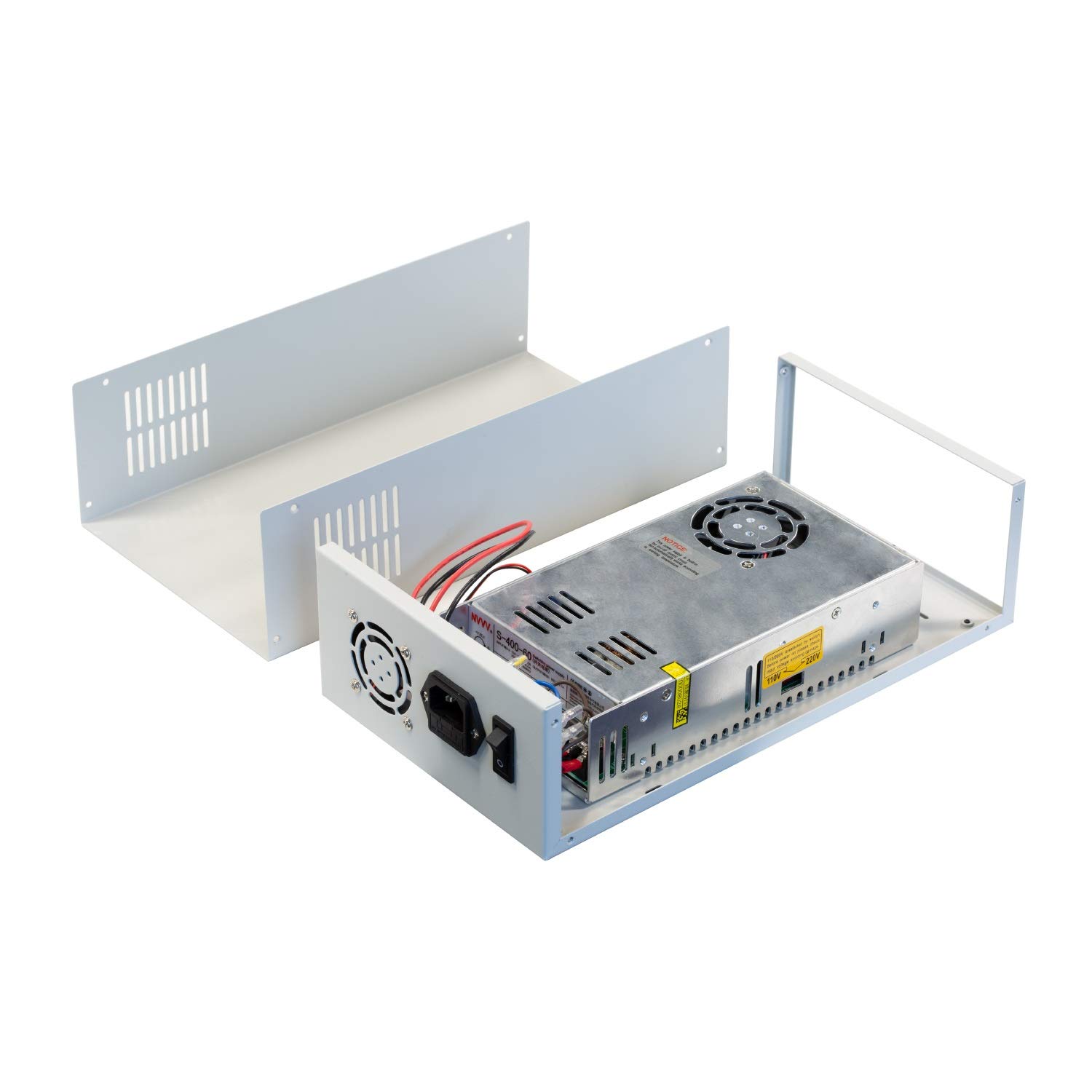
Figure 4.4: Assembled UCTRONICS U6232 power supply and case, showing the internal 400W power supply and the overall structure.

Figure 4.5: The UCTRONICS U6232 case with an inset image of the Riden RD6006/W module, demonstrating how the module integrates into the case.
5. Operating Instructions
After successful assembly and verification of all connections, follow these steps to operate your UCTRONICS U6232 power supply:
- Connect to Mains Power: Plug the power cord into the AC-03 power socket on the rear of the assembled unit, and then into a suitable wall outlet.
- Power On: Flip the KCD3 power switch to the 'ON' position. The internal 400W power supply will activate, and the cooling fan may start operating.
- Riden RD6006/W Operation: If you have an RD6006/W module installed, refer to its specific instruction manual for setting output voltage, current, and other parameters. The UCTRONICS U6232 provides the stable DC input power for the RD6006/W to function.
- Direct Use (if applicable): The 400W power supply provides a constant DC 60V 6.7A output. This can be used directly for applications requiring these specifications, such as powering stepper motors, provided appropriate current limiting and protection are implemented externally if needed.
- Power Off: To turn off the unit, flip the KCD3 power switch to the 'OFF' position. Disconnect from mains power when not in use for extended periods.
6. Maintenance
To ensure optimal performance and longevity of your UCTRONICS U6232 power supply, follow these general maintenance guidelines:
- Cleaning: Periodically clean the exterior of the case with a soft, dry cloth. Ensure ventilation openings are free from dust and debris to maintain proper airflow for the cooling fan. Do not use liquid cleaners directly on the unit.
- Ventilation: Ensure the unit is operated in a well-ventilated area. Do not block the air vents on the case.
- Connections: Occasionally check all wiring connections to ensure they remain secure. Loose connections can lead to poor performance or safety hazards.
- Storage: When not in use, store the unit in a cool, dry place, away from direct sunlight and extreme temperatures.
7. Troubleshooting
If you encounter issues with your UCTRONICS U6232 power supply, refer to the following troubleshooting tips:
- No Power:
- Check if the power cord is securely plugged into both the unit and the wall outlet.
- Verify that the KCD3 power switch is in the 'ON' position.
- Ensure the wall outlet is functional by testing it with another device.
- Confirm the 110V/220V voltage selector switch on the 400W power supply is set correctly.
- Fan Not Operating:
- Check the fan's wiring connections to its power supply board and to the main power supply.
- Ensure the fan is not obstructed by dust or debris.
- Note that the fan may only activate when the power supply reaches a certain temperature.
- No Output Voltage (from RD6006/W):
- Verify that the 400W power supply is providing its 60V DC output to the RD6006/W module. Use a multimeter to check the input terminals of the RD6006/W.
- Consult the RD6006/W manual for specific troubleshooting steps related to its output.
- Overheating:
- Ensure adequate ventilation around the unit.
- Check if the cooling fan is operating correctly.
- Reduce the load on the power supply if it is consistently running hot.
If the problem persists after attempting these steps, please contact UCTRONICS customer support.
8. Specifications
| Feature | Specification |
|---|---|
| Model Number | U6232 |
| Brand | UCTRONICS |
| Power Supply Model | S-400 |
| Case Model | S06A |
| Input Voltage | AC 110V 8A / 220V 4A (Switchable) |
| Output Voltage | DC 60V |
| Output Current | 6.7A |
| Output Wattage | 400 Watts |
| Overall Case Size | 310 × 172 × 86 mm (12.2 × 6.77 × 3.39 inches) |
| Cooling Method | Air (with integrated fan) |
| Item Weight | 2.3 kg |
| Compatibility | Riden RD6006 / RD6006W DC-DC Buck-Converter Modules |
9. Warranty and Support
For warranty information, please refer to the documentation provided with your purchase or visit the official UCTRONICS website. If you require technical assistance, have questions about assembly, or need to report a defective component, please contact UCTRONICS customer support through their official channels.


