
EcoNet Controls EVC300-JW-SK3 (3 sensors)
EcoNet Controls Bulldog-JW WiFi Valve Robot User Manual
Model: EVC300-JW-SK3 (3 sensors)
Product Overview
The EcoNet Controls Bulldog-JW WiFi Valve Robot provides an advanced solution for automatic water shutoff and leak detection, designed to prevent water damage in residential and commercial settings. This system is engineered for straightforward, do-it-yourself installation over existing levered ball valves, eliminating the need for complex plumbing modifications.
The standard kit includes three leak sensors and is expandable to support up to 20 sensors, allowing for comprehensive protection across various areas of your property. With integrated WiFi connectivity, the Bulldog-JW Valve Robot can be remotely monitored and controlled via compatible smart home platforms and smartphone applications. Its robust design, featuring a high-torque motor and intelligent stroke control, ensures reliable operation even with challenging valve installations. The system functions independently without requiring a smart home hub or continuous internet connection, offering both standalone functionality and smart home integration.
Key Features:
- Automatic Water Shutoff: Automatically closes the water supply upon leak detection to prevent damage.
- Expandable Leak Detection: Includes 3 leak sensors, expandable to 20 for extensive coverage.
- DIY Installation: Installs directly over existing levered ball valves without plumbing alterations.
- Wide Valve Compatibility: Supports standard ¾", 1", 1.25", and 1.5" valves.
- WiFi Connectivity: Direct connection to your WiFi network, no separate hub required.
- Durable Performance: High-torque motor and intelligent stroke control for reliable operation.
- Smart Home Integration: Compatible with popular smart home platforms and apps for remote control and monitoring.
Package Contents
Verify that all components are present in your package:
- Bulldog-JW WiFi Valve Robot Unit
- 3 Leak Sensors
- 12V DC 1 Amp Power Adapter
- Mounting Hardware (including HC2L & HC2XL bracket)
- Instruction Manual
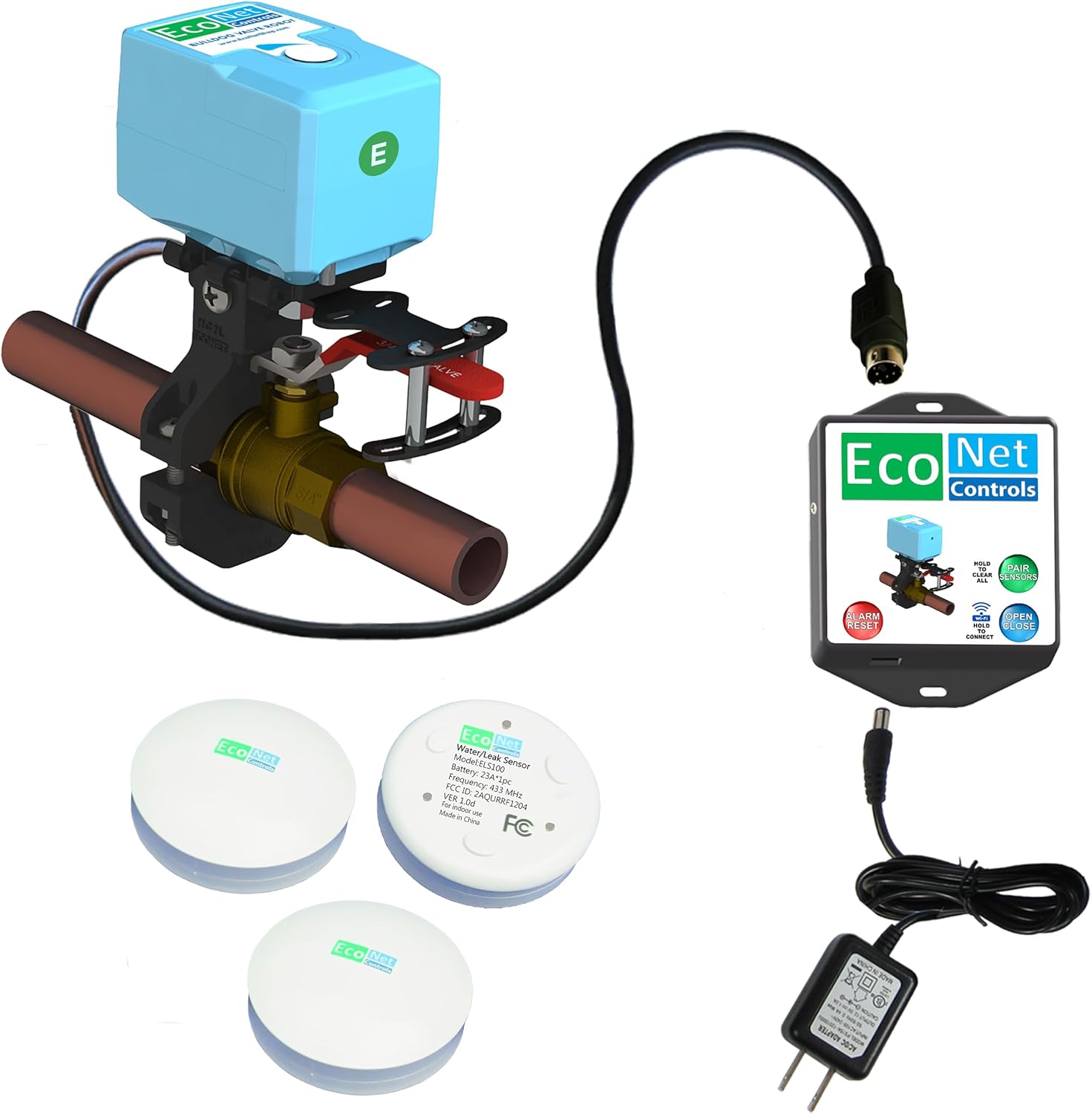
Figure 1: Bulldog-JW WiFi Valve Robot with main unit, control box, power adapter, and three leak sensors.
Setup and Installation
The Bulldog-JW Valve Robot is designed for easy, DIY installation without requiring any plumbing modifications. A Philips #2 screwdriver is required for installation.
1. Valve Compatibility
Ensure your existing levered ball valve is compatible with the Bulldog-JW system. The unit works with most standard ¾", 1", 1.25", and 1.5" valves. Refer to the compatibility chart below.
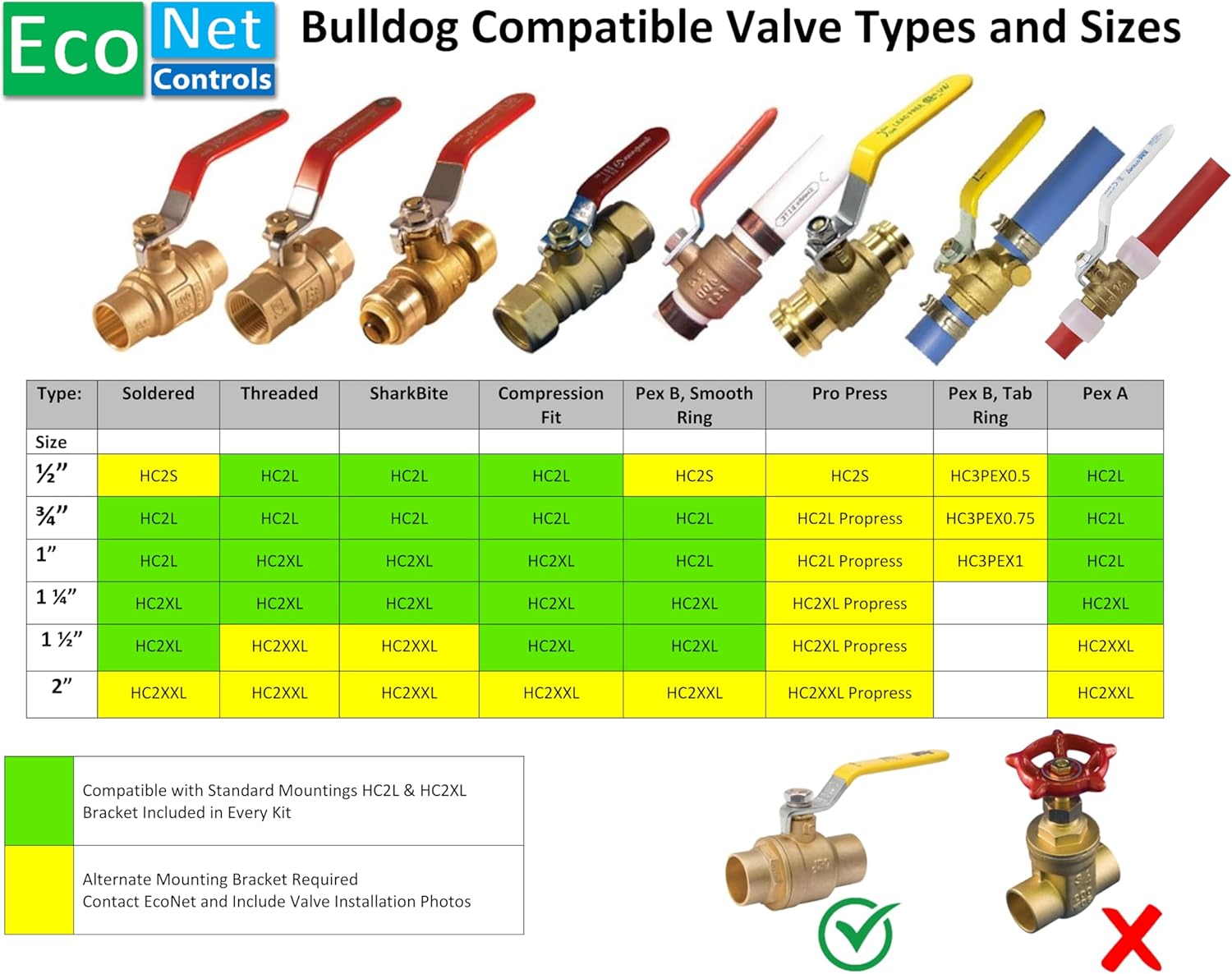
Figure 2: Valve Compatibility Chart for Bulldog-JW. Green indicates compatible with standard mountings, yellow indicates alternate mounting may be required.
2. Mounting the Valve Robot
The Bulldog-JW Valve Robot mounts directly to the valve body, which helps prevent undue stress on the plumbing. Avoid mounting methods that apply pressure to the pipe itself.

Figure 3: Illustration of correct mounting to the valve body versus incorrect mounting to the pipe.
The installation process involves three easy steps:
- Position the lower bracket around the valve.
- Place the Bulldog-JW unit over the valve handle.
- Secure the unit and upper bracket with the provided screws.

Figure 4: Exploded view demonstrating the three-step installation process over an existing ball valve.
For precise installation, consider the dimensions of the unit relative to your valve and surrounding space.

Figure 5: Detailed dimensions of the Bulldog-JW Valve Robot for installation planning.
3. Power Connection
Connect the provided 12V DC 1 amp power adapter to the Bulldog-JW control unit and plug it into a standard electrical outlet. Ensure the power cable is routed safely and securely.
4. Leak Sensor Placement
Place the included leak sensors in areas prone to water leaks. The kit comes with 3 sensors, and you can add up to 20. Common locations include:
- Under sinks
- Under toilets
- Behind ice makers
- Behind dishwashers
- Around sump pumps
- Under HVAC & Humidifiers
- Behind washing machines
- Around water shutoff valves
- Behind refrigerators
- Under water heaters
- Behind freezers
- Under Reverse Osmosis Systems

Figure 6: Recommended locations for deploying leak sensors throughout your home.
Operating Instructions
WiFi Connectivity and App Control
The Bulldog-JW Valve Robot connects directly to your home WiFi network without the need for a separate hub. Follow the instructions in the accompanying quick start guide or app for initial setup and pairing with your smartphone.
Once connected, you can:
- Remotely monitor the status of your water supply.
- Manually open or close the main water valve from your smartphone.
- Receive alerts and notifications in case of a detected leak.
- Integrate with compatible smart home platforms for advanced automation and voice control.
Automatic Water Shutoff
When a leak sensor detects water, it sends a signal to the Bulldog-JW Valve Robot. The robot will then automatically activate its high-torque motor to close the main water valve, preventing further water flow and potential damage. An audible alarm may also sound from the control unit and/or your smartphone app, depending on your settings.
Manual Override
In case of power outage or system malfunction, the valve can typically be operated manually. Refer to the specific instructions in your quick start guide for manual override procedures.
Maintenance
The EcoNet Controls Bulldog-JW WiFi Valve Robot is designed for minimal maintenance. Regular checks include:
- Sensor Check: Periodically test your leak sensors by placing them on a damp cloth to ensure they are functioning correctly and communicating with the main unit.
- Power Supply: Ensure the power adapter is securely connected and the unit is receiving continuous power.
- Physical Inspection: Visually inspect the valve robot and its mounting for any signs of wear or damage. Ensure the valve handle is clear of obstructions.
- Software Updates: Keep the associated smartphone application updated to the latest version to ensure optimal performance and access to new features.
Troubleshooting
If you encounter issues with your Bulldog-JW WiFi Valve Robot, consider the following common troubleshooting steps:
- Unit Not Responding:
- Check power connection. Ensure the 12V DC adapter is plugged in and the outlet is active.
- Verify WiFi connection. Ensure your router is operational and the unit is within range.
- Restart the unit by unplugging and re-plugging the power adapter.
- Valve Not Fully Opening/Closing:
- Check the alignment of the valve robot with the valve handle. Ensure it is securely mounted and the handle's range of motion is not obstructed.
- Confirm the valve itself operates smoothly. Older or stiff valves may require more force than the robot can consistently provide.
- Perform a calibration if your model supports it (refer to app or quick start guide).
- Leak Sensor Not Detecting:
- Ensure the sensor is placed correctly with its contacts facing down.
- Check the sensor's battery (if applicable, though these are typically long-life).
- Verify the sensor is paired with the main unit. Re-pair if necessary.
- Ensure the sensor is within range of the main unit's wireless signal.
- App Connectivity Issues:
- Ensure your smartphone has a stable internet connection.
- Confirm the app is updated to the latest version.
- Restart the app or your smartphone.
- If issues persist, try re-connecting the valve robot to your WiFi network through the app's setup process.
For further assistance, please contact EcoNet Controls customer support.
Specifications
| Feature | Detail |
|---|---|
| Model Number | EVC300-JW-SK3 (3 sensors) |
| Brand | EcoNet Controls |
| Power Supply | 12V DC 1 Amp Adapter |
| Valve Compatibility | ¾", 1", 1.25", 1.5" levered ball valves |
| Leak Sensor Support | Up to 20 sensors (3 included) |
| Connectivity | WiFi (no hub required) |
| Operating Temperature | 68 Degrees Fahrenheit (20°C) |
| Item Weight | 3 pounds (1.36 kg) |
| Product Dimensions | 10 x 7 x 3 inches (25.4 x 17.8 x 7.6 cm) |
| Manufacturer Part Number | 13068 |
| UPC | 628451752301 |
Warranty and Support
For warranty information, technical support, or service inquiries, please contact EcoNet Controls directly. Details regarding your product's warranty period and coverage can typically be found on the manufacturer's official website or within the product packaging.
When contacting support, please have your product model number (EVC300-JW-SK3) and purchase date available.
Manufacturer: EcoNet Controls
Related documentsEVC300-JW-SK3 (3 sensors)

Ask a question about this manual
Ask about setup, troubleshooting, compatibility, parts, safety, or missing instructions. Manuals+ will review the question and use this page’s manual context to help answer it.