
The MeatStick PS881EX
MeatStick Mini X Set Wireless Meat Thermometer User Manual
Model: PS881EX | Brand: The MeatStick
Introduction
The MeatStick Mini X Set is a smart wireless meat thermometer designed to provide precise temperature monitoring for a variety of cooking methods. Its innovative Bluetooth technology allows for hassle-free cooking, ensuring perfect results every time. This manual provides essential information for setting up, operating, and maintaining your MeatStick Mini X Set.

The MeatStick Mini X Set includes the thermometer probe, MiniX charger, and the companion mobile application.
What's Included
- 1 x MeatStick Mini Probe (Black)
- 1 x MeatStick MiniX Charger
Setup Guide
1. Charging the MeatStick Mini
Before first use, ensure your MeatStick Mini probe is fully charged. Insert the probe into the MiniX Charger. The charger requires 2 AA batteries (not included). The probe will begin charging automatically when properly seated.
2. Downloading the MeatStick App
The MeatStick App is essential for operating your thermometer. Download it from the Apple App Store (for iOS devices) or Google Play Store (for Android devices). Search for "The MeatStick App".

The MeatStick App provides a user-friendly interface for managing your cooks.
3. Pairing with Your Device
- Ensure Bluetooth is enabled on your smartphone or tablet.
- Open The MeatStick App.
- The app will automatically search for nearby MeatStick devices. Select your MeatStick Mini from the list to connect. No additional setup or pairing is needed beyond the initial connection.
Operating Instructions
1. Inserting the Probe
Carefully insert the MeatStick Mini probe into the thickest part of the meat, avoiding bones. Ensure the entire metal shaft of the probe is inside the meat, with only the ceramic handle exposed. The probe is designed to be left in the meat throughout the entire cooking process.

The MeatStick Mini allows for true wireless cooking by remaining in the meat.
2. Using the MiniX Charger for Extended Range
The MiniX Charger features a built-in Xtender that boosts the Bluetooth signal. For optimal range, place the MiniX Charger within 6 feet of the MeatStick Mini probe. This extends the range up to 260 feet outdoors (in direct line of sight) or 100 feet indoors.

Utilize the MiniX Charger to extend your wireless range for monitoring.
3. Monitoring with The MeatStick App
The app provides real-time temperature readings for both the internal meat temperature and the ambient temperature. You can:
- Select from a guided cook list for various meats and doneness levels.
- Customize target temperatures and set alerts.
- Receive notifications when your meat is ready.
- View cooking history and temperature graphs.

Monitor your cook progress with detailed temperature graphs in the app.
4. Supported Cooking Methods
The MeatStick Mini is highly durable and suitable for various cooking environments:
- Oven: Ideal for roasts and baked dishes.
- Grill/BBQ: Perfect for grilling steaks, chicken, and other meats.
- Air Fryer: Use for precise temperature control in air frying.
- Deep Frying: The probe is deep-fryer proof.
- Sous Vide: Designed for use in water baths with 8+ hours battery life.
- Rotisserie: Monitor temperatures during rotisserie cooking.

The MeatStick Mini is safe for deep frying.

Achieve perfect results with the MeatStick Mini in various cooking methods.

The MeatStick Mini ensures your food is cooked to perfection.
Official Product Video
Watch this video for a quick overview of The MeatStick Mini X Set and its features.
Maintenance and Care
Cleaning the Probe
The MeatStick Mini probe is dishwasher-safe. For best results, clean the probe immediately after use. You can also wipe it clean with a damp cloth. Ensure the probe is completely dry before storing or recharging.
Probe Durability
The internal sensor of the MeatStick Mini withstands temperatures up to 185°F (85°C), and the ceramic handle withstands up to 572°F (300°C). It is designed to be robust for various cooking methods, including deep frying and sous vide.
Troubleshooting
| Problem | Possible Cause | Solution |
|---|---|---|
| Probe not connecting to app | Bluetooth is off; Probe out of range; Low probe battery; App issue. | Ensure Bluetooth is on. Move closer to the probe/charger. Charge the probe. Restart the app or your device. |
| Inaccurate temperature readings | Probe not inserted correctly; Sensor damaged; Extreme temperature fluctuations. | Ensure the probe is inserted into the thickest part of the meat, avoiding bones. Contact support if you suspect damage. Allow temperatures to stabilize. |
| Short battery life | Probe not fully charged; Old batteries in charger. | Ensure the probe is fully charged before each use. Replace AA batteries in the MiniX Charger if needed. |
| Charger not powering on | Dead AA batteries. | Replace the 2 AA batteries in the MiniX Charger. |
Specifications
- Model Number: PS881EX
- Product Dimensions: 34.45 x 3.5 x 1.97 inches; 2.4 ounces
- Internal Sensor Max Temp: 185°F (85°C)
- Ceramic Handle Max Temp: 572°F (300°C)
- Connectivity: Bluetooth
- Wireless Range: Up to 260ft (outdoors, line of sight) / 100ft (indoors) with MiniX Charger
- Battery Life (Probe): 8+ hours
- Charger Batteries: 2 AA batteries (not included)
- Material: Ceramic (handle)
- Care: Dishwasher Safe, Oven Safe, Wipe Clean
- Special Feature: High Accuracy
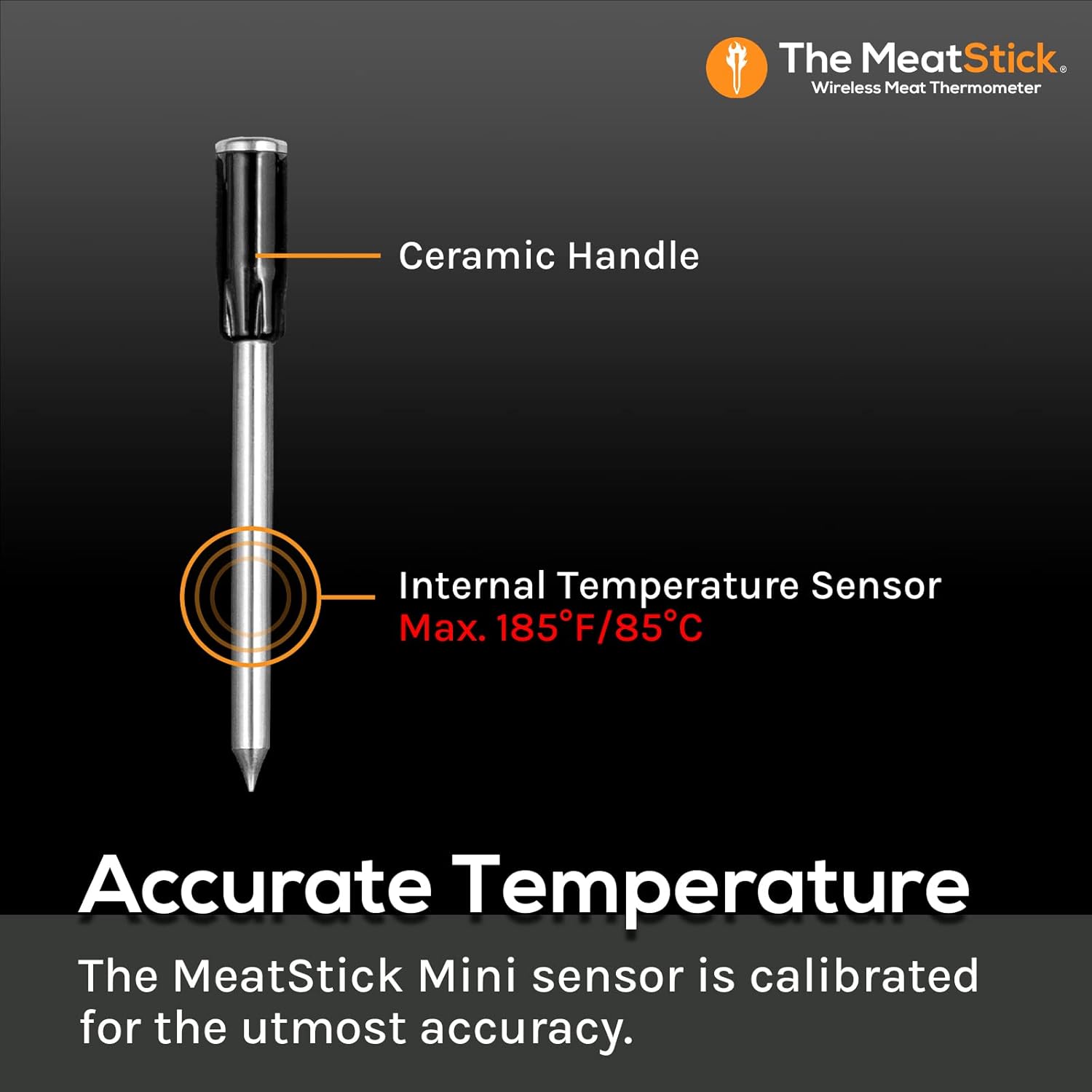
Key components and temperature limits of the MeatStick Mini probe.
Warranty and Support
For warranty information, product support, or any inquiries, please visit the official The MeatStick website or contact their customer service directly. Keep your purchase receipt for warranty claims.
Manufacturer: The MeatStick
Brand Store: The MeatStick Amazon Store
Ask a question about this manual
Ask about setup, troubleshooting, compatibility, parts, safety, or missing instructions. Manuals+ will review the question and use this page’s manual context to help answer it.