
ProForm Proform Pro 5000 (PFTL13820)
Contents
ProForm Pro 5000 Smart Treadmill User Manual
Model: Proform Pro 5000 (PFTL13820)
Introduction
This manual provides essential information for the safe and effective operation, maintenance, and troubleshooting of your ProForm Pro 5000 Smart Treadmill. Please read this manual thoroughly before using the equipment.
The ProForm Pro 5000 Smart Treadmill is designed for dynamic, high-energy workouts. It features a 14-inch smart HD touchscreen and integrates with iFit for a wide range of live and on-demand workouts. The treadmill is built with adjustable ReBound Pro cushioning and a SpaceSaver design for convenient storage.
Safety Information
Always consult with a physician before beginning any exercise program. If you experience any pain or discomfort, stop exercising and consult your physician. Keep children and pets away from the treadmill at all times. Place the treadmill on a level surface with at least 6 feet of clearance behind it and 2 feet on each side.
- Ensure the safety key is properly inserted before starting the treadmill.
- Do not operate the treadmill if it is damaged.
- Wear appropriate exercise clothing and athletic shoes.
- Keep hands and feet clear of moving parts.
- Unplug the treadmill when not in use or before cleaning/maintenance.
Setup and Assembly
Assembly of the ProForm Pro 5000 Smart Treadmill is required. It is recommended that two people perform the assembly due to the size and weight of the components. Refer to the separate assembly guide for detailed, step-by-step instructions and a list of all parts and tools required.
Key Assembly Steps:
- Unpack all components and verify against the parts list.
- Attach the uprights to the base frame.
- Mount the console to the uprights, ensuring all cables are connected.
- Secure all bolts and fasteners as per the assembly guide.
- Connect the power cord to a grounded outlet.
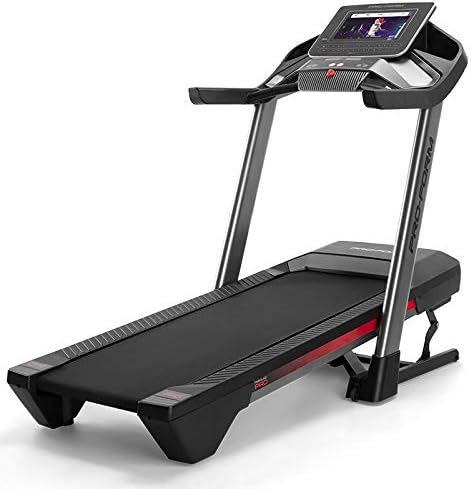
Figure 1: The ProForm Pro 5000 Smart Treadmill in its assembled state.
Operating Instructions
Getting Started
- Plug the power cord into a dedicated, grounded electrical outlet.
- Ensure the safety key is securely clipped to your clothing and inserted into the console.
- Step onto the treadmill belt, placing your feet on the side rails.
Console Overview

Figure 2: Close-up view of the ProForm Pro 5000 Smart Treadmill console, featuring the 14-inch HD touchscreen and control buttons.
The console features a 14-inch HD interactive touchscreen display. Use the touchscreen to navigate through iFit workouts, adjust settings, and monitor your progress. Physical buttons are also available for quick adjustments to speed and incline.
Starting a Workout
- From the main screen, select your desired workout (e.g., iFit program, manual mode).
- If using iFit, follow the on-screen prompts to select a trainer-led workout.
- Press the "Start" button. The belt will begin to move at a slow speed.
- Gradually increase speed and incline using the console controls or by following iFit instructions.

Figure 3: A user engaging in a running workout on the ProForm Pro 5000 Smart Treadmill, demonstrating active use.

Figure 4: A close-up view of a user's feet on the treadmill belt, highlighting the running surface and cushioning.
Adjusting Speed and Incline
- Use the speed buttons on the console to increase or decrease the belt speed (up to 12 MPH).
- Use the incline buttons to adjust the incline percentage (up to 15%).
- For iFit workouts, speed and incline may adjust automatically.
Stopping a Workout
- Press the "Stop" button on the console. The belt will gradually slow down and stop.
- To stop immediately, pull the safety key from the console. The treadmill will stop abruptly.
Maintenance
Regular maintenance ensures the longevity and optimal performance of your treadmill. Always unplug the treadmill before performing any maintenance.
Cleaning
- Wipe down the console and other surfaces with a damp cloth after each use. Avoid harsh chemicals.
- Periodically vacuum underneath the treadmill to prevent dust and debris buildup.
Belt Lubrication
The treadmill belt is pre-lubricated. Refer to the separate maintenance guide or contact customer support for information on when and how to re-lubricate the belt, if necessary.
Belt Alignment and Tension
If the walking belt begins to drift to one side or slips during use, it may require adjustment. Consult the maintenance section of your assembly guide for instructions on how to properly align and tension the belt.
Troubleshooting
| Problem | Possible Cause | Solution |
|---|---|---|
| Treadmill does not start. | Power cord not plugged in; Safety key not inserted; Circuit breaker tripped. | Ensure power cord is fully inserted. Insert safety key. Check household circuit breaker. |
| Belt slips or hesitates. | Belt tension too loose; Belt requires lubrication. | Adjust belt tension (refer to manual). Lubricate belt if necessary. |
| Console display is blank or unresponsive. | Loose cable connection; Software issue. | Check all console cable connections. Power cycle the treadmill (unplug for 60 seconds, then plug back in). If issue persists, contact customer support. |
| Unusual noises during operation. | Loose parts; Debris under belt; Motor issue. | Inspect for loose components and tighten. Clean under the belt. If noise persists, contact customer support. |
For more complex issues or issues not listed here, please contact ProForm Customer Support.
Specifications
| Feature | Detail |
|---|---|
| Model Name | Proform Pro 5000 |
| Model Number | PFTL13820 |
| Dimensions (L x W x H) | 77.3" x 35.3" x 56.6" (Product Dimensions: 56.6"D x 35.3"W x 77.3"H) |
| Maximum Speed | 12 Miles per Hour |
| Maximum Incline | 15% |
| Tread Belt Dimensions | 20" W x 60" L |
| Maximum User Weight | 300 Pounds |
| Display Type | 14-inch HD Interactive Touchscreen |
| Connectivity | Wi-Fi, Bluetooth, USB |
| Power Source | AC Adapter |
| Special Features | Foldable (SpaceSaver Design), Rebound Pro Deck Cushioning |

Figure 5: Dimensional overview of the ProForm Pro 5000 Smart Treadmill, showing length, width, and height.
Warranty and Support
The ProForm Pro 5000 Smart Treadmill is protected by a manufacturer's warranty. Please refer to your warranty card or the official ProForm website for the most current and detailed warranty information.
- Frame Warranty: 10 years
- Parts Warranty: 2 years
- Labor Warranty: 1 year
For technical assistance, parts replacement, or warranty claims, please contact ProForm Customer Support. Have your model number (PFTL13820) and serial number ready when contacting support.
ProForm Customer Support: Visit ProForm's Official Website
Ask a question about this manual
Ask about setup, troubleshooting, compatibility, parts, safety, or missing instructions. Manuals+ will review the question and use this page’s manual context to help answer it.