1. Product Overview
The Pentair EasyTouch Automation System is designed to simplify the control of your pool and spa equipment. This system offers intuitive push-button commands and clear displays for managing various functions. It can operate a standalone pool, a separate spa, or a combined pool and spa setup using shared equipment.
The EasyTouch system provides comprehensive control over variable speed or variable flow pumps, pool lighting, landscape lighting, waterfalls, fountains, and heating systems. It integrates resettable circuit breakers within the Load Center, ensuring easy access for maintenance by you or a service professional.
This particular system, the EC-520545, includes the IntelliChlor IC40 Salt Chlorinator Cell. This cell directly plugs into the control panel, with its transformer integrated within the unit. The IntelliChlor IC40 automatically generates chlorine from salt dissolved in the water, providing effective sanitization without the drawbacks of traditional chlorine methods.

Image: Pentair EasyTouch 8 Function Control Pool and Spa Combo with IC40 Salt Cell, showing the main control panel and two remote control units.
2. Key Features
- Eight-function pool and spa automation system with integrated salt chlorine generator (SCG).
- Includes IntelliChlor Transformer and IntelliChlor IC40 Salt Cell.
- Equipped with 2 valve actuators for automated water flow control.
- Supports control of variable speed or variable flow pumps, pool lighting, landscape lighting, waterfalls, fountains, and various heating options.
- Features on-board self-diagnostics for efficient troubleshooting and repair.
3. Installation
Installation of the Pentair EasyTouch system involves electrical and plumbing work. It is highly recommended that installation be performed by a qualified and licensed professional to ensure proper functionality and safety.
3.1 Electrical Connections
The system's Load Center houses the main control board and circuit breakers. Ensure all power is disconnected before servicing. The wiring diagram, typically located inside the control panel door, provides detailed instructions for connecting power relays, pumps, auxiliary devices, and sensors.
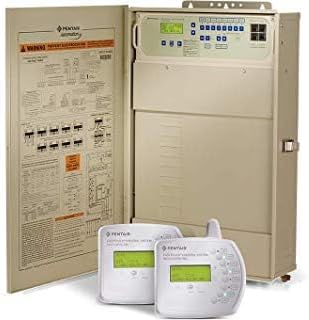
Image: Pentair EasyTouch Control Panel with the internal wiring diagram visible on the door.
3.2 IntelliChlor Salt Cell Integration
The IntelliChlor IC40 Salt Chlorinator Cell connects directly to the EasyTouch control panel. The internal transformer simplifies the setup. Ensure the salt cell is properly plumbed into the pool's circulation system according to the manufacturer's guidelines.
3.3 Sensor Placement
Temperature sensors for pool water, spa water, and ambient air should be installed in appropriate locations as specified in the full installation manual to ensure accurate readings and optimal system performance.
4. Operation
The EasyTouch control panel provides a user-friendly interface for managing your pool and spa. The system can operate in various modes, including automatic scheduling and manual control.
4.1 Control Panel Overview
The main control panel features a digital display and an array of buttons for different functions. The display shows current pool and air temperatures, time, and system status. Buttons are clearly labeled for functions such as Filter Pump, Cleaner, Pool Light, Spa Light, Water Feature, Air Blower, Heater, and Solar.
4.2 Modes of Operation
- Auto: The system operates according to programmed schedules. Indoor control panels and other remote devices can also operate the system.
- Service: Service buttons on the panel operate equipment. Other remote devices are disabled in this mode.
- Time Out: Service buttons on the panel operate equipment for three hours, then settings return to Auto mode.
4.3 Adjusting Settings
Use the 'MENU' and 'SELECT' buttons, along with the up/down arrows, to navigate through the system's settings and adjust parameters such as temperature set points, program schedules, and device run times. Specific auxiliary functions (AUX 1-7) can be assigned to various pool and spa features.
4.4 Remote Control (Optional)
The EasyTouch system supports optional remote control features, allowing you to monitor and adjust your pool and spa settings from a distance, such as from inside your home or via a mobile application (if compatible modules are installed).
Video: Pentair system convenience and easy to control with the app
This video demonstrates the convenience of controlling the Pentair system, including its app integration for remote management of pool and spa functions.
5. Maintenance
Regular maintenance ensures the longevity and efficient operation of your Pentair EasyTouch system.
5.1 Circuit Breakers
The Load Center includes resettable circuit breakers. In case of an electrical fault, a breaker may trip. Reset it by pushing it firmly to the 'OFF' position and then back to 'ON'. If a breaker repeatedly trips, consult a qualified electrician.
5.2 IntelliChlor Salt Cell
Periodically inspect the IntelliChlor IC40 Salt Cell for scale buildup. Follow the instructions provided with the salt cell for cleaning and maintenance. Ensure proper salt levels are maintained in the pool water for optimal chlorine production.
5.3 General System Care
Keep the control panel and surrounding area clean and free from debris. Ensure all wiring connections are secure and protected from the elements. Refer to the complete product manual for detailed maintenance schedules and procedures.
6. Troubleshooting
The EasyTouch system features on-board self-diagnostics to assist with identifying and resolving common issues. The service mode option can help in testing and troubleshooting equipment.
6.1 Common Issues and Solutions
- Equipment Not Responding: Check the circuit breakers in the Load Center. Ensure the system is not in 'Service' mode if attempting to use remote controls. Verify power supply to all connected equipment.
- Incorrect Temperature Readings: Ensure temperature sensors are correctly installed and free from debris.
- Chlorine Production Issues: Check pool salt levels. Inspect the IntelliChlor cell for scale buildup and clean if necessary. Verify the salt cell is properly connected and receiving power.
- Display Errors: Consult the full product manual for a list of error codes and their corresponding troubleshooting steps.
6.2 When to Call a Professional
If issues persist after attempting basic troubleshooting, or if you are uncomfortable performing any diagnostic steps, contact a qualified pool and spa service professional. For complex electrical problems, an electrician should be consulted.
Video: Watch THIS before buying the Pentair Easy Touch Control System
This video provides insights and considerations before purchasing the Pentair EasyTouch Control System, highlighting its features and potential installation requirements.
Video: Up Close Look at This Pool and Spa Combo
A detailed visual inspection of the Pentair Pool and Spa Combo system, showcasing its components and overall design.
Video: This pentair pool system has given us no issues in 10 years
A user testimonial highlighting the long-term reliability and trouble-free operation of the Pentair pool system.
7. Specifications
| Attribute | Value |
|---|---|
| Brand | Pentair |
| Model Number | EC-520545 |
| Item Weight | 69 Pounds |
| Product Dimensions | 39 x 20.8 x 9.5 inches |
| Number of Items | 1 |
| UPC | 788379887636 |
| Product Benefits | Kills Bacteria, Maintains Clean Sanitized Water |
8. Warranty and Support
The Pentair EC-520545 EasyTouch system comes with a limited warranty. For specific details regarding warranty coverage and duration, please refer to the warranty documentation included with your product or contact Pentair customer support.
Customers typically benefit from a 30-day easy return policy from authorized sellers. For technical assistance, troubleshooting guidance, or any product-related inquiries, you can reach out to Pentair customer support. Many users have found the 800-number tech support to be helpful.
For additional information and resources, visit the Pentair Store on Amazon.


