
1. Product Overview
The Pentair Sand Dollar Top Mount Pool Filter SD80 is designed to provide clear and clean pool water. This high-performance sand filter is engineered for ease of operation and maintenance, featuring a durable thermoplastic tank and an efficient design for superior filtration.
Key features include:
- 3.5 square feet of filtration area with a flow rate of 75 GPM.
- One-piece thermoplastic tank for exceptional strength and corrosion resistance.
- Top mount 6-position multi-port valve with pressure gauge and manual air relief.
- Combination water and sand drain for simplified servicing and winterizing.
- Internal design maintains a level sand bed for consistent performance and extended cleaning cycles.
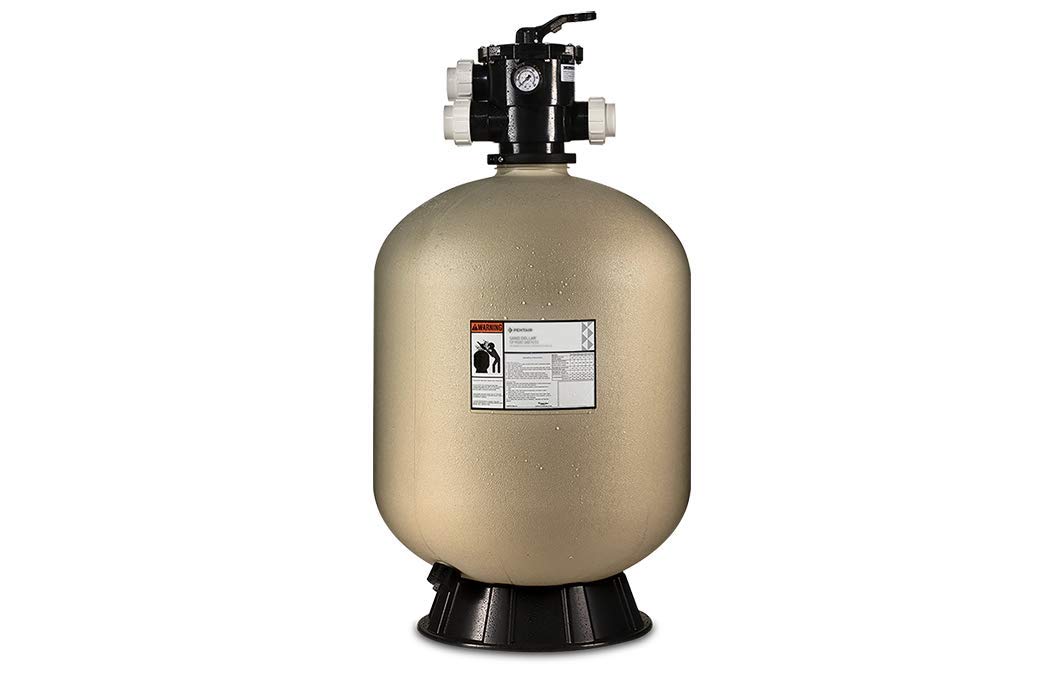
Image 1.1: The Pentair Sand Dollar Top Mount Pool Filter SD80, showing the complete unit with the top-mounted multi-port valve and pressure gauge.
2. Safety Information
Please read and understand all safety warnings and instructions before installing or operating this product. Failure to follow these instructions could result in serious injury or property damage.
- WARNING: This product can expose you to chemicals including Styrene, which is known to the State of California to cause cancer. For more information, go to www.P65Warnings.ca.gov.
- Always disconnect power to the pump before performing any service or maintenance.
- Ensure proper electrical grounding and bonding according to local codes.
- Do not operate the filter if any part is damaged or missing.
- Maintain proper water chemistry to prevent damage to the filter and pool equipment.
3. Setup and Installation
Proper installation is crucial for the efficient and safe operation of your Sand Dollar filter. It is recommended that installation be performed by a qualified pool professional.
3.1 Site Selection
- Place the filter on a firm, level surface, preferably concrete.
- Ensure adequate drainage around the filter.
- Allow sufficient clearance for future servicing and maintenance.
3.2 Sand Loading
The filter requires 350 pounds of filter sand (No. 20 silica sand, 0.45-0.55 mm effective size, 1.0 mm uniformity coefficient). Follow these steps:
- Remove the multi-port valve and internal standpipe assembly from the filter tank.
- Cover the open end of the standpipe to prevent sand from entering.
- Carefully pour the specified amount of sand into the filter tank.
- Ensure the sand is level before proceeding.
3.3 Plumbing Connections
Connect the multi-port valve to the filter tank and plumb the system according to your pool's configuration. The top mount 6-position multi-port valve features a pressure gauge and manual air relief for optimum filtration efficiency.

Image 3.1: Close-up of the Pentair Sand Dollar filter's top-mounted multi-port valve, showing the handle, pressure gauge, and connection ports.
- Connect the pump discharge to the 'PUMP' port on the valve.
- Connect the return line to the pool to the 'RETURN' port.
- Connect a waste line to the 'WASTE' port.
- Ensure all connections are watertight.
4. Operating Your Filter
The multi-port valve controls the flow of water through the filter system. Always turn off the pump before changing the valve position to prevent damage.
4.1 Multi-Port Valve Functions
- FILTER: Normal filtering position. Water flows through the sand bed, is filtered, and returned to the pool.
- BACKWASH: Used for cleaning the filter sand. Water flow is reversed, flushing debris out through the waste port.
- RINSE: Used after backwashing to settle the sand bed and flush any remaining dirty water to waste before returning to filter mode.
- WASTE/DRAIN: Bypasses the filter, sending water directly to the waste port. Useful for vacuuming heavy debris directly to waste or lowering the pool water level.
- RECIRCULATE: Bypasses the filter, circulating water directly back to the pool. Useful for chemical distribution without filtering.
- CLOSED: Shuts off all flow to the filter. Do not operate the pump with the valve in this position.
4.2 Pressure Gauge Monitoring
The pressure gauge indicates the internal pressure of the filter. Note the clean operating pressure after initial startup. When the pressure rises 8-10 PSI above this clean pressure, it indicates the filter needs backwashing.
5. Maintenance
Regular maintenance ensures optimal performance and extends the life of your filter.
5.1 Backwashing
Backwash the filter when the pressure gauge reads 8-10 PSI above the clean operating pressure, or when water clarity diminishes.
- Turn off the pump.
- Set the multi-port valve to 'BACKWASH'.
- Turn on the pump and backwash for 2-3 minutes, or until the water in the sight glass (if equipped) runs clear.
- Turn off the pump.
- Set the valve to 'RINSE'.
- Turn on the pump and rinse for 30-60 seconds.
- Turn off the pump.
- Set the valve to 'FILTER' and resume normal operation.
5.2 Sand Replacement
Filter sand typically needs to be replaced every 3-5 years, depending on usage and water conditions. Refer to section 3.2 for sand loading instructions.
5.3 Winterizing
In areas subject to freezing temperatures, the filter must be properly winterized to prevent damage.
- Backwash the filter thoroughly.
- Turn off the pump and disconnect power.
- Open the combination water and sand drain at the bottom of the tank to completely drain water and sand.
- Remove the multi-port valve and store it in a dry, protected area.
- Cover the filter tank to protect it from elements.
6. Troubleshooting
This section provides solutions to common issues you may encounter.
| Problem | Possible Cause | Solution |
|---|---|---|
| Poor water clarity after filtering | Dirty filter sand; improper water chemistry; damaged internal components | Backwash filter; check and adjust water chemistry; inspect internal components for damage. |
| High filter pressure | Filter needs backwashing; clogged skimmer/pump basket; restricted return lines | Backwash filter; clean skimmer and pump baskets; check return lines for obstructions. |
| Low water flow | Clogged pump impeller; air leak in suction line; low water level in pool | Inspect and clean pump impeller; check for air leaks; ensure adequate pool water level. |
| Water leaking from valve | Worn O-rings or gaskets; cracked valve body | Replace O-rings/gaskets; replace valve if cracked. |
7. Product Specifications
- Model: SD80 (EC-145333)
- Brand: Pentair
- Material: Thermoplastic
- Color: Almond
- Item Weight: 60 Pounds
- Filtration Area: 3.5 sq ft
- Flow Rate: 75 GPM
- Sand Required: 350 lbs (No. 20 silica sand)
- UPC: 788379500436
8. Warranty and Customer Support
This Pentair product is subject to a return policy. Please refer to your purchase documentation for specific warranty terms and conditions. Typically, products are eligible for a 30-day return period from the date of purchase.
For technical assistance, troubleshooting beyond this manual, or warranty claims, please contact Pentair customer support directly. Contact information can usually be found on the manufacturer's official website or on your product packaging.


