Introduction
The Jiehome P81148 Golf Rangefinder is a precision laser measuring device designed to assist golfers in accurately determining distances on the course. It incorporates advanced features such as flag-lock, vibration feedback, and slope compensation to enhance your game. This manual provides detailed instructions for the proper use, maintenance, and troubleshooting of your rangefinder.
Product Features
- Professional Golf Rangefinder: Equipped with Slope Tech, Fast Flag-Lock, 6X Magnification, 800-yard range, and an LCD digital display.
- Slope ON/OFF Technology: Provides compensated distance based on the hole's uphill or downhill gradient. This feature can be toggled ON/OFF, making the device tournament legal when OFF.
- Fast Focus System & Accurate Readings: Utilizes an advanced target acquisition system for precise yardage to the flag or desired location, with an accuracy of +/- 1 yard. Features flag seeker technology for accurate target measurement.
- 4 Ranging Modes: Includes Mode 1 (Continuous Scan, Flag-Lock, Tournament Legal), Mode 2 (Slope Tech + Angle + Flag-lock), Mode 3 (Horizontal Distance Measurement + Vertical Distance Measurement), and Mode 4 (Speed Mode).
- Rechargeable Li-ion Battery: Integrated 3.7V / 750mAh Li-ion battery, capable of approximately 20,000 single measurements on a full charge. Supports 500 charge-discharge cycles.
- 6X Magnification: Offers clear and bright images for easy target identification.
- Water Resistant: Designed to withstand light rain conditions.

Figure 1: Overview of the Jiehome P81148 Golf Rangefinder's main features including 800 yards range, slope compensation, flag locking, battery indicator, vibration mode, and speed measurement.
Package Contents
Upon opening the package, please ensure all the following items are present:
- 1 x Jiehome Golf Rangefinder (Model P81148)
- 1 x USB-C Charging Cable
- 1 x Golf Rangefinder Case
- 1 x Lanyard
- 1 x Cleaning Cloth
- 1 x User Manual (This document)
- 1 x Warranty Card

Figure 2: The rangefinder, its carrying case, and other included accessories.
Setup
1. Charging the Battery
The rangefinder is equipped with a built-in rechargeable Lithium-Ion battery. Before first use, fully charge the device using the provided USB-C cable. Connect the USB-C end to the rangefinder's charging port and the other end to a compatible USB power source (e.g., computer, wall adapter). The battery indicator on the display will show charging status.

Figure 3: The rangefinder's rechargeable battery and USB-C charging port.
2. Adjusting the Eyepiece
To achieve a clear view through the eyepiece, rotate the diopter adjustment ring. This allows users with or without corrective lenses to adjust the focus for optimal clarity. Rotate the ring until the display and target appear sharp.

Figure 4: Adjusting the diopter on the eyepiece for clear vision.
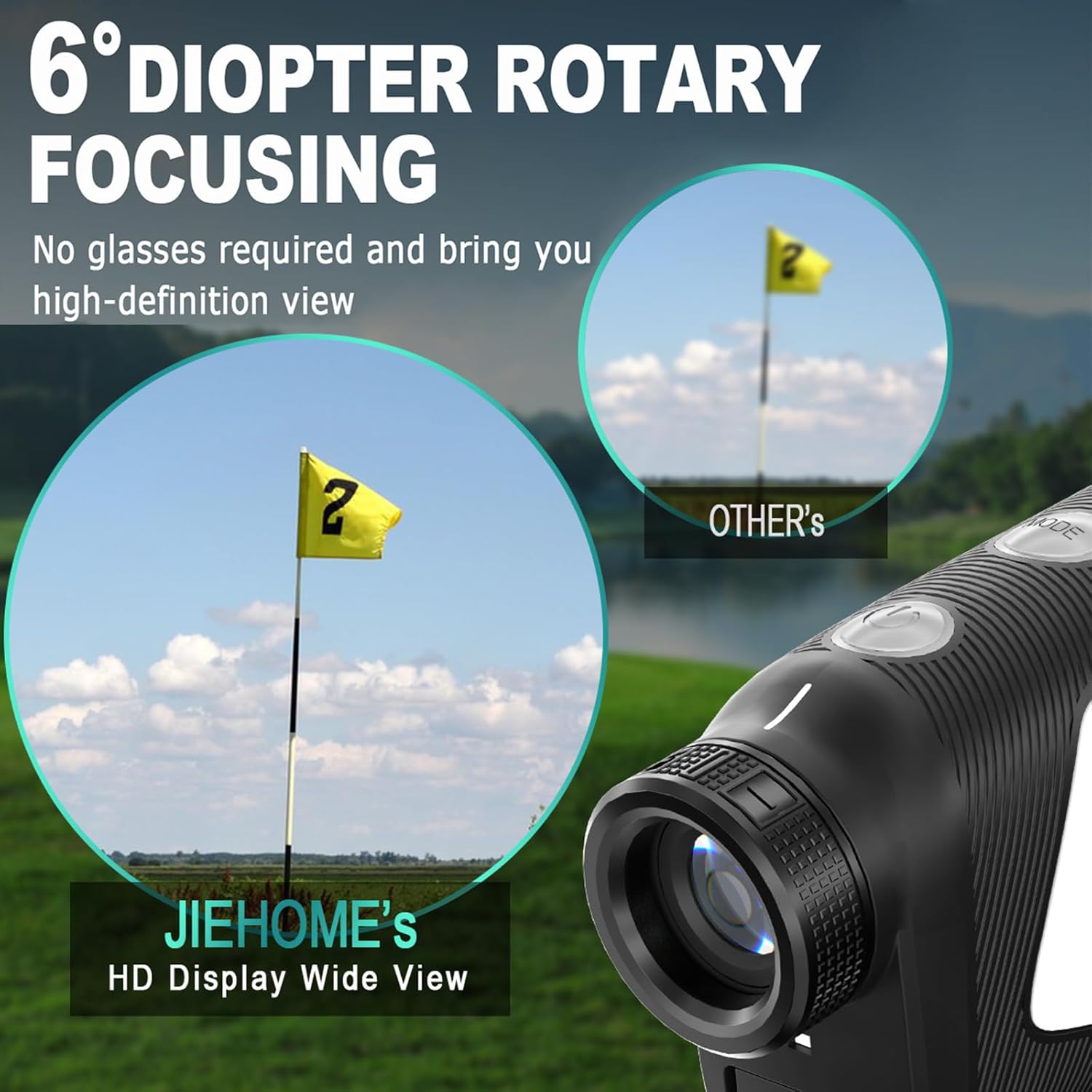
Figure 5: The eyepiece provides a high-definition, wide view for easy target acquisition.
Operating Instructions
1. Power On/Off
Press the power button once to turn on the rangefinder. The device will automatically power off after 20 seconds of inactivity to conserve battery life.
2. Basic Distance Measurement
To measure distance, look through the eyepiece and aim the crosshairs at your desired target. Press the power button once to activate the laser. The measured distance will be displayed on the internal LCD. For continuous scanning, hold down the power button while sweeping across multiple targets.
Video 1: Demonstrates the use of the golf rangefinder for distance measurement on a golf course, including flag-locking and magnetic attachment to a golf cart.
3. Switching Modes
The rangefinder offers multiple operating modes. To cycle through the modes, press the 'MODE' button (typically located on the side or top of the device). The current mode will be indicated on the display.

Figure 6: The four distinct measurement modes available on the rangefinder for various golfing and ranging needs.
Modes of Operation
The Jiehome P81148 Golf Rangefinder features four distinct modes to cater to different measurement needs:
- Mode 1: Continuous Scan & Flag-Lock (Tournament Legal)
In this mode, the device continuously scans for targets. When the crosshairs are held over a flag, the Flag-Lock feature will activate, providing a vibration feedback and displaying the distance to the flag. This mode is legal for tournament play as it does not include slope compensation.
- Mode 2: Slope Technology + Angle + Flag-Lock
This mode calculates and displays the compensated distance, taking into account the incline or decline of the terrain. It also shows the angle of the slope. The Flag-Lock feature is active. This mode is generally not permitted in official tournaments.
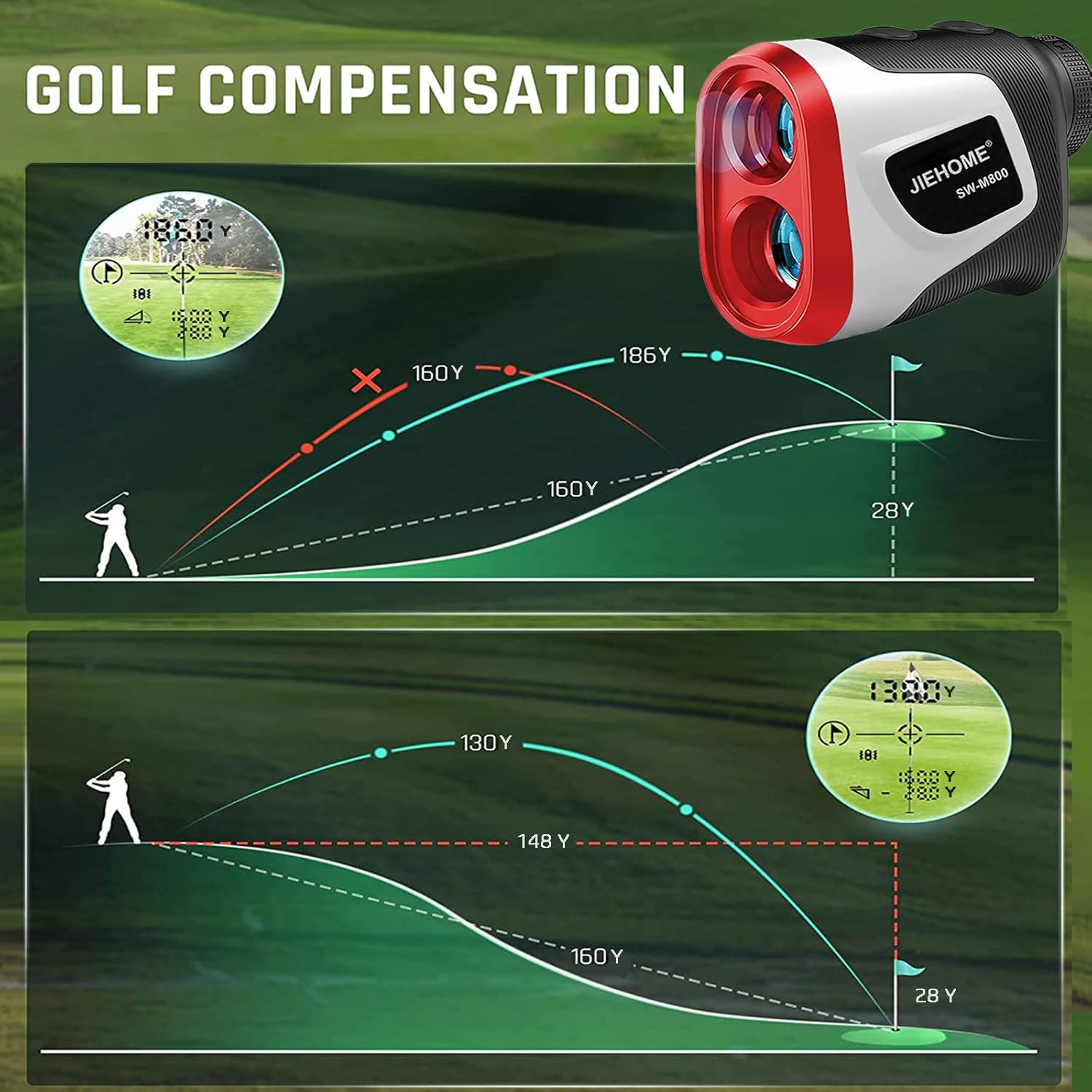
Figure 7: Illustration of how the rangefinder calculates golf compensation for uphill and downhill shots.

Figure 8: The rangefinder's display showing accuracy, range, and flag-lock range, highlighting its tournament legal slope feature.
- Mode 3: Horizontal Distance Measurement + Vertical Distance Measurement
This mode provides both the horizontal distance to a target and its vertical height difference relative to the user's position.
- Mode 4: Speed Mode
Utilize this mode to measure the speed of a moving object. Aim at the object and activate the laser; the speed will be displayed.
Maintenance
- Cleaning: Use the provided cleaning cloth to gently wipe the lenses and the body of the rangefinder. Do not use abrasive materials or chemical cleaners.
- Storage: Store the rangefinder in its protective case when not in use. Avoid exposing it to extreme temperatures or direct sunlight for prolonged periods.
- Battery Care: Recharge the battery regularly, even if the device is not used frequently, to maintain optimal battery health.
Troubleshooting
| Problem | Possible Cause | Solution |
|---|---|---|
| Device does not power on. | Low or depleted battery. | Charge the battery using the provided USB-C cable. |
| Inaccurate distance readings. | Dirty lens, unstable aiming, or target too far/small. | Clean the lenses with the cleaning cloth. Ensure stable aiming. Target larger objects or use Flag-Lock for small targets. |
| Display is blurry. | Eyepiece diopter not adjusted correctly. | Rotate the diopter adjustment ring until the display is clear. |
| No vibration feedback. | Flag-Lock feature not activated or target not detected. | Ensure you are in a mode that supports Flag-Lock. Aim steadily at the flag. |
Specifications
- Model Number: P81148
- Brand: Jiehome
- Magnification: 6X
- Measuring Range: 3-800 yards
- Ranging Accuracy: +/- 0.1 yard
- Pin-seek Range: 200+ yards
- Flag-lock Range: 250+ yards
- Laser Type: Class 1, 905nm
- Display Mode: LCD Digital
- Battery: 3.7V / 750mAh Li-ion (included)
- Battery Working Life: Approx. 20,000 single measurements per full charge
- Battery Life Cycles: Approx. 500 charge-discharge cycles
- Auto Off: 20 seconds of inactivity
- Product Dimensions: 1.4 x 1 x 0.7 cm
- Item Weight: 320 g
- Material: Plastic
- Water Resistance Level: Water Resistant
- Sport: Golf
Warranty and Support
Jiehome provides a 1-year warranty and lifetime technical support for this golf distance finder. If you encounter any issues or have questions regarding your product, please contact customer service via Amazon for assistance. Support is available 24 hours a day.