Introduction
Welcome to the NIXON Base Tide Pro A1307 Digital Watch user manual. This guide provides detailed instructions for the setup, operation, and maintenance of your new digital watch. The Base Tide Pro is designed for water sports enthusiasts, offering essential features like tide data, sunrise/sunset times, and multiple timing functions, all within a durable, water-resistant design.

Figure 1: Front view of the NIXON Base Tide Pro A1307 Digital Watch, displaying time and tide graph.
Setup
1. Initial Power On and Battery
Your NIXON Base Tide Pro A1307 watch comes with a pre-installed battery. If the display is blank, press any button to activate it. If the watch does not power on, the battery may need replacement (refer to the Maintenance section).
2. Setting Time and Date
- Press and hold the MODE button (typically bottom left) to enter the settings menu.
- Use the ADJUST button (typically top right) to cycle through settings options (Time, Date, Year).
- Use the SET button (typically bottom right) to change the selected value.
- Press MODE again to confirm and exit settings.
3. Setting Home Beach and Tide Data
The watch is pre-programmed with tide data for over 550 beaches worldwide. To set your home beach:
- From the main time display, press the TIDE button (refer to your watch's specific button layout for exact labeling).
- Press and hold the SET button to enter tide location selection.
- Use the ADJUST and MODE buttons to navigate through regions and specific beach locations.
- Once your desired location is displayed, press SET to confirm.
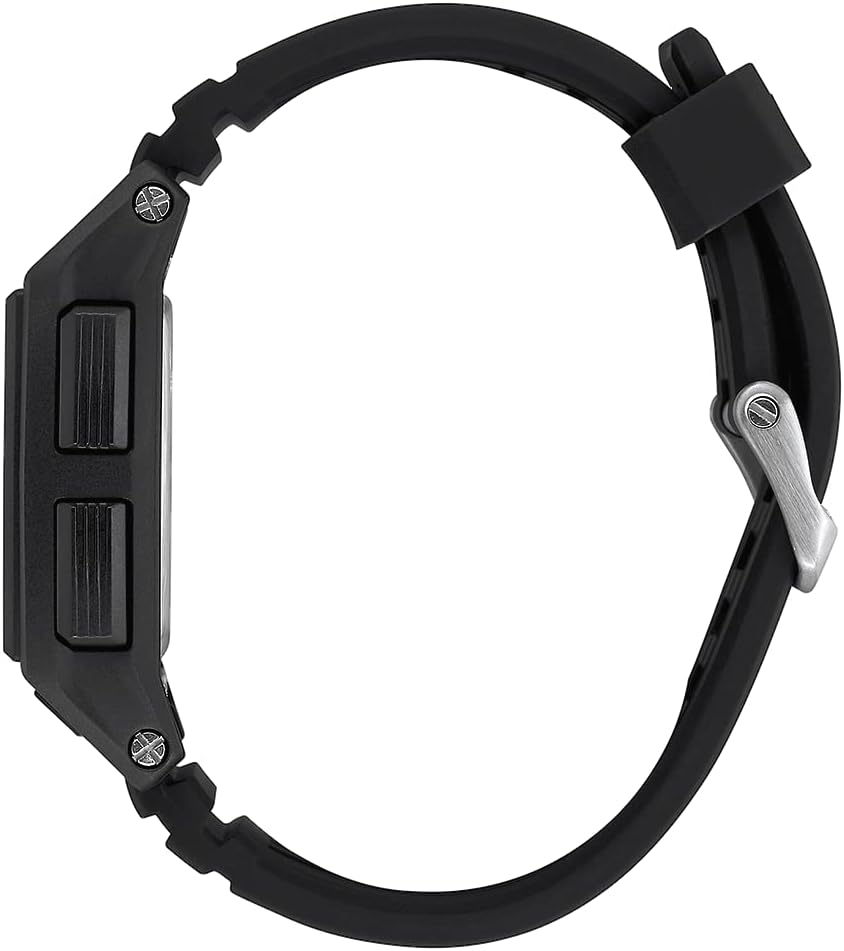
Figure 2: Side view of the watch, showing the control buttons for navigation and settings.

Figure 3: The watch displaying tide information, superimposed on a world map indicating available tide locations.
Operating Instructions
1. General Navigation
The NIXON Base Tide Pro A1307 typically features four buttons for navigation and function selection. While specific labels may vary, common functions include:
- MODE: Cycles through main display modes (Time, Tide, Chronograph, Timer, Alarms).
- SET/START: Used to enter/exit settings, start/stop timers or chronographs.
- ADJUST/LAP: Used to adjust values in settings, or record laps in chronograph mode.
- LIGHT: Activates the EL backlight for visibility in low light conditions.
2. Time Mode
The default display shows the current time (12-hour or 24-hour format), date, and day of the week. You can toggle between different display configurations using the ADJUST button.
3. Tide Mode
Access Tide Mode by pressing the MODE button until the tide graph is displayed. This mode shows:
- Current tide graph for your selected home beach.
- Future and past tide data.
- Sunrise and sunset times.
Use the ADJUST button to scroll through future and past tide predictions.
4. Alarm Functions
The watch features three independent alarms. To set an alarm:
- Navigate to Alarm Mode using the MODE button.
- Press and hold SET to enter alarm setting.
- Use ADJUST to select the alarm number (AL1, AL2, AL3).
- Use SET to toggle between hours and minutes, and ADJUST to change values.
- Press MODE to save and exit.
5. Countdown Timer
The countdown timer can be set for various durations.
- Enter Timer Mode via the MODE button.
- Press and hold SET to set the countdown duration.
- Use ADJUST to change values and SET to move between hours, minutes, and seconds.
- Press SET to start the countdown. Press again to pause, and ADJUST to reset.
6. Wave Counter and Chronograph
These functions are accessible through the MODE button.
- Chronograph: Use SET to start/stop and ADJUST for lap times.
- Wave Counter: Specific instructions for activating and using the wave counter can be found in the detailed PDF manual.
7. Water Resistance (100 Meter / 10 ATM)
The NIXON Base Tide Pro A1307 is water resistant to 100 meters (10 ATM). This makes it suitable for swimming, surfing, and snorkeling. Do not operate buttons underwater as this can compromise the water seal. Ensure the crown (if applicable) is fully pushed in before water exposure.

Figure 4: The watch being worn during an outdoor activity, demonstrating its practical use.
Maintenance
1. Cleaning Your Watch
To maintain the appearance and functionality of your watch, regularly clean it with a soft, damp cloth. For saltwater exposure, rinse the watch thoroughly with fresh water after each use and dry it with a soft cloth. Avoid using harsh chemicals or abrasive materials.
2. Battery Replacement
The watch uses a specific product-specific battery. When the battery runs low, the display may dim or become erratic. Battery replacement should be performed by a qualified watch technician to ensure the water resistance seal is properly maintained. Attempting to replace the battery yourself may void the warranty and compromise water resistance.
3. Band Care
The perforated PU band is designed for breathability and comfort. Clean the band with mild soap and water. Avoid prolonged exposure to direct sunlight or extreme temperatures, which can degrade the material. The double locking looper system ensures a secure fit.
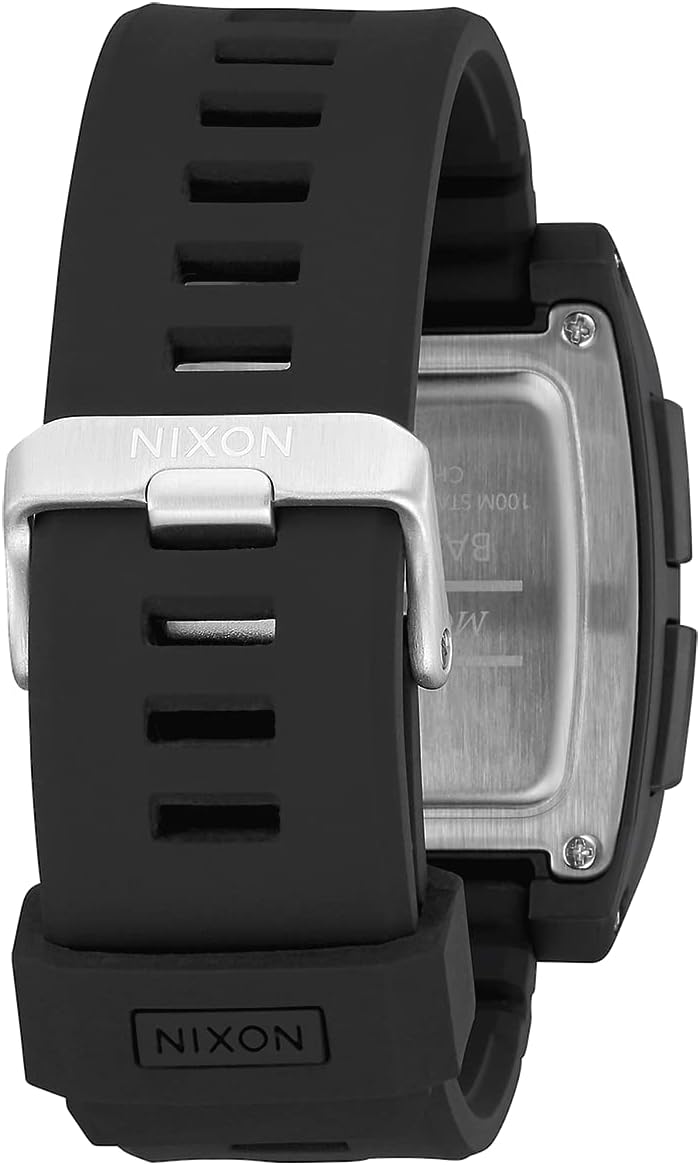
Figure 5: Rear view of the watch, showing the stainless steel case back and the double locking looper system on the band.
Troubleshooting
| Problem | Possible Cause | Solution |
|---|---|---|
| Display is blank or dim. | Low or dead battery. | Replace battery (professional service recommended). |
| Incorrect time or date. | Time/date not set correctly or reset after battery change. | Refer to "Setting Time and Date" section to reset. |
| Tide data is inaccurate. | Incorrect home beach selected or data not synchronized. | Verify your home beach setting. Ensure time and date are accurate. |
| Buttons are unresponsive. | Watch may be wet, or internal issue. | Ensure watch is dry. If issue persists, contact NIXON support. |
Specifications
- Model Number: A1307
- Case Size: 42mm
- Band Width: 24mm
- Water Resistance: 100 Meter / 10 ATM
- Display: Digital EL Backlight
- Functions: Time, Date, Sunrise/Sunset, Future/Past Tide, Dual Time, 3 Alarms, Countdown Timer, Wave Counter, Chronograph
- Material: Recycled ocean plastic case, Stainless steel caseback, PU band
- Clasp Type: Hook & Loop (Double locking looper system)
- Battery: 1 Product Specific battery (included)
- Product Dimensions: 4 x 5 x 5 inches; 2.19 ounces

Figure 6: Engraving on the watch case back, indicating model, water resistance, and material.
Warranty and Support
NIXON products are manufactured to high-quality standards and are covered by a limited warranty against defects in materials and workmanship. For specific warranty details, terms, and conditions, please refer to the official NIXON website or contact their customer support.
For further assistance, detailed instructions, or to view the complete user manual in PDF format, please visit the official NIXON support page or download the PDF directly:
Download NIXON Base Tide Pro User Manual (PDF)