Introduction
This manual provides instructions for the VINABTY replacement remote control, designed for various Sharp Aquos 3D Smart Netflix TV models. This remote offers direct functionality without the need for complex programming, ensuring a seamless replacement experience for your original remote.
Setup
1. Battery Installation
- Locate the battery compartment on the back of the remote control.
- Slide the battery cover downwards or press the latch and lift to open.
- Insert two AAA 1.5V batteries, ensuring the positive (+) and negative (-) terminals align correctly with the markings inside the compartment.
- Replace the battery cover by sliding it back into place until it clicks securely.
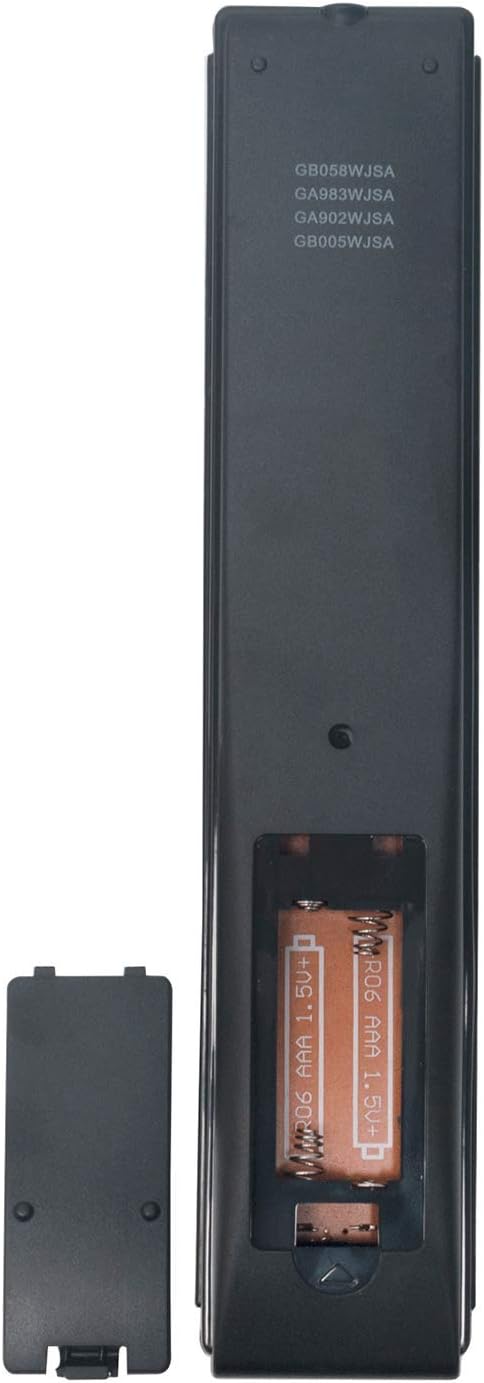
Image: Rear view of the remote control with the battery cover removed, illustrating correct AAA battery placement.
2. Initial Use
The VINABTY replacement remote control is designed to work immediately with compatible Sharp Aquos TV models without any additional programming. Once batteries are installed, point the remote towards your television and begin operation.
Operating Instructions
This remote control provides full functionality for your Sharp Aquos TV. Below are common button functions:

Image: Front view of the VINABTY replacement remote control, highlighting the button layout.
- Power (TV): Turns the television on or off.
- Source: Selects input sources (HDMI, AV, etc.).
- Number Buttons (0-9): Direct channel selection.
- Volume Up/Down (+/-): Adjusts the television volume.
- Channel Up/Down (CH+/-): Changes television channels.
- Mute: Silences the television audio.
- Navigation Pad (Up, Down, Left, Right, OK): Navigates menus and confirms selections.
- Menu: Opens the television's main menu.
- Exit/End: Exits current menu or function.
- Netflix: Direct access button for the Netflix application.
- Colored Buttons (Red, Green, Yellow, Blue): Functionality varies by TV model and application.
- Playback Controls (Play, Pause, Stop, Rewind, Fast Forward): Controls media playback.
Maintenance
Battery Replacement
Replace batteries when the remote's response becomes sluggish or stops working. Always replace both batteries simultaneously with new AAA 1.5V batteries. Do not mix old and new batteries or different battery types.
Cleaning
To clean the remote control, use a soft, dry cloth. For stubborn dirt, lightly dampen the cloth with water. Avoid using harsh chemicals, abrasive cleaners, or excessive moisture, as these can damage the remote's surface or internal components.
Storage
When not in use for extended periods, remove the batteries to prevent leakage and potential damage to the remote. Store the remote in a cool, dry place away from direct sunlight and extreme temperatures.
Troubleshooting
- Remote not responding:
- Check if the batteries are correctly inserted with the correct polarity.
- Replace old batteries with new ones.
- Ensure there is a clear line of sight between the remote control and the TV's infrared receiver. Remove any obstructions.
- Confirm the remote is compatible with your specific TV model.
- Specific buttons not working or acting erratically:
- This can sometimes occur due to minor manufacturing variations. Try pressing the button firmly.
- Ensure the remote is pointed directly at the TV.
- If the issue persists for a particular button, and other functions work, it might indicate a specific button malfunction.
- Short operating range:
- Replace batteries with fresh ones.
- Ensure no strong light sources (like direct sunlight) are interfering with the TV's IR receiver.
Specifications
| Feature | Detail |
|---|---|
| Brand | VINABTY |
| Compatible Devices | Sharp Aquos 3D Smart Netflix Televisions |
| Connectivity Technology | Infrared (IR) |
| Power Source | 2 x AAA 1.5V Batteries (not included) |
| Number of Buttons | 15 (approximate, based on typical layout) |
| Maximum Range | Up to 10 meters (33 feet) |
| Model Numbers | GB058WJSA, GA983WJSA, GA902WJSA, GB005WJSA |
Warranty and Support
For any questions, concerns, or support regarding your VINABTY replacement remote control, please contact the seller or manufacturer directly. Refer to your purchase documentation for specific warranty information and contact details. The manufacturer is committed to assisting you with any issues you may encounter.

