1. Introduction
This manual provides instructions for the installation, operation, and maintenance of your new HQparts carburetor. This carburetor is designed as a replacement part for specific hedge trimmer models, including RYOBI RBC30SET, RLT30CET, JCB BC26, LT26, and HT26. Please read this manual thoroughly before attempting any installation or operation to ensure proper function and safety.
2. Package Contents
Verify that all components listed below are present in your package:
- 1 x Carburetor
- 1 x Primer Bulb
- 2 x Gaskets
- 1 x Fuel Filter
- 1.5 feet x 6617 Fuel Line
- 1.5 feet x 6616 Fuel Line
- 2 x Air Filters
- 1 x Spark Plug
- 1 x Adjustment Tool (Screwdriver)

Figure 1: All components included in the HQparts carburetor replacement kit. This image displays the carburetor, primer bulb, fuel lines, fuel filter, gaskets, air filters, spark plug, and adjustment tool.
3. Safety Information
Always prioritize safety when working with small engines and fuel systems. Failure to follow safety precautions can result in serious injury or damage to equipment.
- Disconnect Spark Plug: Before beginning any work, disconnect the spark plug wire to prevent accidental engine startup.
- Work in a Well-Ventilated Area: Fuel fumes are flammable and hazardous. Ensure adequate ventilation.
- Eye Protection: Wear safety glasses to protect against fuel splashes or debris.
- Fire Extinguisher: Keep a fire extinguisher nearby when working with fuel.
- Fuel Handling: Handle fuel carefully. Do not smoke or use open flames near fuel.
- Refer to Trimmer Manual: Consult your hedge trimmer's original instruction manual for specific disassembly and reassembly procedures.
4. Setup and Installation
This section outlines the general steps for replacing a carburetor. Specific procedures may vary slightly depending on your hedge trimmer model. Always refer to your trimmer's service manual for detailed instructions.
- Preparation: Ensure the engine is cool. Disconnect the spark plug wire. Drain any remaining fuel from the fuel tank.
- Access the Carburetor: Remove the air filter cover and air filter. You may need to remove other covers or components to gain full access to the carburetor.
- Disconnect Fuel Lines: Carefully disconnect the fuel lines from the old carburetor. Be prepared for residual fuel to leak. Note the routing of the fuel lines for correct reinstallation.
- Disconnect Throttle Linkage: Detach the throttle cable or linkage from the old carburetor.
- Remove Old Carburetor: Unscrew the mounting bolts or nuts holding the carburetor to the engine. Remove the old carburetor and any old gaskets.
- Install New Gaskets: Place the new gaskets in their correct positions between the engine, insulator (if present), and the new carburetor. Ensure they are properly aligned.
- Mount New Carburetor: Position the new HQparts carburetor and secure it with the mounting bolts/nuts. Do not overtighten.
- Reconnect Throttle Linkage: Reattach the throttle cable or linkage to the new carburetor. Verify smooth operation.
- Install New Fuel Lines and Filter: Replace old fuel lines with the new 6617 and 6616 fuel lines provided. Install the new fuel filter into the fuel tank, ensuring the correct line connects to the carburetor's inlet and the return line to the tank.
- Install New Primer Bulb: If replacing, carefully remove the old primer bulb and install the new one.
- Install New Air Filters: Place the new air filters into the air filter housing.
- Install New Spark Plug: Replace the old spark plug with the new one provided. Gap the spark plug according to your trimmer's specifications if necessary.
- Reassemble: Reattach any covers or components removed earlier.
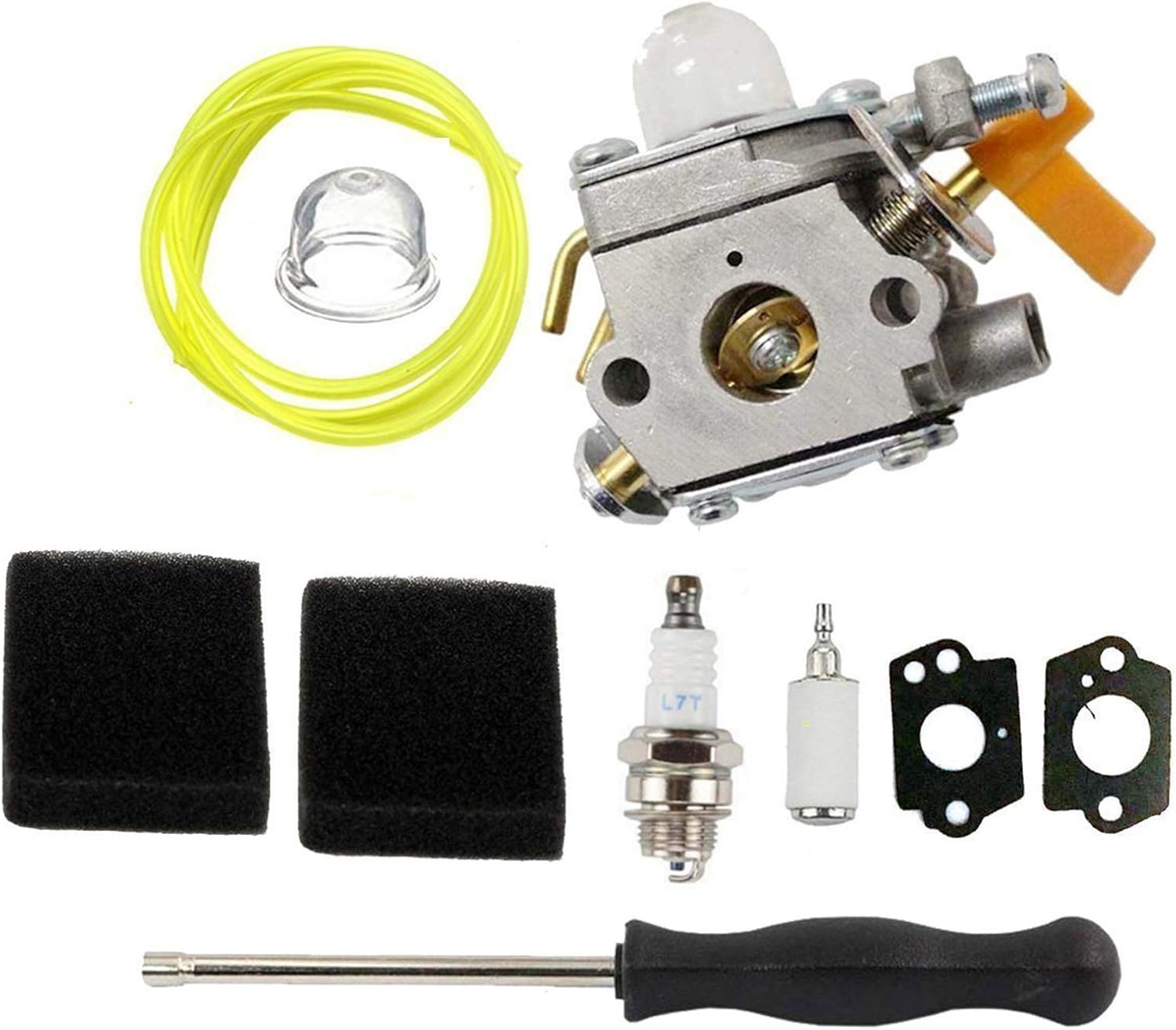
Figure 2: Close-up view of the HQparts carburetor, showing the primer bulb and fuel line connections. Proper connection of these components is crucial for fuel delivery.
5. Operating (Initial Start-up and Adjustment)
After installation, perform the following steps for initial start-up and basic carburetor adjustment.
- Add Fresh Fuel: Fill the fuel tank with the correct fuel/oil mixture specified by your hedge trimmer manufacturer.
- Prime the Carburetor: Press the primer bulb repeatedly until fuel is visible in the bulb and it feels firm. This indicates fuel has reached the carburetor.
- Choke and Start: Engage the choke (if applicable to your trimmer). Pull the starter cord until the engine attempts to start or "pops."
- Disengage Choke: Once the engine pops, disengage the choke and pull the starter cord again to fully start the engine.
- Warm-up: Allow the engine to warm up for a few minutes.
- Idle Adjustment: If the engine idles too fast or too slow, use the idle speed screw (often marked "T") on the carburetor to adjust. Turn clockwise to increase RPM, counter-clockwise to decrease.
- High/Low Speed Adjustment (if applicable): Some carburetors have high (H) and low (L) speed adjustment screws. These are typically factory-set. If adjustment is necessary, make small turns (1/8th turn at a time) and test. Incorrect adjustment can damage the engine. It is recommended to consult a professional for these adjustments if you are unsure.
6. Maintenance
Regular maintenance ensures optimal performance and longevity of your carburetor and hedge trimmer.
- Air Filter: Clean or replace the air filter regularly (every 10-20 hours of operation or seasonally) to prevent dirt from entering the carburetor.
- Fuel Filter: Replace the fuel filter annually or if fuel delivery issues occur.
- Spark Plug: Inspect and clean the spark plug periodically. Replace it annually or if starting issues persist.
- Fuel Quality: Always use fresh, clean fuel mixed with the correct ratio of 2-stroke oil. Stale fuel can cause carburetor issues.
- Storage: Before long-term storage, drain the fuel tank and run the engine until it stops to clear the carburetor of fuel, or use a fuel stabilizer.
7. Troubleshooting
| Problem | Possible Cause | Solution |
|---|---|---|
| Engine won't start | No fuel, clogged fuel filter, faulty spark plug, incorrect choke setting, carburetor not primed. | Check fuel level, replace fuel filter, replace spark plug, adjust choke, prime carburetor. |
| Engine starts then dies | Clogged fuel filter, air leak, carburetor adjustment needed, stale fuel. | Replace fuel filter, check for loose connections, adjust carburetor (idle/mixture), use fresh fuel. |
| Engine runs rough/lacks power | Dirty air filter, incorrect carburetor adjustment, old spark plug. | Clean/replace air filter, adjust carburetor, replace spark plug. |
| Fuel leaks | Loose fuel lines, damaged primer bulb, improperly seated gaskets. | Tighten connections, replace primer bulb, ensure gaskets are correctly installed. |
8. Specifications
This HQparts carburetor is an aftermarket replacement part designed to meet or exceed the specifications of the original equipment manufacturer (OEM) parts for the listed models.
- Compatibility: RYOBI RBC30SET, RLT30CET, JCB BC26, LT26, HT26 Hedge Trimmers
- Part Type: Carburetor Assembly with associated components
- Manufacturer: HQparts

Figure 3: Included gaskets and spark plug. Ensure correct gasket placement for a proper seal and optimal engine performance.
9. Warranty and Support
For any questions regarding installation, operation, or troubleshooting that are not covered in this manual, please contact the seller or manufacturer directly. Refer to your purchase documentation for specific warranty details.
Manufacturer: HQparts
ASIN: B08MX9Q7V7


