
NGTeco C500
NGTeco C500 Outdoor Security Camera User Manual
Model: C500
1. Introduction
Thank you for choosing the NGTeco C500 Outdoor Security Camera. This manual provides detailed instructions for setting up, operating, and maintaining your camera to ensure optimal performance and security for your home or property. The NGTeco C500 features 1080P Full HD video, 2.4G Wi-Fi connectivity, two-way audio, motion detection with spotlight, color night vision, and flexible storage options.

Image: The NGTeco C500 outdoor security camera, a white bullet-style camera with an antenna, mounted on a wall, with a smartphone displaying a live view of a house in the background.
2. Package Contents
Please check the package contents upon opening. If any items are missing or damaged, contact NGTeco customer support.
- NGTeco C500 Outdoor Security Camera
- Power Adapter
- Mounting Screws and Wall Plugs
- Mounting Template
- User Manual (this document)
3. Product Overview
Familiarize yourself with the camera's components before installation.
- Camera Lens: Captures video footage.
- Infrared LEDs: Provide illumination for night vision.
- Spotlights: Enhance color night vision and act as a deterrent.
- Microphone: Captures audio for two-way communication.
- Speaker: Outputs audio for two-way communication.
- Antenna: For Wi-Fi connectivity.
- Power Port: Connects to the power adapter.
- SD Card Slot: For local video storage (supports up to 128GB, card not included).
- Reset Button: Used to reset the camera to factory settings.
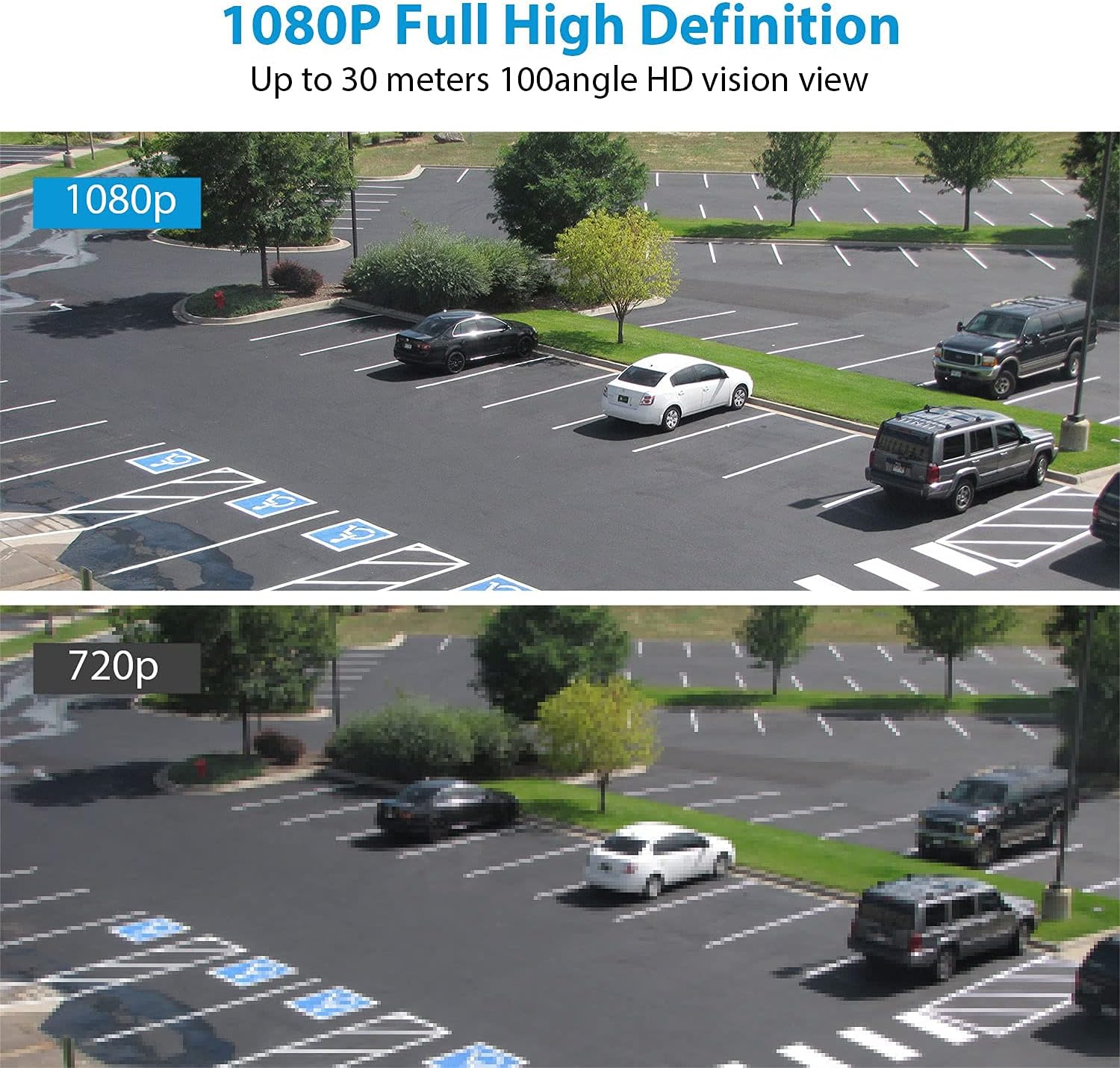
Image: The NGTeco C500 camera mounted on a wall, with an inset showing the location of the SD card slot and reset button.
4. Setup and Installation
4.1 App Download and Account Creation
- Scan the QR code on the package or search for "NGTeco Home" (or similar app name, assuming a common app for NGTeco products) in your mobile app store (App Store for iOS, Google Play for Android).
- Download and install the app.
- Open the app and register a new account using your email address or phone number. Follow the on-screen prompts to complete registration.
4.2 Camera Power On and Wi-Fi Connection
- Connect the camera to a power outlet using the provided power adapter. The camera will power on and emit an indicator light.
- Open the NGTeco Home app, tap the "+" icon to add a new device.
- Select "Security Camera" or the specific model (C500) from the device list.
- Follow the in-app instructions to connect the camera to your 2.4GHz Wi-Fi network. Ensure your phone is connected to the same 2.4GHz Wi-Fi network during setup.
- The app will guide you through scanning a QR code with the camera or using sound pairing.
- Once connected, the camera's indicator light will change, and you will hear a confirmation sound.
4.3 Physical Installation
Choose a suitable outdoor location for installation, ensuring good Wi-Fi signal strength and a clear view of the area you wish to monitor. The camera is IP65 waterproof, suitable for various weather conditions.

Image: The NGTeco C500 camera mounted outdoors, with water droplets on its surface, illustrating its IP65 waterproof rating against rain, snow, shine, temperature, and dust.
- Mark the drilling positions on the wall using the mounting template.
- Drill holes and insert wall plugs if necessary.
- Secure the camera base to the wall using the provided screws.
- Adjust the camera angle to cover the desired monitoring area.
5. Operating Instructions
5.1 Live View and Playback
- Open the NGTeco Home app and select your camera from the device list to access the live view.
- From the live view interface, you can take snapshots, record video manually, and access settings.
- To view recorded footage, tap the "Playback" or "History" option in the app. You can filter by date and time.

Image: A split image demonstrating the clarity difference between 1080p (top) and 720p (bottom) video resolution, showing a parking lot scene captured by the camera.
5.2 Two-Way Audio
The camera features a built-in microphone and speaker, allowing for two-way communication.
- In the live view, tap the microphone icon to speak through the camera's speaker.
- Tap the speaker icon to listen to audio from the camera's microphone.

Image: A visual representation of the camera's two-way audio feature, showing a person at a door communicating with someone via the camera.
5.3 Motion Detection and Alerts
Configure motion detection settings to receive alerts on your mobile device when activity is detected.
- Navigate to the camera settings in the app.
- Enable "Motion Detection" and adjust sensitivity levels as needed.
- Set up activity zones to focus detection on specific areas.
- When motion is detected, the camera can activate its spotlights and send push notifications to your phone.

Image: A comparison showing the effectiveness of NGTeco Security's smart motion detection with activated floodlights (top) versus a standard camera (bottom) in deterring an intruder at a window.
5.4 Night Vision
The NGTeco C500 offers advanced night vision capabilities, including color night vision when spotlights are active.
- The camera automatically switches to infrared (IR) night vision in low-light conditions.
- When motion is detected or manually activated, the built-in spotlights can illuminate the area, providing full-color night vision.
- Night vision range is up to 25 meters (approximately 82 feet).

Image: The NGTeco C500 camera at night, with its spotlights illuminated, demonstrating its FHD advanced night vision capability up to 25 meters.

Image: A smartphone screen displaying three different night vision modes: 1080P (daylight), Spotlight Mode (color night vision), and Infrared Mode (black and white night vision).
5.5 Storage Options
The NGTeco C500 supports two primary storage methods for recorded footage:
- Micro SD Card Storage: Insert a Micro SD card (up to 128GB, Class 10 or higher recommended) into the camera's SD card slot for local storage. The camera will automatically record events or continuous video based on your settings.
- Cloud Storage: Subscribe to the optional cloud storage service through the NGTeco Home app for secure, off-site storage of your video recordings. This provides an additional layer of security in case the camera is damaged or stolen.
6. Maintenance
- Cleaning: Periodically wipe the camera lens and body with a soft, damp cloth to remove dust and dirt. Do not use harsh chemicals or abrasive cleaners.
- Firmware Updates: Check the NGTeco Home app regularly for firmware updates. Keeping your camera's firmware up-to-date ensures optimal performance, security, and access to new features.
- Wi-Fi Connection: Ensure your Wi-Fi router is functioning correctly and the camera has a strong signal for uninterrupted operation.
7. Troubleshooting
| Problem | Possible Cause | Solution |
|---|---|---|
| Camera offline/Cannot connect to Wi-Fi | Weak Wi-Fi signal; Incorrect Wi-Fi password; Router issues; Camera too far from router. |
|
| No motion detection alerts | Motion detection disabled; Sensitivity too low; Incorrect activity zone settings; App notifications blocked. |
|
| Poor image quality | Dirty lens; Low light conditions; Network bandwidth issues. |
|
| Two-way audio not working | Microphone/speaker muted in app; Volume too low; Network delay. |
|
8. Specifications
| Feature | Detail |
|---|---|
| Model Number | C500 |
| Video Capture Resolution | 1080p Full HD |
| Connectivity Technology | Wireless (Wi-Fi 2.4G) |
| Indoor/Outdoor Usage | Outdoor |
| International Protection Rating | IP65 (Waterproof) |
| Special Features | Frame Rate (30 fps), Motion Sensor, Night Vision (Color & IR), Two-Way Audio, Spotlight |
| Storage Options | Micro SD Card (up to 128GB), Cloud Storage |
| Power Source | Wired Electric (12 Volts, 5 watts) |
| Material | Acrylonitrile Butadiene Styrene (ABS) |
| Item Weight | 1.04 pounds |
| Package Dimensions | 9.25 x 4.8 x 3.9 inches |
9. Warranty and Support
NGTeco products typically come with a limited warranty. Please refer to the warranty card included in your product packaging or visit the official NGTeco website for detailed warranty terms and conditions.
For technical support, troubleshooting assistance, or any inquiries regarding your NGTeco C500 camera, please contact NGTeco customer support through their official website or the contact information provided in the app.
Website: www.ngteco.com (Example, actual URL may vary)
Email: support@ngteco.com (Example, actual email may vary)
Related documentsC500


Ask a question about this manual
Ask about setup, troubleshooting, compatibility, parts, safety, or missing instructions. Manuals+ will review the question and use this page’s manual context to help answer it.