
Samsung Electronics SM-R190NZSAXAR
SAMSUNG Galaxy Buds Pro User Manual
Model: SM-R190NZSAXAR
Introduction
This manual provides essential information for the safe and efficient use of your SAMSUNG Galaxy Buds Pro. Please read it thoroughly before using the device to ensure proper operation and to maximize your listening experience. The Galaxy Buds Pro are true wireless earbuds designed for high-quality audio, intelligent Active Noise Cancellation, and clear call performance.
What's in the Box
Verify that all items are present in your product packaging:
- SAMSUNG Galaxy Buds Pro Earbuds (Left and Right)
- Charging Case
- USB-C Charging Cable
- Ear Tips (various sizes)
- User Manual (this document)

Image: The Galaxy Buds Pro earbuds and their charging case, showcasing the Phantom Silver color.
Setup
1. Charging the Earbuds and Case
Before first use, fully charge the Galaxy Buds Pro and their charging case. The charging case holds multiple charges for the earbuds, extending their usage time.
- Connect the USB-C cable to the charging case and a power adapter.
- Place the earbuds into the charging case, ensuring they are correctly seated. The indicator lights on the case will show the charging status.
- A red light indicates charging, green indicates fully charged.

Image: Galaxy Buds Pro earbuds placed inside their open charging case, ready for charging.

Image: The compact, closed charging case for the Galaxy Buds Pro, showing its portable design.
2. Pairing with Your Device
The Galaxy Buds Pro can be easily paired with Bluetooth-enabled devices, especially Samsung Galaxy devices.
- Open the charging case with the earbuds inside. The earbuds will automatically enter pairing mode.
- On your device, go to Bluetooth settings and select "Galaxy Buds Pro" from the list of available devices.
- Follow any on-screen prompts to complete the pairing process.
- For optimal experience, download the Samsung Wearable app (Galaxy Wearable) from your device's app store.
3. Fitting the Earbuds
Proper fit is crucial for sound quality and Active Noise Cancellation effectiveness.
- Select the ear tips that provide the most comfortable and secure seal in your ear canal. Different sizes are included.
- Hold the earbuds by their upper and lower sides and gently insert them into your ears.
- Rotate the earbuds slightly until they sit comfortably and securely. The touch-sensitive sensors will detect when they are properly worn.

Image: Close-up view of the left and right Galaxy Buds Pro earbuds, highlighting their ergonomic design and L/R indicators.
Operating Your Galaxy Buds Pro
1. Touch Controls
The Galaxy Buds Pro feature intuitive touch controls on the outer surface of each earbud.
| Action | Function |
|---|---|
| Single Tap | Play/Pause music, Answer/End call |
| Double Tap | Play next song, Answer/End call (during call waiting) |
| Triple Tap | Play previous song |
| Touch and Hold | Activate Active Noise Cancellation/Ambient Sound, Decline call, Activate voice assistant (customizable in app) |
2. Active Noise Cancellation (ANC) and Ambient Sound
The Galaxy Buds Pro offer advanced noise control features to enhance your audio experience.
- Active Noise Cancellation (ANC): Blocks out external noise, allowing you to focus on your audio. Activate by touching and holding an earbud (default setting).
- Ambient Sound: Allows you to hear your surroundings while still enjoying your audio. Choose from four ambient levels in the Galaxy Wearable app.
- Voice Detect: Automatically switches from ANC to Ambient Sound when it detects your voice, allowing you to have conversations without removing your earbuds.

Image: A person smiling while wearing a Galaxy Buds Pro earbud, demonstrating the Ambient Sound mode that allows awareness of surroundings.

Image: A woman engaged in conversation while wearing Galaxy Buds Pro, highlighting the Voice Detect feature that automatically adjusts sound modes.
3. Official Product Video
Watch this official video for a visual overview of the Samsung Galaxy Buds Pro features, including Active Noise Cancellation and sound quality.
Video: An official Samsung video showcasing the key features and benefits of the Galaxy Buds Pro, including their intelligent noise control and immersive sound.
Maintenance
1. Cleaning Your Earbuds
Regular cleaning helps maintain sound quality and hygiene.
- Gently wipe the earbuds and charging case with a soft, dry, lint-free cloth.
- Remove ear tips and clean them separately with water if necessary, ensuring they are completely dry before reattaching.
- Use a cotton swab or small brush to carefully clean the speaker mesh and charging contacts.
2. Water Resistance
The Galaxy Buds Pro are IPX7 water-resistant, meaning they can be immersed in up to 1 meter of fresh water for up to 30 minutes. This rating does not apply to the charging case.
- Avoid exposing the earbuds to salt water, chlorinated water, or other liquids.
- If the earbuds get wet, dry them thoroughly before placing them back in the charging case to prevent damage.
- Water resistance is not permanent and may decrease over time with normal wear.
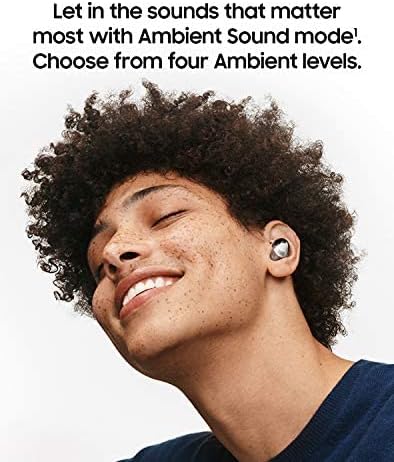
Image: Galaxy Buds Pro earbuds and their case positioned near water droplets, visually representing their IPX7 water-resistant capabilities for workouts and light rain.
Troubleshooting
If you encounter issues with your Galaxy Buds Pro, try the following solutions:
| Problem | Solution |
|---|---|
| Earbuds not connecting | Ensure Bluetooth is enabled on your device. Place earbuds in case, close, then reopen to re-enter pairing mode. Try forgetting the device on your phone and re-pairing. |
| Poor sound quality | Check earbud fit and try different ear tip sizes. Clean speaker mesh. Ensure no obstructions. Check audio source quality. |
| Active Noise Cancellation not working | Ensure earbuds are properly seated in your ears to create a good seal. Verify ANC is enabled in the Galaxy Wearable app. |
| Earbuds not charging | Ensure earbuds are correctly placed in the charging case. Clean charging contacts on both earbuds and case. Try a different USB-C cable or power source. |
| Touch controls unresponsive | Ensure your fingers are clean and dry. Restart the earbuds by placing them in the case, closing it for a few seconds, then reopening. |
Specifications
| Feature | Detail |
|---|---|
| Model Name | Galaxy Buds Pro |
| Model Number | SM-R190NZSAXAR |
| Connectivity | Bluetooth 5.0 |
| Audio Drivers | 11mm Woofer, 6.5mm Tweeter |
| Noise Control | Active Noise Cancellation, Ambient Sound |
| Water Resistance | IPX7 (Earbuds only) |
| Battery Life (Earbuds) | Up to 5 hours (with ANC on) |
| Battery Life (with Case) | Up to 18 hours (with ANC on) |
| Charging | USB-C, Wireless Charging |
| Compatible OS | Android 7.0 or higher (with 1.5GB RAM or above), iOS (limited features) |
| Dimensions (Earbud) | Approx. 20.5 x 19.5 x 20.8 mm |
| Weight (Earbud) | Approx. 6.3 g |
| UPC | 887276517841 |
Warranty and Support
For warranty information, technical support, or service inquiries, please refer to the official Samsung website or contact Samsung customer service. Keep your proof of purchase for warranty claims.
- Online Support: Visit the official Samsung support website for FAQs, troubleshooting guides, and software updates.
- Customer Service: Contact Samsung customer service for personalized assistance.
- Product Documents: Additional user guides and manuals may be available for download on the Samsung website.
You can also find more information and support at the Samsung Store on Amazon.
Related documentsSM-R190NZSAXAR


Ask a question about this manual
Ask about setup, troubleshooting, compatibility, parts, safety, or missing instructions. Manuals+ will review the question and use this page’s manual context to help answer it.