
Introduction
Thank you for purchasing the Creality 3D UW-01 Washing and Curing Machine. This 2-in-1 device is designed to streamline the post-processing of LCD/DLP/SLA resin 3D printed models, offering efficient washing and UV curing capabilities. This manual provides essential information for safe operation, setup, usage, maintenance, and troubleshooting to ensure optimal performance and longevity of your machine.

Figure 1: Creality UW-01 Washing and Curing Machine with transparent orange cover.
Safety Instructions
- Always wear appropriate personal protective equipment (PPE), including gloves and eye protection, when handling resin or cleaning solutions.
- Ensure the machine is placed on a stable, level surface away from direct sunlight and heat sources.
- Do not operate the machine with a damaged power cord or plug.
- Keep the machine away from children and pets.
- Use only recommended cleaning solutions (e.g., isopropyl alcohol) and follow their safety guidelines.
- Never look directly at the UV lights during operation. The protective cover must be in place during curing to prevent UV exposure. The machine features an automatic pause function if the cover is removed during curing.
- Dispose of used resin and cleaning solutions according to local environmental regulations.
Product Overview
The Creality UW-01 integrates washing and curing functionalities into a single compact unit, designed for user convenience and efficiency.
Key Features:
- Dual-Row UV Light System: Equipped with 18 UV LED lights in double rows for powerful and even curing.
- 360° Rotating Platform: Features a magnetic and reflective rotating tray for comprehensive exposure during curing.
- Intuitive LED Touch Control: HD touch-sensitive panel with a large LED display for easy operation and safety features.
- Integrated Wash and Cure System: Seamless transition between washing and curing modes for models up to φ165x200mm.
- Spacious Washing Container: A 190x154x200mm sealed container minimizes evaporation and allows for cleaning fluid reuse.
- Versatile Features with Adjustable Bracket: Multiple washing modes and an adjustable bracket accommodate various platform and model sizes.

Figure 2: Overview of the Creality UW-01's multiple functions and design.

Figure 3: Close-up of the LED HD touch control panel and a model being washed.
Specifications
| Feature | Specification |
|---|---|
| Model | UW-01 |
| Machine Type | Curing and Washing |
| Control Method | Touch button, LED indicator |
| Rated Power | 96W |
| Input Voltage | 24V |
| Curing and Washing Time | 2-90 minutes |
| Washing Size (L×W×H) | 170mm × 120mm × 160mm |
| Air-drying and Curing Size | φ165mm × 200mm |
| Machine Size | 225mm × 225mm × 370mm |
| Machine Weight | 6.5 KG |

Figure 4: Detailed product parameters for the UW-01 machine.
Setup
Before first use, ensure all packaging materials are removed and the machine is placed on a stable, flat surface. Connect the power adapter to the machine and a suitable power outlet.
Initial Assembly:
- Place the main unit on a stable surface.
- Insert the washing container into the main unit. Ensure it is seated correctly.
- For curing, place the rotating platform onto the designated area on the main unit.
- Always ensure the transparent orange protective cover is properly placed on the unit before starting any operation.
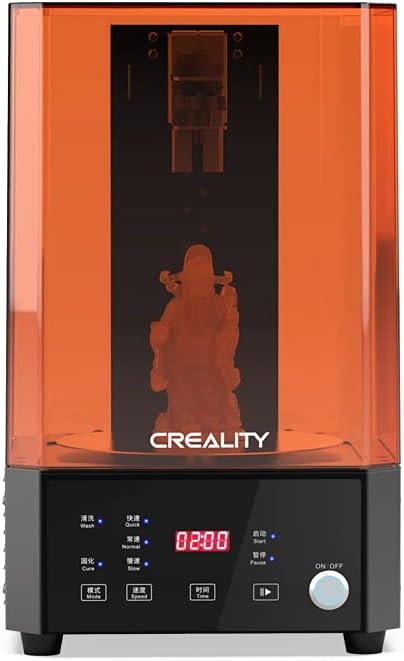
Figure 5: The Creality UW-01 machine with the build plate and washing basket.
Video 1: This video demonstrates the setup and basic usage of the Creality UW-01 Washing and Curing Machine, including how to prepare it for washing and curing operations.
Operating Modes
1. Washing Mode
The washing mode uses a powerful electromagnetic propeller to stir the cleaning solution, effectively removing uncured resin from your 3D printed models.
- Ensure the washing container is filled with an appropriate cleaning solution (e.g., 70% or 99% Isopropyl Alcohol) up to the indicated fill line.
- You can wash models in two ways:
- Using the Washing Basket: Place your printed models directly into the metal washing basket and lower it into the container.
- Platform Suspension Washing: Attach your build plate with the printed model directly to the adjustable bracket. This method reduces contact with the resin and allows for washing without removing the model from the build plate. Adjust the bracket height to ensure the model is fully submerged.
- Select 'Wash' mode on the touch panel.
- Set the desired washing time (2-90 minutes) and speed (Fast, Normal, Slow).
- Place the protective cover over the unit and press 'Start'. The machine will automatically reverse direction periodically for thorough cleaning.

Figure 6: Illustration of strong wash, UV cure, wash in basket, and platform suspension washing methods.

Figure 7: Details on adjustable three-gear speed settings and the self-adjustable bracket for washing.
2. Curing Mode
After washing, models require UV curing to achieve their final hardness and strength. The UW-01 uses dual-band UV light and a rotating platform for uniform curing.
- Remove the washing container and place the rotating platform onto the main unit.
- Carefully place your washed and dried 3D printed model(s) onto the center of the rotating platform. The platform's magnetic and reflective mirrors enhance curing efficiency.
- Select 'Cure' mode on the touch panel.
- Set the desired curing time (2-90 minutes) and speed (Fast, Normal, Slow). For most models, 5-10 minutes is sufficient, but larger or thicker models may require more time.
- Place the transparent orange protective cover over the unit. The machine will not start curing without the cover properly in place.
- Press 'Start'. The UV lights will activate, and the platform will begin rotating.

Figure 8: The Creality UW-01 machine operating in curing mode with UV lights active.

Figure 9: Illustration of the 360-degree specular reflections for enhanced curing and the double-row UV lamp beads.
Maintenance
Regular maintenance ensures the longevity and optimal performance of your UW-01 machine.
Cleaning:
- After each use, especially after washing, ensure the washing container and propeller are clean.
- If the cleaning solution becomes cloudy or ineffective, replace it. Used resin-contaminated alcohol can be left in sunlight to cure the resin, then filtered and reused or disposed of properly.
- Wipe down the exterior of the machine and the protective cover with a soft, dry cloth. Avoid abrasive cleaners.
Component Replacement:
Periodically, certain components may need replacement due to wear or malfunction. Refer to the following video for guidance on replacing the Hall Switch, a common maintenance task.
Video 2: This video provides a step-by-step guide on how to replace the Hall Switch component of the Creality UW-01, which is essential for proper operation.
Troubleshooting
| Problem | Possible Cause | Solution |
|---|---|---|
| Machine does not power on | Power cable loose; Power outlet issue | Check power connections; Try a different outlet |
| Washing/Curing does not start | Protective cover not properly placed; Incorrect mode selected | Ensure cover is fully seated; Verify mode selection (Wash/Cure) |
| Models are still sticky after washing | Insufficient washing time; Cleaning solution is diluted/dirty | Increase washing time; Replace cleaning solution |
| Models are still soft after curing | Insufficient curing time; Model not fully dry before curing | Increase curing time; Ensure models are completely dry before curing |
| Rotating platform not spinning | Platform not correctly placed; Motor issue | Re-seat the rotating platform; Contact customer support if issue persists |
Warranty and Support
Creality provides a standard warranty for the UW-01 Washing and Curing Machine. For detailed warranty terms, technical support, or service inquiries, please refer to the official Creality website or contact their customer service directly. Keep your purchase receipt as proof of purchase for warranty claims.
Video 3: A short preview video highlighting the benefits of the Creality UW-01 Wash and Cure Machine.


