
1. Introduction
This manual provides essential information for the setup, operation, and maintenance of your Positive Grid Spark 40 Guitar Amplifier and its accompanying Traveler Bag. The Spark 40 is a versatile 40-watt combo amplifier designed for electric, bass, and acoustic guitars, featuring smart technology and mobile app integration.

Figure 1.1: The Positive Grid Spark 40 Amplifier shown with its dedicated Traveler Bag.
2. Setup
Follow these steps to set up your Spark 40 amplifier for the first time.
- Unpacking: Carefully remove the Spark 40 amplifier and all accessories from the packaging. Ensure all components listed in the packing list are present.
- Power Connection: Connect the provided power adapter to the DC IN 19V 2.5A port on the rear of the amplifier. Plug the other end into a suitable power outlet.
- Instrument Connection: Plug your guitar (electric, bass, or acoustic) into the 1/4-inch INPUT jack on the front panel of the amplifier.
- Power On: Flip the power switch located on the front panel to the 'ON' position. The power indicator light will illuminate.
- App Installation (Optional but Recommended): Download the Positive Grid Spark app from your device's app store (iOS or Android).
- Bluetooth Pairing:
- Ensure Bluetooth is enabled on your mobile device.
- Open the Spark app. The app will guide you through the pairing process. Select "Spark 40" from the list of available devices.
- Once paired, you can control amplifier settings and stream audio through the Spark 40.

Figure 2.1: A musician practicing with the Spark 40 amplifier in a home setting.

Figure 2.2: The Spark 40 amplifier interacting with the Spark mobile application for tone control and features.
3. Operating the Spark 40 Amplifier
The Spark 40 offers a range of controls and features for diverse musical applications.
3.1 Front Panel Controls

Figure 3.1: Detailed view of the Spark 40 amplifier's front panel controls.
- Amp Type Selector: Rotate this knob to select between various amplifier models (e.g., Clean, Glassy, Crunch, Hi-Gain, Metal, Bass, Acoustic).
- Gain: Adjusts the input sensitivity and amount of overdrive/distortion.
- Bass, Mid, Treble: Standard equalization controls to shape your tone.
- Master: Controls the overall output volume of the amplifier.
- Mod, Delay, Reverb: Adjusts the intensity of modulation, delay, and reverb effects.
- Output: Controls the volume for the headphone output.
- Input: 1/4-inch jack for connecting your instrument.
- Music Volume: Controls the volume of audio streamed via Bluetooth or connected via the AUX input.
- Preset Buttons (1-4): Save and recall your favorite tones. Press and hold to save a preset.
- Tuner (Hold): Press and hold to activate the built-in tuner.
3.2 Rear Panel Connections
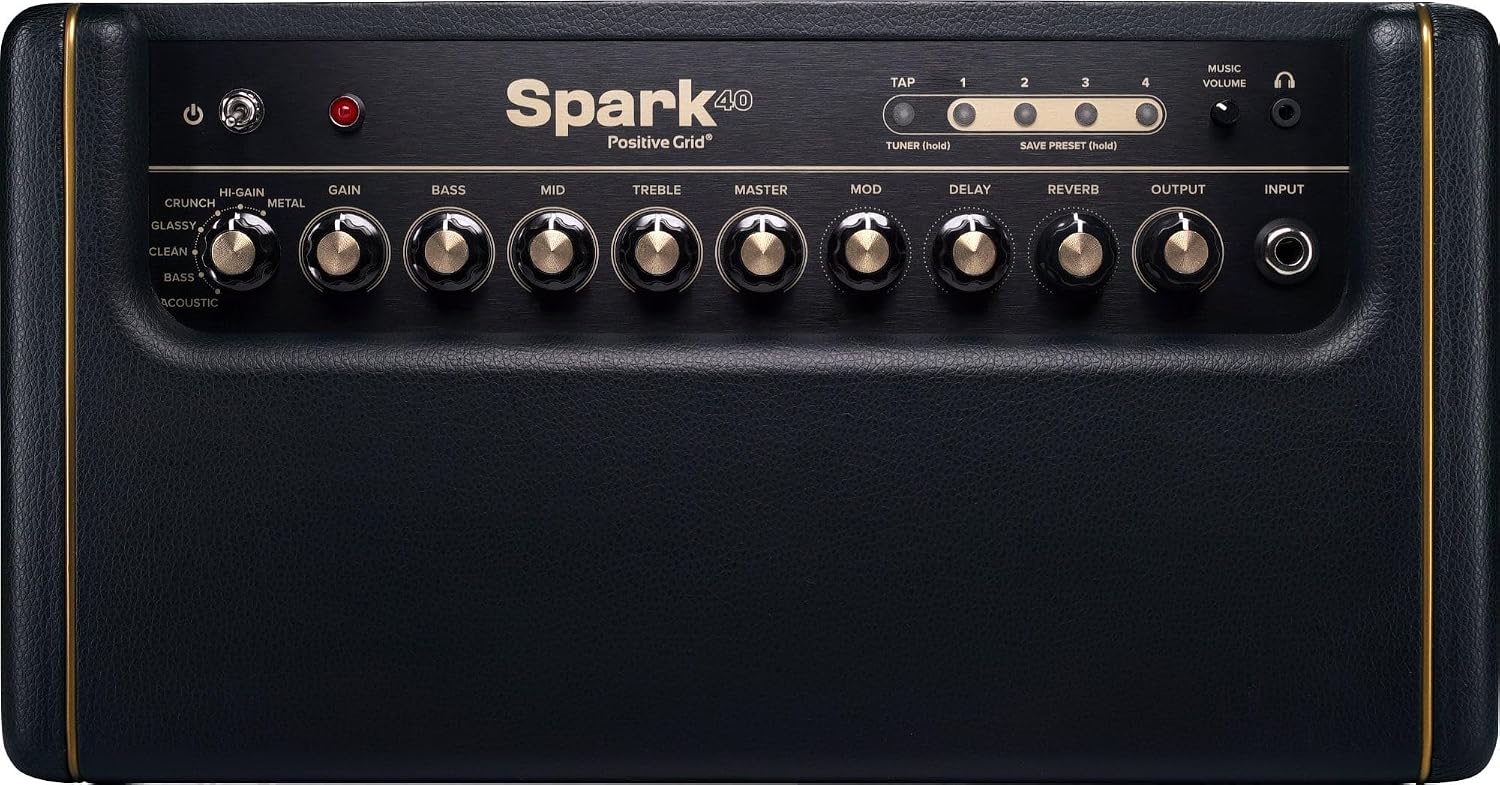
Figure 3.2: Detailed view of the Spark 40 amplifier's rear panel connections.
- DC IN 19V 2.5A: Power input for the included adapter.
- USB: Connects to a computer for use as an audio interface for recording.
- AUX: 3.5mm input for connecting external audio devices.
- Bluetooth Indicator: Shows Bluetooth connection status.
3.3 Using the Spark Mobile App
The Spark app unlocks the full potential of your amplifier, offering advanced features and extensive tone customization.

Figure 3.3: Various screens of the Spark mobile application, showcasing its features.
- Smart Jam: The app listens to your playing and generates dynamic bass and drum backing tracks in real-time.
- Auto Chords: Import songs from streaming services (e.g., Spotify, Apple Music), and the app will automatically display guitar chords in real-time.
- Tone Cloud: Access a vast library of over 50,000 tones created by other users and Positive Grid. You can download, modify, and upload your own presets.
- Virtual Amps & Effects: Customize your sound with a wide array of virtual amplifiers, pedals, and effects within the app.
- Recording: Use the Spark 40 as a USB audio interface to record your playing directly to a computer using your preferred Digital Audio Workstation (DAW).

Figure 3.4: The Spark 40 amplifier connected via USB to a laptop, functioning as an audio interface for recording.
4. Traveler Bag Usage
The included Traveler Bag is designed for convenient and secure transportation of your Spark 40 amplifier.

Figure 4.1: A user carrying the Spark 40 amplifier in its custom-fitted Traveler Bag.
- Custom Fit: The bag is specifically designed to fit the Spark 40 amplifier snugly, providing protection during transport.
- Protective Interior: Features a thick, padded interior to safeguard the amplifier from impacts and scratches.
- Storage Compartment: A front zipper compartment is available for storing the power adapter, cables, and other small accessories.
- Carrying Options: Equipped with comfortable carry handles and a removable shoulder strap for versatile carrying.

Figure 4.2: The Spark Traveler Bag, highlighting its design and storage capabilities.
5. Maintenance
Proper care and maintenance will ensure the longevity and optimal performance of your Spark 40 amplifier.
- Cleaning:
- Wipe the exterior with a soft, dry cloth.
- For stubborn dirt, use a slightly damp cloth and then dry thoroughly.
- Avoid using abrasive cleaners, solvents, or waxes, as these can damage the finish.
- Storage:
- Store the amplifier in a cool, dry place away from direct sunlight and extreme temperatures.
- When not in use, it is recommended to store the amplifier in its Traveler Bag for added protection.
- Ventilation: Ensure the amplifier has adequate ventilation during operation to prevent overheating. Do not block any vents.
- Cable Management: Always handle cables carefully. Avoid sharp bends or kinks that can damage internal wiring.
6. Troubleshooting
If you encounter issues with your Spark 40 amplifier, refer to the following common troubleshooting tips:
| Problem | Possible Cause | Solution |
|---|---|---|
| No power | Power cable not connected; power outlet faulty; power switch off. | Ensure power cable is securely connected to both the amplifier and a working power outlet. Check the power switch. |
| No sound from instrument | Instrument cable faulty; volume knobs turned down; incorrect input selected (if applicable via app). | Check instrument cable. Increase Gain and Master volume. Ensure correct amp type is selected. |
| Bluetooth connection issues | Bluetooth not enabled on device; amplifier not in pairing mode; interference. | Ensure Bluetooth is on and the Spark app is open. Try restarting both the amplifier and your mobile device. Move closer to the amplifier. |
| App not controlling amplifier | Bluetooth not connected; app outdated; amplifier firmware outdated. | Verify Bluetooth connection. Update the Spark app to the latest version. Check Positive Grid's website for firmware updates. |
For further assistance, please visit the official Positive Grid support website or contact their customer service.
7. Specifications
Detailed technical specifications for the Positive Grid Spark 40 Amplifier.
| Feature | Detail |
|---|---|
| Brand | Positive Grid |
| Model Number | Spark40 |
| Output Wattage | 40 Watts |
| Speaker Count | 2 x 4-inch Custom Designed Speakers |
| Item Weight | 19.26 pounds (approx. 8.74 kg) |
| Product Dimensions (L x W x H) | 7.48 x 13.78 x 7.09 inches (approx. 19 x 35 x 18 cm) |
| Compatible Devices | Computer, Smartphone, Tablet |
| Connector Type | USB, AUX, Bluetooth |
| Material Type | Wood (cabinet) |
| Power Source | Corded Electric (19V DC) |

Figure 7.1: Visual representation of the Spark 40 amplifier dimensions.
8. Warranty and Support
Positive Grid products are designed for reliability and performance. For information regarding warranty coverage, please refer to the warranty card included with your product or visit the official Positive Grid website.
For technical support, product registration, or to access frequently asked questions, please visit the Positive Grid support portal: