
1. Introduction and Overview
The Sylvania TruWave PAR16 LED Light Bulb with GU10 bi-pin base is designed to provide high-quality, energy-efficient illumination. Featuring TruWave Technology, this bulb aims to deliver light that closely mimics natural sunlight, minimizing unnecessary blue light and enhancing visual comfort. It is dimmable and operates at 3000K, offering a warm white light suitable for various indoor applications.
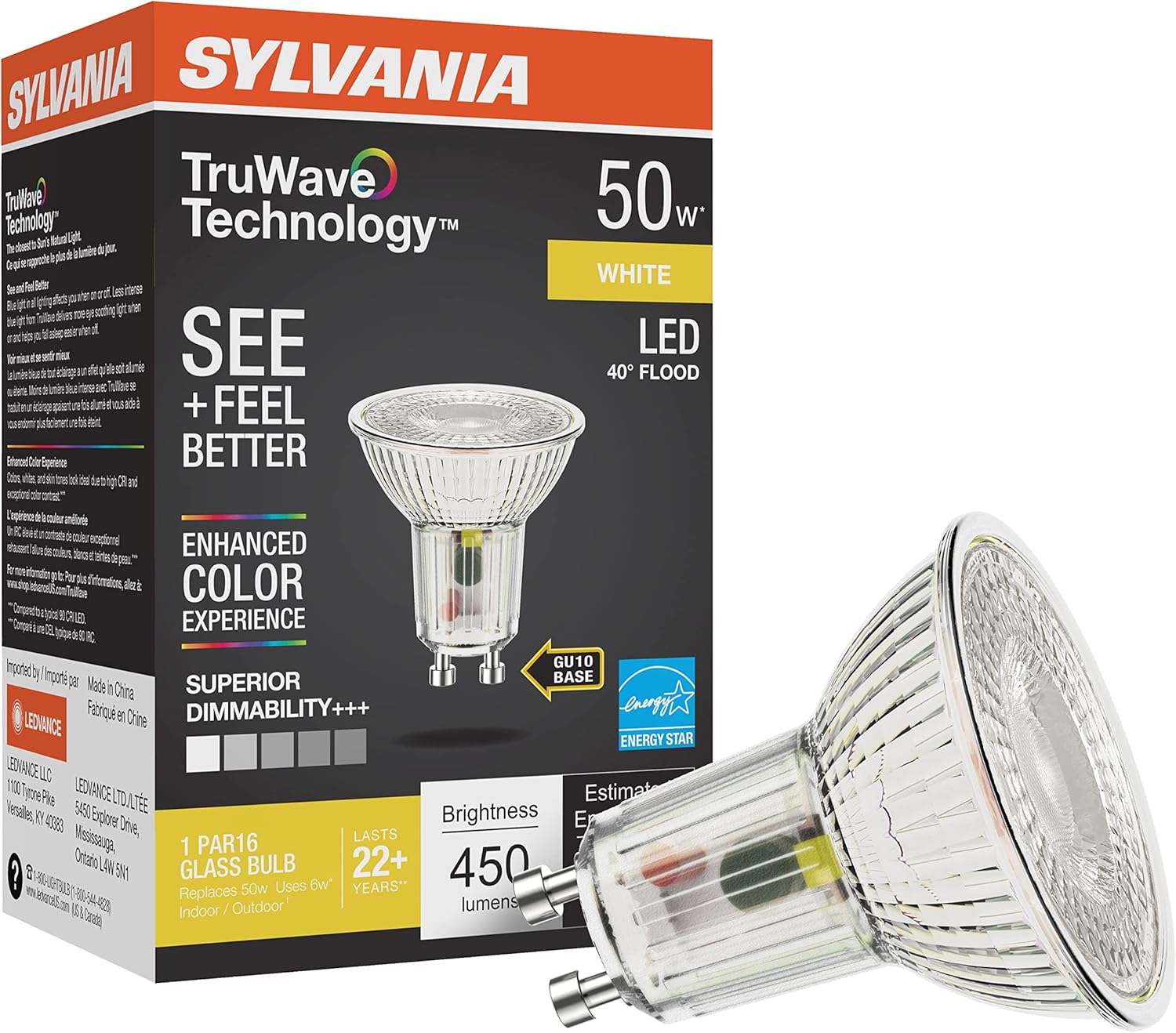
Figure 1: Sylvania TruWave PAR16 LED Light Bulb and its packaging.
2. Key Features
- TruWave Technology: Delivers light most like the Sun's Natural Light, minimizing unnecessary blue light.
- Enhanced Visual Comfort: Designed to be more soothing for the eyes, reducing eye strain during activities like reading.
- Improved Sleep/Wake Cycle: Supports a healthier circadian rhythm by providing light that aids in easier sleep and wakefulness.
- Vivid Color Rendition: Shows real, vivid colors, whites, and skin tones, ensuring accurate perception of your environment.
- Energy Efficient: Replaces 50W incandescent bulbs with only 6W of power consumption.
- Dimmable: Compatible with most dimmers for adjustable light levels.
- Long Lifespan: Rated for an average life of 25,000 hours.
- Color Temperature: 3000 Kelvin (Warm White).

Figure 2: The Sylvania TruWave light bulb provides soothing illumination for reading.
3. Setup and Installation
Before installation, ensure the power to the fixture is turned off at the circuit breaker to prevent electrical shock. This bulb is designed for use in GU10 bi-pin base fixtures.
- Power Off: Turn off the power to the light fixture at the main circuit breaker or fuse box.
- Remove Old Bulb: Allow the old bulb to cool completely before handling. Gently twist or pull the old GU10 bulb from its socket.
- Insert New Bulb: Align the two pins of the Sylvania TruWave PAR16 LED bulb with the two holes in the GU10 socket. Gently push the bulb into the socket and twist it clockwise until it is securely seated. Do not force the bulb into the socket.
- Restore Power: Turn the power back on at the circuit breaker.
- Test: Turn on the light switch to ensure the bulb is functioning correctly.
Safety Precautions:
- Do not install with wet hands.
- Ensure the fixture is rated for the bulb's wattage and type.
- This bulb is suitable for indoor use.

Figure 3: Close-up view of the GU10 bi-pin base for proper installation.
4. Operating Instructions
The Sylvania TruWave PAR16 LED Light Bulb operates like a standard light bulb once installed. Simply use your existing light switch to turn it on or off.
- Dimmable Functionality: This bulb is fully dimmable. For optimal performance, use with compatible LED dimmers. Refer to your dimmer's instructions for specific compatibility and operation.
- Color Temperature: The bulb provides a 3000K warm white light, creating a comfortable and inviting atmosphere.
Video 1: This video provides a guide to understanding color temperature (CCT) in lighting, demonstrating how different Kelvin values affect the ambiance of a room.
5. Maintenance
LED bulbs require minimal maintenance. Follow these guidelines to ensure longevity and optimal performance:
- Cleaning: Ensure the bulb is cool and the power is off before cleaning. Wipe the bulb with a soft, dry cloth. Do not use liquid or abrasive cleaners.
- Replacement: Due to the long lifespan of LED bulbs, frequent replacement is not necessary. Replace the bulb when its light output significantly diminishes or it ceases to function.
- Storage: If storing bulbs, keep them in their original packaging in a cool, dry place.
6. Troubleshooting
If you encounter issues with your Sylvania TruWave PAR16 LED Light Bulb, refer to the following common troubleshooting steps:
- Bulb Not Lighting Up:
- Check if the power switch is on.
- Ensure the bulb is securely twisted into the socket.
- Verify that the circuit breaker for the fixture is not tripped.
- Test the bulb in another working fixture to confirm if the bulb or fixture is at fault.
- Flickering or Dimming Issues:
- Ensure your dimmer switch is compatible with LED bulbs. Older dimmers may cause flickering or improper dimming.
- Check for loose connections in the fixture or wiring.
- If using multiple bulbs on one dimmer, ensure the total wattage is within the dimmer's specified range.
- Reduced Brightness:
- Confirm the bulb is not connected to a dimmer that is set too low.
- Ensure the bulb is clean and free from dust or debris.
If these steps do not resolve the issue, contact Sylvania customer support for further assistance.
7. Specifications
| Specification | Detail |
|---|---|
| Model Number | 40932 |
| Bulb Shape Size | PAR16 |
| Bulb Base | GU10 Bi-Pin |
| Light Type | LED |
| Wattage | 6 Watts |
| Incandescent Equivalent | 50 Watts |
| Brightness | 450 Lumens |
| Color Temperature | 3000 Kelvin (Warm White) |
| Dimmable | Yes |
| Voltage | 120 Volts |
| Average Life | 25,000 Hours |
| Color Rendering Index (CRI) | 90 |
| Product Dimensions | 1.97"W x 2.41"H |
| Indoor/Outdoor Usage | Indoor |
| Material | Glass |
Video 2: This video highlights the benefits of SYLVANIA Natural Light Series with TruWave Technology, focusing on improved visual comfort and well-being.
8. Warranty and Support
This Sylvania TruWave PAR16 LED Light Bulb comes with a 5-year warranty from the date of purchase. This warranty covers defects in materials and workmanship under normal use and service.
For warranty claims, technical support, or any questions regarding your product, please contact Sylvania customer service. Keep your proof of purchase for warranty validation.
You can find more information and contact details on the official LEDVANCE website (the manufacturer of Sylvania products).
Online Resources: For additional product information, FAQs, and support, visit the LEDVANCE Store on Amazon or the official Sylvania/LEDVANCE website.


