
1. Introduction
Thank you for choosing the VEVOR Commercial Meat Bone Saw Machine. This manual provides essential information for the safe operation, installation, maintenance, and troubleshooting of your new equipment. Please read this manual thoroughly before operating the machine to ensure proper use and to prevent injury or damage.
2. Safety Instructions
Operating this machine requires strict adherence to safety protocols. Failure to follow these instructions may result in serious injury or equipment damage.
- Always wear appropriate personal protective equipment (PPE), including cut-resistant gloves and safety glasses.
- Ensure the machine is placed on a stable, level surface before operation.
- Verify that the power supply matches the machine's requirements (110V).
- Never operate the machine with damaged or missing safety guards.
- Keep hands and fingers clear of the saw blade at all times. Use the provided meat pushing slab to feed material.
- Do not attempt to cut materials other than bones, frozen meat, or frozen fish.
- Unplug the machine from the power source before performing any cleaning, maintenance, or blade changes.
- In case of a malfunction, immediately turn off the machine and unplug it. Do not attempt repairs unless qualified.
- Keep children and unauthorized personnel away from the operating area.
- The machine features a built-in protection sensor that stops operation if the cover is opened. Do not bypass this safety feature.
3. Product Overview and Components
The VEVOR Commercial Meat Bone Saw Machine is designed for efficient and safe cutting of various bone-in and frozen food products. It features a robust stainless steel construction and a powerful 850W motor.

Figure 3.1: Overview of the VEVOR Commercial Meat Bone Saw Machine with key components labeled.
Key Components:
- Saw Blade Tension System: Adjusts the tension of the saw blade for optimal cutting performance and safety.
- Imported Saw Blade: High-quality, sharp blade for precise cuts.
- Cutting Thickness Adjustment Board: Allows precise adjustment of cutting thickness from 4mm to 180mm.
- Meat Pushing Slab: A safety device used to push meat towards the blade, keeping hands away.
- Enlarged Workbench: Spacious stainless steel work surface (380 x 365 mm) for handling various sizes of meat.
- On/Off Switch: Easy-to-operate power control.
- Motor Guard: Protects the motor and internal components.

Figure 3.2: The VEVOR Commercial Meat Bone Saw Machine, suitable for cutting bones, frozen meat, and fish.
4. Setup
Follow these steps for initial setup of your bone saw machine:
- Unpacking: Carefully remove all components from the packaging. Inspect for any shipping damage.
- Placement: Position the machine on a sturdy, level, and non-slip surface. Ensure adequate space around the machine for safe operation and ventilation.
- Blade Installation (if not pre-installed):
- Ensure the machine is unplugged.
- Open the protective cover.
- Carefully place the saw blade onto the wheels, ensuring the teeth are pointing downwards towards the cutting surface.
- Adjust the saw blade tension system until the blade is taut and centered on the wheels. The blade should not wobble or be excessively tight.
- Close the protective cover securely.
- Power Connection: Connect the power cord to a grounded 110V electrical outlet.
- Initial Check: Before cutting, briefly turn on the machine to ensure the blade runs smoothly and without unusual noises. Immediately turn off if any issues are observed.

Figure 4.1: Included accessories for setup and maintenance.
5. Operating Instructions
Follow these steps for safe and effective operation:
- Preparation:
- Ensure all safety instructions are understood and followed.
- Clean the workbench surface.
- Place the material (bone, frozen meat, or fish) on the workbench.
- Adjusting Cutting Thickness:
- Use the cutting thickness adjustment board to set the desired thickness. The range is 4mm to 180mm.
- Ensure the adjustment is locked in place before starting the machine.

Figure 5.1: Workbench with precise thickness gauge for adjustment.
- Starting the Machine: Press the 'ON' button (typically green) to start the motor. The saw blade will begin to rotate at 15 m/s.
- Cutting:
- Using the meat pushing slab, gently and steadily guide the material towards the rotating saw blade.
- Apply even pressure. Do not force the material through the blade.
- Keep your hands on the pushing slab and away from the blade at all times.

Figure 5.2: Proper use of the meat pushing slab for safety.
- Stopping the Machine: Once cutting is complete, press the 'OFF' button (typically red) to stop the machine. Wait for the blade to come to a complete stop before removing cut material or cleaning.
6. Maintenance
Regular maintenance ensures the longevity and safe operation of your machine.
6.1. Cleaning
- Always unplug the machine before cleaning.
- Wipe down all stainless steel surfaces with a damp cloth and mild detergent.
- Remove any meat or bone residue from the blade, workbench, and internal compartments. A brush may be used for stubborn areas.
- Rinse with clean water and dry thoroughly to prevent rust.
- Do not use abrasive cleaners or steel wool, as these can damage the stainless steel finish.

Figure 6.1: The machine's design facilitates easy cleaning.
6.2. Blade Replacement
- Ensure the machine is unplugged.
- Open the protective cover.
- Release the tension on the saw blade using the tension system.
- Carefully remove the old blade. Dispose of it safely.
- Install a new blade, ensuring the teeth are correctly oriented.
- Adjust the blade tension until it is firm and centered.
- Close the protective cover securely.
7. Troubleshooting
Refer to this section for common issues and their solutions.
| Problem | Possible Cause | Solution |
|---|---|---|
| Machine does not start | No power supply; Power switch off; Safety cover open; Overload protection activated. | Check power connection; Turn on power switch; Ensure safety cover is closed; Reset overload protection (if applicable). |
| Blade not cutting efficiently | Dull blade; Incorrect blade tension; Material too hard or thick. | Replace blade; Adjust blade tension; Ensure material is within machine's capacity. |
| Excessive vibration or noise | Loose components; Incorrect blade tension; Damaged blade. | Check and tighten all fasteners; Adjust blade tension; Replace damaged blade. |
| Blade comes off during operation | Insufficient blade tension; Misaligned blade. | Immediately turn off machine. Reinstall blade and adjust tension correctly. Ensure blade is centered on wheels. |
8. Specifications
Technical details for the VEVOR Commercial Meat Bone Saw Machine.
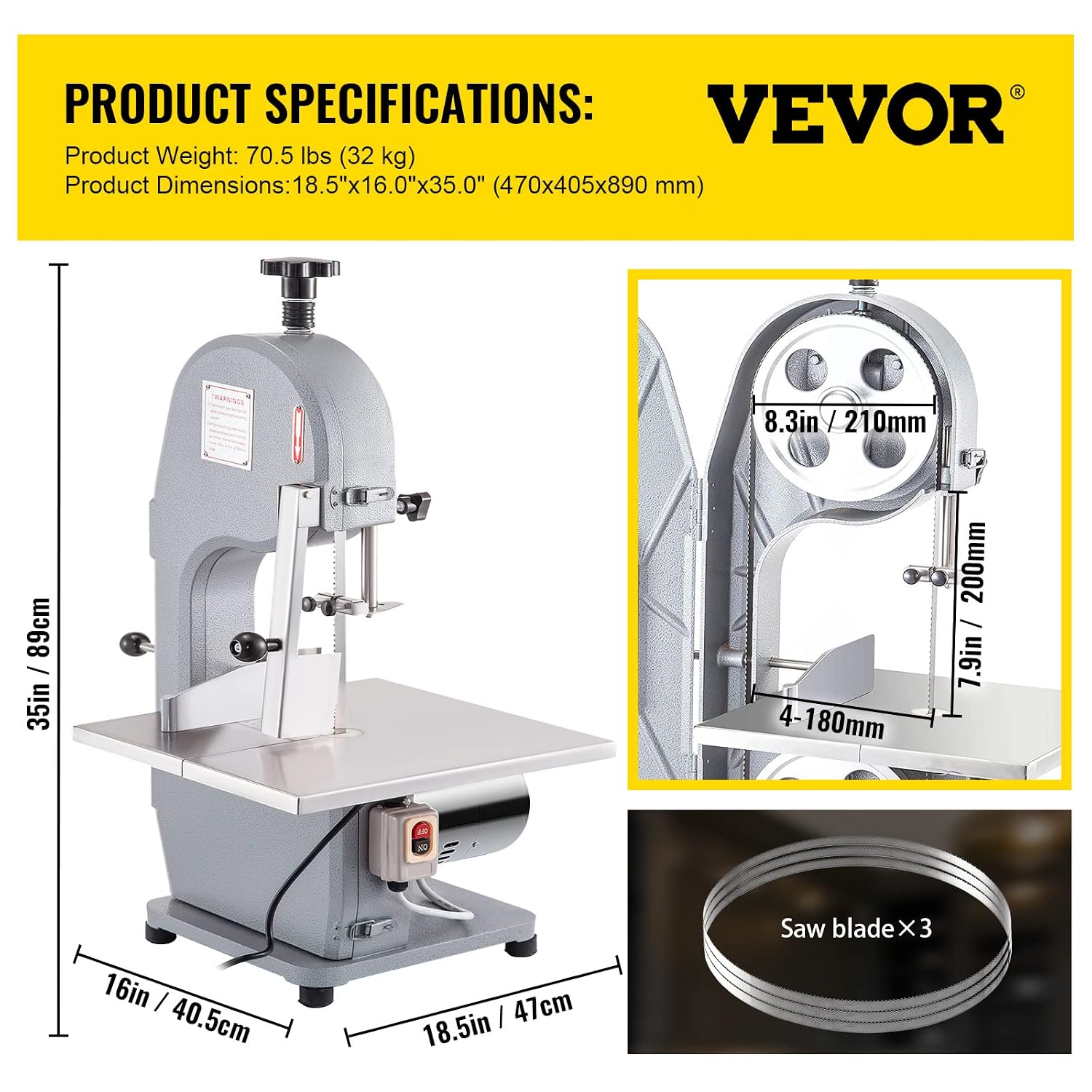
Figure 8.1: Detailed product dimensions and cutting capacities.
| Feature | Detail |
|---|---|
| Brand | VEVOR |
| Model Number | Commercial Meat Bone Saw Machine 850W |
| Power | 850 Watts (1.12 HP) |
| Voltage | 110 Volts |
| Blade Speed | 15 Meters per second |
| Blade Length | 95 Inches |
| Cutting Thickness Range | 4 mm to 180 mm |
| Max Cutting Height | 200 mm |
| Workbench Dimensions | 380 x 365 mm (14.5 x 15 inches) |
| Product Dimensions (L x W x H) | 51.1 x 51.1 x 110 cm (18.5 x 16.0 x 35.0 inches) |
| Item Weight | 71 Pounds (approx. 32.2 kg) |
| Material | Food-grade Stainless Steel (body), Stainless Steel (blade) |
| Included Components | Electric Bone Saw, 3 Saw Blades |
| Special Feature | Portable |
9. Warranty & Support
This VEVOR product comes with a lifetime warranty. For warranty claims, technical support, or service inquiries, please contact VEVOR customer service through the official website or your purchase platform. Please have your model number and purchase date available when contacting support.