
1. Introduction
Thank you for purchasing the Sandoo SC1050 Steam Mop. This versatile steam cleaner is designed to provide efficient and chemical-free cleaning for various surfaces in your home. Please read this manual thoroughly before first use to ensure safe and optimal operation.
Key Features:
- Versatile Cleaning: Suitable for hardwood, tile, and laminate floors.
- Multifunctional: Comes with 12 accessories and 2 reusable pads for cleaning floors, windows, sinks, and more.
- Safe & Powerful: 1200W strong power produces 105℃/221℉ hot water steam for deep cleaning, safer for children and pets.
- Fast Heat-Up: Heats up in 15-18 seconds, ready for quick use.
- Adjustable Steam: Features an adjustable steam button for customized cleaning.
- Extended Usage: 300ml (10oz) water tank capacity provides up to 20 minutes of continuous steaming.
- Long Power Cord: Equipped with a 20ft power cord for extended reach.
2. Product Overview & What's in the Box
Familiarize yourself with the components included in your Sandoo SC1050 Steam Mop package:

Figure 2.1: Sandoo SC1050 Steam Mop and its complete set of accessories.
Package Contents:
- Sandoo SC1050 Main Steam Mop Unit
- Handle Assembly (Upper and Lower Poles)
- Mop Head
- 2 x Reusable Microfiber Pads (one blue, one white)
- Carpet Glider Attachment
- Measuring Cup
- Main Nozzle
- Small Round Brush
- Large Round Brush
- Scraper Tool
- Angle Nozzle
- Window Squeegee
- Accessory Adapter
- User Manual
3. Setup & Installation
Follow these steps to assemble your steam mop:
- Assemble the Handle:
Connect the upper handle to the metal connecting pole. Ensure the release button clicks into place to secure the connection.
Figure 3.1: Connecting the handle components.
- Attach the Mop Head:
Press the release button on the main body and insert the mop head until it clicks securely. Then, attach a microfiber pad to the mop head using the Velcro fasteners.

Figure 3.2: Securely attaching the mop head and pad.
- Connect Main Body to Pole:
Insert the assembled pole into the main body of the steamer until it locks into place. Ensure all connections are firm before use.
- Fill the Water Tank:
Open the silicone cap on the water tank. Use the provided measuring cup to supply up to 300ml of tap water. Close the silicone cap firmly.
Figure 3.3: Filling the water tank with the measuring cup.
4. Operating Instructions
4.1. General Floor Cleaning
- Ensure the microfiber pad is securely attached to the mop head.
- Plug the power cord into a suitable electrical outlet. The power switch will light up red, indicating it's heating.
- Wait approximately 15-18 seconds for the steam mop to heat up. The light will turn green when it's ready for use.
- Adjust the steam level using the steam adjustment knob to achieve the desired cleaning effect. Medium steam is suggested for most surfaces.
- Begin mopping your floor. Move the steam mop slowly and steadily over the surface to allow the steam to penetrate and clean effectively.

Figure 4.1: Steam mop in action on a hard floor.
4.2. Using Accessories for Targeted Cleaning
The Sandoo SC1050 comes with various adapters for different cleaning tasks:
- Carpet Glider: Attach the carpet glider over the mop head and microfiber pad for refreshing carpets and rugs.
- Main Nozzle: Use for concentrated steam on stubborn spots or for attaching other small tools.
- Round Brushes (Small & Large): Ideal for scrubbing grout, oven interiors, and other hard-to-reach areas.
- Scraper Tool: Effective for removing baked-on grease or grime.
- Angle Nozzle: Perfect for cleaning corners and tight spaces.
- Window Squeegee: For streak-free cleaning of windows and mirrors.
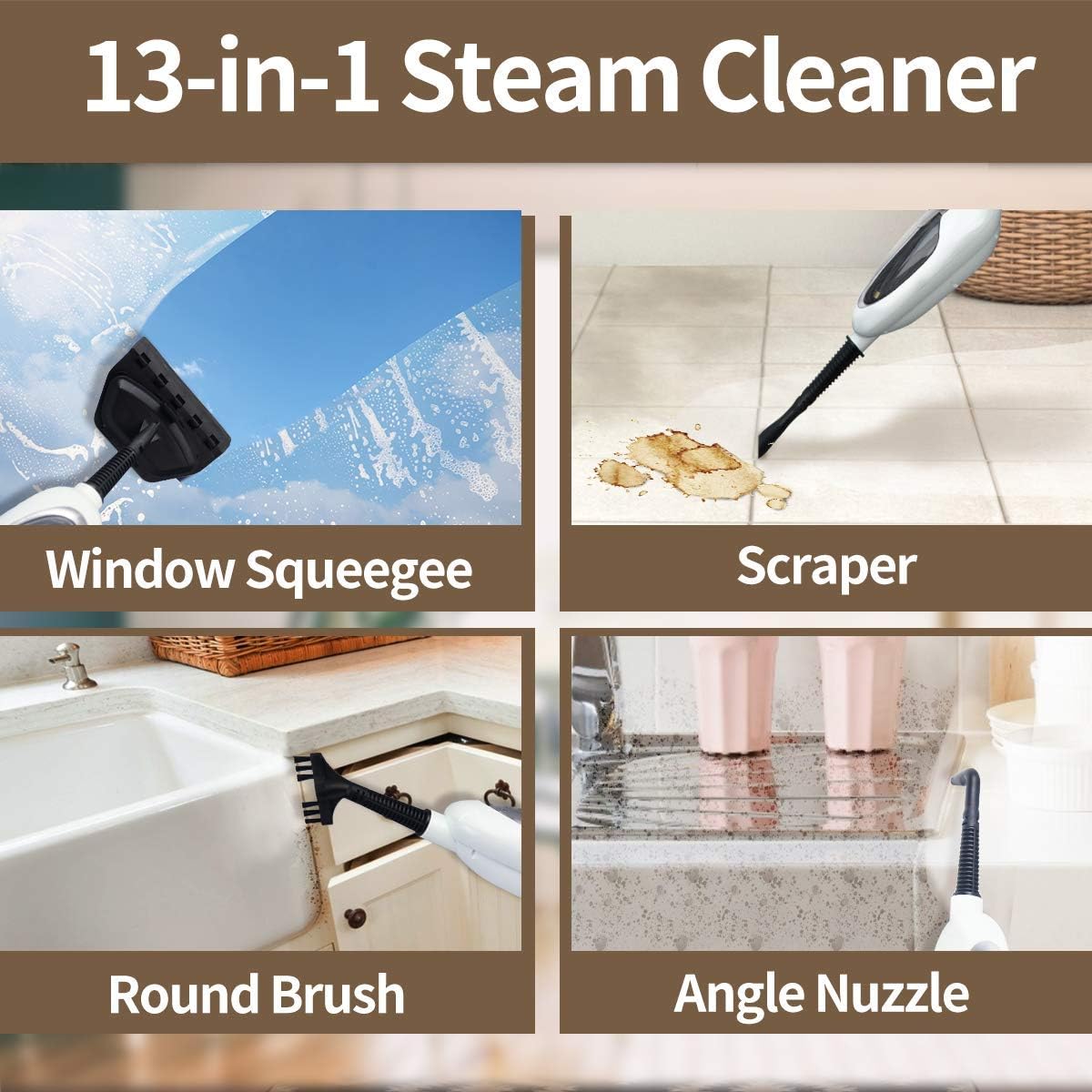
Figure 4.2: Examples of accessory usage.
To attach an accessory, ensure the main unit is unplugged and cool. Insert the desired accessory into the accessory adapter, then attach the adapter to the main body's steam outlet.
5. Maintenance
5.1. Cleaning the Microfiber Pads
The microfiber pads are reusable and can be machine washed. Do not use bleach or fabric softeners, as this may damage the fibers. Air dry or tumble dry on low heat.
5.2. Descaling the Unit
To maintain optimal performance and prevent mineral buildup, descale the unit regularly, especially if you live in an area with hard water. Consult the full user manual for detailed descaling instructions.
5.3. Storage
After use, ensure the unit is unplugged and completely cool. Empty any remaining water from the tank. Wrap the power cord neatly around the cord holders. Store the steam mop in a dry, safe place, away from direct sunlight and out of reach of children.
6. Troubleshooting
If you encounter any issues with your Sandoo SC1050 Steam Mop, please refer to the table below for common problems and their solutions:
| Problem | Possible Cause | Solution |
|---|---|---|
| Power switch does not light up. | Not plugged in correctly; Power outage. | Check plug connection; Check power supply. |
| No steam producing. | Water tank empty; Unit not heated up; Steam outlet blocked. | Refill water tank; Wait for light to turn green; Clean steam outlet. |
| Not enough steam. | Low water level; Steam adjustment too low. | Refill water tank; Adjust steam knob to higher setting. |
| Water dripping from mop head. | Excess water in tank; Unit not fully heated. | Ensure water level is not overfilled; Wait for light to turn green. |
| Mop pad not absorbing water. | Pad is dirty or worn out. | Clean or replace mop pad. |
For further assistance, please contact Sandoo customer support.
7. Specifications
- Brand: sandoo
- Model Name: Steam Mop (SC1050)
- Wattage: 1200 watts
- Voltage: 220 Volts
- Tank Volume: 300 Milliliters (10 oz)
- Heat Up Time: 15-18 seconds
- Usage Time: Up to 20 minutes per fill
- Cable Length: 20 Feet
- Item Weight: 5.8 Pounds
- Surface Recommendation: Tile, Hardwood, Laminate
- Included Components: Cleaning Pad, Measuring Cup, Various Accessories
- Color: Pearl white
- UPC: 798789670896
8. Warranty & Support
The Sandoo SC1050 Steam Mop comes with an 18-month warranty from the date of purchase. For warranty claims, technical support, or any inquiries, please contact Sandoo customer service through the retailer's platform or visit the official Sandoo website.
Online Support: For additional resources, FAQs, and product registration, please visit www.sandootech.com.