Introduction
This manual provides instructions for the VINABTY RMT-D301 Replacement Remote Control, specifically designed for the Sony Media Player SMP-N100. This remote is a direct replacement and does not require programming. Simply insert the batteries, and it is ready for use with your compatible Sony Media Player.
Setup
Battery Installation
The RMT-D301 remote control requires two (2) AAA batteries for operation. Follow these steps to install the batteries:
- Locate the battery compartment on the back of the remote control.
- Slide the battery compartment cover downwards to open it.
- Insert two new AAA batteries, ensuring the positive (+) and negative (-) terminals align correctly with the markings inside the compartment.
- Slide the battery compartment cover back into place until it clicks securely.

Note: Do not mix old and new batteries. Do not mix alkaline, standard (carbon-zinc), or rechargeable (Ni-Cd, Ni-MH, etc.) batteries. Always remove old, weak, or worn-out batteries promptly and recycle or dispose of them in accordance with local and national regulations.
Operating Instructions
Button Functions
The VINABTY RMT-D301 remote control provides full functionality for your Sony Media Player SMP-N100. Below is a general overview of the main buttons and their functions:
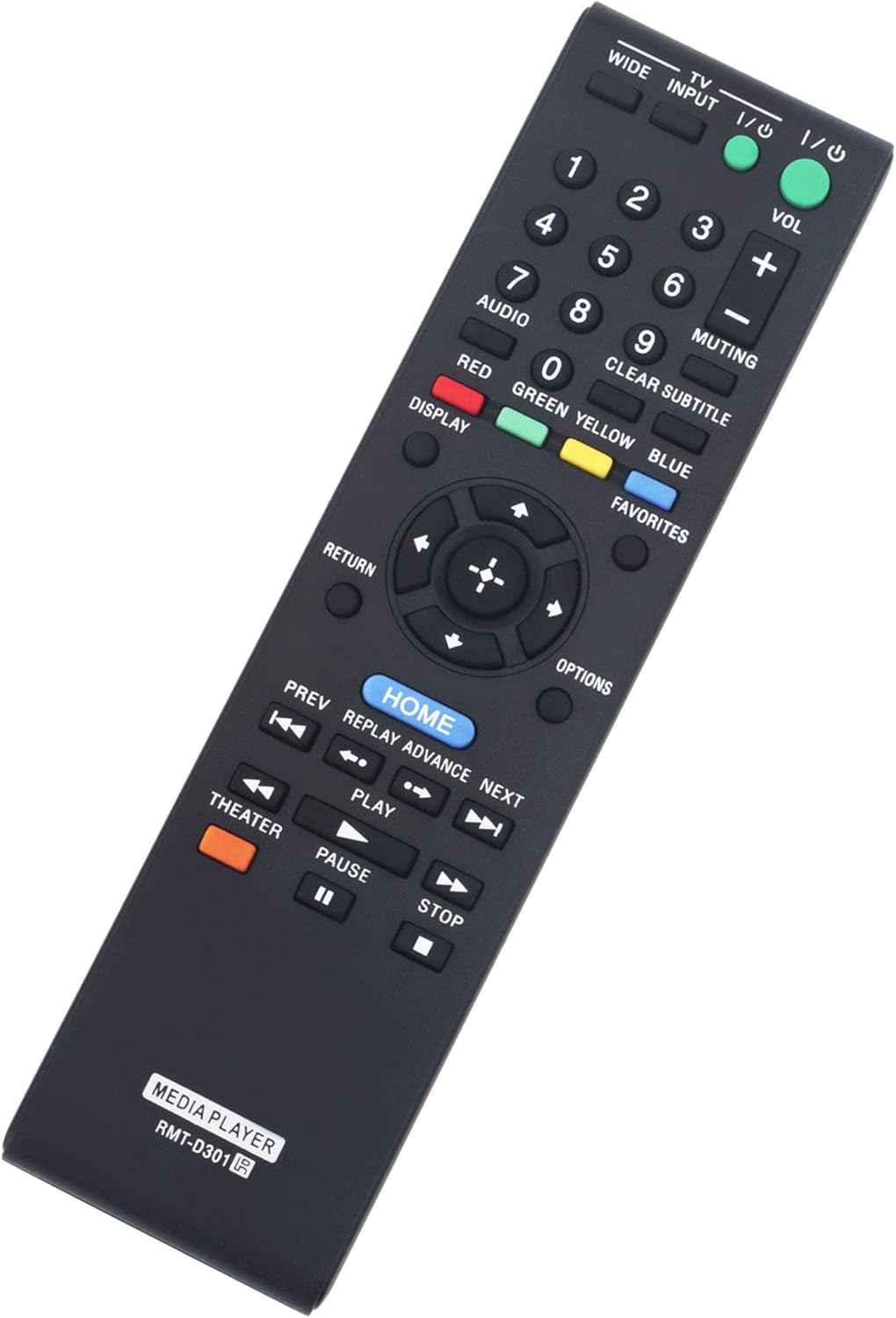
| Button | Function |
|---|---|
| Power (I/O) | Turns the media player on or off. |
| TV Input | Selects the input source on your television. |
| WIDE | Adjusts the screen aspect ratio. |
| Numbers (0-9) | Direct selection of channels or menu options. |
| VOL +/- | Adjusts the volume level. |
| MUTING | Mutes or unmutes the audio. |
| Navigation Pad (Up/Down/Left/Right) & OK | Navigates through menus and confirms selections. |
| HOME | Accesses the main menu of the media player. |
| RETURN | Goes back to the previous screen or menu. |
| OPTIONS | Displays context-sensitive options. |
| Playback Controls (Play, Pause, Stop, FWD, REV, PREV, NEXT) | Controls media playback functions. |
| THEATER | Activates or deactivates theater mode. |
| DISPLAY | Shows on-screen display information. |
| CLEAR SUBTITLE | Clears or displays subtitles. |
| FAVORITES | Accesses favorite content or settings. |
Maintenance
Cleaning and Care
To ensure the longevity and optimal performance of your remote control, follow these maintenance guidelines:
- Wipe the remote control regularly with a soft, dry cloth to remove dust and smudges.
- Avoid using abrasive cleaners, solvents, or strong chemicals, as these can damage the remote's surface or internal components.
- Keep the remote control away from direct sunlight, high temperatures, and excessive moisture.
- If the remote will not be used for an extended period, remove the batteries to prevent leakage and potential damage.
Troubleshooting
Common Issues and Solutions
If you encounter any issues with your RMT-D301 remote control, please refer to the following troubleshooting tips:
- Remote not responding:
- Check if the batteries are inserted correctly with the correct polarity (+/-).
- Replace the batteries with new ones.
- Ensure there are no obstructions between the remote control and the media player.
- Verify that the media player is powered on.
- Buttons not working:
- Clean the remote control surface, especially around the buttons, to remove any dirt or debris that might be interfering with button presses.
- If only specific buttons are not working, the remote might be damaged. Consider replacing the remote.
- Intermittent operation:
- This could indicate low battery power. Replace the batteries.
- Ensure you are within the effective range of the media player.
As this is a direct replacement remote, no programming is required. If the remote does not function after installing new batteries and ensuring no obstructions, please contact customer support.
Specifications
| Feature | Detail |
|---|---|
| Model Number | RMT-D301 |
| Compatible Devices | Sony Media Player SMP-N100 |
| Connectivity Technology | Infrared |
| Batteries Required | 2 x AAA batteries |
| Product Dimensions | 7.25 x 2 x 0.7 inches |
| Item Weight | 2.39 ounces |
| Special Feature | Ergonomic design |
Warranty Information
This VINABTY remote control comes with a standard manufacturer's warranty. Please refer to the product packaging or contact the seller for specific warranty terms and conditions. Keep your purchase receipt as proof of purchase for any warranty claims.
Customer Support
For further assistance, technical support, or inquiries regarding your VINABTY RMT-D301 Replacement Remote Control, please contact your retailer or the manufacturer directly. Contact information can typically be found on the product packaging or the seller's website.


