1. Introduction
This manual provides essential information for the assembly, operation, maintenance, and care of your Bush Furniture Saratoga L Shaped Computer Desk with Drawers and Storage. Please read these instructions carefully before beginning assembly or use to ensure safe and proper functionality of your new desk.
The Saratoga L Shaped Computer Desk offers a spacious workspace with integrated storage, designed for home or office environments. It features a durable surface, multiple drawers for organization, and a retractable keyboard tray.

Image 1.1: The Bush Furniture Saratoga L Shaped Computer Desk in Linen White Oak. This image displays the overall design of the desk, featuring its L-shape, integrated drawers on both sides, and a retractable keyboard tray.
2. Safety Information
- Weight Limit: Do not exceed the maximum weight limit of 200 pounds (90.7 kg) on the desktop surface.
- Stability: Ensure the desk is properly assembled and placed on a level surface to prevent tipping.
- Assembly: Follow all assembly instructions precisely. Incorrect assembly can lead to instability and potential injury.
- Children: Keep small parts and assembly hardware away from children.
- Moving the Desk: If the desk needs to be moved after assembly, it is recommended to empty all drawers and lift the desk with assistance to prevent damage or injury. Do not drag the desk.
3. Package Contents
Before beginning assembly, verify that all components listed in the product's included assembly guide are present and undamaged. The package typically includes:
- Desktop panels (L-shaped configuration)
- Side panels and support structures
- Drawer components (fronts, sides, backs, bottoms)
- Drawer slides and hardware
- Retractable keyboard tray components
- Decorative hardware (drawer pulls)
- Assembly hardware (screws, dowels, cam locks, etc.)
- Detailed assembly instructions booklet
If any parts are missing or damaged, contact Bush Furniture customer service for assistance.
4. Setup and Assembly
Assembly of the Bush Furniture Saratoga L Shaped Computer Desk requires careful attention to detail. It is recommended that two people participate in the assembly process to ensure safety and ease of construction.
4.1 Recommended Tools
- Hammer
- Phillips Head Screwdriver
- (Optional) Power Drill with appropriate bits (use with caution to avoid overtightening)
4.2 Assembly Steps
- Unpack and Organize: Carefully unpack all components and lay them out in an organized manner. Identify each part using the labels provided in the assembly guide.
- Review Instructions: Read the entire assembly instruction booklet before starting. Pay close attention to diagrams and warnings.
- Assemble Base Structures: Begin by assembling the main base structures and pedestals according to the step-by-step diagrams.
- Install Drawer Slides: Attach the drawer slides to the desk frame and drawer boxes as indicated. Ensure they are level and aligned for smooth operation.
- Construct Drawers: Assemble the box drawers and file drawers. Install the decorative drawer pulls.
- Attach Desktop: Securely attach the L-shaped desktop panels to the assembled base.
- Install Keyboard Tray: Mount the retractable keyboard tray in the designated location.
- Final Adjustments: Once fully assembled, ensure all connections are tight and the desk is stable.
The L-desk can be assembled in a right or left-handed configuration. Refer to the specific instructions in your manual for guidance on this option.

Image 4.1: Rear view of the Saratoga L Shaped Computer Desk. This perspective highlights the finished back design, allowing the desk to be placed facing any direction in a room.
5. Operating Instructions
5.1 Desktop Usage
The spacious 66W x 72D desktop provides ample room for multiple monitors, a laptop, and other office equipment. Distribute weight evenly across the surface and avoid placing excessively heavy items in one concentrated area.
5.2 Drawer Operation
The desk features five drawers for organization:
- File Drawers (3): These drawers are designed to hold letter, legal, and A4-size paperwork. They operate on smooth full-extension ball bearing slides, allowing easy access to the entire drawer contents.
- Box Drawers (2): Use these smaller drawers for storing office supplies such as pens, staplers, and notebooks.
To open a drawer, gently pull the handle. To close, push firmly until it is fully seated. Avoid slamming drawers to prolong the life of the slides.
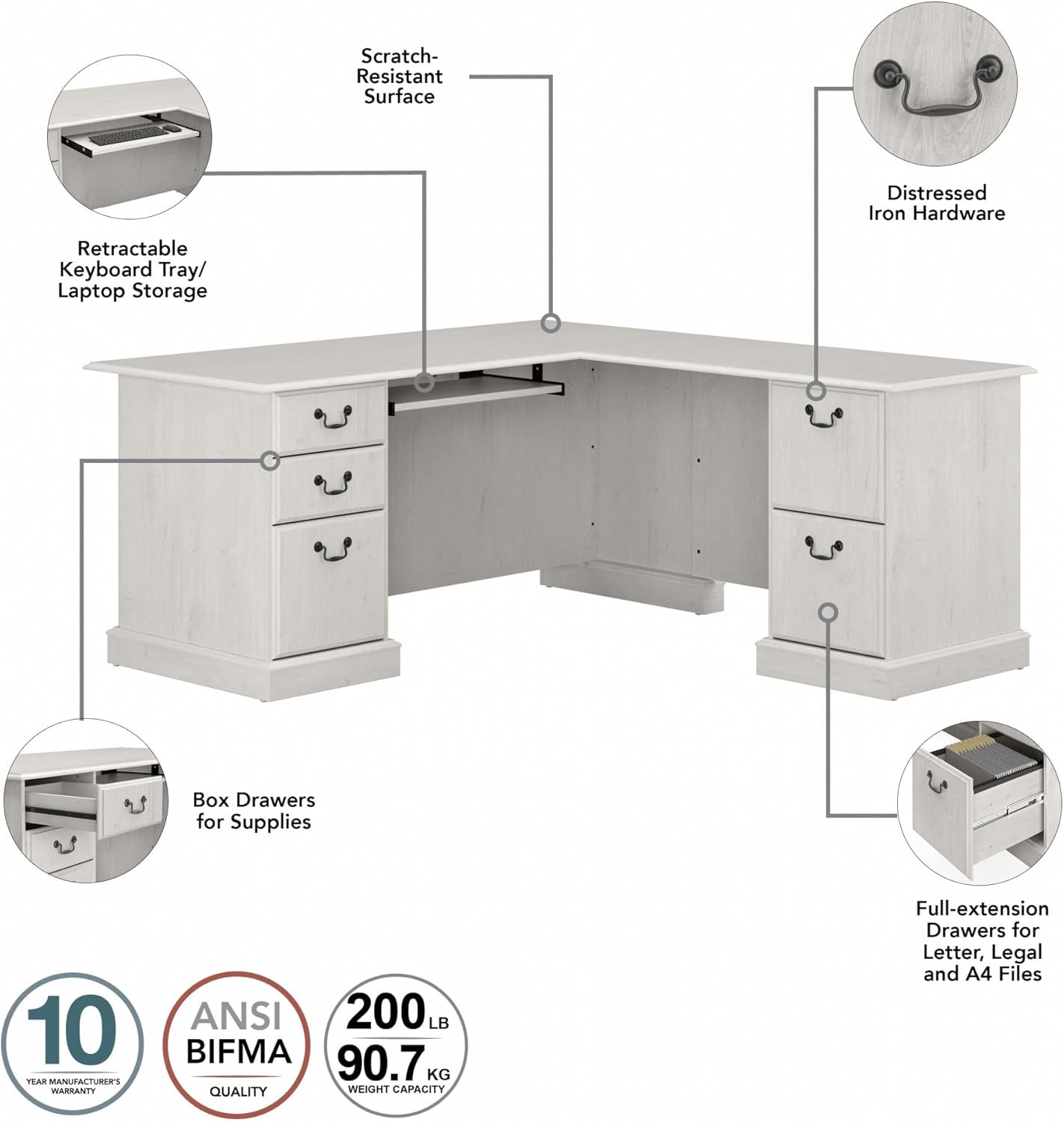
Image 5.1: Feature callouts for the Saratoga L Shaped Computer Desk. This image highlights key components such as the retractable keyboard tray, scratch-resistant surface, distressed iron hardware, box drawers for supplies, and full-extension file drawers.
5.3 Retractable Keyboard Tray
The retractable keyboard tray provides a convenient space for your keyboard and mouse, helping to keep the main desktop surface clear. Pull the tray gently forward to extend it and push it back to retract it when not in use.

Image 5.2: Close-up view of the retractable keyboard tray. This image shows a keyboard and mouse placed on the extended tray, demonstrating its functionality and space-saving design.
6. Maintenance and Care
- Cleaning: Wipe the desk surfaces with a damp cloth. Avoid using harsh chemicals or abrasive cleaners, which can damage the finish.
- Spills: Clean up spills immediately to prevent staining or damage to the wood finish.
- Hardware: Periodically check all assembly hardware (screws, bolts) and tighten if necessary to maintain stability.
- Sunlight: Avoid prolonged exposure to direct sunlight, which can cause fading or discoloration of the finish.
- Heat: Do not place hot items directly on the desk surface. Use coasters or protective pads.

Image 6.1: Detailed view of the Linen White Oak finish. This image illustrates the texture and color of the desk's surface, which should be cleaned with a damp cloth.
7. Troubleshooting
This section addresses common issues you might encounter with your desk.
7.1 Desk Instability / Wobbling
- Check Connections: Ensure all screws, cam locks, and other fasteners are securely tightened.
- Level Surface: Verify that the desk is placed on a flat, level floor. Use shims if necessary to stabilize.
- Re-assembly Check: If instability persists, review the assembly instructions to confirm all parts were installed correctly.
7.2 Drawers Not Opening/Closing Smoothly
- Check Alignment: Ensure drawer slides are properly aligned and not bent.
- Obstructions: Look for any objects obstructing the drawer's path or caught in the slides.
- Lubrication: A small amount of silicone-based lubricant can be applied to the drawer slides if they feel stiff.
- Overload: Do not overload drawers beyond their capacity, as this can strain the slides.
7.3 Keyboard Tray Issues
- Mounting: Check that the keyboard tray rails are securely mounted and aligned.
- Obstructions: Ensure no cables or items are blocking the tray's movement.
For issues not covered here, please refer to the contact information in the Warranty and Support section.
8. Specifications
| Model Number | EX45770-03K |
| Brand | Bush Home |
| Product Dimensions (D x W x H) | 71.22"D x 66.02"W x 30.47"H (180.9 cm D x 167.7 cm W x 77.4 cm H) |
| Item Weight | 119 Pounds (54 kg) |
| Maximum Weight Recommendation | 200 Pounds (90.7 kg) |
| Color | Linen White Oak |
| Base Material | Engineered Wood |
| Top Material Type | Engineered Wood |
| Number of Drawers | 5 (3 File Drawers, 2 Box Drawers) |
| Drawer Glide Mechanism | Ball Bearing Glides |
| Special Feature | Reversible L-shape configuration |
| Required Assembly | Yes |
| Recommended Number of People for Assembly | 2 |
| Tools Recommended For Assembly | Hammer, Screw Driver |

Image 8.1: Dimensional diagram of the Saratoga L Shaped Computer Desk. This image provides detailed measurements for the overall desk, individual drawer dimensions, and the keyboard tray, along with the 200 lb weight capacity.
9. Warranty and Support
9.1 Manufacturer's Warranty
The Bush Furniture Saratoga L Shaped Computer Desk is backed by the Bush Furniture 10 Year Manufacturer's Warranty. This warranty covers defects in materials and workmanship under normal use. For specific terms and conditions, please refer to the warranty documentation included with your product or visit the official Bush Furniture website.
9.2 Customer Support
For assistance with assembly, missing parts, or any other product-related inquiries, please contact Bush Furniture customer service. Contact information can typically be found in your product packaging or on the manufacturer's website.
Online Resources: You may also find helpful resources, FAQs, and assembly videos on the Bush Furniture official website.
10. Product Overview Video
Video 10.1: An overview video showcasing the Bush Furniture Saratoga Collection. This video highlights various features and design elements of the collection, including the L Shaped Computer Desk. Please note that some features shown may apply to other products within the Saratoga collection and not exclusively to this specific desk model.


