
Introduction
This manual provides essential instructions for the safe and efficient operation, maintenance, and troubleshooting of your Eureka PowerSpeed Upright Vacuum Cleaner, Model NEU280. Please read this manual thoroughly before using the appliance and retain it for future reference.

Image: Front view of the Eureka PowerSpeed Upright Vacuum Cleaner, Model NEU280, in blue and black.
Important Safety Information
Always follow basic safety precautions when using electrical appliances to reduce the risk of fire, electric shock, or injury. This includes:
- Do not leave the vacuum cleaner unattended when plugged in.
- Unplug from outlet when not in use and before servicing.
- Do not use outdoors or on wet surfaces.
- Do not allow to be used as a toy. Close attention is necessary when used by or near children.
- Use only as described in this manual. Use only manufacturer’s recommended attachments.
- Do not use with damaged cord or plug. If appliance is not working as it should, has been dropped, damaged, left outdoors, or dropped into water, return it to a service center.
- Do not pull or carry by cord, use cord as a handle, close a door on cord, or pull cord around sharp edges or corners. Do not run appliance over cord. Keep cord away from heated surfaces.
- Do not unplug by pulling on cord. To unplug, grasp the plug, not the cord.
- Do not handle plug or vacuum cleaner with wet hands.
- Do not put any object into openings. Do not use with any opening blocked; keep free of dust, lint, hair, and anything that may reduce air flow.
- Keep hair, loose clothing, fingers, and all parts of body away from openings and moving parts.
- Do not pick up anything that is burning or smoking, such as cigarettes, matches, or hot ashes.
- Do not use to pick up flammable or combustible liquids, such as gasoline, or use in areas where they may be present.
- Do not use without dust cup and/or filters in place.
- Turn off all controls before unplugging.
- Use extra care when cleaning on stairs.
- Store your vacuum cleaner indoors in a cool, dry area.
Assembly
The Eureka PowerSpeed vacuum cleaner is designed for easy assembly. Follow these steps to prepare your vacuum for first use:
- Insert the handle into the main body of the vacuum cleaner until it clicks securely into place.
- Secure the flexible hose by connecting one end to the hose inlet on the vacuum body and the other end to the hose clip on the handle.
- Ensure all attachments are stored on board for convenience.

Image: A person assembling the Eureka PowerSpeed vacuum cleaner by inserting the handle into the main unit.
Operating Instructions
Powering On and Off
To turn the vacuum cleaner on or off, locate the power button on the main body. Press the button once to activate the vacuum and again to turn it off.
Adjusting Height Settings
The PowerSpeed features 5 height settings to optimize cleaning performance across various floor types, including carpets, shag rugs, and hard floors. Adjust the dial on the vacuum head to the appropriate setting for your surface. The wheels are designed to run smoothly on hardwood floors to prevent scratches.

Image: A hand adjusting the height setting dial on the vacuum cleaner head, showing options for different floor types.
Using Attachments
The vacuum includes multiple accessories for versatile cleaning. A quick-release handle connects to the stretch hose for above-floor cleaning. The included 7-inch crevice tool, dusting brush, and upholstery tool help clean hard-to-reach areas, extract dirt, and remove pet hair from various surfaces like cars, curtains, ceilings, or furniture. All tools can be stored directly on the vacuum for easy access.

Image: A person using the hose attachment with an upholstery tool to clean a sofa, demonstrating the on-board tool storage.
Image: A collage showing the dusting brush cleaning blinds, the crevice tool cleaning a floor edge, and the upholstery tool cleaning a sofa.
Maintenance
Regular maintenance ensures optimal performance and extends the life of your vacuum cleaner.
Emptying the Dust Cup
The vacuum features an extra-large capacity dust cup. To empty, press the release button to detach the dust cup from the main unit. Position it over a trash receptacle and press the bottom release button to empty the contents. Reattach the dust cup securely after emptying.

Image: A person emptying the detached dust cup of the Eureka PowerSpeed vacuum into a trash can.
Cleaning the Filter
The vacuum is equipped with a washable foam filter. For best performance, clean the filter regularly. Remove the filter from the dust cup assembly and rinse it under running water until clean. Allow the filter to air dry completely before reinserting it into the vacuum. Do not operate the vacuum with a wet filter.
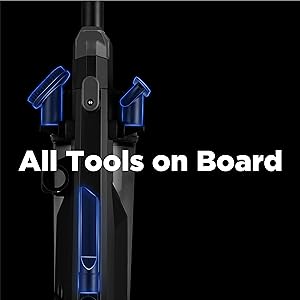
Image: A person rinsing the circular foam filter under a faucet.
Cleaning the Roller Brush and Belt
The floor brush and belt may become clogged with hair and debris during use. It is recommended to clean the roller brush and belt every 2 weeks. Failure to clean these components regularly can lead to malfunction, reduced suction, or even damage to the belt and motor. Refer to the detailed instructions in the full PDF manual for how to access and clean these parts.

Image: Two black replacement belts for the vacuum cleaner, indicating parts that require maintenance.
Troubleshooting
If your vacuum cleaner is not operating correctly, review the following common issues before contacting customer service.
- No Power: Ensure the power cord is securely plugged into a working electrical outlet. Check the circuit breaker if necessary.
- Reduced Suction: Check if the dust cup is full and needs emptying. Inspect the filter for clogs and clean it if dirty. Verify that the hose and attachments are free from blockages. Ensure the roller brush and belt are clean and free of tangled hair or debris.
- Vacuum Not Picking Up Debris: Adjust the height setting to match your floor type. Check the roller brush for obstructions or damage.
- Unusual Noise: Turn off and unplug the vacuum immediately. Check for any foreign objects caught in the brush roll or hose. If the noise persists after clearing obstructions, contact customer service.
Specifications
| Feature | Specification |
|---|---|
| Brand | Eureka |
| Model Name | PowerSpeed (NEU280) |
| Special Feature | Bagless, Cyclone Filtration, Lightweight |
| Filter Type | Foam |
| Included Components | Crevice Tool, Dusting Brush, Pet Tool |
| Cordless? | No |
| Capacity | 1.9 Liters |
| Wattage | 960 watts |
| Hose Length | 7 Feet |
| Recommended Uses | Indoor Cleaning (carpet, hard floor) |
| Form Factor | Upright |
| Color | Blue |
| Product Dimensions | 13.4"L x 13.78"W x 44.5"H |
| Noise Level | 88 dB |
| Amperage | 8 Amps |
| Item Weight | 11.5 pounds |
Warranty and Support
Your Eureka PowerSpeed Upright Vacuum Cleaner Model NEU280 comes with a 2-year limited warranty. This warranty covers defects in material and workmanship under normal household use.
For any questions, technical assistance, or warranty claims, please contact our customer service team:
Customer Service: 1-800-282-2886
Please have your model number (NEU280) and proof of purchase available when contacting support.


