
Alpicool LGCF55
Alpicool LGCF55 Portable Refrigerator User Manual
Model: LGCF55 | Brand: Alpicool
1. Product Overview
The Alpicool LGCF55 is a versatile 12-volt portable refrigerator and freezer designed for use in various environments, including trucks, RVs, vehicles, and outdoor travel. With a 52-quart (55-liter) capacity, it offers ample storage for drinks, snacks, and perishable items, maintaining temperatures from -4°F to 68°F (-20°C to 20°C).
This unit is engineered for reliable cooling performance, featuring an LG compressor and advanced battery protection to prevent vehicle battery drain. Its compact and lightweight design, along with integrated handles and wheels, ensures easy portability and convenient placement in tight spaces.

Figure 1: Alpicool LGCF55 Portable Refrigerator, showcasing its compact and durable exterior.
2. Key Features
- Spacious Capacity: 52 Quarts (55 Liters), capable of holding approximately 60 x 12oz cans of cola.
- Dual Functionality: Operates as both a refrigerator and a freezer, with a temperature range of -4°F to 68°F (-20°C to 20°C).
- LG Compressor: Equipped with a high-performance LG compressor for efficient and rapid cooling.
- Car Battery Protection: Features 3 levels (Low, Med, High) to prevent vehicle battery depletion.
- User-Friendly Interface: LCD display and digitized temperature adjustment for precise control.
- Convenient Design: Includes a built-in LED light, removable internal basket, and corner protectors.
- Portability: Compact and lightweight with integrated handles and wheels for easy transport.
- Low Noise Operation: Designed for quiet performance, minimizing disturbance.

Figure 2: Visual representation of key features including Bluetooth function, LG compressor, fast freeze, battery protection, anti-shaking, rated power, mute low noise, built-in LED light, and temperature range.

Figure 3: The refrigerator's versatility for various applications, including freezing ice cream, chilling beef, fruit, skincare products, and beer at different optimal temperatures.
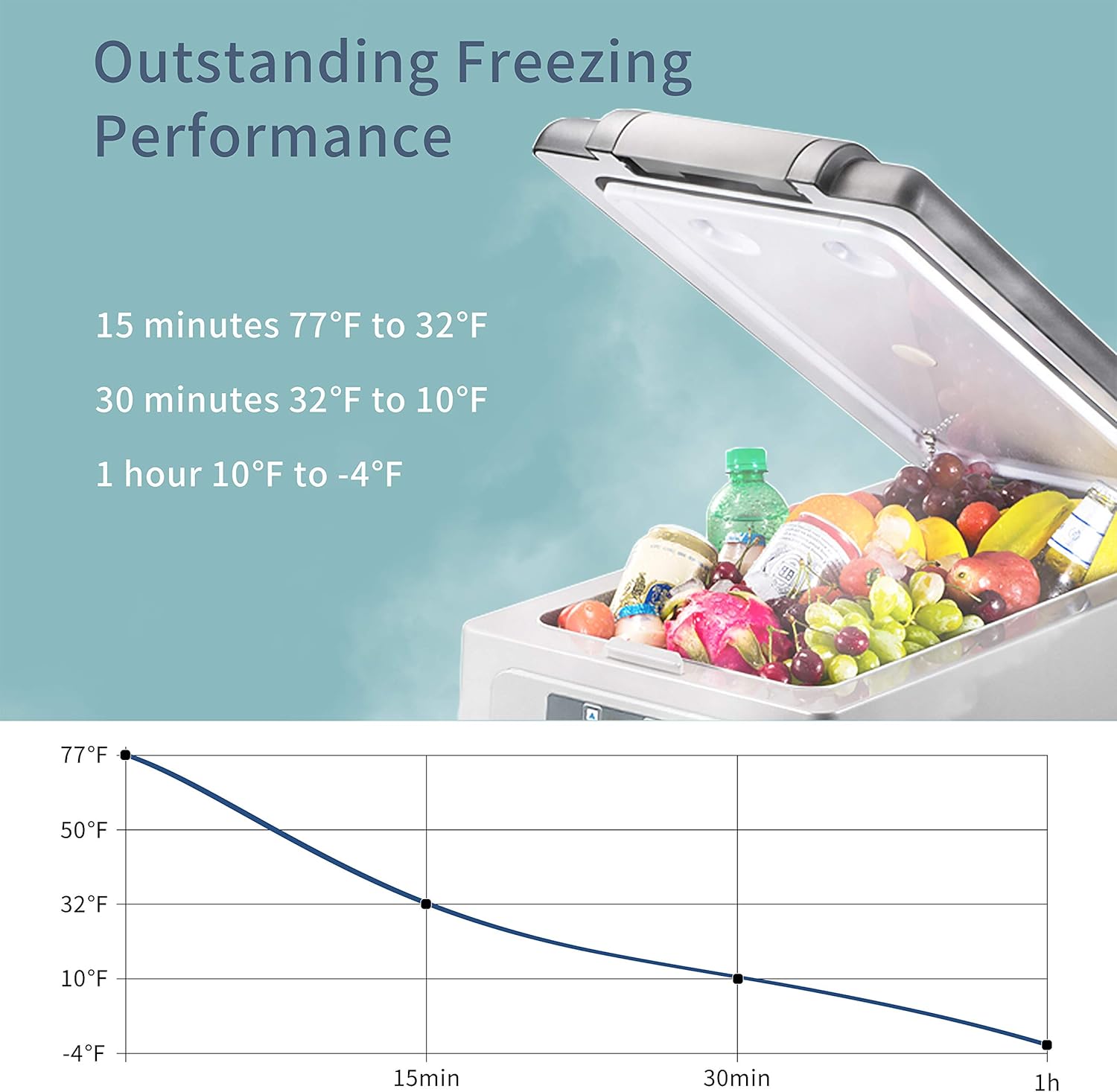
Figure 4: Graph illustrating the rapid cooling performance, showing temperature drops from 77°F to -4°F within one hour.

Figure 5: Diagram highlighting the main components: Door Latch, Removable Internal Basket, LCD Control Panel, Corner Protector, Built-in LED Light, and LG Compressor.
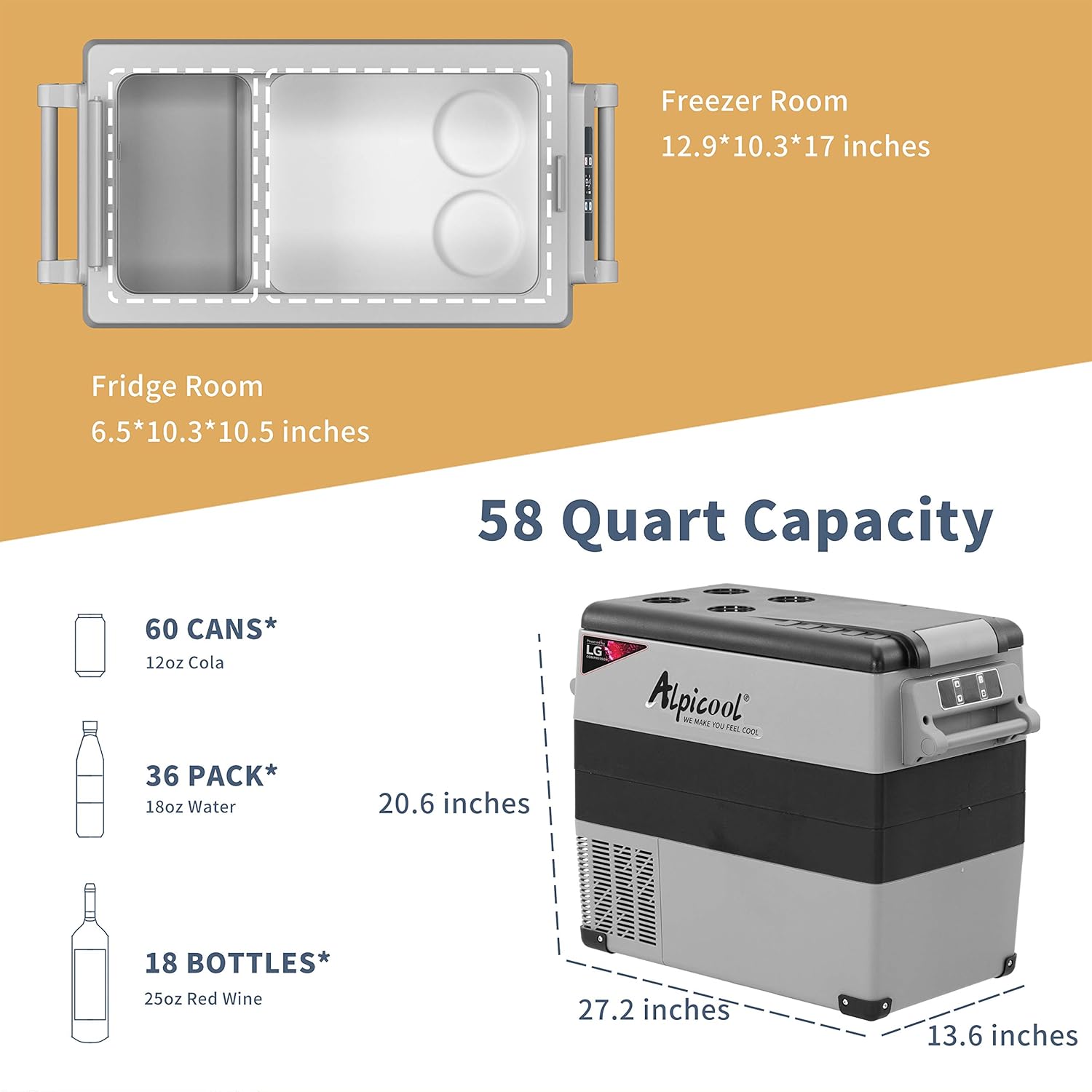
Figure 6: Detailed view of the 58-quart capacity, showing internal dimensions for freezer and fridge rooms, and examples of items it can hold (cans, water bottles, wine bottles).

Figure 7: Examples of typical usage environments for the portable refrigerator, including vehicles, camping, boating, and sports activities.
3. Setup
3.1 Unpacking and Inspection
- Carefully remove the refrigerator from its packaging.
- Inspect the unit for any signs of damage during transit. If damage is found, do not operate the unit and contact customer support.
- Ensure all included components are present: the refrigerator unit, AC power adapter, DC power cable, and internal basket.
3.2 Placement
- Place the refrigerator on a flat, stable surface.
- Ensure adequate ventilation around the unit. Do not block the vents, as this can lead to overheating and shutdown.
- Avoid direct sunlight or heat sources to optimize cooling efficiency.
3.3 Power Connection
The Alpicool LGCF55 can be powered by both AC (110-240V) and DC (12/24V) sources.
- AC Power: Connect the AC power adapter to the unit's AC input port, then plug the adapter into a standard wall outlet.
- DC Power: Connect the DC power cable to the unit's DC input port, then plug the other end into your vehicle's 12V or 24V cigarette lighter socket.
For initial use, it is recommended to plug the unit into AC power for at least 6 hours to allow the compressor lubricant to settle before operating on DC power.
4. Operating Instructions
4.1 Powering On/Off
Press the power button on the LCD control panel to turn the unit on or off. The display will illuminate when the unit is active.
4.2 Temperature Adjustment
- Use the '+' and '-' buttons on the control panel to set your desired temperature. The temperature range is -4°F to 68°F (-20°C to 20°C).
- The unit will automatically adjust its cooling to reach and maintain the set temperature.
- The display shows the current internal temperature.
4.3 Cooling Modes (ECO/MAX)
The unit typically offers two cooling modes: ECO (Economy) and MAX (Maximum).
- ECO Mode: Prioritizes energy efficiency, suitable for maintaining temperature over longer periods with lower power consumption.
- MAX Mode: Provides faster cooling, ideal for quickly reaching the desired temperature or in hot environments.
- Refer to the control panel or user interface for instructions on switching between modes.
4.4 Battery Protection Settings
To protect your vehicle's battery from draining, the unit features three battery protection levels: Low, Med (Medium), and High.
- High: The unit will shut off at a higher battery voltage, offering maximum protection for your vehicle's battery. Recommended for starting batteries.
- Med: A balanced setting for most applications.
- Low: The unit will operate until a lower battery voltage, allowing for longer operation but with less battery protection. Recommended for deep cycle or auxiliary batteries.
- Adjust this setting via the control panel to suit your power source and usage needs.
4.5 Using the Internal Basket
The removable internal basket helps organize contents and allows for easy removal of items. Place heavier or less frequently accessed items below the basket.
5. Maintenance
5.1 Cleaning
- Before cleaning, ensure the unit is powered off and unplugged.
- Wipe the interior and exterior surfaces with a damp cloth and mild detergent. Avoid abrasive cleaners or solvents.
- Ensure the unit is completely dry before reconnecting power.
- Regularly clean the vents to prevent dust buildup, which can affect cooling efficiency.
5.2 Storage
- When storing the unit for extended periods, ensure it is clean and dry.
- Leave the lid slightly ajar to prevent odors and mildew formation.
- Store in a cool, dry place away from direct sunlight.
6. Troubleshooting
| Problem | Possible Cause | Solution |
|---|---|---|
| Unit does not power on. | No power supply; faulty cable; vehicle battery low. | Check power connections. Ensure power source is active. Check vehicle battery voltage and adjust battery protection setting if necessary. |
| Not cooling sufficiently. | Blocked vents; excessive ambient temperature; lid not sealed; too many items. | Ensure vents are clear. Move unit to a cooler location. Check lid seal. Do not overfill. Consider using MAX mode. |
| Temperature inconsistency. | Frequent opening of lid; sensor issue; large temperature swings in environment. | Minimize lid openings. Ensure proper placement and ventilation. If persistent, contact support. |
| Unit shuts off unexpectedly. | Low vehicle battery (battery protection activated); overheating. | Check vehicle battery. Adjust battery protection setting to a lower level (e.g., Low) if using an auxiliary battery. Ensure proper ventilation to prevent overheating. |
If you encounter issues not listed here or if solutions do not resolve the problem, please contact Alpicool customer support.
7. Specifications
| Specification | Detail |
|---|---|
| Brand Name | Alpicool |
| Model Number | LGCF55 |
| Capacity | 52 Quarts (55 Liters) |
| Temperature Range | -4°F to 68°F (-20°C to 20°C) |
| Power Input | 12V/24V DC, 110-240V AC |
| Compressor | LG Compressor |
| Item Weight | 32.4 pounds |
| Product Dimensions (D x W x H) | 13.6 x 20.6 x 27.2 inches |
| Material Type | Plastic |
| Defrost System | Automatic |
| Included Components | Basket |
8. Warranty and Support
Alpicool products are designed for durability and performance. For specific warranty details regarding your LGCF55 Portable Refrigerator, please refer to the warranty card included with your purchase or visit the official Alpicool website.
If you require technical assistance, have questions about operation, or need to report an issue, please contact Alpicool customer support. Have your model number (LGCF55) and purchase information ready when contacting support.
You can visit the Alpicool Store for more information: Alpicool Store
Ask a question about this manual
Ask about setup, troubleshooting, compatibility, parts, safety, or missing instructions. Manuals+ will review the question and use this page’s manual context to help answer it.