
1. Introduction
This manual provides essential instructions for the safe and effective operation of the UNIKS C54 AC Clamp Meter. Please read this manual thoroughly before using the device and retain it for future reference. The UNIKS C54 is a True RMS AC clamp meter designed for measuring AC current up to 400A and AC/DC voltage up to 1000V, featuring a VFD function and a 4000-count backlit display.
2. Safety Information
Always adhere to the following safety precautions to prevent personal injury or damage to the meter.
- Do not exceed the maximum input limits for any function.
- Ensure the test leads are in good condition and properly connected before making measurements.
- Do not use the meter if it appears damaged or if the case is open.
- Exercise extreme caution when working with voltages above 60V DC or 30V AC RMS, as these pose a shock hazard.
- Always disconnect power to the circuit and discharge all high-voltage capacitors before performing resistance, continuity, or diode tests.
- Adhere to local and national safety codes. Use personal protective equipment (PPE) such as insulated gloves and eye protection.
- The device complies with safety standards EN: 61326, EN: 61010-1, EN: 61010-02-032, EN: 61010-02-03.
3. Product Overview
The UNIKS C54 clamp meter is designed for accurate electrical measurements. Key features include:
- True RMS AC current measurement up to 400A.
- AC/DC voltage measurement up to 1000V.
- Backlit 4000-count display for clear readings.
- VFD (Variable Frequency Drive) function for accurate measurements on inverter-controlled devices.
- Non-contact voltage (NCV) detection.
- Innovative design for comfortable and quick operation.
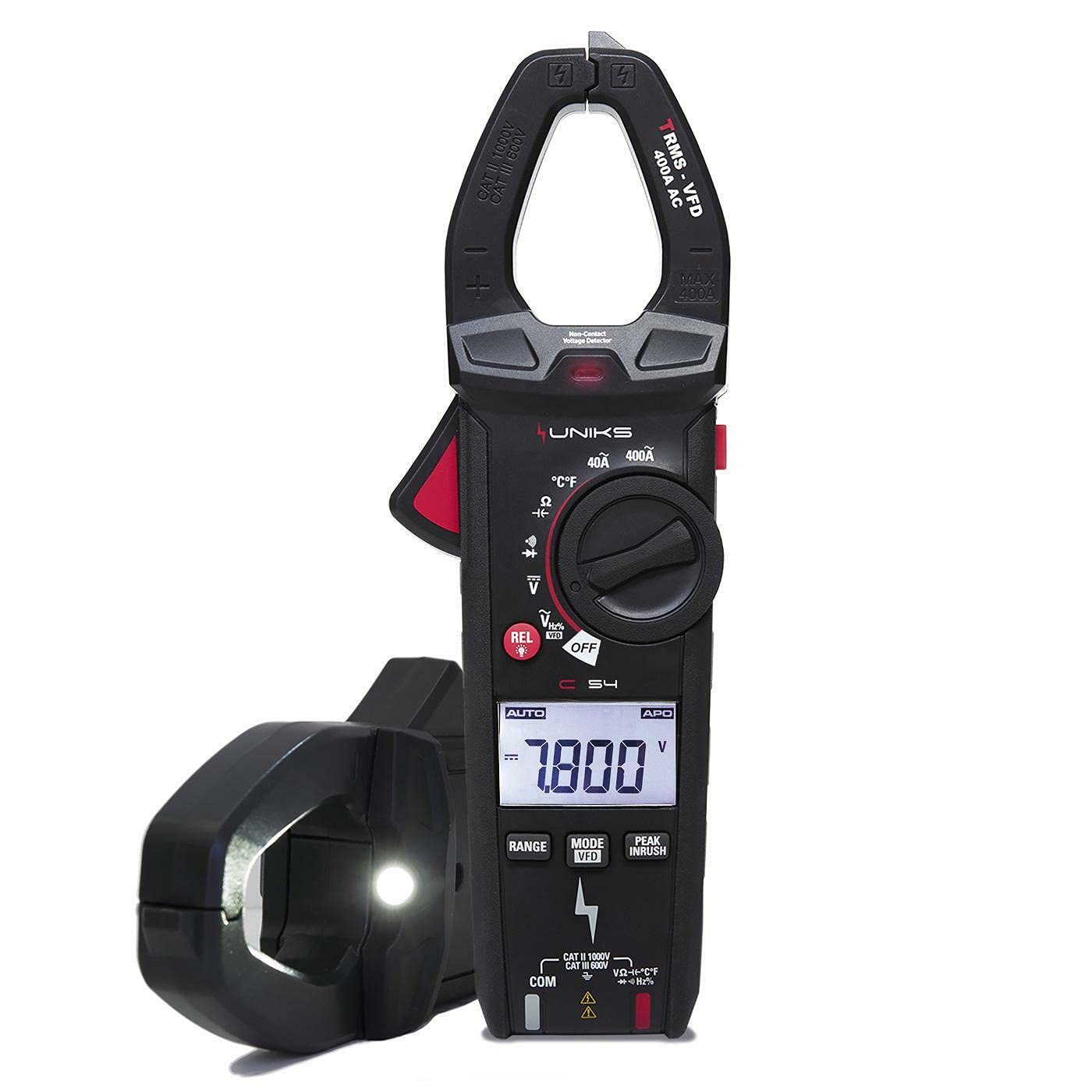
Figure 3.1: Front view of the UNIKS C54 AC Clamp Meter, showing the display, function dial, and clamp jaws.
4. Setup
4.1 Battery Installation
- Ensure the meter is turned off.
- Locate the battery compartment cover on the rear of the meter.
- Use a screwdriver to open the battery compartment.
- Insert the required batteries, observing correct polarity.
- Replace the battery compartment cover and secure it with the screw.
4.2 Connecting Test Leads
For voltage, resistance, continuity, and diode measurements, connect the test leads as follows:
- Insert the red test lead into the "VΩHz" input jack.
- Insert the black test lead into the "COM" input jack.
5. Operating Instructions
5.1 AC Current Measurement (Clamp)
- Turn the function dial to the "ACA" position.
- Press the clamp trigger to open the jaws.
- Encircle a single conductor with the clamp jaws. Ensure the jaws are fully closed.
- Read the AC current value on the display.
5.2 AC/DC Voltage Measurement
- Connect the test leads as described in Section 4.2.
- Turn the function dial to the "V~" (AC Voltage) or "V-" (DC Voltage) position.
- Touch the test probes to the circuit points where voltage is to be measured.
- Read the voltage value on the display.
5.3 VFD Function
The VFD function allows for accurate voltage and frequency measurements on variable frequency drives and other non-sinusoidal waveforms. To activate:
- Turn the function dial to the "V~" position.
- Press the "VFD" button (if available) or cycle through modes until "VFD" is indicated on the display.
- Proceed with voltage measurement as usual.
5.4 Non-Contact Voltage (NCV) Detection
- Turn the function dial to the "NCV" position.
- Move the top tip of the meter near a live conductor.
- The meter will emit an audible beep and/or flash an LED indicator when AC voltage is detected.
6. Maintenance
6.1 Cleaning
Wipe the meter's case with a damp cloth and a mild detergent. Do not use abrasives or solvents. Ensure the meter is completely dry before use.
6.2 Battery Replacement
When the battery indicator appears on the display, replace the batteries as described in Section 4.1. Remove batteries if the meter is not used for extended periods.
6.3 Fuse Replacement
The UNIKS C54 clamp meter typically does not have user-replaceable fuses for current measurement via the clamp. For other functions, refer to the specific fuse ratings if applicable in the full product manual. If fuse replacement is necessary, it should be performed by qualified personnel.
7. Troubleshooting
| Problem | Possible Cause | Solution |
|---|---|---|
| Meter does not power on. | Dead or incorrectly installed batteries. | Check battery polarity or replace batteries. |
| No reading or "OL" displayed. | Measurement range exceeded, open circuit, or incorrect function selected. | Select a higher range, check circuit continuity, or ensure correct function is selected. For clamp measurements, ensure only one conductor is within the jaws. |
| Inaccurate readings. | Poor test lead connection, external interference, or low battery. | Ensure secure connections, move away from strong electromagnetic fields, or replace batteries. |
8. Specifications
| Parameter | Value |
|---|---|
| Model | C54 |
| AC Current (True RMS) | Up to 400A |
| AC Voltage | Up to 1000V |
| DC Voltage | Up to 1000V |
| Display | 4000 Counts, Backlit |
| Safety Rating | CAT III 600V, CAT II 1000V |
| Special Functions | VFD, NCV |
| Weight | 500 grams |
| Compliance | EN: 61326, EN: 61010-1, EN: 61010-02-032, EN: 61010-02-03 |
9. Warranty and Support
Information regarding warranty coverage and technical support for the UNIKS C54 clamp meter is typically provided with the product packaging or available on the manufacturer's official website. Please refer to these resources for detailed warranty terms and contact information for support.
For further assistance, please visit the UNIKS official website or contact their customer service department.


