1. Introduction
Thank you for choosing the Aiwa X-100 Bluetooth Speaker. This manual provides essential information for setting up, operating, and maintaining your device. Please read it thoroughly to ensure optimal performance and longevity of your speaker.
The Aiwa X-100 is a compact Bluetooth speaker engineered to deliver powerful and realistic sound. It features two 40mm drivers and a front-facing bass radiator, all encased in a durable metal housing. Its design allows it to fill a room with sound while occupying minimal space.
2. Features
- Compact Design, Powerful Sound: Despite its small size (approximately 1.45 lbs), the X-100 produces room-filling, realistic audio.
- True Wireless Stereo (TWS): Wirelessly link two X-100 units together for an immersive stereo sound experience.
- Advanced Bluetooth Connectivity: Equipped with Qualcomm Bluetooth 5.0, offering a stable connection range of up to 65 feet.
- Premium Hardware: Features two 40mm drivers and a front-facing bass radiator for deep bass and clear audio. The machined metal housing provides a robust and elegant aesthetic.
3. Package Contents
Please check the box for the following items:
- Aiwa X-100 Bluetooth Speaker
- Micro USB Charging Cable
- User Manual (this document)
4. Setup
4.1 Initial Charging
Before first use, fully charge your Aiwa X-100 speaker. Connect the supplied Micro USB cable to the speaker's charging port and the other end to a 5V/1A USB power adapter (not included). A full charge typically takes approximately 3 hours.
4.2 Powering On/Off
To power on the speaker, press and hold the power button located on the top panel until the indicator light illuminates. To power off, press and hold the power button again until the indicator light turns off.

Figure 1: Top view of the Aiwa X-100 speaker with control buttons.
5. Operating Instructions
5.1 Bluetooth Pairing
- Ensure the speaker is powered on and in Bluetooth pairing mode (indicated by a flashing LED).
- On your device (smartphone, tablet, computer), enable Bluetooth and search for available devices.
- Select "Aiwa X-100" from the list of devices.
- Once paired, the speaker will emit a confirmation sound, and the LED indicator will remain solid.
The Aiwa X-100 supports Bluetooth 5.0 for a stable connection up to 65 feet.
5.2 True Wireless Stereo (TWS) Pairing
To achieve a wider soundstage, you can pair two Aiwa X-100 speakers together for True Wireless Stereo (TWS) functionality.
- Ensure both X-100 speakers are powered on and not connected to any other Bluetooth device.
- On one of the speakers (this will be your primary speaker), double-press the Bluetooth button. It will enter TWS pairing mode.
- The primary speaker will automatically search for the secondary speaker. Once connected, both speakers will emit a confirmation sound.
- Now, connect your device to the primary speaker via Bluetooth as described in Section 5.1. Audio will play in stereo through both speakers.

Figure 2: Illustration of two Aiwa X-100 speakers linked for TWS.
5.3 Controls
The Aiwa X-100 features intuitive touch controls on its top panel:
- Power Button: Press and hold to power on/off.
- Volume Down (-): Press to decrease volume.
- Volume Up (+): Press to increase volume.
- Play/Pause Button: Press to play or pause audio. Press to answer/end calls.
5.4 Battery Life
The Aiwa X-100 provides approximately 8 hours of playtime on a full charge, depending on volume levels and audio content.

Figure 3: Aiwa X-100 offers up to 8 hours of playtime.
6. Maintenance
To ensure the longevity and optimal performance of your Aiwa X-100 speaker, follow these maintenance guidelines:
- Cleaning: Use a soft, dry cloth to wipe the speaker's surface. Do not use abrasive cleaners, alcohol, or chemical solvents, as these may damage the finish.
- Storage: Store the speaker in a cool, dry place away from direct sunlight, extreme temperatures, and high humidity.
- Water Exposure: The Aiwa X-100 is NOT waterproof. Avoid exposing it to water or other liquids.
- Charging: Always use the provided Micro USB cable or a certified equivalent for charging.
7. Troubleshooting
If you encounter issues with your Aiwa X-100 speaker, please refer to the following common solutions:
- No Power: Ensure the speaker is fully charged. Connect it to a power source and allow it to charge for at least 30 minutes before attempting to power on again.
- No Sound: Check the volume levels on both the speaker and your connected device. Ensure the speaker is properly paired via Bluetooth.
- Bluetooth Pairing Issues:
- Make sure the speaker is within the 65-foot Bluetooth range of your device.
- Turn off Bluetooth on your device and then turn it back on.
- Forget the "Aiwa X-100" from your device's Bluetooth settings and attempt to pair again.
- Restart both the speaker and your connected device.
- TWS Pairing Failure: Ensure both speakers are not connected to any other Bluetooth device before initiating TWS pairing. Try resetting both speakers and repeating the TWS pairing steps.
- Distorted Sound: Reduce the volume on both the speaker and your connected device. Ensure there are no obstructions between the speaker and your device that could interfere with the Bluetooth signal.
8. Specifications
| Model Name | X100 |
| Brand | Aiwa |
| Speaker Type | Soundbar |
| Connectivity Technology | Wireless (Bluetooth) |
| Bluetooth Version | 5.0 (Qualcomm AptX Low Latency) |
| Bluetooth Range | Up to 65 feet |
| Audio Output Mode | Stereo |
| Surround Sound Channel Configuration | 2.0 |
| Speaker Size | 40 Millimeters (x2) |
| Audio Driver Type | Dynamic Driver |
| Frequency Response | 50Hz-20KHz |
| Decoding | aptX, LL, SCB, AAC, MP3 |
| Power Source | Battery Powered |
| Battery Type | 1 Lithium Ion (included) |
| Battery Capacity | 8000 mAh |
| Charging Time | 3 Hours |
| Play Time | Up to 8 hours |
| Product Dimensions (D x W x H) | 2.4" x 7.5" x 2" |
| Item Weight | 1.45 Pounds |
| Color | Black |
| Is Waterproof | FALSE |
| Control Method | Touch |
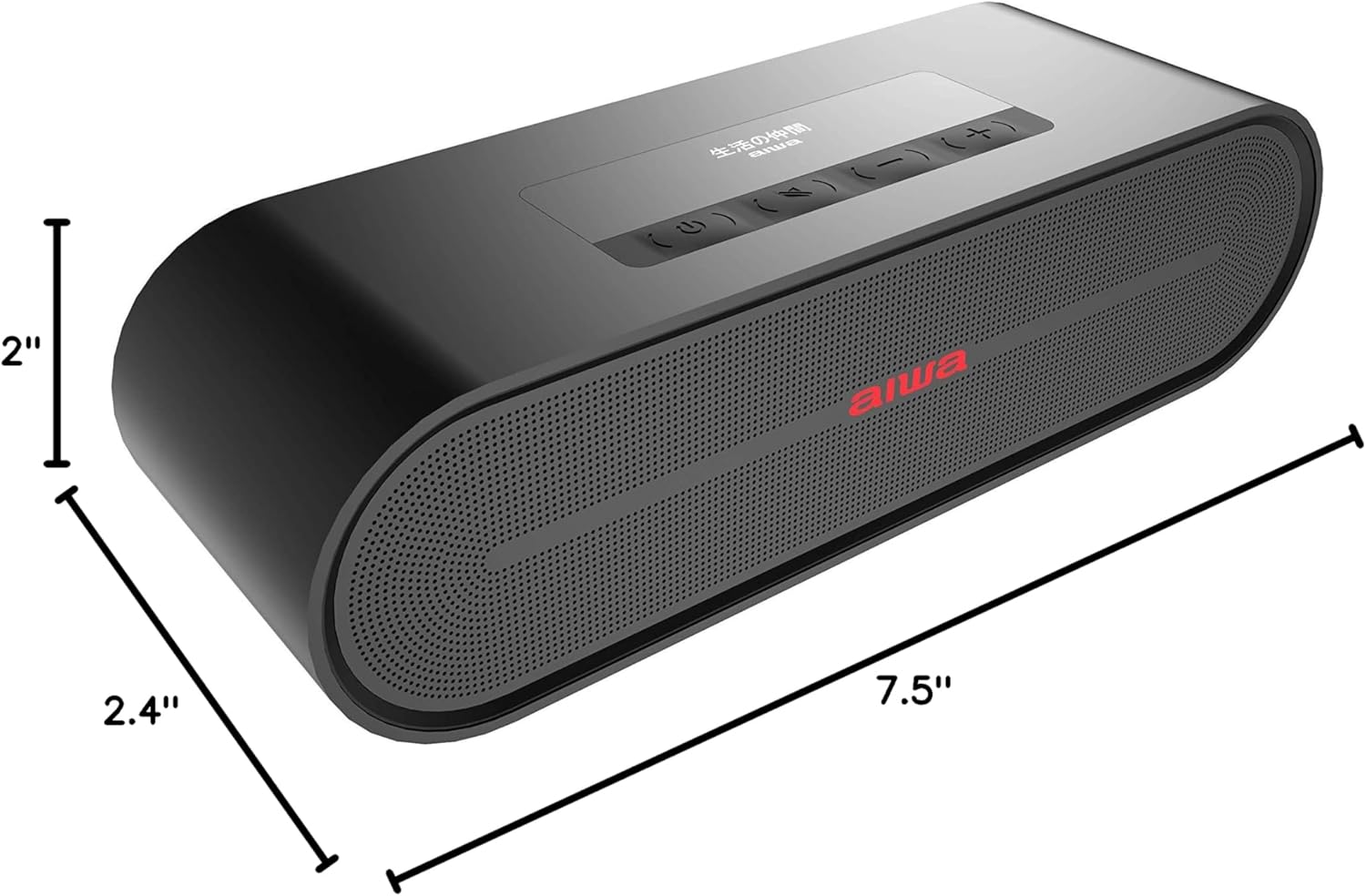
Figure 4: Aiwa X-100 product dimensions.
9. Official Product Video
Video 1: An overview of the Aiwa X-100 Bluetooth Speaker, highlighting its design, internal components, and TWS pairing capability. This video demonstrates the speaker's features and aesthetic in various settings.
10. Warranty and Support
The Aiwa X-100 Bluetooth Speaker comes with a limited warranty. For specific warranty details, please refer to the warranty card included with your purchase or visit the official Aiwa website. For technical support, troubleshooting assistance, or service inquiries, please contact Aiwa customer support through their official channels.


