Introduction
This manual provides essential information for the proper use, care, and maintenance of your Oris Divers Sixty-Five Automatic Watch. Please read this manual thoroughly before using your watch to ensure optimal performance and longevity.
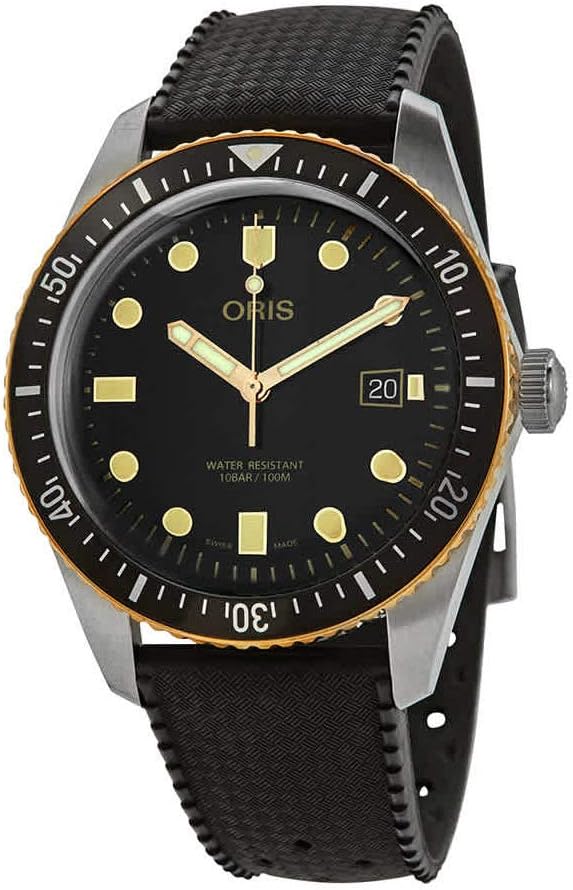
Figure 1: Oris Divers Sixty-Five Automatic Watch (Model: 01 733 7720 4354-07 4 21 18)
Setup
Unpacking and Initial Inspection
Carefully remove the watch from its packaging. Inspect the watch for any visible damage. Ensure all protective films are removed from the crystal and case back.
Setting the Time and Date
- Unscrew the Crown: The crown is located on the right side of the watch case. Gently unscrew it counter-clockwise until it pops out to position 1.
- Setting the Date: Pull the crown out to position 2. Turn the crown clockwise or counter-clockwise to adjust the date. Avoid setting the date between 9 PM and 3 AM, as this can damage the movement.
- Setting the Time: Pull the crown out to position 3. Turn the crown to move the hour and minute hands. To ensure accurate time setting, synchronize with a reliable time source.
- Winding the Watch: After setting, push the crown back to position 1. Wind the watch by turning the crown clockwise approximately 20-30 times. This provides the initial power reserve for the automatic movement.
- Screw Down the Crown: Push the crown firmly back into the case and screw it down clockwise until it is tight. This ensures water resistance.
Operating the Watch
Automatic Movement
Your Oris Divers Sixty-Five watch is equipped with an automatic mechanical movement. It is powered by the natural motion of your wrist. When worn regularly, the watch will remain wound. If the watch is not worn for an extended period, it may stop. In this case, manually wind it as described in the "Setup" section.
Unidirectional Rotating Bezel
The watch features a unidirectional rotating bezel, designed for timing dives or other events. To use, align the triangle marker on the bezel with the minute hand at the start of your activity. The bezel will only rotate counter-clockwise, preventing accidental increases in elapsed time.
Water Resistance
This watch is water resistant to 10 BAR (100 meters / 330 feet). It is suitable for swimming and snorkeling. Important: Ensure the crown is fully screwed down before any contact with water. Do not operate the crown or pushers (if present) while the watch is submerged or wet.
Maintenance
Cleaning
To clean your watch, use a soft, damp cloth. For more thorough cleaning, especially after exposure to saltwater, rinse the watch with fresh water and dry it with a soft cloth. Do not use harsh chemicals or abrasive materials.
Storage
When not wearing the watch, store it in a cool, dry place, away from direct sunlight and strong magnetic fields. If storing for an extended period, consider a watch winder to keep the automatic movement running.
Service Intervals
For optimal performance and longevity, it is recommended to have your Oris watch serviced by an authorized service center every 3-5 years. This includes checking the movement, seals, and water resistance.
Troubleshooting
| Problem | Possible Cause | Solution |
|---|---|---|
| Watch stops or loses time | Insufficient power reserve | Manually wind the watch (20-30 turns of the crown) or wear it for several hours. |
| Date does not change | Incorrect time setting (AM/PM) | Advance the time by 12 hours. Ensure the date is not set during the restricted period (9 PM - 3 AM). |
| Condensation under crystal | Loss of water resistance or extreme temperature change | Immediately take the watch to an authorized service center. Avoid further contact with water. |
If the problem persists after attempting these solutions, please contact an authorized Oris service center.
Specifications
- Model Number: 01 733 7720 4354-07 4 21 18
- Movement: Oris Automatic Mechanical
- Case Diameter: 42mm
- Water Resistance: 10 BAR (100 meters / 330 feet)
- Clasp Type: Deployment Clasp
- Dial Color: Black
- Strap Material: Rubber
- First Available: October 31, 2019
Warranty and Support
Oris watches are manufactured to the highest standards and undergo rigorous quality control. For information regarding your watch's warranty, please refer to the warranty card included with your purchase or visit the official Oris website. For service and support, please contact an authorized Oris service center.
Manufacturer: Oris


