
Fujifilm X100V
Contents
Fujifilm X100V Digital Camera User Manual
Model: X100V
Introduction
This manual provides essential instructions for the safe and effective use of your Fujifilm X100V Digital Camera. The X100V is designed for exceptional image and video quality, featuring a 26.1MP X-Trans CMOS 4 sensor and X-Processor 4. It includes a newly designed 23mm F2 lens, an advanced hybrid viewfinder, and a two-way tilting LCD touchscreen for versatile shooting.
Please read this manual thoroughly before using the camera and keep it in a safe place for future reference.
Setup
1. Unpacking and Initial Inspection
Carefully remove all items from the packaging. Ensure the following components are present:
- Fujifilm X100V Camera Body
- Battery
- USB Cable
- Strap
- Lens Cap
2. Inserting the Battery and Memory Card
Open the battery/memory card compartment cover located on the bottom of the camera. Insert the battery with the correct orientation until it clicks into place. Insert an SD/SDHC/SDXC memory card into the slot until it locks. Close the cover securely.
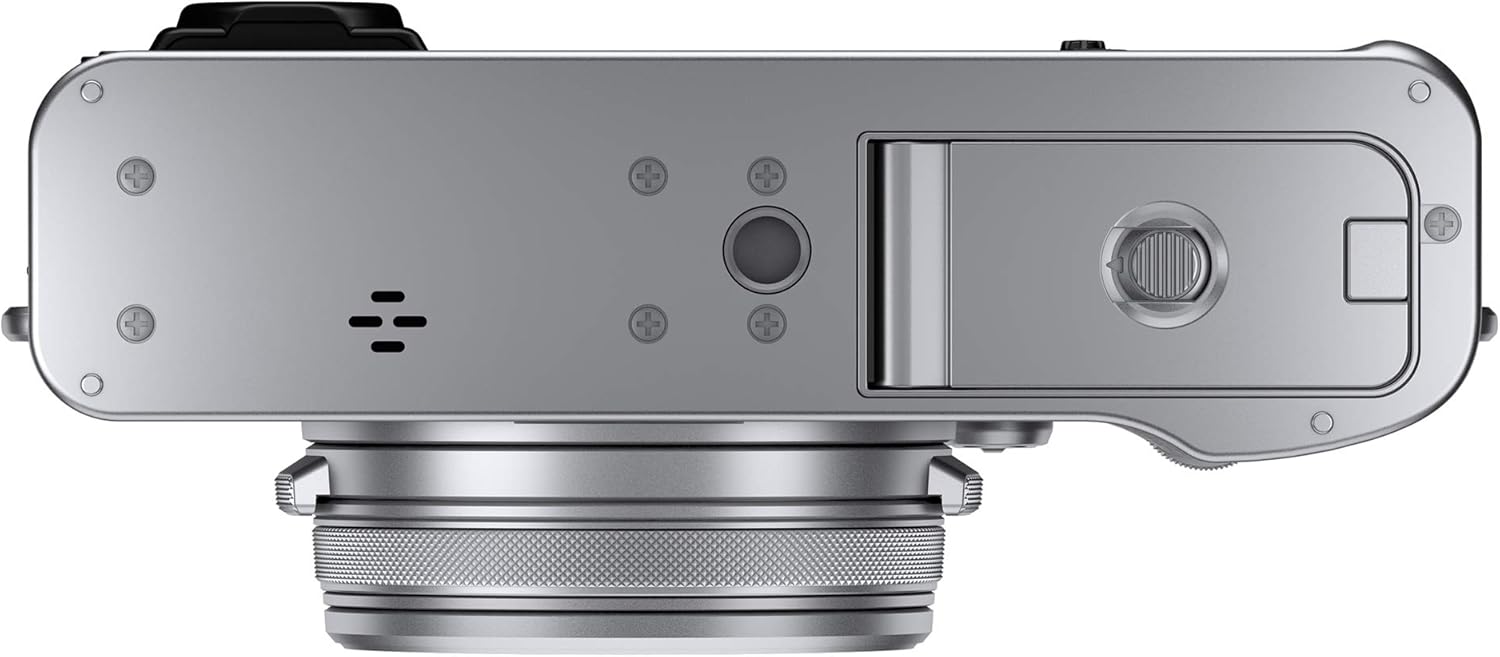
Figure 1: Bottom view of the camera, illustrating the battery and memory card compartment.
3. Charging the Battery
Connect the camera to a USB power source using the provided USB cable to charge the battery. The charging indicator will illuminate during charging and turn off when complete.
4. Attaching the Strap
Attach the camera strap to the strap lugs on both sides of the camera for secure handling.

Figure 2: Front view of the Fujifilm X100V, showing the strap lugs on the sides.
Operating the Camera
1. Powering On/Off
To power on the camera, rotate the ON/OFF switch located on the top plate. To power off, rotate it back to the OFF position.
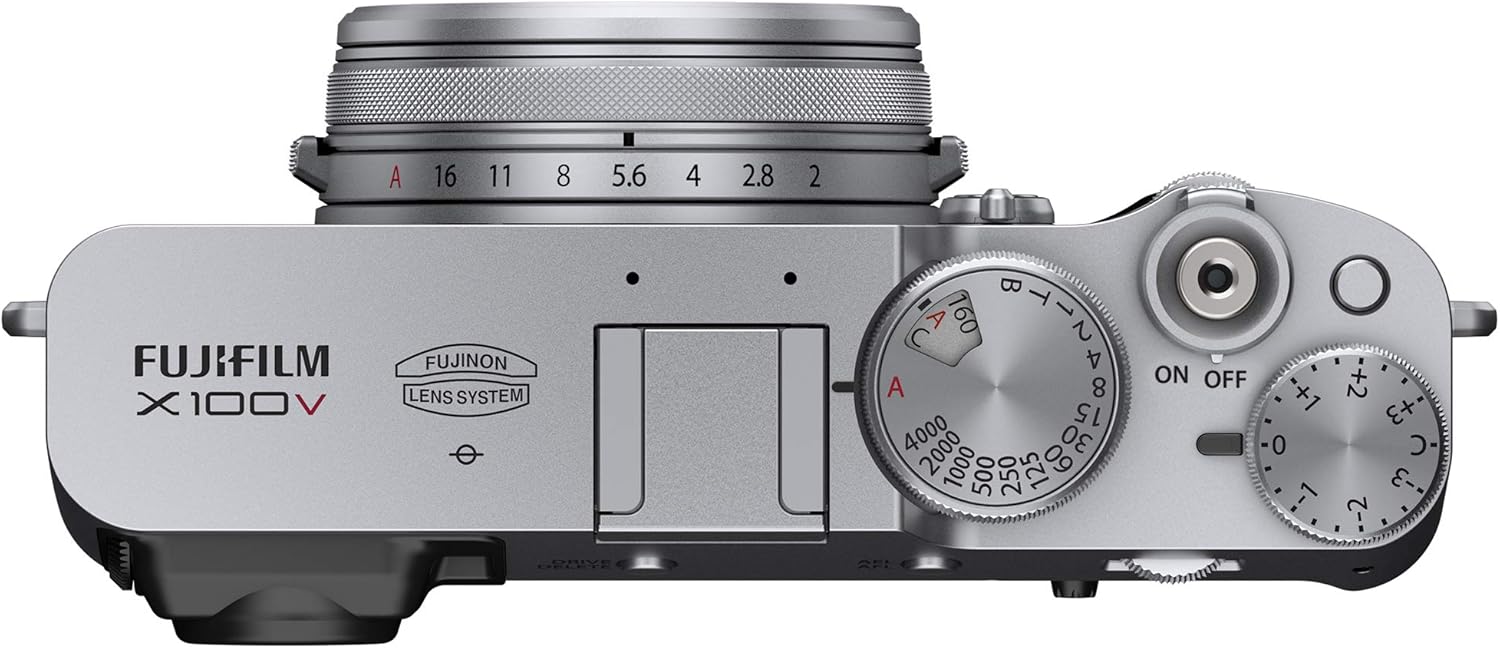
Figure 3: Top view of the camera, highlighting the ON/OFF switch and various control dials.
2. Using the Viewfinder and LCD Screen
The X100V features an advanced hybrid viewfinder, allowing you to switch between a 0.52x magnification optical viewfinder (OVF) and a 3.69M-dot OLED electronic viewfinder (EVF). The two-way tilting LCD touchscreen provides quick, intuitive controls and aids in framing images from various angles.

Figure 4: Rear view of the camera with the LCD screen tilted for flexible viewing.

Figure 5: Rear view of the camera with the LCD screen in its standard, closed position.
3. Lens and Focusing
The camera is equipped with a fixed 23mm F2 lens, equivalent to 35mm in 35mm format. It is designed for high-resolution images with minimal distortion. The camera supports various focus modes including Continuous-Servo AF (AF-C), Manual Focus (MF), and Single-Servo AF (AF-S).

Figure 6: Front angle view of the camera, showcasing the integrated 23mm F2 lens.
4. Shooting Modes and Exposure Control
The X100V offers shooting modes such as Automatic, Movie, and Panorama. Exposure control can be set to Manual. Flash modes include TTL MODE, Manual, Slow Sync, Commander, and Off, with a built-in flash available.
5. Connectivity
The camera supports wired and wireless connectivity, including Wi-Fi for image transfer and remote control. It features HDMI output for connecting to external displays.

Figure 7: Side view of the camera, indicating the location of the HDMI port and other connectivity options.
Maintenance
1. Cleaning the Camera Body
Wipe the camera body with a soft, dry cloth. For stubborn dirt, use a cloth lightly dampened with water or a mild cleaning solution, then wipe dry immediately. Avoid using organic solvents.
2. Cleaning the Lens and Viewfinder
Use a blower brush to remove dust from the lens and viewfinder. For smudges, use a lens cleaning cloth and lens cleaning fluid. Apply the fluid to the cloth, not directly to the lens.
3. Storage
When not in use for extended periods, remove the battery and store the camera in a cool, dry place away from direct sunlight and high humidity. Use a desiccant if storing in humid environments.
Troubleshooting
| Problem | Possible Cause / Solution |
|---|---|
| Camera does not power on. | Battery may be depleted or incorrectly inserted. Ensure battery is charged and properly seated. |
| Images are blurry. | Check focus settings. Ensure lens is clean. Use a faster shutter speed or tripod in low light. |
| Memory card error. | Ensure the memory card is correctly inserted and not full. Try formatting the card (this will erase all data). |
| Flash does not fire. | Check flash mode settings. Ensure flash is not set to "Off" or in a mode that suppresses flash. |
| Wi-Fi connection issues. | Ensure Wi-Fi is enabled on the camera and the connecting device. Check network settings and password. |
For further assistance, please refer to the support section or contact customer service.
Specifications
| Feature | Detail |
|---|---|
| Model Name | X100V |
| Brand | Fujifilm |
| Photo Sensor Resolution | 26.1 MP |
| Sensor Type | CMOS (APS-C) |
| Lens Type | Fixed 23mm F2 (35mm equivalent) |
| Lens Construction | 8 elements in 6 groups with 2 aspherical elements |
| Optical Zoom | 1x |
| Minimum Shutter Speed | 0.00025 seconds |
| Expanded ISO Range | 100 - 51200 |
| Viewfinder | Hybrid (Optical/Electronic) |
| Display Type | Tilting LCD Touchscreen |
| Screen Size | 3 inches |
| Video Resolution | 2160p (4K) |
| Supported File Formats | JPEG, RAW |
| Flash Memory Type | SD/SDHC/SDXC |
| Connectivity | Wi-Fi, HDMI, USB |
| Item Weight | 2.7 pounds |
| Color | Silver |
| UPC | 732515752449, 649661427353 |
| Manufacturer Part Number | 16642939 |
Warranty Information
This Fujifilm X100V Digital Camera (Renewed) comes with a 90-day limited warranty. Please retain your proof of purchase for any warranty claims. For detailed terms and conditions, refer to the warranty documentation provided with your product or contact the seller.
Support
If you encounter any issues or have questions not covered in this manual, please refer to the official Fujifilm support website or contact their customer service. For renewed products, you may also contact the Amazon Renewed support team for assistance related to your purchase.
- Fujifilm Global Support: www.fujifilm.com/global/en/support
- Amazon Renewed Support: Refer to your Amazon order details for specific contact information.
Ask a question about this manual
Ask about setup, troubleshooting, compatibility, parts, safety, or missing instructions. Manuals+ will review the question and use this page’s manual context to help answer it.