Introduction
The G GENEINNO S1 Underwater Sea Scooter is a compact and powerful device designed to enhance your underwater experience. Featuring dual motors and a 2-speed control, it allows for effortless movement through water, making it ideal for swimming, snorkeling, and diving. Its lightweight design and long battery life ensure extended enjoyment and portability. This manual provides essential information for the safe and effective operation, maintenance, and troubleshooting of your S1 Sea Scooter.

Figure 1: G GENEINNO S1 Underwater Sea Scooter. This image shows the sleek, black and white design of the S1 scooter from an angled perspective, highlighting its dual propellers and central body.
What's in the Box
Upon unboxing your G GENEINNO S1 Sea Scooter, please verify that all the following components are included:
- G GENEINNO S1 Sea Scooter (with battery included)
- Carrying Bag
- Charger
- Anti-Lost Rope
- User Manual (this document)
- Warranty Card
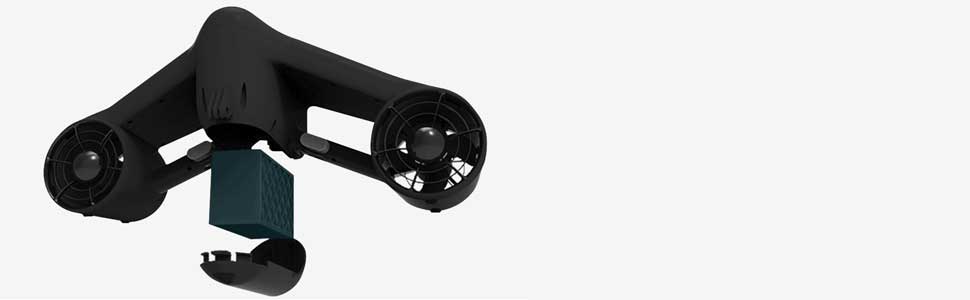
Figure 2: Included components. This image displays the main unit (Trident), carrying bag, battery, anti-lost rope, and charger, illustrating what comes in the product packaging.
Setup
1. Charging the Battery
Before first use, fully charge the battery. Connect the charger to the battery and then to a power outlet. The indicator lights on the charger will show the charging status. A full charge provides approximately 45 minutes of running time.
2. Installing the Battery
The S1 Sea Scooter features a replaceable battery for extended use. To install or replace the battery:
- Ensure the scooter is dry and clean before opening the battery compartment.
- Locate the battery compartment cover on the underside of the scooter.
- Carefully open the cover and insert the fully charged battery, ensuring proper alignment with the connectors.
- Securely close the battery compartment cover to maintain its waterproof seal.

Figure 3: Battery replacement. This image illustrates the process of inserting or removing the battery from the underside of the sea scooter, emphasizing the ease of replacement.
3. Attaching the Anti-Lost Rope
Attach the anti-lost rope to the designated attachment point on the scooter and secure the other end to your wrist or a secure part of your gear. This prevents the scooter from drifting away if you lose your grip.
Operating Instructions
1. Powering On and Off
To power on the S1 Sea Scooter, press and hold the power button located on the central handle until the indicator lights illuminate. To power off, press and hold the power button again.
2. Speed Control
The S1 features a 2-speed control system. Press the speed control button to switch between the two available speeds: 2.2 mph (low speed) and 4.0 mph (high speed). Select the speed appropriate for your activity and comfort level.

Figure 4: 2-Speed Control. This image shows a person underwater using the S1 scooter, illustrating its dual-speed capability (4.0 mph and 2.2 mph) for varied underwater propulsion.
3. Underwater Operation
Hold the S1 Sea Scooter firmly with both hands. Press the activation triggers on both handles simultaneously to engage the propellers. Releasing either trigger will automatically shut off the motors for safety. The S1 is designed for depths up to 164 feet (50 meters).
Video 1: G GENEINNO S1-Pro Underwater Sea Scooter in action. This video demonstrates the S1-Pro being used by divers and snorkelers, showcasing its speed, maneuverability, and ease of use in various underwater environments, including deep dives and coral reefs.

Figure 5: Diving with the S1 Sea Scooter. This image shows a person diving with the S1 scooter, highlighting its capability to reach depths of up to 164 feet.
4. Camera Mount Compatibility
The S1 Sea Scooter is equipped with a mount compatible with GoPro cameras and other similar action cameras. This allows you to capture stunning underwater footage during your adventures. To attach a camera, simply secure it to the designated mount point on the front of the scooter.

Figure 6: GoPro compatibility. This image demonstrates how a GoPro camera can be easily attached to the S1 sea scooter, enabling users to record their underwater experiences.
Maintenance
Proper maintenance ensures the longevity and optimal performance of your S1 Sea Scooter.
- Rinse After Use: After each use, especially in saltwater, thoroughly rinse the entire scooter with fresh water to remove salt, sand, and debris.
- Dry Completely: Ensure the scooter is completely dry before storing it. Pay special attention to the battery compartment and charging ports.
- Battery Care: Store the battery in a cool, dry place. If storing for extended periods, charge the battery to approximately 50-60% capacity. Avoid fully discharging the battery for long-term storage.
- Inspect Propellers: Regularly check the propellers for any entanglement (e.g., fishing line, seaweed) or damage. Clean them gently if necessary.
- Seal Inspection: Periodically inspect the waterproof seals around the battery compartment and other openings for any signs of wear or damage. Replace seals if compromised.
Troubleshooting
| Problem | Possible Cause | Solution |
|---|---|---|
| Scooter does not turn on. | Battery is not charged or not properly installed. | Ensure battery is fully charged and correctly inserted into the compartment. |
| Motors do not engage. | Activation triggers not pressed simultaneously or safety lock engaged. | Press both triggers firmly at the same time. Check if any safety locks are active. |
| Reduced thrust or speed. | Low battery charge or debris in propellers. | Recharge battery. Inspect and clear any debris from propellers. |
| Water in battery compartment. | Battery compartment cover not sealed properly. | Immediately remove battery, dry compartment, and ensure cover is securely sealed before next use. Inspect seals for damage. |
Specifications
- Brand: G GENEINNO
- Model: S1-Pro
- Dimensions: Approximately 19.7 inches (L) x 8.9 inches (W) x 8.2 inches (H)
- Weight: Approximately 8 lbs
- Max Depth: 164 ft (50 meters)
- Speeds: 2 (2.2 mph / 4.0 mph)
- Running Time: Up to 45 minutes (per charge)
- Battery: Changeable
- Camera Mount: Compatible with GoPro and similar action cameras
- Material: Plastic
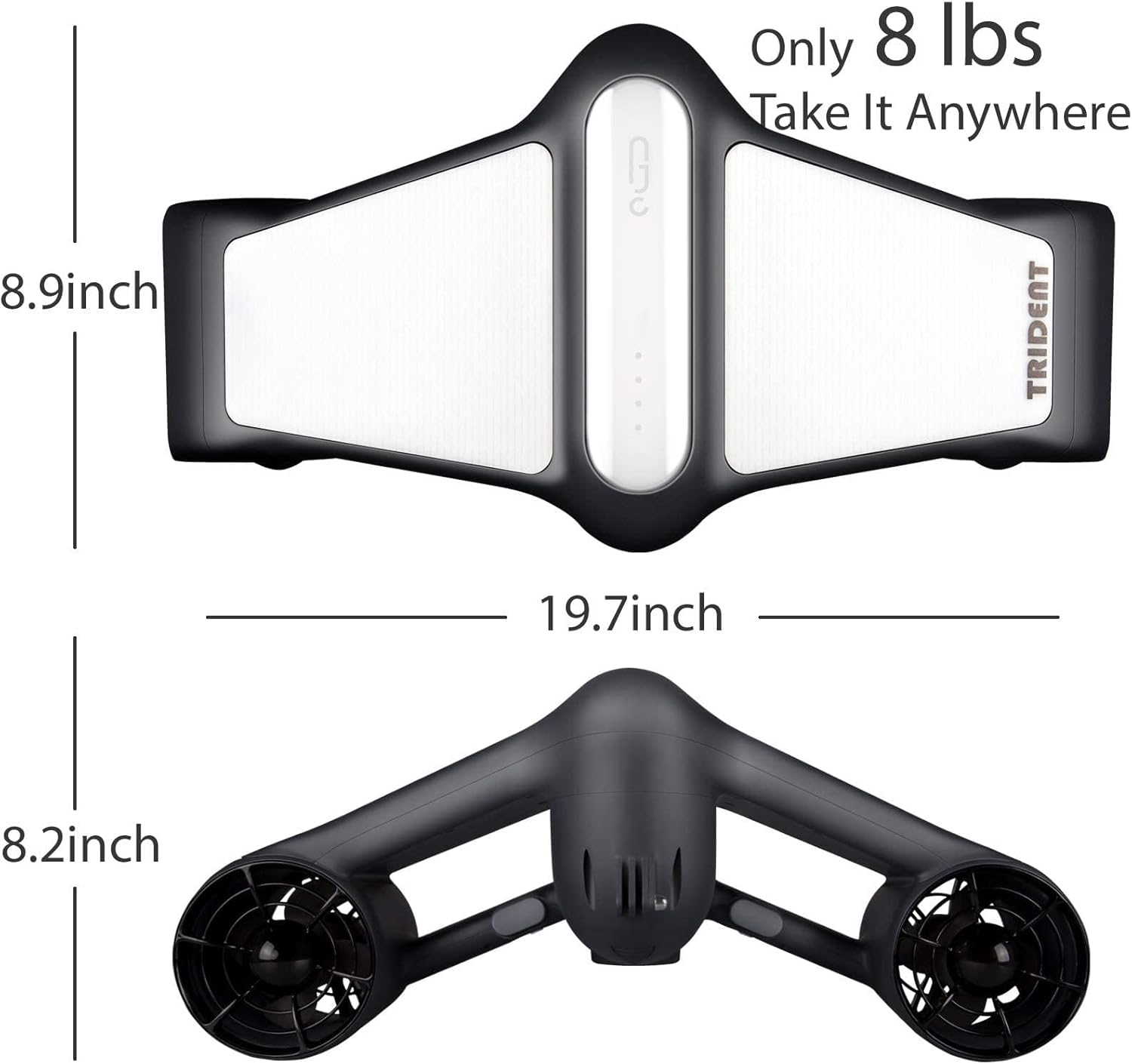
Figure 7: Product dimensions and weight. This image provides a top-down and front view of the S1 scooter, detailing its length (19.7 inches), width (8.9 inches), and height (8.2 inches), and noting its light weight of 8 lbs for portability.
Warranty and Support
Information regarding product warranty and customer support is typically provided on the warranty card included in the product packaging or available on the official G GENEINNO website. Please refer to these resources for detailed warranty terms, conditions, and contact information for technical support or service inquiries.