1. Introduction
The SANSHIELD Non-Contact Forehead Thermometer (Model CK-T1502) is an advanced infrared digital thermometer designed for quick and accurate temperature measurement. It features both body mode for human temperature (forehead) and object mode for surfaces, food, or liquids. Its non-contact design ensures hygienic use, making it suitable for adults, children, and the elderly. Equipped with high-precision sensors, it provides readings in just one second with an accuracy of 0.4°F.
2. Safety Information
Please read all instructions carefully before using this device. Improper use may result in inaccurate readings or damage to the device.
- Do not immerse the thermometer in water or other liquids.
- Keep the device away from direct sunlight, dust, and extreme temperatures.
- Do not drop the thermometer or subject it to strong impact.
- Ensure the ambient temperature is above 59°F (15°C) for optimal performance and allow the thermometer and user to acclimate to the environment before taking a reading.
- This thermometer is intended for household use and is not a substitute for professional medical advice. Consult a doctor if you have concerns about temperature readings.
- Keep out of reach of children.

Figure 2.1: Optimum measurement distance of 1-2 inches from the forehead for accurate readings. Ensure ambient temperature is above 59°F and both thermometer and user are acclimated.
3. Package Contents
Upon opening the package, please verify that all items listed below are present and in good condition:
- 1x SANSHIELD Non-Contact Forehead Thermometer (Model CK-T1502)
- 1x Carrying Pouch
- 1x User Manual
- Note: 2x AAA batteries are NOT included and must be purchased separately.

Figure 3.1: Contents included in the SANSHIELD Non-Contact Forehead Thermometer package. Please note that AAA batteries are required for operation and are not supplied.
4. Product Overview
Familiarize yourself with the components of your SANSHIELD Non-Contact Forehead Thermometer:

Figure 4.1: The SANSHIELD Non-Contact Forehead Thermometer and its packaging.

Figure 4.2: Dimensions of the thermometer, approximately 6.5 inches long and 1.6 inches wide.
Key Features:

Figure 4.3: Overview of the thermometer's 10 core advantages, including non-contact measurement, fever alarm, and 1-second readings.
- Infrared Sensor: Located at the top, used for non-contact temperature detection.
- LCD Display: Clear, three-color backlit screen for temperature readings and indicators.
- SCAN Button: Initiates temperature measurement.
- MODE Button: Switches between Body and Object measurement modes.
- '+' and '-' Buttons: Used for navigating memory records or adjusting settings.
- Battery Compartment: Located at the handle, requires 2 AAA batteries.
5. Setup
5.1 Battery Installation
The SANSHIELD thermometer requires 2 AAA batteries (not included) for operation.
- Locate the battery compartment cover on the back of the thermometer handle.
- Slide the cover downwards to open the compartment.
- Insert two AAA batteries, ensuring the positive (+) and negative (-) terminals align correctly with the indicators inside the compartment.
- Slide the battery compartment cover back into place until it clicks securely.
The thermometer will power on automatically once batteries are correctly installed. If not, press the SCAN button to turn it on.
6. Operating Instructions
6.1 Taking a Temperature Reading (Body Mode)
- Ensure the thermometer is in Body Mode. If not, press the MODE button to switch until the body icon appears on the display.
- Hold the thermometer 1-2 inches (3-5 cm) away from the center of the forehead.
- Press the SCAN button once.
- The temperature reading will appear on the LCD screen within 1 second.
- The screen backlight color will indicate the temperature status:
- Green: Normal temperature (89.6°F - 99.4°F / 32.0°C - 37.4°C)
- Orange: Slight fever (99.5°F - 100.3°F / 37.5°C - 37.9°C)
- Red: High fever (100.4°F - 109.4°F / 38.0°C - 43.0°C) with an audible alarm.
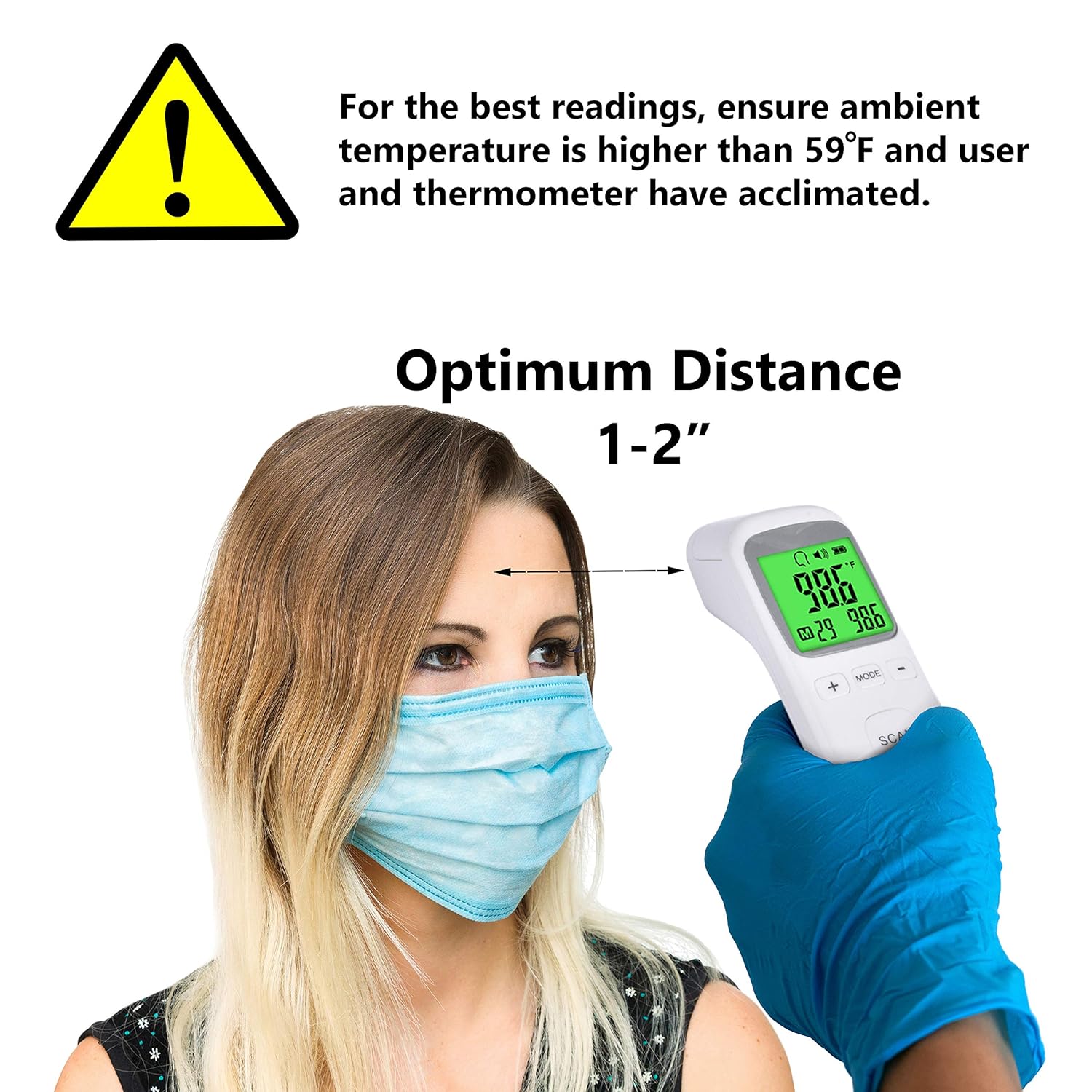
Figure 6.1: The three-color LCD display indicating temperature ranges for normal, slight fever, and high fever.

Figure 6.2: Examples of the thermometer's versatile use for body and object temperature measurements.
6.2 Taking a Temperature Reading (Object Mode)
Object mode is suitable for measuring the temperature of surfaces, liquids (like baby formula), or ambient room temperature.
- Press the MODE button to switch until the object icon appears on the display.
- Point the thermometer at the object or surface you wish to measure, maintaining a distance of 1-2 inches.
- Press the SCAN button.
- The temperature reading will be displayed.
6.3 Switching Temperature Units (°F/°C)
To switch between Fahrenheit (°F) and Celsius (°C):
- With the thermometer powered on, press and hold the MODE button for approximately 3-5 seconds.
- The unit will change on the display. Release the button when the desired unit is shown.
6.4 Memory Function
The thermometer stores up to 32 sets of temperature readings, allowing you to track changes over time.
- To view stored readings, press the '+' or '-' buttons when the thermometer is on.
- Each press will cycle through the stored readings, from the most recent to the oldest.
6.5 Automatic Shut-off
To conserve battery life, the thermometer will automatically shut off after approximately 15 seconds of inactivity.
7. Maintenance
7.1 Cleaning the Thermometer
Regular cleaning ensures accurate readings and extends the life of your device.
- Use a soft, dry cloth to wipe the body of the thermometer.
- For the infrared sensor lens, gently wipe with a cotton swab lightly moistened with alcohol. Do not use abrasive cleaners or immerse the device in water.
- Ensure the thermometer is completely dry before storing.
7.2 Storage
When not in use, store the thermometer in its carrying pouch in a cool, dry place, away from direct sunlight and extreme temperatures.
If the thermometer will not be used for an extended period, remove the batteries to prevent leakage and potential damage to the device.
8. Troubleshooting
If you encounter issues with your thermometer, please refer to the following common problems and solutions:
| Problem | Possible Cause | Solution |
|---|---|---|
| No display/Device won't turn on | Batteries are dead or incorrectly installed. | Replace batteries with new AAA batteries, ensuring correct polarity. |
| Inaccurate readings |
|
|
| "Lo" or "Hi" displayed | Temperature is outside the measurable range. | Ensure measurement is within the specified operating range (Body: 89.6°F-109.4°F; Object: 32°F-212°F). |
| Screen backlight color is incorrect | This is a feature, not a malfunction. | Refer to Section 6.1 for explanation of color indicators (Green, Orange, Red). |
If the problem persists after trying these solutions, please contact customer support.
9. Specifications
| Feature | Detail |
|---|---|
| Model Number | CK-T1502 |
| Measurement Method | Non-Contact Infrared |
| Measurement Distance | 1-2 inches (3-5 cm) |
| Measurement Time | 1 second |
| Body Temperature Range | 89.6°F - 109.4°F (32.0°C - 43.0°C) |
| Object Temperature Range | 32°F - 212°F (0°C - 100°C) |
| Accuracy | ±0.4°F (±0.2°C) |
| Memory Storage | 32 readings |
| Display Type | LCD with 3-color backlight |
| Power Source | 2 x AAA Batteries (not included) |
| Automatic Shut-off | Approx. 15 seconds |
| Product Dimensions | 6.81 x 1.85 x 1.81 inches |
| Product Weight | 3.21 ounces |
| Manufacturer | Shenzhen Changkun Technology Co., Ltd. |
| Care Instructions | Wipe Clean |
10. Warranty and Support
For warranty information or technical support, please refer to the contact details provided with your purchase documentation or visit the official SANSHIELD website. Please have your model number (CK-T1502) and purchase date ready when contacting support.
Manufacturer: Shenzhen Changkun Technology Co., Ltd.