
Introduction
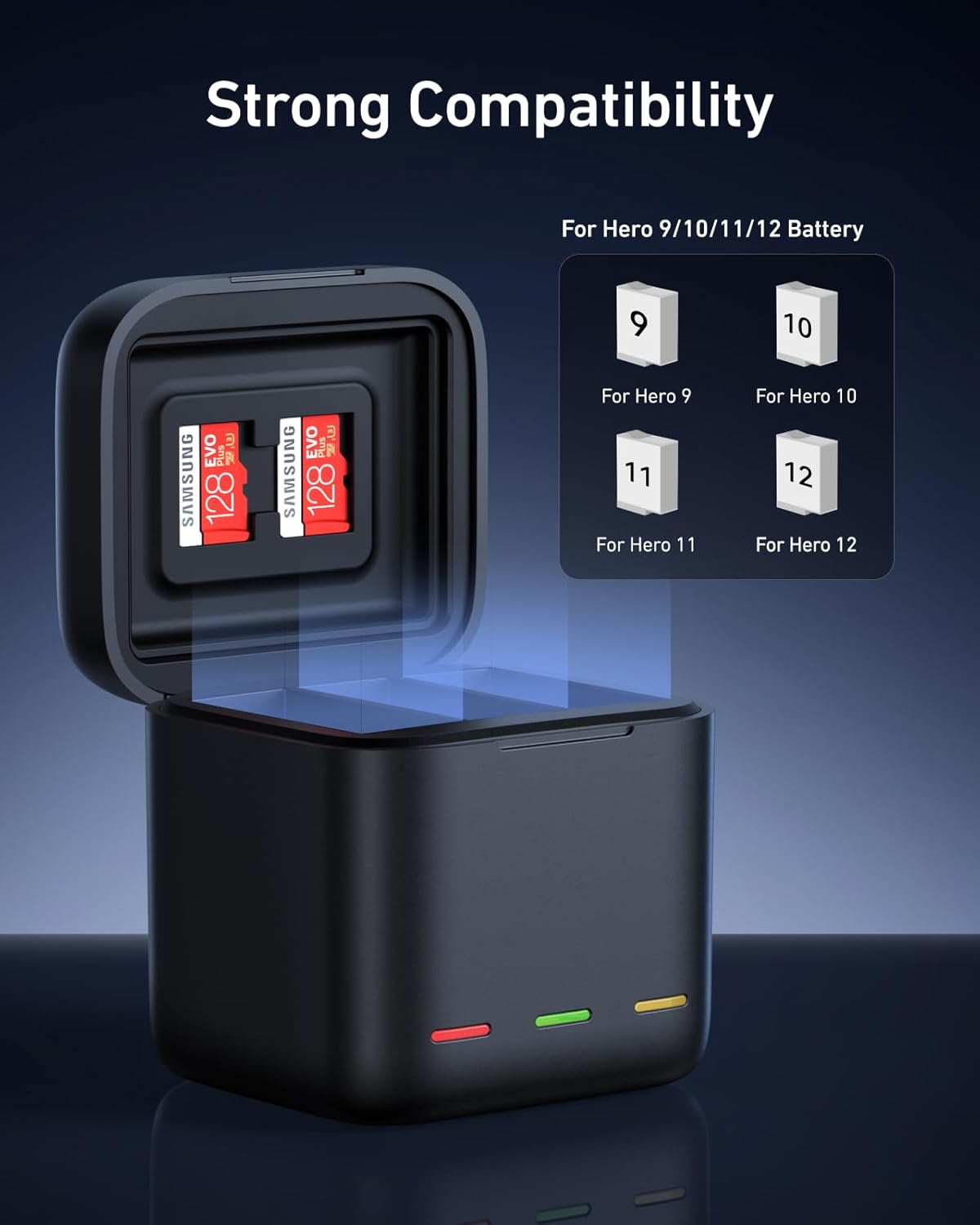
Thank you for choosing the TELESIN Triple USB-C Battery Charger. This compact and efficient charging case is designed to simultaneously charge up to three GoPro Hero 9, Hero 10, Hero 11, or Hero 12 batteries. It also functions as a protective storage case for your batteries and two SD cards, making it an ideal accessory for adventurers and content creators. This manual provides essential information for safe and optimal use of your charger.
Safety Information
- Read all instructions before use.
- Keep the charger away from water, moisture, and extreme temperatures.
- Do not attempt to disassemble or modify the charger.
- Use only compatible GoPro Hero 9/10/11/12 batteries.
- Ensure proper ventilation during charging.
- Unplug the charger when not in use or during electrical storms.
- This device incorporates intelligent safety protections against overcharging, overheating, short-circuits, and unstable power input.
Package Contents
Verify that all items are present in your package:
- TELESIN Triple USB-C Battery Charger Case
- USB-C Charging Cable

Setup
- Connect Power: Connect the provided USB-C cable to the charger's USB-C port. Plug the other end into a compatible USB power source (e.g., wall adapter, power bank, laptop USB port). The charger supports 2.4A fast charging.
- Insert Batteries: Open the charger lid. Insert up to three compatible GoPro Hero 9/10/11/12 batteries into the designated slots. Ensure the batteries are inserted correctly with the contacts aligned.
- Insert SD Cards (Optional): The charger also features two slots for storing SD cards. Carefully insert your SD cards into these slots for secure storage.


Operating Instructions
Charging Process
Once batteries are inserted and the charger is connected to a power source, charging will begin automatically. The LED indicators on the front of the charger will display the charging status for each battery slot.
LED Indicator Status
The charger features three LED lights, one for each battery slot, to indicate the charging status:
- Red Light: Indicates that the battery in that slot is currently charging.
- Green Light: Indicates that the battery in that slot is almost fully charged.
- Yellow Light: Indicates that the battery in that slot is fully charged.

The charger is designed to stop charging automatically once batteries reach 100% to prevent overcharging and prolong battery life. A full charge for three batteries simultaneously typically takes approximately 2 hours.
Maintenance
- Cleaning: Use a soft, dry cloth to clean the exterior of the charger. Do not use liquid cleaners or solvents.
- Storage: Store the charger in a cool, dry place away from direct sunlight and extreme temperatures. When storing batteries within the case, ensure they are clean and dry.
- Dust and Water Resistance: The charger case offers IP54 dust and water resistance, providing protection against limited dust ingress and water spray from any direction. However, it is not waterproof and should not be submerged.
Troubleshooting
| Problem | Possible Cause | Solution |
|---|---|---|
| Batteries not charging | Loose connection, incompatible battery, power source issue | Ensure USB-C cable is securely connected. Verify batteries are correctly inserted. Check if the power source is active. Confirm batteries are compatible GoPro Hero 9/10/11/12. |
| LED indicators not lighting up | No power, charger malfunction | Check power connection and try a different USB power source. If the issue persists, contact customer support. |
| Slow charging | Low power output from source, faulty cable | Use a power adapter with sufficient output (e.g., 5V/2.4A). Try a different USB-C cable. |
| Charger feels hot | Normal operation, poor ventilation, excessive ambient temperature | A slight warmth is normal. Ensure the charger is in a well-ventilated area. If it becomes excessively hot, disconnect immediately and contact support. |
Specifications
- Brand: TELESIN
- Model: COB
- Compatible Devices: GoPro Hero 9, Hero 10, Hero 11, Hero 12 Cameras
- Charging Slots: 3 for batteries, 2 for SD cards
- Input Interface: USB Type-C
- Input Current: 2.4A (Fast Charging)
- Output Voltage: 5 Volts
- Approximate Charging Time: 2 hours (for 3 batteries simultaneously)
- Product Weight: 150 g
- Product Dimensions: 5.6 cm (Depth) x 10.6 cm (Width) x 12.6 cm (Height)
- Safety Protections: Overcharge, Overheat, Short-circuit, Unstable Power Input
- Dust/Water Resistance: IP54
Warranty and Support
TELESIN products are manufactured to high-quality standards. For warranty information, please refer to the warranty card included with your purchase or visit the official TELESIN website. If you encounter any issues or have questions regarding your TELESIN Triple USB-C Battery Charger, please contact TELESIN customer support for assistance.