1. Introduction
Thank you for choosing the Green Cell Pro 1000W/2000W 12V Pure Sine Wave Power Inverter. This device converts 12V DC battery power into 220V/230V AC power, allowing you to operate standard household appliances from a vehicle, solar setup, or other 12V battery source. This manual provides essential information for safe and efficient use of your inverter.

Image 1.1: The Green Cell Pro 1000W Pure Sine Wave Power Inverter, showing its robust design and included battery connection cables.
2. Safety Instructions
Please read and understand all safety instructions before operating the inverter. Failure to follow these instructions may result in electric shock, fire, or serious injury.
- Ventilation: Ensure adequate ventilation around the inverter. Do not block ventilation openings.
- Environment: Do not expose the inverter to rain, moisture, direct sunlight, or extreme temperatures. Keep it away from flammable materials.
- Connections: Always connect the inverter to a 12V DC power source. Ensure all connections are tight and secure to prevent arcing and overheating.
- Grounding: The inverter must be properly grounded.
- Overload: Do not exceed the inverter's continuous power rating (1000W) or peak power rating (2000W). Overloading can damage the inverter and connected devices.
- Children: Keep the inverter out of reach of children.
- Maintenance: Refer to the maintenance section for cleaning and care. Do not attempt to disassemble or repair the inverter yourself.
3. Package Contents
Verify that all items are present in the package:
- Green Cell Pro 1000W/2000W Pure Sine Wave Power Inverter
- Battery connection cables (red and black)
- User Manual
4. Product Features
The Green Cell Pro Inverter offers advanced features for reliable power conversion:
- Pure Sine Wave Output: Provides a stable and clean power output identical to household electricity, suitable for sensitive electronics like laptops, televisions, and medical equipment.
- High Power Capacity: Delivers a continuous power of 1000W and a peak power of up to 2000W, capable of handling various appliances.
- Versatile Connectivity: Equipped with standard AC outlets (230V) and a USB port for charging smaller gadgets such as smartphones and tablets.
- Comprehensive Protection: Features multiple safety mechanisms including protection against overvoltage, undervoltage, overload, short circuit, and overheating, ensuring the safety of both the inverter and connected devices.
- Durable Construction: Housed in a robust aluminum casing, designed to withstand mechanical damage and shocks, making it suitable for mobile applications.

Image 4.1: Visual representation of the pure sine wave output, highlighting its smooth and consistent power delivery.

Image 4.2: This image emphasizes the inverter's durable aluminum construction and user-friendly design, ensuring reliability and ease of management.
5. Setup
Follow these steps to set up your Green Cell Pro Inverter:
- Placement: Choose a dry, well-ventilated location for the inverter, away from direct sunlight, heat sources, and moisture. Ensure there is enough space for air circulation around the cooling fan.
- Battery Connection:
- Connect the red battery cable to the positive (+) terminal of the 12V battery and the positive (+) input terminal on the inverter.
- Connect the black battery cable to the negative (-) terminal of the 12V battery and the negative (-) input terminal on the inverter.
- Ensure connections are tight. Loose connections can cause overheating and damage.
- Note: The cigarette lighter plug cable (if included with other models) has a nominal capacity of at most 150W. For 1000W operation, direct battery connection with the provided cables is required.
- Grounding: Connect a grounding wire from the inverter's grounding screw to a proper earth ground (e.g., vehicle chassis or dedicated ground rod).
- Initial Check: Before connecting any AC devices, double-check all connections.
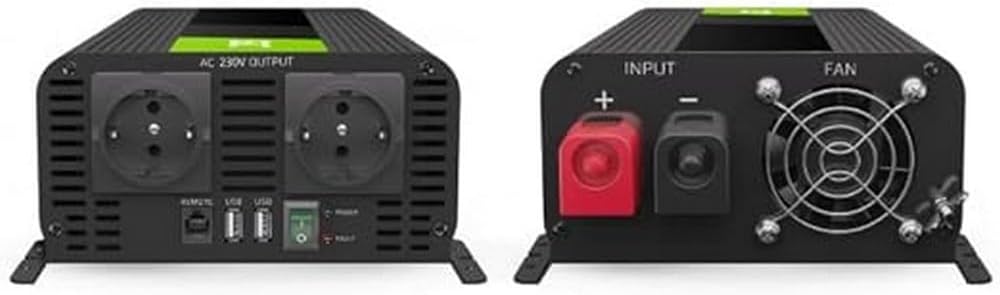
Image 5.1: Detailed view of the inverter's front panel with AC outlets and USB port, and the rear panel with DC input terminals and cooling fan, illustrating connection points.

Image 5.2: A clear diagram labeling the various ports and controls on the inverter, including signal diodes, positive/negative poles, AC output, USB port, and the power button.
6. Operating Instructions
Once the inverter is properly set up, follow these steps for operation:
- Power On: Press the power button on the inverter. The power indicator light should illuminate, indicating the inverter is active.
- Connect Devices: Plug your 230V AC appliances into the inverter's AC outlets. For smaller devices, use the USB port.
- Monitor Load: Ensure the total power consumption of connected devices does not exceed the inverter's continuous power rating (1000W).
- Power Off: When finished, turn off all connected appliances, then press the inverter's power button to switch it off.
The inverter allows you to power various devices directly from a battery, making it ideal for situations away from grid power.

Image 6.1: An individual working on a laptop, demonstrating the inverter's utility in providing power for electronic devices in a mobile setting.

Image 6.2: This graphic illustrates how the inverter enables direct battery power for various devices, such as laptops, electric water heaters, and other electrical loads, suitable for camping or off-grid use.
7. Maintenance
Proper maintenance ensures the longevity and optimal performance of your inverter:
- Cleaning: Periodically clean the exterior of the inverter with a dry, soft cloth. Ensure ventilation openings are free from dust and debris. Do not use liquid cleaners.
- Connections: Regularly check battery and grounding connections for tightness. Loose connections can lead to power loss or overheating.
- Storage: If storing the inverter for an extended period, disconnect it from the battery and store it in a cool, dry place.
8. Troubleshooting
If you encounter issues with your inverter, refer to the following common problems and solutions:
| Problem | Possible Cause | Solution |
|---|---|---|
| Inverter does not turn on | No power from battery, loose connections, faulty battery, inverter protection activated. | Check battery voltage, ensure connections are secure, test battery, reset inverter by disconnecting and reconnecting. |
| No AC output | Overload, low battery voltage, overheating, short circuit in connected device. | Reduce load, charge battery, allow inverter to cool, check connected devices for faults. |
| Inverter beeps or fault light is on | Overload, low/high battery voltage, overheating, short circuit. | Identify and resolve the specific fault condition (e.g., reduce load, check battery, ensure ventilation). |
| Connected device not working correctly | Device power requirement exceeds inverter capacity, device incompatibility. | Verify device wattage, ensure device is compatible with pure sine wave output. |
9. Specifications
Key technical specifications for the Green Cell Pro 1000W/2000W 12V Pure Sine Wave Power Inverter:
| Feature | Specification |
|---|---|
| Product Name | Green Cell Pro 1000W/2000W 12V 220V/230V Pure Sine Wave Power Inverter |
| Brand | Green Cell |
| Model Number | INVGC09 |
| Input Voltage | 12 Volts DC |
| Output Voltage | 220V/230V AC |
| Continuous Power | 1000 Watts |
| Peak Power | 2000 Watts |
| Output Waveform | Pure Sine Wave |
| USB Output | Yes (for charging small gadgets) |
| Number of AC Outlets | 2 |
| Dimensions (L x W x H) | 29 x 13 x 8 cm |
| Weight | 2 kilograms |
| Recommended Use | Indoor and Outdoor |

Image 9.1: This graphic provides guidance on selecting the correct voltage (12V or 24V) and power rating for an inverter, emphasizing that the consumed power should not exceed 85% of the inverter's nominal power.
10. Warranty and Support
Green Cell products are designed for reliability and performance. For warranty information, technical support, or service inquiries, please refer to the contact details provided with your purchase or visit the official Green Cell website. Keep your proof of purchase for warranty claims.


