1. Introduction
This manual provides comprehensive instructions for the assembly, operation, and maintenance of your Whadda WSG192 Soldering Minikits Maker Kit. This kit allows you to build and play a classic electronic tennis game. It features VGA color output, an on-board buzzer or line out for audio, and options for external power. Each player controls their bat using a rotating potentiometer for precise movement.

Figure 1: Assembled Whadda WSG192 Kit. This image displays the main circuit board connected to two player control units, each with a potentiometer.
2. Safety Information
Please read and understand all safety instructions before beginning assembly or operation. Failure to do so may result in injury or damage to the product.
- Soldering Safety: Soldering involves high temperatures. Always wear appropriate eye protection. Ensure adequate ventilation to avoid inhaling solder fumes. Use a heat-resistant surface and keep flammable materials away from the soldering area.
- Electrical Safety: This kit operates with batteries or an external power supply. Ensure correct polarity when inserting batteries. Do not short-circuit battery terminals. Disconnect power before making any modifications or repairs.
- Component Handling: Some electronic components can be sensitive to static electricity. Handle components by their edges and avoid touching pins directly.
- Adult Supervision: This kit is recommended for users with experience in electronics and soldering. Adult supervision is advised for younger or inexperienced builders.
3. Package Contents
Verify that all components listed below are present in your kit before starting assembly. Component quantities may vary based on specific kit variations.
- Main Printed Circuit Board (PCB)
- Electronic Components (resistors, capacitors, ICs, diodes, etc.) for soldering onto the PCB
- Two Player Control Units (PCBs with potentiometers)
- Connecting Wires for player units and power
- Battery Holders (for AA batteries, batteries not included)
- VGA Connector
- Audio Jack / Buzzer
- Push Buttons and Switches
4. Assembly and Setup
Assembly of the Whadda WSG192 kit requires basic soldering skills. Follow the detailed instructions provided in the separate assembly guide (if included) or refer to the circuit diagram for component placement.
4.1. Component Soldering
- Identify Components: Carefully identify all electronic components using the provided parts list and circuit diagram.
- Solder Components: Solder each component onto the main PCB in its designated location. Start with smaller components and work your way up to larger ones. Ensure all solder joints are clean and secure.
- Connect Player Units: Solder the connecting wires from the main PCB to the two player control units. Pay attention to polarity and correct pin assignments.
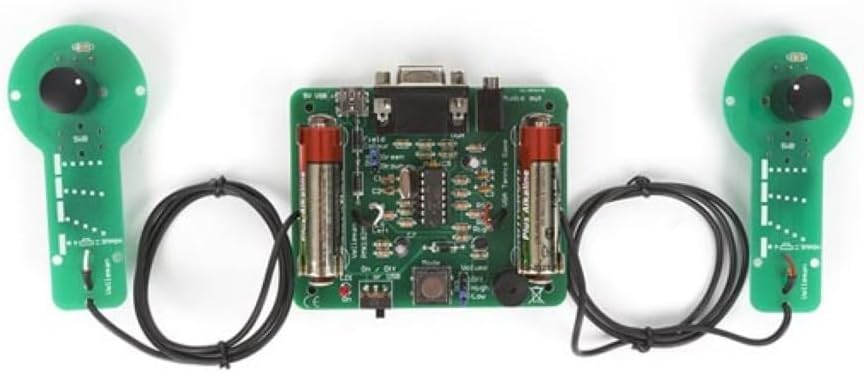
Figure 2: Main Circuit Board (Top View). This image shows the central circuit board with various electronic components, battery holders, and connectors.
4.2. Power Supply
- Battery Installation: Insert the required AA batteries (not included) into the battery holders on the main PCB, ensuring correct polarity (+/-).
- External Power (Optional): The kit supports external power. Refer to the circuit diagram for the correct voltage and connector type. Ensure the external power supply matches the kit's requirements to prevent damage.
4.3. Video and Audio Connections
- VGA Output: Connect a standard VGA cable from the kit's VGA port to a compatible monitor or display.
- Audio Output: The kit includes an on-board buzzer for sound. An optional line-out jack may be present for connecting to external speakers or headphones.
5. Operating Instructions
5.1. Powering On
Once assembly is complete and power is connected (batteries or external supply), locate the ON/OFF switch on the main PCB and switch it to the 'ON' position. The game should appear on your connected VGA display.
5.2. Game Play
- Each player uses their respective control unit.
- Rotate the potentiometer on your control unit to move your bat up and down on the screen.
- The objective is to hit the ball and prevent it from passing your bat, scoring points against your opponent.
5.3. Audio Control
If an audio volume control or switch is present, adjust it to your preferred level. The on-board buzzer provides basic game sounds.
6. Maintenance
- Cleaning: Keep the circuit board and components clean and free from dust. Use a soft, dry brush or compressed air. Do not use liquid cleaners directly on the electronics.
- Storage: Store the kit in a dry, cool environment away from direct sunlight and extreme temperatures.
- Battery Replacement: If using batteries, replace them when the game performance degrades or if the unit will be stored for an extended period to prevent leakage.
- Inspection: Periodically inspect solder joints and connections for any signs of wear or damage. Re-solder any loose connections if necessary.
7. Troubleshooting
| Problem | Possible Cause | Solution |
|---|---|---|
| No power / Game does not start |
|
|
| No video output |
|
|
| Player controls unresponsive |
|
|
8. Specifications
| Model Number: | WSG192 |
| Manufacturer: | Velleman |
| Part Number: | WSG192 |
| Item Weight: | 4.9 ounces |
| Product Dimensions: | 6.1 x 1.38 x 6.1 inches |
| Power Source: | Batteries (AA, not included) or External Power |
| Video Output: | VGA Color Output |
| Audio Output: | On-board Buzzer or Line Out |
| ASIN: | B08M8SRK1G |
| Date First Available: | July 2, 2021 |
9. Warranty and Support
For warranty information and technical support, please refer to the documentation included with your purchase or contact the retailer or manufacturer directly. Keep your proof of purchase for warranty claims.
Manufacturer: Velleman


