
1. Introduction and Overview
The VEGA Men X2 Beard Trimmer (VHTH-17) is designed for precise beard and mustache grooming. This advanced trimmer features self-sharpening stainless steel blades, 40 adjustable length settings, and a durable, waterproof (IPX7) body. It offers both corded and cordless operation, supported by a fast-charging lithium-ion battery providing up to 90 minutes of runtime. A 5-minute quick charge feature allows for up to 10 minutes of immediate use.
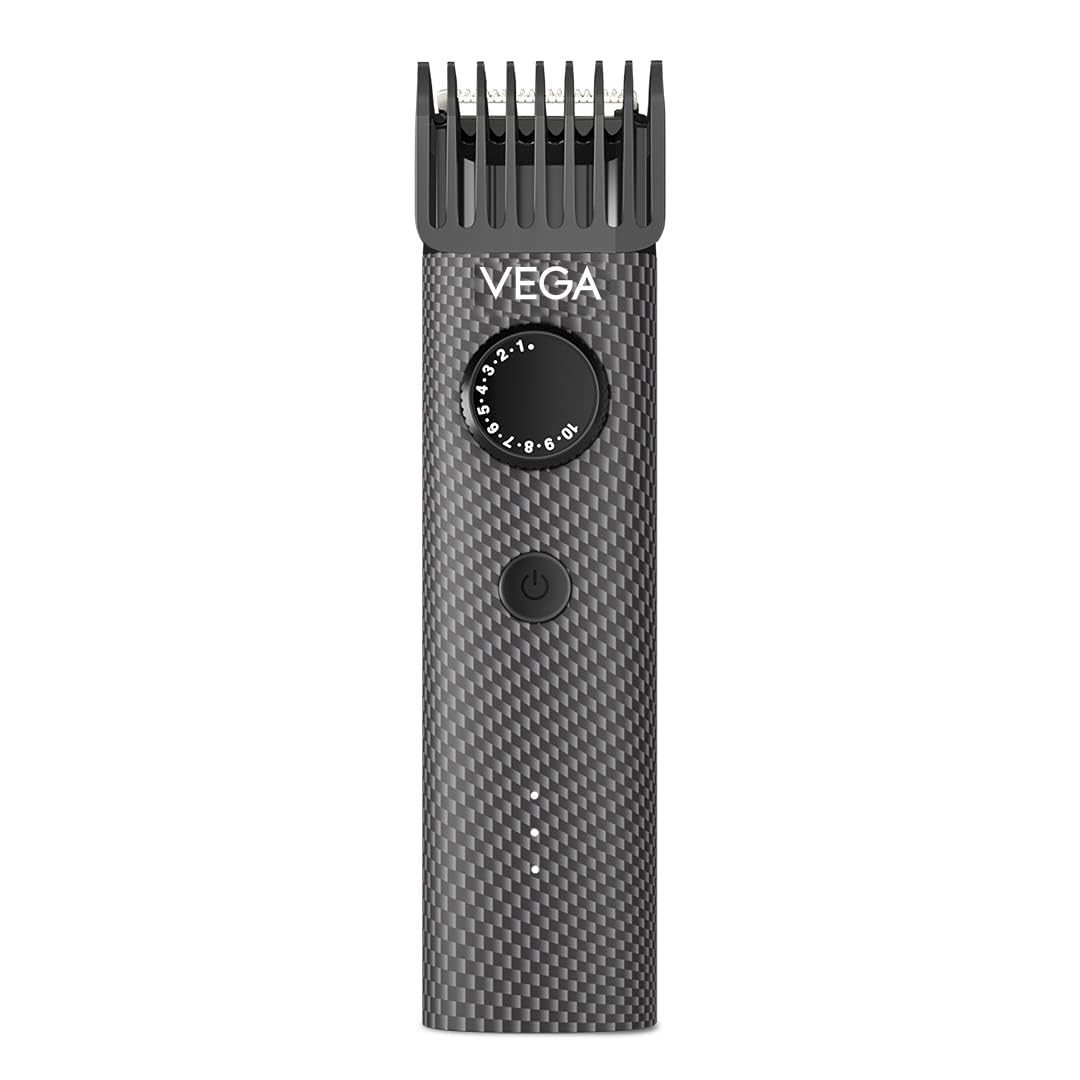
Figure 1.1: VEGA Men X2 Beard Trimmer (VHTH-17) showcasing its ergonomic design.
Video 1.1: An official product video showcasing the key features and design of the VEGA Men X2 Beard Trimmer, including its quick charge, run-time, waterproof design, and length settings.
2. What's in the Box
Upon opening your VEGA Men X2 Beard Trimmer package, please ensure all the following components are present:
- 1 x VEGA Men X2 Beard Trimmer (VHTH-17)
- 2 x Comb Attachments
- 1 x USB Charging Cable
- 1 x Travel Pouch

Figure 2.1: All components included in the VEGA Men X2 Beard Trimmer package.
3. Key Features
The VEGA Men X2 Beard Trimmer is equipped with several features designed for optimal grooming:
- High Performance Steel Blades: Corrosion-free and self-sharpening stainless steel blades ensure a smooth and comfortable trim.
- 40 Adjustable Length Settings: A rotary wheel allows precise length adjustments from 0.5mm to 20mm.
- Waterproof (IPX7): The trimmer body is fully washable, and the detachable head and comb can be rinsed under running water.
- Fast Charging & High Performance Battery: A 600mAh Lithium-ion battery provides up to 90 minutes of runtime with a full charge in 90 minutes.
- 5-Minute Quick Charge: Provides up to 10 minutes of runtime for urgent grooming needs.
- Cord & Cordless Use: Offers flexibility for use with or without the charging cable.
- USB Charging: Convenient charging via laptop, power bank, or adaptor (adaptor not included).
- Designer Print Body: Features a unique chequered print design.

Figure 3.1: Visual representation of the VEGA Men X2 Beard Trimmer's key features.
4. Setup
4.1 Initial Charging
- Connect the provided USB charging cable to the trimmer's charging port.
- Plug the other end of the USB cable into a compatible USB power source (e.g., laptop, power bank, or a USB wall adapter - not included).
- Allow the trimmer to charge fully for approximately 90 minutes before first use. The LED indicator will show charging status.
- For a quick trim, a 5-minute charge provides up to 10 minutes of runtime.

Figure 4.1: Connecting the USB charging cable to the trimmer.
4.2 Attaching Comb Attachments
- Ensure the trimmer is turned off.
- Align the desired comb attachment with the trimmer head.
- Gently push the comb attachment onto the trimmer head until it clicks securely into place.
- To remove, gently pull the comb attachment away from the trimmer head.
5. Operation
5.1 Power On/Off
- To turn on the trimmer, press the power button.
- To turn off the trimmer, press the power button again.
5.2 Adjusting Length Settings
- With a comb attachment in place, rotate the adjustment wheel located on the trimmer body.
- Select your desired trimming length, ranging from 0.5mm to 20mm. The selected length will be indicated on the wheel.

Figure 5.1: Adjusting the trimming length using the rotary wheel.
5.3 Trimming
- Ensure your beard is clean and dry before trimming.
- Hold the trimmer with the blades facing the desired trimming area.
- Move the trimmer against the direction of hair growth for an even trim.
- Use the trimmer with or without the cord as needed.
6. Maintenance
6.1 Cleaning the Trimmer
The VEGA Men X2 Beard Trimmer is IPX7 waterproof, allowing for easy cleaning.
- Ensure the trimmer is turned off and disconnected from the charging cable before cleaning.
- Remove the comb attachment.
- Detach the trimmer head by gently pushing it off the body.
- Rinse the trimmer head and comb attachment under running water to remove hair clippings.
- The entire trimmer body can also be rinsed under water.
- Allow all parts to air dry completely before reattaching the head and comb, or storing the trimmer.
6.2 Blade Care
The stainless steel blades are self-sharpening. To maintain optimal performance, ensure they are kept clean and free of debris.
6.3 Storage
Store the trimmer in a cool, dry place, away from direct sunlight and out of reach of children. Use the provided travel pouch for protection when not in use or during travel.
7. Troubleshooting
- Trimmer not turning on:
- Ensure the trimmer is fully charged. Connect it to the charger and wait for the LED indicator to show a full charge.
- Check if the power button is pressed firmly.
- Poor trimming performance:
- Clean the blades and comb attachment thoroughly to remove any trapped hair or debris.
- Ensure the comb attachment is correctly secured.
- The battery might be low; try charging the trimmer.
- Trimmer making unusual noise:
- Clean the trimmer head and blades.
- If the noise persists, contact customer support.
For issues not covered here, please refer to the warranty and support section for assistance.
8. Specifications
| Feature | Detail |
|---|---|
| Model Number | VHTH-17 |
| Blade Material | Stainless Steel |
| Minimum Cutting Length | 0.5 Millimetres |
| Maximum Cutting Length | 20 Millimetres |
| Length Settings | 40 |
| Power Source | Battery Powered (Lithium-ion) |
| Battery Capacity | 600mAh |
| Full Charge Time | 90 Minutes |
| Run Time | Up to 90 Minutes |
| Quick Charge | 5 minutes for 10 minutes runtime |
| Waterproof Rating | IPX7 |
| Connector Type | USB |
| Product Dimensions (LxWxH) | 16.7 x 9.2 x 4.5 Centimeters |
| Item Weight | 270 Grams |
9. Warranty and Support
9.1 Warranty Information
The VEGA Men X2 Beard Trimmer (VHTH-17) comes with a 1-Year Manufacturer Warranty from the date of purchase.
9.2 Customer Support
For any queries, concerns, or warranty claims, please contact VEGA customer care:
- Email: customercare@vega.co.in
- Telephone: 080-69496949
- Timings: 10:00 AM to 5:30 PM (IST), Monday - Saturday (excluding holidays)
Please retain your purchase receipt for warranty validation.


